Want your cafe to show up first when someone searches “coffee shop near me”? You're not alone. Competing with big chains like Starbucks might seem tough, but local SEO can help you stand out right in your neighborhood. Understanding what local SEO is is the first step to outperforming larger brands. Here’s how you can do it:
- Optimize Your Google Business Profile: Complete every field, add keywords like “best latte in [Your Area],” and upload high-quality photos. Profiles with photos get 42% more clicks.
- Leverage Local Keywords: Use terms like “cozy cafe near [Landmark]” or “vegan pastries in [Neighborhood]” in your content.
- Focus on Reviews: A one-star increase can boost conversions by 44%. Ask happy customers to leave Google reviews and respond to all feedback.
- Consistency Matters: Ensure your business name, address, and phone number (NAP) match across all platforms by managing your local citations.
- Create Community Content: Write about local events, partnerships, or seasonal menu updates to connect with your audience.
Why it works: Local SEO helps small cafes attract nearby customers by targeting specific searches chains often overlook. With the right strategy, you can increase foot traffic by 30%-40%, just like other independent cafes have done.
Let’s dive into the details.
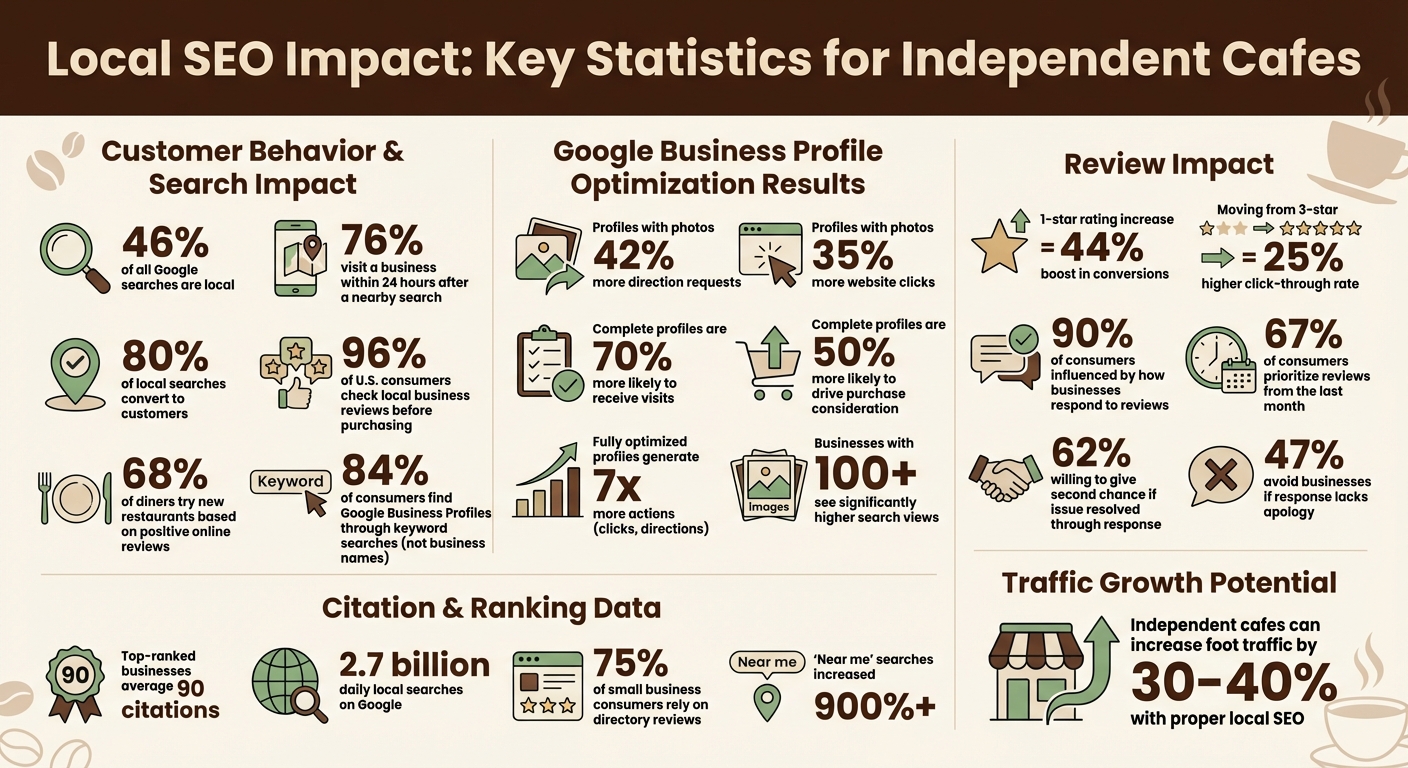
Local SEO Statistics for Cafes: Key Performance Metrics and Impact
Local SEO Essentials for Restaurants | Pro Tips For Hospitality Brands
sbb-itb-0e6533f
How to Optimize Your Google Business Profile
Your Google Business Profile is one of the best tools to attract nearby coffee lovers. Here’s why: users are 70% more likely to visit a business and 50% more likely to consider a purchase if the profile is complete. Yet, many cafe owners leave essential fields blank or upload just a handful of photos, missing out on customers ready to make a purchase.
Claim and Fully Complete Your Profile
When competing with larger chains, a well-optimized profile can give you a local edge. Start by claiming your profile through Google Business Profile Manager. Google now requires a continuous video recording for verification, showing your cafe’s location, equipment, and proof of management - like unlocking the front door. This step reduces fake listings and helps build trust with Google.
Once verified, make sure every field is complete. Your Business Name, Address, and Phone number (NAP) should match exactly across your website and directories. Even small inconsistencies, like “St.” versus “Street,” can confuse Google and hurt your rankings. Select a specific primary category like "Coffee Shop" or "Bakery", and add up to nine secondary categories to cover all your offerings, such as "Espresso Bar" or "Sandwich Shop."
Don’t overlook the 750-character business description. Use this space to naturally include keywords like “best coffee in [Your City]” or “artisan pastries” while sharing your story. Highlight the neighborhoods you serve, your unique values, and what sets you apart from chain competitors. Set accurate operating hours, including holiday schedules, and link directly to your website using UTM tracking codes to measure traffic from your profile.
A digital menu is a must. Use the menu editor to list items with descriptions and prices. This is crucial for showing up in searches like “cold brew near me” or “vegan breakfast.” You can also enable “Order with Google” to let customers place orders directly from search results. Don’t forget to use attributes like “Wi-Fi,” “Outdoor seating,” or “Wheelchair accessible entrance” to appear in filtered searches.
Once your profile is complete, the next step is to incorporate local keywords strategically into your business description.
Add Keywords to Your Business Description
Here’s an eye-opening stat: 84% of consumers find Google Business Profiles through keyword searches rather than searching for a specific business name. That means potential customers aren’t searching for “The Daily Grind” - they’re typing “coffee shop with Wi-Fi” or “latte near me.” Using a local keyword generator can help identify these high-intent phrases. Your business description needs to capture these searches.
Write your 750-character description in your brand’s voice, but include specific offerings. Instead of saying “we serve great coffee,” say “we serve cold brew, single-origin espresso, and artisan pastries.” Mention your neighborhood by name: “Located in the heart of Hawthorne, we’re your go-to spot for morning coffee and fresh-baked croissants.” This local detail helps Google understand your relevance.
"Be sure to include keywords in your business description, as this will help your Google Maps Local Pack rankings not just for searches that contain your business name, but for searches for products and services as well." - Kristen McCormick, Head of Marketing, Hatch
Avoid overloading your description with keywords, as it can sound unnatural and hurt readability. Also, never add keywords to your business name (e.g., “The Daily Grind - Best Coffee & Pastries”), as this violates Google’s rules and may lead to profile suspension.
Along with a strong description, high-quality visuals can make your profile stand out.
Upload Quality Photos and Keep Your Menu Current
Photos act as your digital storefront. Profiles with photos get 42% more requests for driving directions and 35% more clicks to their website. Businesses with over 100 images also see significantly higher search views. Use authentic visuals to show potential customers what to expect.
Start by uploading 10–20 clear photos of your cafe’s interior, exterior, and menu items. Use natural lighting and avoid heavy filters to keep the images trustworthy. Then, commit to adding 3–5 fresh photos weekly. This signals to Google that your business is active. Short vertical videos (15–30 seconds) of latte art or a barista in action are especially engaging in 2025.
| Image Type | Recommended Size | Purpose |
|---|---|---|
| Logo | 720 x 720 pixels | Brand recognition in search results |
| Cover Photo | 1024 x 576 pixels | Primary image on your profile |
| General Photos | 720 x 720 pixels | Showcase food, drinks, and atmosphere |
Keep your menu updated with current prices and seasonal offerings. When you introduce a new drink or pastry, update your profile immediately. Google’s “What’s Happening” module highlights these updates, helping you attract customers searching for seasonal items like “pumpkin spice latte”. For added visibility, name your image files descriptively before uploading (e.g., “best-latte-art-cafe-seattle.jpg”).
"Your Google Business Profile is curb appeal. Make it unmistakable who you are, what you serve, and how to book - right now." - David Holman, Founder, Local Restaurant SEO
Lastly, use the Questions & Answers section to your advantage. Don’t wait for customers to ask - proactively add 10–15 common questions, such as “Do you offer vegan milk options?” or “Is there parking available nearby?” This ensures accurate information and shows you’re attentive to customer needs.
How to Use Customer Reviews to Improve Rankings
For independent cafes battling large chains, customer reviews are more than just feedback - they're a way to boost your local visibility and build trust within your community. Google highlights the importance of review count and star ratings as part of "prominence", a factor that directly impacts your cafe's position in local search results. In fact, star ratings climbed from the #24 ranking factor in 2017 to #8 by 2020. And here's a big one: 96% of U.S. consumers check local business reviews before making a purchase decision.
The numbers show just how powerful reviews can be. Improving your rating by just one star - say, from 3.0 to 4.0 - can lead to a 44% increase in Google Business Profile conversions. Jumping from a 3-star to a 5-star average can boost your click-through rate by 25%. Google even scans review text for keywords. So, when customers mention phrases like "best espresso" or "amazing latte art", your cafe is more likely to show up for those search terms.
Consistency is key. A steady flow of reviews signals to Google that your business is active and reliable. But beware of sudden spikes - they may trigger spam filters. It's also worth noting that 67% of consumers prioritize recent reviews (within the last month) over older ones.
"Your volunteer reviewers can be a more persuasive sales force than your paid marketing department." – Miriam Ellis, Local SEO Subject Matter Expert, Moz
So, how do you encourage these reviews? Let’s dive in. Following a local SEO checklist can help ensure you don't miss any critical steps.
Ways to Ask Customers for Reviews
Timing is everything. Ask for a review when a customer is clearly happy with their experience. Train your baristas to casually mention it when customers compliment their coffee or service. A simple, "We’d love it if you could share your experience on Google", can go a long way. After all, 68% of diners try new restaurants based on positive online reviews.
Make it easy for customers to leave reviews by using QR codes. Place these on menus, table tents, or near the exit, linking directly to your Google Business Profile review page. You can also use your POS system to collect email addresses or phone numbers and send follow-up messages within 24–48 hours. Keep these messages short and personal: "Thanks for visiting today! We’d love your feedback on Google."
Encourage specifics. Instead of a generic request, say, "We’d love to hear what you thought of our cold brew", or "Let us know how you liked the cinnamon roll." This adds keyword-rich content to your reviews, helping your cafe rank for niche searches.
One big rule: Never offer incentives like discounts or freebies in exchange for reviews. It violates Google’s guidelines and could result in penalties or even suspension of your profile. Also, avoid "review gating", where you only ask for reviews from customers who had a positive experience. This practice is also against the rules.
Once reviews start rolling in, responding to them thoughtfully is just as important.
How to Respond to Reviews
Responding to reviews isn’t just polite - it’s a key part of local SEO. 90% of consumers are influenced by how businesses respond to reviews, and 60% expect a response within two days. Your replies don’t just address the reviewer; they also show potential customers how you handle feedback.
For positive reviews (4-5 stars): Keep it short and heartfelt. Thank the reviewer by name if you can, and reference something specific they mentioned. For example: "Thanks, Sarah! We’re thrilled you loved the caramel latte. Can’t wait to see you again soon!"
For negative reviews (1-2 stars): Respond quickly, apologize sincerely, and offer a solution. Avoid being defensive or making excuses - 47% of consumers will avoid a business if the owner’s response doesn’t include an apology. Acknowledge the issue and invite the customer to reach out privately. For instance: "We’re sorry to hear about your experience, John. This isn’t the standard we aim for. Please contact us at [email] so we can make things right." Interestingly, 62% of customers are willing to give a business another chance if their issue is resolved through an owner’s response.
For neutral reviews (3 stars): Address any specific concerns mentioned. If someone comments about slow service during a busy morning, acknowledge it and explain how you’re working to improve.
If you spot spam or fake reviews, don’t engage. Instead, use the "Report review" tool in your Google Business Profile to flag them.
"Owner responses represent one of the greatest assets your local business has for becoming an active contributor to your online reputation, rather than a powerless bystander." – Miriam Ellis, Local SEO Subject Matter Expert, Moz
How to Build and Manage Local Citations
To show up in local searches, your cafe needs more than just a Google Business Profile. Local citations - mentions of your cafe’s name, address, and phone number (NAP) - play a big role in helping customers find you. These mentions can appear on platforms like Yelp, TripAdvisor, Facebook, or even local blogs and news sites. They not only build on the trust established by your Google Business Profile but also improve your local search rankings.
The numbers back this up. A study on local rankings found that businesses in the top spot averaged 90 citations. Considering that around 46% of all Google searches - approximately 2.7 billion daily - are aimed at local results, citations are a must if you want to be discovered. They also matter to your customers: 75% of small business consumers say they rely on reviews from directory listings before deciding to visit.
"Citations are a cornerstone of local SEO. They build trust, verify your business, and are a significant signal to search engines about your local relevance." – Moz
Let’s dive into what local citations actually are and why they’re essential for your SEO strategy.
What Local Citations Are and Why They Matter
A local citation refers to any online mention of your cafe’s NAP details. This could range from a full directory listing on Yelp that includes your hours and menu to a casual mention in a local food blogger’s article. Citations generally fall into two categories:
- Structured citations: These are listings in directories like Google, Bing, Yelp, or TripAdvisor.
- Unstructured citations: These are mentions on blogs, event pages, or news stories.
Having consistent citations helps Google verify your cafe’s existence and location, which boosts your credibility with both search engines and potential customers. Plus, citations increase your visibility - people might find your cafe through platforms like Facebook or Yelp instead of a standard Google search. For small cafes competing against larger chains, targeting hyper-local directories, Chamber of Commerce listings, or community event pages can give you an edge.
To get started, focus on platforms that are particularly important for cafes: Google Business Profile, Yelp, Facebook, TripAdvisor, and Apple Maps. After that, consider submitting your information to data aggregators like Foursquare, Data Axle, and Neustar/Localeze. These services distribute your NAP details to hundreds of smaller directories, saving you the hassle of manual submissions.
When combined with a well-optimized Google Business Profile, these citations help establish a strong local presence. But consistency is key - your NAP details need to match across all platforms to build trust and authority.
Keep Your NAP Information Consistent
Consistency in your NAP data is the golden rule for local citations. Your NAP details should match the version used in your Google Business Profile, as discrepancies can confuse both customers and search engines, potentially hurting your rankings. Inconsistent information is one of the main reasons cafes lose out in local searches.
Start by creating a master record of your NAP details in a spreadsheet. This will serve as your single source of truth, ensuring consistency across all platforms. Make sure your address matches the exact format used by the US Postal Service. If your business has moved or changed its phone number, track down old listings with outdated information and either update or delete them.
"For local businesses, prioritizing consistent and accurate NAP citations across the web is non-negotiable for online success." – Chima Mmeje, SEO Copywriter, Moz
Avoid using call tracking numbers in your citations unless you have a clear strategy, as they can create inconsistencies that confuse Google and hurt your rankings. Also, keep an eye out for duplicate listings. Use search tools on platforms like Google Maps to find and remove duplicates, as they can dilute your ranking power. Regularly audit your citations to catch and correct errors before they impact your rankings using a local SEO audit tool - a process sometimes referred to as preventing "NAP creep".
You can manage citations manually or with automated tools. Doing it manually gives you full control and is often free, but it’s time-intensive and harder to manage if your details change. Automated services like Moz Local or Semrush Listing Management can save time by pushing consistent data across dozens of platforms at once, though they typically require a subscription. A hybrid approach works well: automate updates for major directories while manually managing hyper-local sources.
How to Create Content That Attracts Local Customers
Once you've optimized your profile and developed a solid review strategy, the next step is crafting website content that speaks directly to local customers. With 46% of all Google searches aimed at finding local businesses and "near me" searches increasing by over 900% in recent years, creating content tailored to your neighborhood can significantly boost your visibility.
Think like your customers. When someone searches for "quiet coffee shop to study near [your neighborhood]" or "best matcha latte in [your city]", your content should be ready to answer those exact queries. Writing blog posts about neighborhood-specific topics not only positions your café as a local expert but also captures the search terms your audience is using.
"Local businesses should focus on branding, customer experience, and developing their expertise. With generative AI coming into play, having lots of content about your topic isn't enough. Your content across all platforms needs to paint a clear picture of who you are and why you're important." – Amanda Jordan, RicketyRoo
Content that highlights local events and partnerships is particularly effective. Write about neighborhood festivals, collaborations with nearby businesses, or seasonal menu updates. This kind of content shows Google that your business is active in the community. Plus, 76% of people who search for something nearby on their smartphone visit a business within 24 hours, making timely and relevant content a powerful tool for driving foot traffic.
Write About Local Events and Seasonal Changes
Covering local events and seasonal updates provides regular opportunities to publish fresh content while reinforcing your connection to the community. For instance, if you're hosting an open mic night, participating in a street festival, or introducing a pumpkin spice latte featuring beans from a local roaster, share the details in a blog post. This type of content appeals to both search engines and potential customers.
Take it a step further by expanding these updates into full blog posts. If you're collaborating with a local bakery, write about the partnership - include photos, describe the products, and explain why you chose to work together. These posts often earn backlinks from your partner's website and social media, which can further boost your visibility.
Seasonal menu changes also deserve special attention. Instead of simply updating your menu page, create a blog post like "Our Fall Menu is Here: Introducing the Brown Sugar Oat Latte" and include details about the ingredients or brewing process. Use conversational language that mirrors how people search online, such as "Where can I get a good pumpkin spice latte near [local landmark]?" This approach taps into voice search traffic, which is growing as more people use Siri, Google Assistant, and Alexa to find nearby spots.
Don't forget to update your seasonal photos on your Business Profile. Cafes with more photos tend to receive more direction requests, and seasonal images - like a holiday-themed interior or a summer drink on your patio - keep your profile fresh and inviting.
Include Location-Based Keywords in Your Content
Using a local keyword research tool to find location-based keywords helps link customer searches to your café. Instead of general terms like "best coffee shop", use specific phrases that include your neighborhood, nearby landmarks, or transit stops. For example, "laptop-friendly coffee shop in Inman Park near the MARTA station" targets customers with clear intent and a precise location.
The best strategy combines intent, location, and unique appeal naturally throughout your site. For instance, your homepage might say, "We're a quiet café in East Atlanta with strong Wi-Fi and plenty of outlets - perfect for remote workers and students." On your menu page, you could mention "vegan pastries and oat milk lattes in Hawthorne." These phrases should appear in your H1 headers, meta descriptions, image alt text, and body copy.
| Keyword Category | Example Phrases | Purpose |
|---|---|---|
| By Vibe/Purpose | "quiet café to study in Portland", "laptop-friendly café near NYU" | Targets specific customer needs |
| By Product | "best matcha latte Brooklyn", "vegan pastries and coffee in Hawthorne" | Captures searches for specific items |
| By Location | "coffee near Piedmont Park", "best café near Union Square" | Attracts foot traffic from nearby landmarks |
| By Timing | "late-night coffee shop open now", "early morning coffee near 10001" | Matches immediate needs |
Pay attention to the questions customers ask in your shop - like "Do you have oat milk?" or "Is this a good place to work?" - and turn those into keywords such as "best oat milk latte in [your city]" or "work-friendly cafes in [your neighborhood]." Dedicated FAQ pages answering these questions can capture long-tail conversational searches that reflect how people actually speak.
Avoid keyword stuffing, where location terms are forced into every sentence. Google can penalize your rankings for this. Instead, focus on creating helpful, genuine content that naturally incorporates your location. Add a Google Maps widget to your contact page, reference nearby streets or landmarks in your "About" section, and write blog posts that address your community's needs.
How Local SEO Bot Simplifies Cafe Marketing
Running a café is no small feat, especially when you're juggling the demands of local SEO alongside brewing the perfect cup of coffee. That's where Local SEO Bot steps in, automating tedious SEO tasks so you can concentrate on what matters most - your customers. Instead of manually updating multiple directories and keeping your Google Business Profile in check, this platform consolidates everything into a single, easy-to-use dashboard. No more wrestling with spreadsheets or remembering countless passwords.
Local SEO Bot takes care of critical tasks like ensuring NAP (Name, Address, Phone number) consistency across platforms like Google, Yelp, and TripAdvisor. It also conducts automated citation audits, scouring the web for incorrect business mentions and fixing them for you. Even tricky details, like aligning address formats across multiple directories, are handled seamlessly - saving you from the frustration of manual corrections. Plus, updating regular and holiday hours across all platforms happens in real time.
Automate Your Google Business Profile Updates
Knowing how to set up your Google Business Profile and keeping it active is key, and Local SEO Bot makes it effortless. With one-click optimization, you can upload photos, schedule Google Posts, and maintain a steady flow of updates - all signaling to Google that your café is active and reliable. Industry data supports how vital this consistency is for maintaining trust with search engines.
Worried about unauthorized changes to your profile? Local SEO Bot's GBP Protection feature safeguards your hard-earned rankings by blocking competitors or vandals from altering your café's name, hours, or status. On top of that, the platform's AI module speeds up content creation, helping you craft Google Posts and respond to reviews with personalized, thoughtful replies - tasks that usually eat up hours of your week.
Track Your Rankings and Performance
Understanding how your café performs in local search is crucial, and Local SEO Bot's Position Checker gives you real-time insights. It monitors your visibility in Google local search results, allowing you to act swiftly if competitors start closing in. Key metrics like profile views, direction requests, and phone calls are tracked directly from your Business Profile, and you can generate automated reports in just 30 seconds. These reports can even be scheduled for weekly or monthly delivery.
For a deeper dive, the Growth Statistics feature highlights how your visibility improves over time, while Smart Tasks offers weekly, actionable tips tailored to help you stay ahead of nearby competitors. The platform also provides detailed data on website conversions, online orders, and reservations, giving you a clear picture of your SEO efforts' impact. With this data-driven approach, your café can hold its own - and even surpass - larger chains in local search results.
Conclusion
Why Local SEO Matters for Long-Term Growth
Local SEO isn’t just a short-term tactic - it’s a smart, long-term investment. While paid ads disappear as soon as your budget runs dry, a well-optimized Google Business Profile and a consistent local presence keep drawing in customers day after day. Here’s something to think about: 76% of people who search for something nearby on their smartphone visit a related business within 24 hours, and about 80% of local searches turn into customers.
For independent cafes, local SEO levels the playing field against larger chains. Big brands might dominate nationally, but they often lack the personal touch and community connection that make local cafes stand out. By optimizing your profile and creating content that resonates with your neighborhood, your cafe can see noticeable boosts in foot traffic and attract new, loyal customers.
"The more involved you are in the communities you serve, the more reason you will be giving local people to talk about and link to your business." – Miriam Ellis, Local Search Scientist, Moz
The advantages are clear, so why wait to get started?
Start Making an Impact Today
To see results, take action now. Begin by claiming your Google Business Profile, ensuring that your business’s Name, Address, and Phone number (NAP) are consistent across all platforms, and encouraging happy customers to leave glowing reviews. These small steps can add up - fully optimized profiles can generate up to 7x more actions, like clicks and direction requests.
If juggling these tasks feels like too much while running your cafe, tools like Local SEO Bot can simplify the process. For just $49/month, it handles your Google Business Profile updates, keeps your NAP consistent across directories, and tracks your rankings - all while you focus on delighting customers with exceptional coffee. Get started today and watch more local customers choose your cafe over the big chains.
FAQs
How can I optimize my Google Business Profile to help my café stand out?
To help your café’s Google Business Profile (GBP) stand out and climb the rankings, start by ensuring every detail is accurate and complete. Verify your profile, and include the essentials: your business name, address, phone number, website, and operating hours. Choose the most fitting category - like Café - and highlight extras such as Free Wi-Fi or Outdoor Seating if they apply.
Add high-quality photos that showcase your café’s interior, exterior, and menu items. Regularly update these images to keep your profile fresh. Ask satisfied customers to leave reviews, and take the time to respond to each one - whether it’s glowing praise or constructive feedback - always maintaining a professional tone. Use tools like Google Posts to share updates, special offers, or upcoming events, and stay active by addressing common questions in the Q&A section.
Consistency is key. Make sure your business name, address, and phone number (NAP) match across your website, social media platforms, and other directories. Check your profile’s performance using the Insights feature and update details like holiday hours or new menu items as needed. These steps can help your café draw in more local customers and hold its own against larger competitors.
What’s the best way for cafes to get more customer reviews on Google?
The secret to gathering more customer reviews lies in keeping the process simple and inviting. Start by reaching out to customers for feedback at the right moment - like when they’re enjoying their coffee or just before they check out. A friendly follow-up email or text with a direct link to your Google Business Profile can also make it easy for them to share their thoughts. Another smart move? Use QR codes on tables, menus, or receipts that take customers straight to your review page for quick and effortless feedback.
Be sure your website and social media pages feature a clear, easy-to-find “Leave a Review” button. Train your staff to gently remind guests to share their experiences, too. When reviews start rolling in, take the time to respond to each one. Thank customers for their positive feedback and handle any concerns with professionalism. Highlight standout reviews (with the customer’s permission) in your café or on social media to build trust and encourage others to leave their own. These straightforward steps can help you collect more reviews, boosting your business’s reputation and visibility on Google.
How do local citations help my café rank higher on Google?
Local citations are online mentions of your café’s name, address, and phone number (NAP) on platforms like directories, review sites, and local blogs. These mentions serve as a trust signal to Google, confirming that your business information is accurate. When your NAP details are consistent across multiple trusted sources, Google is more likely to view your café as relevant and reliable. This can improve your rankings in local search results, including the highly visible Google Map Pack.
On the flip side, inconsistent NAP details can create confusion for Google and harm your visibility. To prevent this, double-check that your information is identical across major U.S. directories like Yelp, TripAdvisor, and YellowPages, as well as your Google Business Profile. Keeping your citations accurate and widely distributed strengthens your local presence, making it easier for nearby customers to discover your café and helping you stand out against larger competitors.