Businesses with multiple locations face unique challenges in local SEO. Competitors vary by city, and what works in one market might fail in another. To outperform rivals in search rankings, you need to analyze their strategies for each location.
Here’s the quick breakdown:
- Identify Competitors: Use Google Maps or tools like BrightLocal to find top-ranking businesses in specific areas.
- Categorize Rivals: Separate direct competitors (same services) from indirect ones (different services targeting similar customers).
- Review Google Business Profiles: Check categories, reviews, and photos for insights into their strengths.
- Analyze Keywords: Use tools like Ahrefs or SEMrush to find location-specific keywords competitors rank for.
- Evaluate Backlinks: Study competitors’ backlink profiles and citation sources for new opportunities.
- Track Rankings: Monitor competitors’ performance across different ZIP codes and keywords.
Key takeaway: By analyzing competitors’ local SEO tactics, you can refine your strategy to improve rankings and drive more traffic for each location.
Read on for detailed steps and tools to streamline this process.
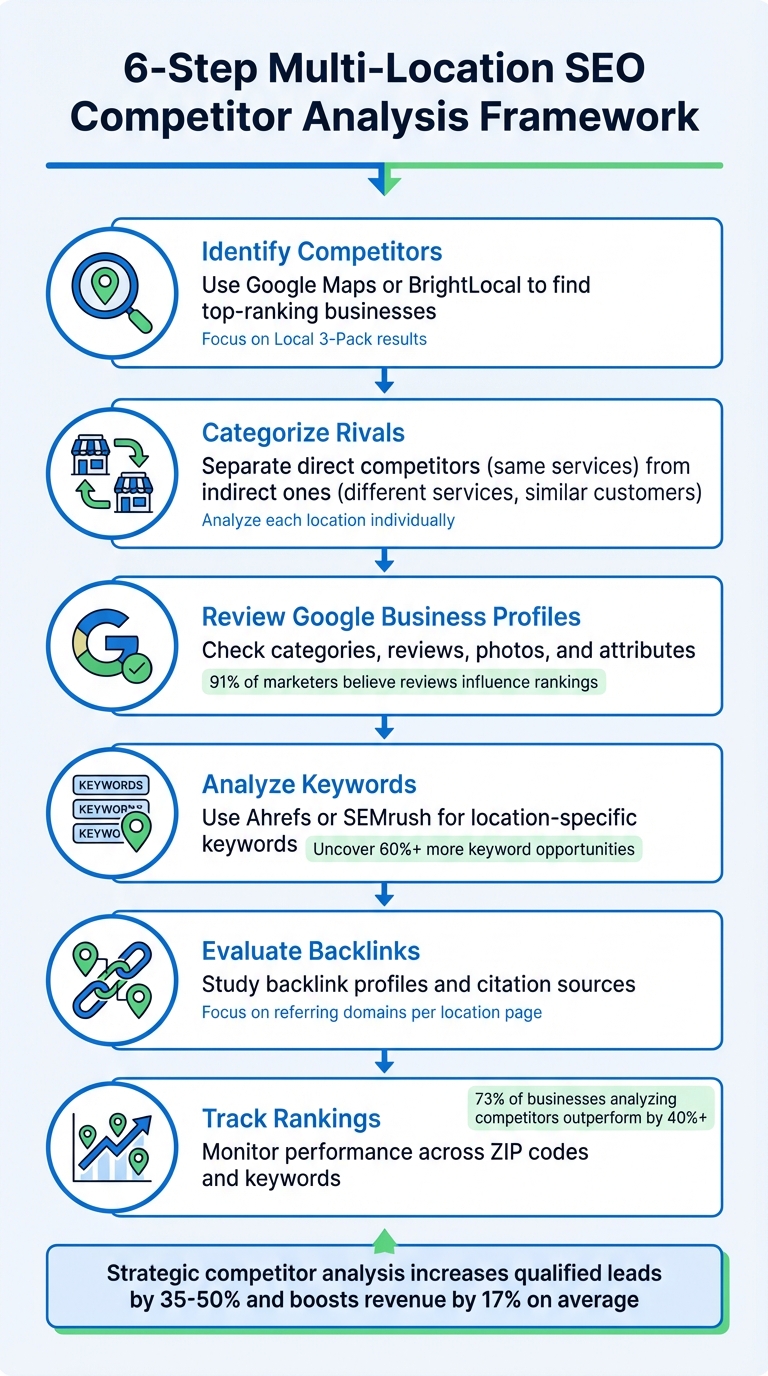
6-Step Multi-Location SEO Competitor Analysis Framework
How to Find Competitors in Different Locations
Finding Local Competitors on Google Maps
To identify local competitors, start by using Google Maps with the exact keywords your customers would likely search for. For example, type phrases like "plumbers in Dallas" or "pizza near downtown Austin" for each specific location you want to analyze. The businesses that show up in the top three map results - also known as the Local 3-Pack - are your main competitors in that area.
Here’s an important tip: you need to search from the physical location to get accurate results. Google’s algorithm heavily factors in proximity, so the results you see from your office may differ from what a customer sees just a few blocks away. For instance, a plumbing business in Dallas identified Public Service Plumbers, Pure Plumbing, and Metro Flow Plumbing as key competitors in the local pack.
If you’re analyzing locations remotely, tools like BrightLocal’s Local Search Results Checker or the GS Location Changer browser extension can help you simulate searches from specific addresses. Always use incognito mode to avoid skewing results with your search history. For a broader view, click on "More businesses" to explore 10-20 competitors.
To keep track, create a spreadsheet listing businesses that appear most frequently across 5-7 core keywords. The names that consistently show up are likely your strongest competitors. Be sure to exclude directories like Yelp, TripAdvisor, or Yellow Pages - they’re not direct competitors but can serve as citation opportunities.
Once you’ve built your competitor list, it’s time to distinguish between direct and indirect competitors.
Direct vs. Indirect Competitors
After compiling your local competitor list, categorize them based on their market focus.
Direct competitors are businesses that offer the same products or services at similar price points in your local market. For example, two plumbing companies or two upscale restaurants targeting the same customer base would fall into this category.
Indirect competitors, on the other hand, are a bit more complicated. These businesses might not provide the exact same services, but they still rank for your target keywords and attract potential customers. For instance, a high-end restaurant might find itself competing with a casual café that’s better optimized for searches like "best dining in [City]".
"Local competitor analysis includes all businesses that rank for your target (local) keywords in maps and organic results (including the local pack)" - Ann Smarty, Brand and Community Manager at InternetMarketingNinjas
For businesses operating in multiple locations, competition can vary widely. Your top rival in Chicago might not even have a presence in Phoenix, so it’s essential to analyze each location individually. Pay close attention to businesses that rank high despite being located far from the city center - they often excel in technical optimization and are worth studying.
🚀 Local SEO Competitor Analysis | Rank Your Service Business #1 on Google Maps 🌟
How to Analyze Google Business Profiles
Digging into competitors' Google Business Profiles can reveal gaps in optimization and highlight ways to improve your own strategy. These profiles often serve as the first impression for potential customers and play a big role in local search rankings. Tailor your analysis to each location to align with its unique competitive environment.
Checking Profile Attributes and Optimization
Start by identifying the primary category your competitors have chosen. This is widely considered the most critical ranking factor. As Miriam Ellis, Local SEO Subject Matter Expert at Moz, puts it:
"The category you choose as your primary/first category is believed to have the strongest impact".
If only one category is visible, check the page source by searching for "GCID" to uncover all categories listed for the business.
Next, take a close look at the business name for signs of keyword stuffing or geographic modifiers. While keywords in names once provided a ranking boost, Google’s Vicinity Update in late 2021 reduced this effect. Watch for phrases like "Best Plumber in Dallas", which might indicate outdated or noncompliant practices.
Assess the landing page URL linked to the profile. Does it lead to a generic homepage or a location-specific page? For multi-location businesses, linking to pages tailored to individual locations often provides more localized and relevant content, which can improve local rankings. Also, evaluate the attributes listed, such as "Wheelchair accessible", "Black-owned", or "Late-night food." These details help Google match businesses with specific customer needs.
Don’t overlook visual content. Check how many photos are uploaded, how recent they are, and whether they were added by the business or customers. High-quality, recent photos of storefronts, interiors, and staff are not only great for credibility but can also improve conversions. Similarly, review the Google Posts section to see how often updates are made - regular activity indicates an engaged and active business. Finally, analyze the Q&A section to see how responsive the business is to customer inquiries, which can reveal their approach to customer service.
| Element | What to Look For | Why It Matters |
|---|---|---|
| Primary Category | Match to core service | Key ranking factor |
| Business Name | Keyword stuffing or geo-modifiers | May signal outdated or noncompliant tactics |
| Landing Page | Homepage vs. tailored location page | Localized pages improve relevance |
| Photo Count | Number and recency of images | Builds trust and attracts customers |
| Google Posts | Posting frequency | Shows active management |
| Q&A Responses | Owner response rate | Reflects customer service quality |
Once you’ve assessed these profile details, shift your focus to reviews for deeper insights into customer engagement.
Analyzing Reviews and Ratings
Reviews are a goldmine of competitive insights. Start by comparing the total number of reviews and the average star rating. According to a 2019 Moz industry report, 91% of marketers believe factors like review ratings, sentiment, and recency influence local pack rankings.
Look closely at review recency and calculate the response rate. Businesses that respond to a high percentage of reviews show strong customer engagement and active profile management.
Dive deeper into the sentiment and recurring themes in reviews. Google’s "People often mention" section highlights common topics, like "friendly staff" or "slow service", that resonate with customers. Patterns in complaints - such as issues with wait times - can expose opportunities to outperform competitors. Andrew McDermott from Moz emphasizes this point:
"Your competitor's review portfolio... is a treasure trove of secrets, pointing to your competitor's strengths, weaknesses, goals, and objectives".
Be on the lookout for signs of fake or incentivized reviews that might artificially inflate a competitor’s profile. Use these insights to refine your own review strategy, whether by responding more promptly, addressing common criticisms, or encouraging customers to leave detailed feedback.
Analyzing Keywords and On-Page SEO
When it comes to multi-location SEO, understanding what your competitors are doing with their keywords can give you a serious edge. By analyzing their strategies, you can uncover opportunities to craft content that resonates locally. It’s not just about knowing what they’re targeting - it’s about spotting the gaps they’ve missed and using them to your advantage.
Finding Competitor Keywords
One of the best ways to identify competitor keywords is by analyzing their domains. Tools like Ahrefs, SEMrush, or KWFinder allow you to plug in a competitor’s URL and filter the results by location, whether that’s a country, city, or even neighborhood. Since search rankings vary by area, it’s important to tailor your keyword research to each location.
A keyword gap analysis can be a game-changer. This approach compares your site to up to five competitors, pinpointing the keywords they rank for in specific regions that you don’t. In fact, research shows that this kind of analysis can uncover over 60% more keyword opportunities compared to relying solely on your own research. Pay close attention to the difference between specific keywords (like "car service London") and implicit keywords (like "car service" when searched from London). Specific keywords may have lower search volumes, but they often indicate stronger local intent.
Don’t forget about competitors’ Google Business Profiles. The categories they choose act as high-level keywords for local search optimization. Plus, customer reviews can be a goldmine for discovering effective phrases, such as "best emergency plumber". As Connor Wilkins, CMO at Direction.com, wisely says:
"Keep your friends close, and your competitors closer when it comes to local SEO – observing their strategies helps keep your tactics ahead of the curve".
To see search results exactly as local users do, try using a VPN or a Google Location Changer. This can help you uncover hidden location-specific landing pages competitors use to target ZIP codes or neighborhoods.
These insights are the foundation for refining your on-page SEO, which we’ll dive into next.
Reviewing On-Page SEO Elements
Once you’ve identified the right keywords, the next step is to analyze how competitors optimize their pages. Start with title tags and meta descriptions. Look for the inclusion of primary keywords, geographic modifiers, and any unique selling points. Title tags are especially important - they’re one of the most influential SEO elements, and their ideal length is around 50–60 characters.
Check header tags to ensure competitors are using their H1 to include both the service keyword and the city name. Also, see if their H2 and H3 headers incorporate related local terms. When it comes to organizing location-specific pages, subfolders (e.g., "example.com/los-angeles/") are often better than subdomains, as they help consolidate domain authority.
Make sure Name, Address, and Phone number (NAP) details are presented as crawlable HTML text rather than images. Search engines can’t read text embedded in images, which makes this a critical detail. For multi-location businesses, check if competitors have dedicated landing pages for each branch. These pages should feature unique local content, embedded maps, and even driving directions.
Use a structured data testing tool to evaluate Schema markup. Look for elements like LocalBusiness, Organization, PostalAddress, or Product schemas that help search engines better understand business details. Also, assess content quality and localization. Do they mention local events, community involvement, or use geo-tagged images with descriptive alt text that includes local keywords?
| On-Page Element | Focus Areas | Impact |
|---|---|---|
| Title Tags | City/State placement, primary keyword use | Crucial for boosting rankings |
| H1 Headers | Service keyword + city name combination | Signals page relevance to search engines |
| URL Structure | Subfolders vs. subdomains for locations | Influences domain authority |
| NAP Data | HTML text vs. images, consistency | Must match Google Business Profile |
| Schema Markup | LocalBusiness, geo-data inclusion | Improves search visibility and results |
Research shows that businesses analyzing competitors outperform others in local rankings by more than 40%. As Moz puts it, "The question isn't 'What are they doing?' but 'How can we solve this problem better for our audience?'". By identifying what works and tailoring it to your specific locations, you can build a stronger local SEO strategy and stand out across all your markets.
sbb-itb-0e6533f
Reviewing Backlinks and Citations
When it comes to multi-location SEO, understanding trust signals like backlinks and citations is just as important as nailing on-page SEO. Backlinks and citations act as the backbone of local SEO, signaling to Google which businesses are reliable and relevant in specific areas. For businesses with multiple locations, this becomes even more critical since each branch operates in its own local competitive environment.
Examining Backlink Profiles
The first step is to analyze which websites are linking to your competitors' location pages. Pay close attention to referring domains (RDs) - it’s better to have unique links from different sites than multiple links from the same domain.
Leverage tools like Ahrefs, SEMrush, or Moz's Open Site Explorer to export competitor backlink profiles. Focus on page-level competitors for each branch rather than looking at the domain as a whole. For instance, a competitor's Austin location page might have entirely different backlinks compared to their Dallas page, so each page needs its own analysis. Research indicates that in competitive industries, a high Domain Authority website might only need 10 referring domains to rank, whereas a lower authority site could require 30 or more.
Identify the link gap - domains linking to your competitors but not to you. Stellar SEO explains it best:
"A true link gap appears when: The same domain links to two or more ranking competitors, that domain does not link to your site, [and] the link points to a relevant page, not a random asset".
Focus on getting editorial links from authoritative, relevant domains. Check anchor text profiles to see how top-ranking competitors balance branded links and keyword-rich links. Also, use browser extensions to identify which competitor citations provide dofollow links, as these pass more authority to local landing pages than nofollow links.
Don’t overlook local partnerships. Competitors often secure links from local Chambers of Commerce, community organizations, and event sponsorships - these are usually straightforward to replicate at the branch level. As Backlinko suggests:
"Use your location landing pages as link destinations instead of the homepage. They're more relevant to searchers in each market and can strengthen those pages' ability to rank locally".
By analyzing backlinks, you’ll also uncover where competitors gain citation value. Once you’ve mapped out backlink opportunities, shift your focus to citations that reinforce your local presence.
Checking Local Citations
Backlink insights should be paired with a thorough review of local citations. Citations - mentions of your business’s Name, Address, and Phone number (NAP) - are a cornerstone of local search visibility. Search for your competitors’ NAP directly on Google to locate their citations. Tools like Andrew Shotland's NAP Hunter, Whitespark's Local Citation Finder, or BrightLocal's Citation Tracker can help you compare your citations to theirs.
This gap analysis will reveal high-value directories where your competitors are listed but you’re not. Prioritize these opportunities based on their Domain Authority and how often they appear among top competitors.
| Priority Level | Domain Authority (DA) | Competitor Occurrences |
|---|---|---|
| Top Priority | 30–100 | 2–3 |
| Medium Priority | 10–29 | 2–3 |
| Low Priority | 0–9 | 0–1 |
Not all citations carry the same weight. General directories like Yelp or Yellow Pages are a good starting point, but industry-specific or local niche directories often provide the extra push you need. As Casey Meraz, Founder of Juris Digital, explains:
"If you're just getting the same citations that everyone else has, that doesn't really set you apart does it?"
Make sure Google has indexed your citations - unindexed listings don’t contribute much to your SEO efforts. Use tools like Moz Fresh Web Explorer to set up alerts for competitor brand names and NAP data, helping you spot new citation opportunities as they arise. For multi-location businesses, it’s essential to maintain a centralized spreadsheet with accurate NAP details for every branch. Inconsistent information can hurt your brand’s trustworthiness in Google’s eyes.
Tracking Rankings and Performance
Keeping an eye on your competitors' local search performance is crucial. Regular monitoring across different locations helps solidify insights from competitor profiles, keyword research, and backlink analysis. It’s important to track each branch individually - your competitor’s Austin location might dominate the Local Pack, while their Dallas branch barely makes an appearance.
Monitoring Local Search Rankings
Local search rankings are influenced by the searcher’s location. As Miriam Ellis, Local SEO Subject Matter Expert at Moz, explains:
"There is no #1 for all searchers. A user on the north side of town may see a completely different local pack of results if they go south".
This proximity factor means rankings need to be tracked from multiple geographic points within your service area. Tools like GTrack, BrightLocal, or LocalRanking can help monitor both Local Pack positions and localized organic rankings. Local Pack visibility often depends on proximity and an optimized Google Business Profile, while organic rankings lean more on domain authority and strong on-page SEO.
For your primary keywords, weekly monitoring of Local Pack positions is ideal. Secondary keywords can be checked monthly. Research shows that 73% of local businesses analyzing their competitors outperform others by more than 40% in local rankings. It’s also a good idea to manually search from your business locations now and then, as tools using proxies sometimes produce inconsistent results. Tracking "Share of Voice" - how often competitors appear in top results within a specific area - can pinpoint which ZIP codes or neighborhoods they dominate.
Beyond rankings, digging into visitor behavior can give you an even sharper competitive edge.
Reviewing Traffic and Engagement Data
Rankings are just part of the picture. Understanding traffic and engagement offers deeper insights. While you won’t have direct access to competitors' analytics, third-party tools like SEMrush, Ahrefs, and SE Ranking can estimate traffic. These tools rely on keyword rankings, search volume, and click-through rates to provide traffic estimates. SE Ranking highlights:
"SE Ranking's web traffic data is as reliable as it gets. That's because of its AI-powered algorithms and extensive keyword databases. It looks closely at keyword rankings, search volume, and CTR to provide accurate traffic estimates".
Pay attention to your competitors’ top-performing landing pages, as these often reveal their most engaging content and can expose gaps in your own strategy. Additionally, analyzing which regions drive the most traffic for them might uncover potential growth areas for your business.
Engagement metrics like bounce rates also tell an important story. If users quickly return to search results after visiting a competitor’s site, it signals a missed opportunity to engage - something you can capitalize on. Casey Meraz, Founder of Juris Digital, notes:
"If your users visit your site and then click back to the search results it indicates that they didn't find what they were looking for".
For businesses with physical locations, Google Business Profile "Popular Times" data can reveal when competitors experience the most foot traffic. Monitoring review velocity and response rates is another smart move - top competitors often maintain response rates of 90% or higher. Strategic competitor analysis like this has been shown to boost qualified leads by 35% to 50%.
Using Local SEO Bot for Automated Competitor Tracking
Analyzing competitors across 200 cities and 20 keywords - totaling over 12,000 entries - is an exhausting manual task. Automation simplifies this process, turning what could take days into just minutes, revolutionizing multi-location SEO management.
Features for Competitor Analysis
Local SEO Bot streamlines competitor tracking and multi-location management. Its automated rank tracking monitors Local Pack positions for dozens of keywords across various geographic areas. This feature highlights how proximity impacts your rankings compared to competitors. By simulating searches from specific GPS coordinates or ZIP codes, it delivers precise results that manual checks simply can't match.
The platform's Google Business Profile management dashboard allows you to oversee anywhere from 10 to 100+ locations in one place, while also analyzing competitor profiles. You can uncover which primary and secondary categories your competitors are using, track their frequency of Google Posts, and monitor their Q&A activity. With over 300 data points crawled across local search, citations, and Google Business Profiles, the system identifies ranking opportunities your competitors might be leveraging.
Additionally, automated citation and review management ensures consistency in NAP (Name, Address, Phone) details and consolidates reviews from all locations. The platform syncs data with major aggregators and directories, eliminating manual entry errors that often affect multi-location businesses. Automated review requests via SMS or email also help you match or exceed competitors' review velocity and response rates.
These features translate into considerable time savings, making your multi-location SEO efforts more efficient and effective.
How Automation Saves Time
Automation slashes the time spent on monthly analysis, reducing it from 4–6 hours per location to just 4–6 hours for your entire network. These tools also uncover 60% more keyword opportunities and identify 15–20 content gaps per competitor compared to traditional manual methods.
Instead of manually updating business descriptions, categories, or photos across multiple locations, bulk updates can be pushed instantly. Quarterly automated NAP audits catch inconsistencies early, preventing potential traffic losses. You can even set alerts for major competitor ranking shifts, spikes in review activity, or new content launches.
With these tools, achieving first-page rankings becomes quicker and more cost-effective. Automation cuts the time required to reach first-page rankings by 60% to 80% compared to standard optimization strategies. Starting at just $49/month for the Basic plan, Local SEO Bot provides a hands-free solution that includes Google Business Profile management, citation building, ranking tracking, and local SEO audits - all essential tools to keep your business ahead of the competition without overwhelming your team.
Conclusion
Competitor analysis plays a key role in multi-location SEO. By carefully reviewing Google Business Profiles, keywords, backlinks, citations, and rankings for each location, you can pinpoint the gaps that fuel growth opportunities.
But here’s the thing - scaling these efforts without automation is a recipe for inefficiency. Tracking competitors manually across numerous locations eats up time and resources. Automation changes the game entirely. As Octavian Ciorici puts it:
"Local SEO competitor analysis is the foundation of market dominance. It's not about copying what others do; it's about understanding the competitive ecosystem to identify market gaps, optimize resource allocation, and develop strategies that consistently outperform established players".
The numbers back it up. Strategic competitor analysis can increase qualified leads by 35–50%. Companies that excel in organic search see an average revenue boost of 17%. These aren’t just small wins - they’re advantages that build momentum over time.
Tools like Local SEO Bot streamline the process by automating tasks such as rank tracking, profile management, and citation building. With its ability to monitor Local Pack rankings across multiple keywords and locations, the platform ensures no site gets left behind due to unnoticed competitor activity. By embracing these automated solutions, businesses can ensure every location stays competitive in its local market.
FAQs
How can I find my local competitors for each business location?
To pinpoint your local competitors for each area, start by identifying specific keywords that tie your services to the location. For example, you might use terms like "plumber in Seattle, WA" or "roof repair 98101." Then, open an incognito browser window and search these keywords on Google. Pay attention to the businesses that show up in the local pack and the top organic results. From there, list the top 5–10 competitors for each location, focusing on details from their Google Business Profile (GBP), such as their address, categories, and customer reviews.
If you want to streamline the process, tools like Local SEO Bot can make competitor research easier by analyzing rankings, review counts, and citation sources. Be sure to verify that each competitor's GBP aligns with your service area and offerings. To keep everything organized, use a spreadsheet to document your findings, and revisit it every 3–4 months to track any shifts in your market. This method gives you a solid understanding of your competition and helps you refine your strategy effectively.
What are the best tools to analyze competitor keywords and backlinks for specific locations?
To dig into competitor keywords and backlinks for specific locations, you'll want tools that let you filter by location and reveal both keyword and backlink gaps.
Here are some standout options:
- Moz: Offers insights into keyword and link gaps, helping you discover location-specific terms and domains where your competitors are excelling.
- Ahrefs and Semrush: Both provide geo-targeted keyword tracking and backlink analysis, making it easier to find local citations and authority-building opportunities.
- BrightLocal: Focuses on local keyword rank tracking and backlink audits, helping you uncover gaps and opportunities in specific regions.
These tools are invaluable for identifying location-based opportunities and fine-tuning your strategy to outperform competitors in your chosen markets.
How can automation make competitor analysis easier for multi-location SEO?
Automation takes the hassle out of competitor analysis for multi-location SEO by managing tedious tasks like collecting and organizing data from various locations. Instead of manually tracking keyword rankings, Google Business Profile metrics, citations, and reviews for each site, automation tools handle it all, saving you a ton of time and effort.
Tools like Local SEO Bot make it easier to keep an eye on competitors across multiple locations. They provide real-time updates on ranking changes and create detailed reports that pinpoint areas needing improvement. With automated updates, your data stays up-to-date, allowing for quicker decisions and better optimization of your Google Maps listings. This not only eliminates hours of manual work but also makes your SEO strategy more scalable and efficient.