When someone searches for "dentist near me", they’re often ready to book an appointment. If your dental practice isn’t visible in the top Google Maps results (the "Local Pack"), you’re missing out on a huge opportunity - 88% of local searchers either call or visit a business within 24 hours, and the Local Pack grabs over 70% of all clicks.
Here’s how to rank higher on Google Maps and attract more patients:
- Optimize Your Google Business Profile (GBP): Claim and verify your listing, complete all fields with accurate, keyword-rich details, add service-specific and location-based keywords, and upload real photos of your practice to build trust.
- Manage Patient Reviews: Request reviews consistently, respond to all feedback professionally, and encourage patients to mention specific services in their reviews.
- Ensure NAP Consistency: Your Name, Address, and Phone Number must be identical across all directories (Google, Yelp, Healthgrades, etc.).
- Use Location Keywords on Your Website: Add city and neighborhood terms naturally in your content, create dedicated service pages, and implement schema markup to improve local search relevance.
- Track Progress: Use geo-grid heatmaps to monitor rankings across different areas and run regular audits to identify and fix issues.
Ranking higher on Google Maps requires effort, but the payoff is clear: more visibility, increased inquiries, and new patients ready to book. Let’s dive deeper into each step.
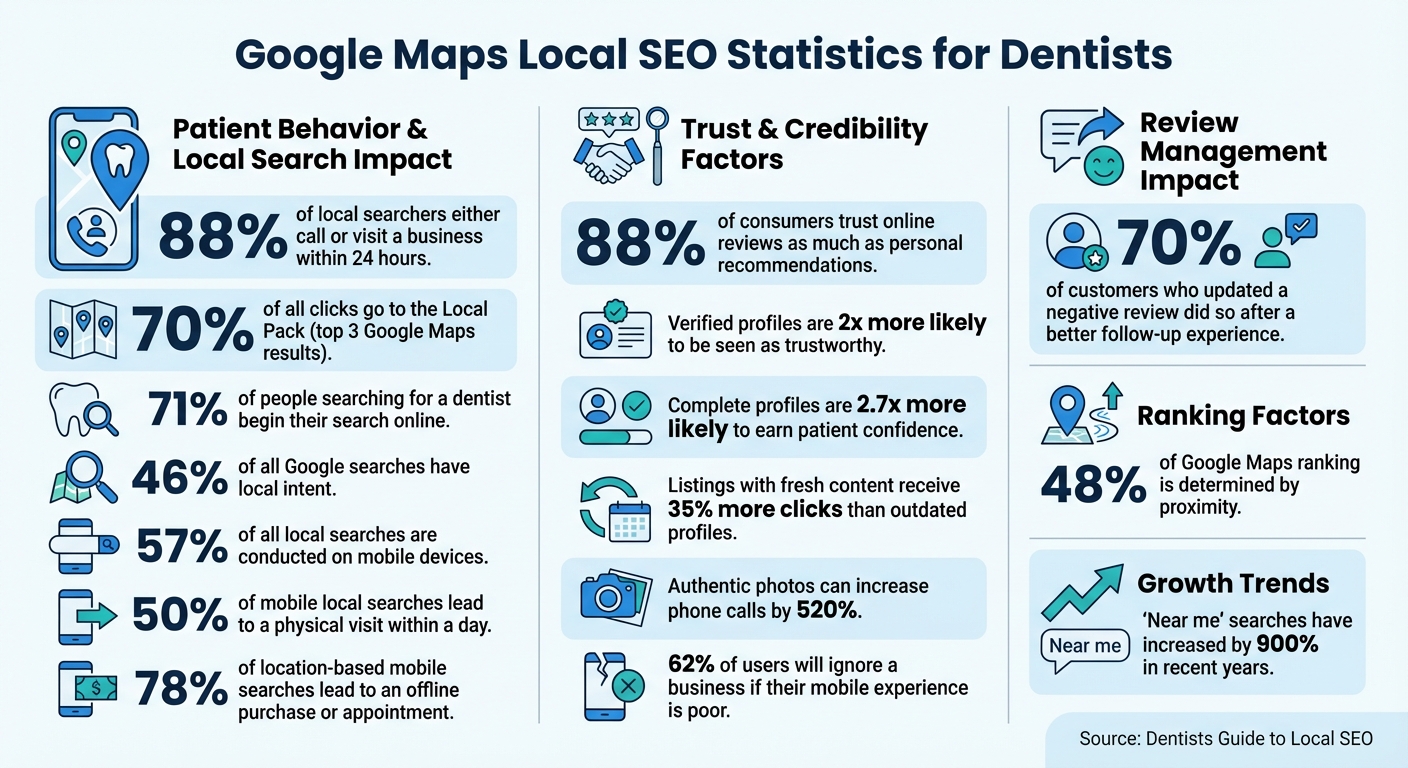
Google Maps Local SEO Statistics for Dentists: Key Performance Metrics
Master Dental SEO: Boost Your Practice's Online Visibility By Ranking on Google Maps

How to Optimize Your Google Business Profile

Optimizing your Google Business Profile is a key step in building a strong local SEO strategy that attracts patients who are ready to book appointments. Verified profiles are twice as likely to be seen as trustworthy by potential patients, and complete profiles are 2.7 times more likely to earn their confidence. To get started, claim ownership of your profile and fill out every field with accurate, keyword-rich details.
Claim and Verify Your Profile
Begin by searching for your practice name on Google Maps. If a listing already exists, click "Claim this business" or "Own this business?" and follow the steps. If you don’t find a listing, head to google.com/business and select "Add your business to Google."
Verification is essential to gain control over your listing. Google offers several methods based on your eligibility:
- Postcard Verification: A PIN code will arrive at your practice address within 5–14 days.
- Phone/SMS Verification: Instant access via an automated call or text, if eligible.
- Email Verification: Available for practices with established emails.
- Video Verification: May apply to businesses needing to verify physical equipment.
Since the verification process can take up to two weeks, it’s best to start immediately. Keep in mind, listings remain unverified and less visible until the PIN is entered. If you’re using the postcard method, note that the PIN expires after 30 days.
Once your profile is verified, you can enhance it with detailed and accurate information to gain trust and improve visibility.
Complete All Profile Details for Your Dental Practice
After verification, focus on filling out every section of your profile. Set "Dentist" as your primary category since it’s the most common term patients search for. You can also add up to 10 secondary categories to highlight specific services, like "Cosmetic Dentist", "Orthodontist", or "Emergency Dental Service."
Use the business description field (up to 750 characters) to craft a concise overview that naturally incorporates your location and key services. For example:
"Providing family dentistry in Capitol Hill, Seattle since 2015. We specialize in Invisalign, sedation dentistry, and same-day emergency care."
Avoid overloading your description with keywords. Instead, focus on making it easy to read while including terms that matter. Use the services section to list all your treatments, such as teeth whitening, dental implants, and root canals. This helps Google match your profile with specific searches. Additionally, include up to 20 neighborhoods or suburbs in the service areas section to expand your reach.
You can also select attributes like "wheelchair accessible", "accepts new patients", or "women-owned." Enable the messaging feature and link directly to your online booking system to make scheduling seamless for patients.
Upload high-quality photos of your practice - such as the exterior, reception area, treatment rooms, and team members. Authentic images can increase phone calls by 520%. Avoid stock photos; showcasing real pictures of your practice creates a stronger connection with potential patients.
Add Location-Based Keywords to Your Profile
Incorporating location-based keywords helps Google understand where your practice operates and what services you offer. Nearly 46% of all Google searches have local intent, and "near me" searches have skyrocketed by 900% in recent years. Use location terms naturally throughout your profile. For example, in your description, mention your city, neighborhood, or nearby landmarks:
"Our clinic provides comprehensive dental care in downtown Portland, close to Pioneer Square and the Pearl District."
When listing services, include location modifiers like "Invisalign in Portland" or "emergency dental care in Pearl District." Rename photo files with location keywords (e.g., "dental-implants-portland.jpg"). If certain neighborhoods show weaker rankings, add them to your service areas. You can also publish Google Posts twice a month, incorporating location-specific phrases and links to relevant pages on your website.
"Google doesn't show you for 'near me' searches based on having those words on your site – it's based on your location data, relevance, and proximity to the searcher." – Coko Agency
Finally, use the Q&A section to address common patient inquiries with keyword-rich answers. For instance:
"Yes, we provide emergency dental care in downtown Portland seven days a week."
This not only improves your profile’s relevance but also allows you to guide the conversation about your services.
Once your profile is optimized, the next step is managing patient reviews to further strengthen your local presence.
How to Manage Patient Reviews
Once you've optimized your Google Business Profile, the next step is managing patient reviews. Reviews play a key role in your profile's visibility, influencing its Prominence based on factors like the number of reviews, their quality, how recent they are, and the keywords they include. Considering that 88% of consumers trust online reviews as much as personal recommendations, maintaining a strong review profile is crucial for attracting new patients. Effective review management not only strengthens your profile but also builds trust and improves your practice's online presence.
Timely, professional responses to reviews signal to Google that your practice is active and trustworthy. Plus, 70% of customers who updated a negative review did so after receiving a better experience during a follow-up interaction.
Ask Patients for Reviews
The best time to request a review is right after a positive appointment. Make it simple by providing a direct link to your Google Business Profile or displaying QR codes at the front desk and in treatment rooms. This allows patients to leave feedback before they even leave your office.
To keep the process consistent without overwhelming your staff, use automated SMS or email follow-ups to send review requests 2–3 days after appointments. Train your team to naturally ask for reviews during the checkout process and track how many patients are being approached for feedback.
Encourage patients to include specific details about their experience, such as mentioning services like "teeth whitening" or "dental implants." These keywords in reviews help Google associate your practice with relevant search queries, improving your rankings. However, be mindful of Google's guidelines - offering discounts or incentives in exchange for reviews is not allowed.
How to Respond to Reviews
Responding to all reviews - positive and negative - within 24–48 hours shows both Google and prospective patients that your practice is engaged and professional. Responses should directly address the reviewer's comments and showcase how your practice values feedback.
For positive reviews, personalize your response by using the patient's name and mentioning specific details from their visit. Thank them and, if appropriate, share any relevant updates about your practice. For negative reviews, stay courteous and professional. Apologize publicly for their experience and invite them to discuss the issue privately via phone or email. This approach not only protects patient privacy but also demonstrates your commitment to resolving concerns.
"Reviews are not just for the business and a single customer to read - they are for the entire review-reading public to peruse. How a brand presents itself in responding to negative reviews signals to all consumers how well it will treat them if they experience a problem." – Moz
Whenever possible, include location-based keywords in your responses. For instance, you might say, "Thank you for trusting us with your dental implants in downtown Portland. We're thrilled we could provide the care you needed." This adds a local touch and reinforces your practice's connection to the area.
If managing reviews feels overwhelming, automation can help.
Automate Review Management with Local SEO Bot
Manually managing reviews can be time-consuming, especially when quick and consistent responses are essential. Local SEO Bot simplifies this process by automating review requests, responses, and tracking - all for $49/month. This tool ensures no review goes unnoticed, saves your staff valuable time, and keeps a steady stream of fresh reviews coming in, which can boost your Google Maps ranking. By automating the process, you can focus more on providing excellent patient care while maintaining an active online presence.
Building Local Citations and Maintaining NAP Consistency
Once you've tackled review management, the next step to boosting your Google Maps ranking is building local citations. These citations are consistent mentions of your practice's Name, Address, and Phone Number (NAP) across online directories. They help signal credibility to Google and reinforce your practice's legitimacy in local searches. But here's the catch: consistency is everything. Google relies on NAP information as a key ranking factor to assess your relevance and authority in local search results.
Even small discrepancies, like using "St." instead of "Street" or "Ste." instead of "Suite", can confuse Google. This confusion can lead to lower rankings and create frustration for potential patients who encounter conflicting contact details. Consider this: 46% of all Google searches are for local information, and 88% of people searching for a local service on mobile devices either visit or call within 24 hours. If your NAP information isn't accurate and consistent, you risk missing out on these high-intent patients.
Check and Fix Your NAP Information
Start by auditing your current listings. Search for your practice on platforms like Google, Yelp, and major healthcare directories such as Healthgrades and Zocdoc to spot any inconsistencies. Create a master record with your exact business name (as it appears on your signage), full address, and phone number. For example, if your signage says "Riverside Smiles Dental Center", use that exact name across all platforms.
Next, claim and update any outdated or unclaimed listings. If your practice has moved or changed its phone number, update every listing immediately to avoid SEO penalties. Make it a habit to audit your listings quarterly to catch errors or duplicates. If you find duplicate profiles, use Google's Business Profile Manager to merge or remove them.
Once your NAP information is consistent, you're ready to list your practice on the most influential directories.
List Your Practice on Key Directories
Focus on directories that matter most to your field and local visibility. Here's a breakdown of where to start:
| Directory Type | Examples |
|---|---|
| Dental-Specific | ADA Find-a-Dentist, Healthgrades, Zocdoc, Vitals |
| Major Search/Maps | Google Business Profile, Bing Places, Apple Maps |
| General Business | Yelp, Better Business Bureau (BBB), Facebook, Yellow Pages |
| Healthcare General | WebMD, Wellness.com, CareDash |
Begin with dental-specific directories since they're highly relevant for healthcare-related searches. Once those are covered, expand to general business directories and local community resources, like your Chamber of Commerce. Each listing strengthens your local presence and creates more opportunities for patients to find you. Just make sure all listings match your standardized NAP.
Use Local SEO Bot for Automated Citation Building
Manually updating citations can be tedious and prone to errors. That’s where Local SEO Bot comes in. For $49/month, this tool automates the process, ensuring your NAP information stays consistent across platforms. It continuously monitors your listings, flags inconsistencies, and keeps your local SEO on track. By automating this task, you free up your staff to focus on patient care while still maintaining a strong online presence.
sbb-itb-0e6533f
Using Location-Based Keywords and Optimizing Your Website
Once your citations and review strategies are solid, it’s time to focus on making your website a true local magnet. While your Google Business Profile might catch someone’s eye, it’s your website that convinces them to book an appointment. Consider this: 71% of people searching for a dentist begin their search online, and 78% of location-based mobile searches lead to an offline purchase or appointment. If your website isn’t optimized with location-based keywords, schema markup, and mobile-friendly design, you’re likely missing out on potential patients.
Add Location Keywords to Your Website Content
Start by figuring out what terms your local audience actually uses. Tools like Google Autocomplete, Google Keyword Planner, and Ahrefs can help you find the right mix of services and locations. For instance, instead of vague phrases like "dentist near me", focus on specific terms like "dental implants Dallas" or "pediatric dentist Brooklyn Heights." Google already interprets "near me" searches based on GPS data, so there’s no need to force it into your content.
Once you’ve nailed down your keywords, strategically place them in title tags, meta descriptions, headings, and the early sections of your page content. For example, a service page targeting "Invisalign in Austin" might have a title like: "Invisalign Clear Aligners in Austin, TX | [Practice Name]." Build dedicated service pages for high-demand treatments like veneers, implants, or teeth whitening instead of crowding everything into a generic "Services" page. If you serve multiple areas, create unique landing pages for each location. These pages should feature local landmarks, staff bios, and an embedded Google Map to give them a personal touch.
Don’t forget about your images. Rename image files with location-specific keywords and include descriptive alt text. This not only improves accessibility but also helps search engines better understand your content’s relevance to local searches.
Add Schema Markup for Local SEO
Schema markup is a type of structured data that helps search engines understand your website’s content and location. Google prefers JSON-LD format, so use it to implement structured data for your practice. For example, use schema types like Dentist or LocalBusiness to include your name, address, phone number (NAP), hours, and services.
Take it a step further with specialized schema types:
- FAQPage schema: Helps capture traffic from "People Also Ask" sections and voice searches.
- Service schema: Highlights individual treatments like implants or whitening on dedicated pages.
- Review schema: Displays patient ratings directly in search results, adding credibility.
- Physician schema: Spotlights individual dentists’ credentials and expertise.
After adding schema, use Google Search Console to ensure there are no errors or indexing issues.
"Schema is a type of structured data that helps search engines better understand your content." - MEDVOLTA
When done right, schema markup integrates seamlessly with your site, boosting your local search performance.
Make Your Website Mobile-Friendly
Here’s a critical fact: 57% of all local searches are conducted on mobile devices. And since Google uses mobile-first indexing, your site’s mobile version is what determines its ranking. If your site isn’t optimized for mobile, you’re practically invisible to more than half of your audience. Even worse, 50% of mobile local searches lead to a physical visit within a day. A slow or clunky mobile experience could be costing you appointments.
Start by implementing a responsive design that adjusts to any screen size. Make sure navigation is simple, and buttons are large enough to tap easily on a smartphone. Compress images using efficient formats like WebP, and consider a Content Delivery Network (CDN) to improve load times. Aim for your site to load in under 2.5 seconds on a 4G connection to meet Google’s Core Web Vitals standards, particularly the Interaction to Next Paint (INP) metric.
Include prominent "Call Now" and "Book Appointment" buttons on your mobile site. Avoid intrusive pop-ups or interstitials that block content on smaller screens. If your site’s load time exceeds 2.5 seconds, upgrading to faster hosting is a must. Remember, 62% of users will ignore a business if their mobile experience is poor. In today’s digital world, a mobile-friendly site isn’t just helpful - it’s non-negotiable.
"Most local patients search on smartphones, and a slow or unresponsive site will push them away." - Adrian Clocusneanu, RevUp Dental
Tracking Your Rankings and Running Local SEO Audits
Once you've optimized your website, citations, and reviews, the next step is to monitor your progress and make adjustments as needed. Regularly tracking your rankings and conducting audits is crucial for maintaining and improving your visibility on Google Maps. These efforts connect your optimization work to tangible results.
Use Geo-Grid Heatmaps to Track Rankings
While traditional rank trackers show your position from a single location, geo-grid heatmaps provide a clearer picture by displaying rankings across multiple specific areas within your service region. This is important because proximity accounts for nearly half - 48% - of the ranking factors influencing Google Maps. Your position can vary greatly depending on where the searcher is located.
"These heat maps reveal your ranking at dozens of pinpointed locations, so instead of guessing whether you're visible, you can see your reach, street by street." - My Social Practice
Heatmaps highlight areas where your visibility is lacking - places where you're close by but not appearing in search results due to strong competition or incomplete optimization. For instance, you may discover that a competitor farther away is outperforming you. This could signal the need to refine your citations or better target service-related keywords. By comparing heatmaps before and after updates, you can measure progress and identify "opportunity zones." These are areas where you're ranking between 4th and 10th place - just outside the top three spots that attract over 70% of all clicks. With small adjustments to your Google Business Profile, you could move into these coveted positions.
These insights lay the groundwork for running thorough audits.
Run Regular Local SEO Audits
Local search is constantly evolving - competitors update their profiles, algorithms shift, and new reviews are added. To keep your optimizations effective, regular audits are a must. They help you catch issues like inconsistent NAP (Name, Address, Phone) data, missing schema markup, or a slowdown in review activity before they hurt your rankings.
A proper audit should cover several key areas:
- Google Business Profile completeness: Pay close attention to your primary category.
- NAP consistency: Ensure uniformity across directories like Yelp and Healthgrades.
- On-page SEO: Evaluate local keyword usage on your website.
- Competitor analysis: Compare your performance against top local rivals.
"Local SEO audits are primarily necessary due to the ever-shifting nature of local markets and online environments... Google doesn't just change from week to week, but can literally change from hour to hour." - Search Engine Land
Tools like Local SEO Bot simplify the process by running automated audits. These tools identify gaps in your local optimization efforts and provide a clear performance snapshot. They can flag issues like citation errors, outdated service descriptions, or technical problems. Running these audits monthly helps you stay ahead of changes, while quarterly checks ensure your NAP information remains consistent across all platforms.
Keeping Your Google Business Profile Active
After optimizing and tracking your profile, the next step is keeping it active. Staying engaged with your profile is essential for maintaining strong local rankings. Google rewards businesses that consistently update their information, signaling that your dental office is not only operational but also attentive to its online presence. Considering that 46% of all Google searches are for local information, an active profile ensures your practice stays visible when potential patients are searching for a dentist.
An up-to-date profile doesn’t just boost visibility - it also builds trust. Listings with fresh content and recent photos are twice as likely to be seen as trustworthy and receive 35% more clicks than outdated profiles. With 88% of consumers who search for a local business on their mobile devices calling or visiting within 24 hours, keeping your profile current can directly lead to more appointments.
Post Regular Updates on Google
Aim to post at least twice a month to keep your practice relevant and top of mind.
"Post a minimum of twice a month"
- Adrian Lefler, Vice President, My Social Practice
Follow the 90/10 rule: 90% of your content should be educational or engaging, while 10% can promote your services. Share useful dental tips, announce new services, or highlight your involvement in the community. For promotional posts, consider offering discounts - like teeth whitening specials or new patient offers - and always include a clear call to action, such as "Book Online" or "Call Now." Link these posts to specific service pages on your website to drive traffic and encourage conversions.
Consistent updates not only enhance your Google Business Profile but also strengthen your overall online presence and foster patient engagement across platforms.
Upload Photos Regularly
Make it a habit to upload fresh photos every month. Patients want to see what your office looks like now, not years ago.
Photos add a personal touch to your practice. While clinical before-and-after shots (with patient consent) can showcase your expertise, team photos often resonate more with potential patients. People want to connect with the faces behind the practice rather than just the procedures. Include updated photos of your office’s exterior, interior, and team to help patients feel comfortable and familiar with your practice before they even step through the door.
Conclusion
This guide has outlined how dentists can improve their rankings on Google Maps by creating a well-rounded local SEO strategy where all components work together. By refining your Google Business Profile, maintaining consistent NAP (Name, Address, Phone) details across directories, managing patient reviews actively, and regularly updating your profile with fresh content, you're signaling to Google that your practice is both relevant and trustworthy.
With 88% of consumers reaching out to a business within 24 hours of conducting a local search, showing up in the top Map Pack is a game-changer. These are individuals ready to make a decision.
"It's not just about being seen; it's about being chosen."
- Adrian Lefler, Vice President, My Social Practice
As competition intensifies, staying consistent is crucial. Use geo-grid heatmaps to track your progress, perform regular local SEO audits to catch technical issues, and keep your Google Business Profile vibrant with timely updates, posts, and photos. Practices that prioritize ongoing improvement often lead their local markets. These steps tie together the strategies discussed throughout this guide.
Start by claiming your profile, standardizing your information across platforms, and gathering patient reviews. Build on this foundation, and with a steady, strategic approach, you'll rise in rankings and attract more local patients.
FAQs
How does ranking higher on Google Maps benefit my dental practice?
Ranking higher on Google Maps can greatly enhance your dental practice's visibility. Securing one of the top three spots in the map pack ensures that your practice is front and center for local patients searching for dental services. This matters because nearly half of all clicks on local search results go to these top-ranking positions.
A strong presence on Google Maps doesn’t just attract more attention - it leads to more phone calls and appointment bookings. On the flip side, if your ranking is lower, your practice becomes harder to find, reducing your chances of connecting with potential patients. By focusing on local SEO, you can make your practice more visible in local searches, helping you reach and engage with more patients in your community.
How can I optimize my Google Business Profile to improve local SEO for my dental practice?
Optimizing your Google Business Profile (GBP) is a smart way to increase your dental practice's visibility on Google Maps. Start by claiming and verifying your profile to establish its authenticity. Double-check that your business details - such as name, address, and phone number (NAP) - are accurate and consistent across all online platforms.
Select the most appropriate primary and secondary categories for your practice, like “Dentist” or “Orthodontist.” Add high-quality photos and videos that highlight your office, team, and the treatments you offer. Encourage happy patients to leave positive reviews and make it a habit to respond to all feedback in a professional manner. Keep your profile up to date with your current hours, services, and location-specific posts to remain relevant.
These efforts can boost your local rankings and help you reach more patients in your community.
What’s the best way to manage and respond to patient reviews to improve my Google Maps ranking?
Patient reviews are a key factor in how your practice ranks on Google Maps, making it crucial to manage them effectively. Google looks at how many reviews you have, how positive they are, and how recent they are when determining your local search visibility.
Start by keeping an eye on all new reviews posted to your Google Business Profile. Set up notifications so you can respond promptly - ideally within 24 hours. For positive reviews, take a moment to thank the patient by name, acknowledge the specific service they appreciated, and include a friendly invitation, like encouraging them to schedule their next visit. For negative reviews, respond professionally by addressing their concerns, offering a sincere apology, and suggesting they contact you offline via phone or email to resolve the issue. This shows that you’re committed to patient care and open communication.
To gather more positive reviews, ask happy patients right after their appointment, send follow-up emails with a direct link to your profile, or display QR codes at your front desk for easy access. Just steer clear of offering incentives - Google strictly prohibits this. Make it a habit to collect genuine, recent reviews and report any fake or inappropriate ones. By staying on top of reviews and engaging with patients, you can build trust, improve your online reputation, and boost your practice’s visibility in search results.