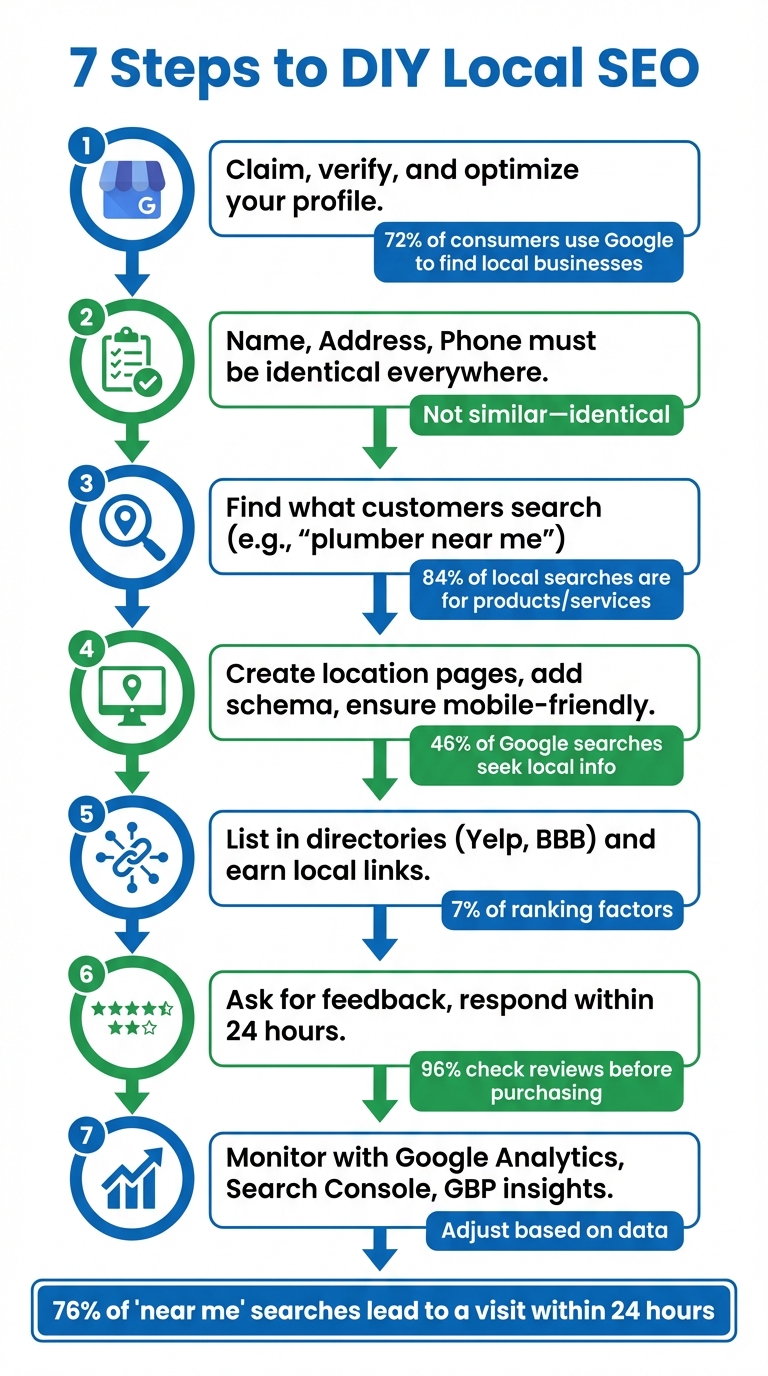
Want your business to show up when locals search for services you offer? Local SEO helps connect you with customers searching for terms like “best pizza in Chicago” or “plumber near me.” You don’t need a big budget or an agency to succeed. Here are the 7 steps you can take today to boost your local visibility:
- Set up and optimize your Google Business Profile (GBP): Claim your profile, verify it (video or postcard), and keep it complete and updated with accurate details, photos, and posts.
- Ensure consistent NAP (Name, Address, Phone): Audit your listings across directories and fix discrepancies to build trust with search engines.
- Research local keywords: Use tools like Google Autocomplete, Keyword Planner, and Trends to find phrases your customers use (e.g., “emergency plumber Chicago”).
- Optimize your website: Create location-specific pages, add schema markup, and ensure mobile-friendly, fast-loading pages.
- Build citations and backlinks: List your business in directories (Yelp, BBB) and earn links from local sources like news outlets or community websites.
- Manage reviews: Ask customers for feedback, respond to both positive and negative reviews quickly, and maintain a strong average rating.
- Track progress: Use tools like Google Analytics, Search Console, and GBP insights to monitor traffic, conversions, and rankings.
Key stat: 76% of “near me” searches lead to a visit within 24 hours. Follow these steps to attract more high-intent customers and grow your business.
7 Steps to Boost Local SEO for Your Business
How to Do Local SEO: Complete A-Z Tutorial
Step 1: Set Up and Optimize Your Google Business Profile

Your Google Business Profile (GBP) is a must-have tool for local SEO success. It’s free and directly impacts whether your business appears in the Local Pack - the top three map results. Considering that 72% of consumers use Google to find local business information and that users are 70% more likely to visit a business with a complete profile, optimizing your GBP is a no-brainer.
How to Claim and Verify Your Google Business Profile
First, create a dedicated Google account for your business. Head over to google.com/business and search for your business name. If it’s already listed, click on "Claim this business" or "Manage now". If it’s not there, select "Add your business to Google" to create a new listing.
After claiming your profile, you’ll need to verify that you’re authorized to manage it. As of 2025, Google’s preferred verification method is video. Record a video (under two minutes) showcasing your business location, street signage, nearby landmarks, and proof of ownership - like unlocking your door or accessing your point-of-sale system. Google typically reviews these submissions within five business days.
If video verification isn’t an option, you can request a postcard with a verification code. This postcard usually arrives within five days, and you’ll need to enter the code in your GBP dashboard to finalize the process. Keep in mind that until verification is complete, your profile won’t be visible to the public.
Key Profile Elements to Complete
Make sure every field in your profile is filled out. Pay special attention to your business name, address, and phone number (NAP) - these details need to match exactly across all online directories. When selecting a category, choose one that best describes your business (e.g., "Italian Restaurant" instead of just "Restaurant"). This is one of the most important factors for ranking. You can also add up to nine secondary categories to highlight additional services.
Write a business description of up to 750 characters, focusing on local keywords while keeping the tone natural. The first 250 characters are especially important since they’re visible before users click "more". Don’t forget to upload high-quality photos of your business - include shots of the exterior, interior, products, and your team in action. Businesses with photos tend to get 42% more requests for driving directions and 35% more website clicks.
Regular Updates to Maintain Visibility
An active profile is a visible profile. Post updates at least once a week to share promotions, new services, or upcoming events. Local SEO expert Darren Shaw emphasizes this point:
"Most businesses are doing Google Posts all wrong. They treat their Google Business Profile like a social media profile, but it is NOT. GBP is the one platform that people visit with the intent to BUY, so lean into that".
Keep your business hours up to date, especially during holidays. Use the "Special Hours" feature to ensure accuracy - Google rewards businesses that keep their profiles current. Add new photos every month to keep your profile engaging and fresh.
Lastly, respond to every review, especially negative ones, within 24 hours. Quick responses show accountability and build trust with potential customers who often read reviews before making a decision.
Once your GBP is fully optimized and actively maintained, the next step is ensuring your NAP details are consistent across all online platforms.
Step 2: Maintain Consistent NAP Information Across the Web
After optimizing your Google Business Profile, the next step is ensuring your business's Name, Address, and Phone number (NAP) are consistent across the internet. This consistency is crucial for strengthening your local presence. Even minor discrepancies - like spelling out "Street" instead of using "St." or listing an incorrect suite number - can confuse search engines. When Google encounters conflicting information, it struggles to confirm your business's legitimacy and location, which can hurt your local search rankings.
Inconsistent NAP details aren't just a technical issue; they can cost you customers who are ready to visit. As Naresh from RankwithNaresh emphasizes:
"Your business Name, Address, and Phone number must be identical everywhere online. Not similar - identical."
Audit Your NAP Information
Start by creating a master spreadsheet with your correct business name, address, and phone number. This document will act as your go-to reference for all online listings. Use a local phone number with a recognizable area code instead of a toll-free number, as it signals a stronger local presence to search engines.
Next, search for your business name and city on Google. Review the first five pages of results for directory listings, blogs, news articles, and community pages. Pay close attention to subtle errors like outdated addresses, phone numbers in different formats, or variations in your business name. If your business has rebranded or moved, search for your old details to uncover outdated "zombie" citations that may still be floating around.
Don't forget to check your social media profiles on platforms like Facebook, Instagram, and LinkedIn. Ensure they match your Google Business Profile exactly. Also, make sure your NAP is displayed as crawlable text on your website, not embedded in images, since search engines can’t read text within graphics.
Tools to Track and Fix NAP Errors
Manually auditing your NAP information is effective but time-intensive. To save time, you can use tools designed to scan multiple directories for inconsistencies. For example:
- BrightLocal: Offers citation tracking alongside other local SEO features.
- Moz Local: Specializes in keeping your listings accurate across major directories.
- Semrush: Includes listing management as part of its comprehensive SEO toolkit.
These tools allow you to manage and update your listings from a single dashboard. While they may not catch every mention - especially on smaller blogs or niche community sites - they cover the major directories that significantly impact your rankings.
With your NAP information now consistent, you’re ready to dive into researching local keywords to attract more targeted traffic.
Step 3: Research Local Keywords
Now that your NAP (Name, Address, Phone) details are sorted, it’s time to figure out what your customers are actually searching for on Google when they need your services. This is where local keyword research comes into play - it helps you uncover the exact search phrases people in your area are using.
Local keywords combine your service, a modifier (like "emergency"), and a location (such as "Chicago"). These combinations clearly indicate user intent. The stats show why this is so important: 84% of local searches are for a product or service, not a specific business name. And here’s the kicker - 76% of people who search "near me" on their phone visit a related business within 24 hours. That’s a lot of potential customers with high buying intent.
Use Free Tools to Find Local Keywords
You don’t need to spend a dime to start finding useful keywords. Google Autocomplete is a great place to begin. Just type in your service, and you’ll see suggestions like "electrician near me", "electrician open now", or "emergency electrician" pop up in real time.
Scroll to the bottom of any search results page, and you’ll find the "Related searches" section. This area often includes neighborhood-specific terms or variations you might not have thought of. Plus, the "People also ask" boxes sprinkled throughout the results can give you insight into the questions your potential customers are asking - perfect for building both your keyword strategy and content ideas.
If you have a Google Ads account, Google Keyword Planner is another free tool that lets you filter search volume by city or region. Want to compare keyword trends across different areas? Google Trends can show you which terms are gaining traction in nearby cities or neighborhoods. For more in-depth data, tools like Ubersuggest or Semrush’s Keyword Magic Tool (offering up to 10 free searches daily) provide insights into traffic, keyword ideas, and ranking difficulty. Even ChatGPT can help brainstorm location-specific phrases, such as "walk-in dentist Chicago".
Build a Focused Keyword List
Once you’ve gathered a wide range of keyword ideas, it’s time to narrow them down. Focus on high-intent phrases that directly match your services. Use a simple spreadsheet to track each keyword’s monthly search volume, difficulty score, and relevance to your business. If your website is new, aim for keywords with a difficulty score between 0–49% to improve your chances of ranking.
Pay special attention to transactional keywords - phrases that include terms like "affordable", "open now", "emergency", or "near me." These signal that the user is ready to take action. Don’t dismiss keywords with low search volume either. For example, "gluten-free bakery South Beach" might only get 20 searches a month, but those searches could be from people ready to buy exactly what you’re offering. Lastly, assign one primary keyword to each page on your website. This prevents your pages from competing with each other for the same search terms.
With a focused keyword list in hand, you’re ready to start optimizing your website to capture these local searches.
Step 4: Optimize Your Website for Local Search
Leverage your local keyword research to refine your website and improve its visibility. The aim here is to ensure that both Google and your potential customers know exactly where you operate and what services you offer. With nearly half (46%) of all Google searches focused on finding local businesses, this step can significantly impact your online presence.
Create Location-Specific Pages
Build dedicated landing pages for each service area, even if you don’t have a physical office in those locations. Avoid using cookie-cutter templates - each page should have entirely original content. Include references to local landmarks or community details to make these pages stand out. For instance, if you’re a plumber covering both Austin and San Antonio, your Austin page might mention emergency repairs near the University of Texas campus or work in the Hyde Park neighborhood.
Each location page should prominently feature your primary "Service + City" keyword in critical areas like the title tag, meta description, URL slug, and H1 header. Make sure this keyword appears above the fold so it’s immediately visible to both users and search engines. Additionally:
- Display the specific NAP (Name, Address, Phone) for each location.
- Embed a Google Map to show the exact service area.
- Add LocalBusiness Schema markup for better search engine understanding.
- Link each Google Business Profile to its corresponding location page - not your homepage.
While these pages help improve your organic search rankings, keep in mind that they won’t appear in the Map Pack unless you have a verified Google Business Profile for that city. Considering that local and organic searches drive 69% of total website traffic, investing time in creating these pages is well worth it.
Add Local Schema Markup
Help search engines better understand your business details by adding local schema markup. This code provides essential information like your address, phone number, and operating hours. While it doesn’t directly influence rankings, it enhances your visibility by enabling rich snippets and knowledge panels.
Google suggests using the JSON-LD format for schema markup because it’s clean, adaptable, and doesn’t interfere with your page’s visible content. The key schema type for local SEO is LocalBusiness, and you can specify subtypes (e.g., Restaurant, Dentist, Attorney) where applicable. Include the following details in JSON-LD format:
- Business name
- Address (using the
PostalAddressformat) - Phone number (in E.164 format, e.g., +14155551234)
- Geo-coordinates (with at least 5 decimal places)
- Operating hours (in ISO 8601 format)
You can also add a price range (e.g., $ to $$) to give users an idea of affordability. Use tools like Google’s Structured Data Markup Helper or AI platforms like ChatGPT to generate the code. Once added to your webpage’s <head> section, validate it with Google’s Rich Results Test or the Schema Markup Validator. For businesses with multiple locations, create separate pages for each and apply unique LocalBusiness schema to avoid confusion. Ensure the NAP details in your schema match exactly with those on your Google Business Profile and website to maintain consistency.
Improve Mobile Performance and Load Speed
Optimizing your site for mobile users is critical. About half of all mobile searches are for local results, and 30% are tied to specific locations. Even more compelling, 76% of people conducting "near me" searches on mobile visit a related business within 24 hours. These users are ready to act, so your site needs to load quickly to keep them engaged.
Page speed plays a role in rankings for both mobile and desktop searches. With 83% of users expecting a site to load in under 3 seconds, start by running your site through Google PageSpeed Insights to identify performance issues. Key improvements include:
- Compressing images using formats like WebP for faster loading.
- Minifying JavaScript and CSS files.
- Implementing responsive design to ensure your site looks great on any screen size.
If your site is hosted on shared servers, upgrading to dedicated or high-performance hosting can improve server response times. Additionally, use a Content Delivery Network (CDN) like Cloudflare to serve content from servers closer to your users, reducing load times. With the rise of AI-driven search and voice search, having a fast, mobile-friendly site with clear structured data is essential for capturing local traffic.
sbb-itb-0e6533f
Step 5: Build Local Citations and Backlinks
Citations and backlinks work together to establish your business's credibility online. Local citations refer to mentions of your business's Name, Address, and Phone number (NAP), often including your website URL. These come in two types: structured citations, which appear in directories like Yelp or Yellow Pages, and unstructured citations, found in blog posts, news articles, or even social media. These citations account for about 7% of ranking factors for both Google Local Pack and local organic search results. They help search engines confirm your business’s legitimacy and location.
Local backlinks, on the other hand, are links from websites like news outlets, chambers of commerce, or community organizations. These links signal to Google that your business is actively engaged in the local community. Considering that 98% of consumers used the internet to search for local businesses in 2022, building these links is essential for improving your visibility. To get started, focus on listing your business in key online directories.
List Your Business in Online Directories
Start by listing your business on major platforms like Google Business Profile, Bing Places, and Apple Maps. Then, expand to other well-known directories like Yelp and the Better Business Bureau. These directories often rank highly in search results, providing additional opportunities for customers to find your business.
| Directory Category | Examples | Best For |
|---|---|---|
| Top Tier | Google Business Profile, Bing Places, Apple Maps | General visibility and maps |
| General/Trust | Yelp, Better Business Bureau (BBB), Facebook | Credibility and reviews |
| Service-Based | Angi, Thumbtack, HomeAdvisor | Contractors, plumbers, cleaners |
| Hospitality | TripAdvisor, OpenTable, Foursquare | Restaurants and travel |
| Professional | LinkedIn, Whitepages, Yellowbook | B2B and general contact info |
| Industry-Specific | HealthGrades (Medical), Zillow (Real Estate), Edmunds (Auto) | Specialized consumer searches |
To save time, submit your business details to data aggregators like Data Axle, Localeze, and Foursquare. These platforms distribute your NAP information to hundreds of smaller directories automatically. For industry-specific visibility, target directories tailored to your niche - such as TripAdvisor for restaurants or Healthgrades for medical practices.
Search each platform for existing, unclaimed profiles and claim them. It’s better for SEO to claim an existing listing than to create a duplicate. Ensure your NAP information is consistent across all platforms - for example, don’t use "St." on one site and "Street" on another. Inconsistencies can confuse search engines and hurt your rankings. Once your listings are set up, you can focus on building backlinks from local sources.
Get Backlinks from Local Sources
Tap into your local network to secure backlinks. Start by reaching out to suppliers, distributors, and contractors you work with. Many of these businesses have "Partners" or "Suppliers" pages on their websites where they can link to your business.
Joining your local Chamber of Commerce is another excellent way to get a trusted backlink that typically includes your NAP details. Sponsoring community events can also earn you a spot on event supporter pages, complete with a backlink.
Collaborate with local news outlets by sharing newsworthy updates about your business, such as grand openings, anniversaries, charity events, or unique offerings. Position yourself as a local expert that reporters can quote in industry-related stories. You can also host events like seminars, networking meetups, or fundraisers and promote them through local blogs and directories to gain both citations and backlinks.
"The main takeaway here is that the more involved you are in the communities you serve, the more reason you will be giving local people to talk about and link to your business." - Miriam Ellis, Local Search Scientist, Moz
Finally, research where your top local competitors are earning backlinks using SEO tools, and try to replicate those placements. Even if a local blog or news outlet mentions your business without including a link, search engines still view these mentions as signals of your local authority.
Step 6: Manage Customer Reviews
Customer reviews play a big role in shaping your local search rankings. Google openly considers both the number of reviews and their average score when deciding which businesses appear in the Map Pack. Beyond rankings, reviews help establish trust - 96% of U.S. consumers check local business reviews before making a purchase decision. Interestingly, the sweet spot for review scores is between 4.2 and 4.5 stars, which tends to feel more genuine to potential customers.
Reviews also influence whether someone chooses your business after finding it. About half of consumers will only consider businesses with at least a four-star rating. Fresh reviews matter too - 39% of customers specifically filter for the most recent feedback. This means building a steady flow of new reviews is just as important as maintaining a strong overall rating. Below are some practical ways to encourage and respond to reviews, boosting both your local visibility and customer trust.
Ask Customers for Reviews
The simplest way to get more reviews? Just ask. Over half of customers (51%) leave a review when prompted. Timing is key - make your request right after a positive interaction while the experience is still fresh in their minds.
How you ask matters too. Customers are most receptive to review requests via email, in person, or by text. For service-based businesses, a follow-up email within 24 hours of completing a job works well. For retail or restaurants, staff can casually mention reviews during checkout if a customer seems happy with their experience.
Make it easy for them to leave a review. Thirty percent of customers skip writing reviews because the process feels too complicated. To simplify, include a direct link to your Google Business Profile review page in follow-up emails, or use QR codes that customers can scan on their phones. You can also include review prompts on receipts, business cards, or even product packaging.
However, steer clear of offering incentives like discounts or gifts in exchange for reviews. This practice violates platform rules and is illegal in many areas. Avoid "review gating" too - this means only asking satisfied customers to leave public reviews while directing unhappy ones to private feedback forms. Google and other platforms strictly prohibit this.
Respond to Reviews
Responding to reviews is just as important as collecting them. It shows customers that you value their opinions and can even help improve your rankings. A majority of consumers (60%) expect businesses to reply to reviews within two days, and 90% factor in how a company responds to reviews when deciding whether to engage with them.
For positive reviews, go beyond generic responses like "Thank you." Personalize your reply by mentioning something specific from the review. You can even use the opportunity to share updates, such as an upcoming event or a new product, to keep the conversation engaging.
Negative reviews require a thoughtful approach. Use the HEART method: Halt, Empathize, Apologize, Respond with a solution, and take detailed conversations offline. When handled well, 62% of customers who leave a negative review are willing to give your business another chance. In fact, 70% of customers may revise their negative review if they feel their concerns were genuinely addressed.
| Response Action | Impact |
|---|---|
| Offering a resolution | 58% more likely to use the business |
| Sincere apology | 56% more likely to consider the business |
| Accepting responsibility | 54% more likely to return |
| Arguing with customers | 46% will avoid the business |
One golden rule: never argue with reviewers or accuse them of dishonesty in public responses. Nearly half of consumers (46%) will avoid a business if they see the owner arguing with customers online. Instead, take ownership of the issue, propose a specific solution, and move the conversation to private channels like email or phone. By managing reviews thoughtfully, you’ll not only strengthen your local SEO but also build lasting trust with your audience.
Step 7: Track and Adjust Your Local SEO Performance
Keeping tabs on your local SEO performance is critical to ensuring your efforts are paying off. Nick Pierno, Director of Custom Projects at Whitespark, puts it plainly:
"Proper tracking is the single most important element in your local business digital marketing stack".
Without tracking, you're essentially flying blind. Tools like Google Analytics, Google Search Console, and Google Business Profile (GBP) insights are free and packed with data to help you evaluate and refine your strategy. By monitoring key metrics, you can identify what's working, fix what isn’t, and keep improving.
Metrics to Monitor
Start with GBP insights. These show you direct actions like phone calls, direction requests, and website clicks. Businesses that keep their profiles updated see 42% more direction requests and 35% more website clicks. Beyond GBP, focus on conversion metrics - track form submissions, phone calls, bookings, and chat inquiries, as 80% of local searches lead to a conversion.
Pay attention to your local keyword rankings. The first organic result on Google gets an average click-through rate of 31.7%, which is nearly ten times higher than the 10th result. Keep an eye on review signals too - how many reviews you’re getting, your average rating, how recent the reviews are, and how quickly you respond. Dive into Google Analytics to see which traffic sources are driving visitors to your site.
Engagement metrics like dwell time are also important. If visitors leave your site quickly, it could mean your content isn’t hitting the mark. Additionally, Google’s AI-generated summaries (like those for searches such as “best plumber near me”) are increasingly pulling data from your GBP and structured content.
| Metric Category | Key Data Points | What It Tells You |
|---|---|---|
| GBP Insights | Calls, Directions, Clicks | Measures local intent and potential foot traffic |
| Conversions | Form fills, Bookings, Calls | Tracks the ROI of your SEO efforts |
| Rankings | Map Pack & Organic Position | Shows how visible you are compared to competitors |
| Reputation | Star rating, Review volume | Reflects customer trust and potential click-through rates |
| On-Page | Dwell time, Bounce rate | Indicates how well your content aligns with local searcher intent |
Use Data to Improve Your Results
Reviewing these metrics regularly helps you stay on top of your local SEO game. For example, if you’re seeing high traffic but low conversions, it might mean your content isn’t resonating with searchers. Maybe your landing page buries key details or lacks a clear call-to-action - fix those issues immediately.
Low dwell time often signals that visitors aren’t finding your content engaging or relevant. To improve, consider adding clear headings, detailed service descriptions, or local customer testimonials to your location pages. Google Search Console can also reveal keywords with high impressions but low click-through rates. Tweak your title tags and meta descriptions by placing important keywords upfront to boost clicks.
If your keyword rankings suddenly drop, act fast. It could be due to a Google algorithm update, increased competition, or technical issues. Use Google Search Console to check for crawl errors or indexing problems, and make sure your NAP (name, address, phone number) is consistent across all directories.
Set up conversion goals in Google Analytics for key actions like form submissions, phone calls, or bookings. Assign a dollar value to these actions based on your average sale and conversion rate. For instance, if your average job is worth $1,000 and you close 10% of leads, each lead is worth $100. Call tracking can also help you identify which marketing efforts are driving phone calls, but ensure your NAP details remain consistent.
Don’t forget to analyze your competitors. Look at their backlinks, domain authority, and the keywords they rank for. This can help you spot areas where you’re falling behind and uncover opportunities for new content or better link-building strategies.
Local SEO is not a one-and-done project. Businesses that consistently show up in the Map Pack are the ones that monitor performance regularly and adjust their strategies based on the data. Small changes - like responding to more reviews, updating your GBP, or improving an underperforming page - can lead to big gains in visibility over time. Regular reviews and adjustments keep your strategy sharp and aligned with the ever-changing market.
Conclusion
Local SEO is not a one-and-done task - it’s a continuous effort that demands regular attention and fine-tuning. As Jean-François Monfette, Specialist in Digital Marketing at BDC, aptly states:
"Unless you're a well-known brand, if you're not on the Google map, you don't exist."
By implementing the seven steps - ranging from optimizing your Google Business Profile to tracking your performance - you’re equipped to make your business stand out in local search. Search engines prioritize businesses that stay active. Posting photos, responding to reviews, and keeping your profile up-to-date signals to Google that your business is engaged and dependable. These practices lay the groundwork for better visibility, but remember, patience is essential. It typically takes one to two months for search engine crawlers to index your changes and reflect them in rankings.
Don’t be discouraged if results aren’t immediate. Stay consistent - respond to every review, whether it’s glowing or critical, and refresh your content at least weekly.
Here’s an important stat to keep in mind: 60% of smartphone users reach out to businesses through local search, and one in five will visit a physical store after searching online. That’s a huge opportunity you don’t want to miss.
The businesses that dominate the Map Pack are the ones that constantly monitor their data and tweak their strategies based on real insights. Begin with manageable steps, track your progress, and build from there. Your local customers are out there searching - make sure they can find you.
FAQs
How can I verify my Google Business Profile if I can’t use video?
If video verification isn’t available, you can still confirm your Google Business Profile using other methods like a postcard, phone call, or email.
- Log in to your Google Business Profile and click “Verify now.”
- Pick one of the alternative verification methods:
- Postcard: Google will send a postcard with a 5-digit code to your business address. Once it arrives, log in and enter the code to verify.
- Phone: Google will call your listed business number and provide a code. Enter this code in your profile to complete verification.
- Email: Google will send a verification link or code to your registered email address. Either click the link or enter the code to confirm your profile.
- After completing the process, a green checkmark will appear, showing that your profile is verified and ready to be seen in local search results.
If none of these methods are available, select “Verify later” and check back in a few days. Google may provide additional options based on your account activity.
What are the best tools to track and improve local SEO performance?
To gauge how well your DIY local SEO efforts are paying off, having the right tools in your corner can make a big difference. Here are some of the best options for small businesses in the U.S.:
- BrightLocal: This tool helps you keep tabs on your Google Business Profile (GBP) performance, track local rankings, manage customer reviews, and audit your citations across various directories.
- SEMrush: A great choice for monitoring keyword rankings in local search results. It also ensures your business details remain consistent across platforms like Google and Apple Maps.
- Google Business Profile Insights: A free tool that provides valuable data on how customers are discovering your business - whether through searches, maps, or direct calls.
By pairing a rank tracker like BrightLocal or SEMrush with insights from Google Business Profile, you can get a complete view of your local SEO performance. This combination helps you identify strengths and pinpoint areas that could use some extra attention.
What’s the best way to get more customer reviews without breaking platform rules?
To gather more genuine customer reviews while staying within platform rules, consider these practical tips:
- Deliver top-notch service every time: Satisfied customers are naturally more inclined to share positive feedback. Focus on clear communication, dependability, and delivering great outcomes.
- Ask directly, but politely: Once a job or purchase is complete, kindly request a review. A simple approach works best, like saying, "If you have a moment, could you leave a quick review on Google?"
- Simplify the process: Send a direct link to your review page in a follow-up email or text. Making it easy for customers to leave a review significantly increases the likelihood they'll do it.
Steer clear of offering rewards or requesting specific ratings, as these actions often breach platform policies. Stay engaged by regularly checking and professionally responding to reviews, showing customers you genuinely appreciate their input. These steps can help you build a solid foundation of authentic feedback while staying compliant.