Keyword stuffing in Google Business Profiles (GBP) is a risky practice that can harm your local search visibility and reputation. It involves overloading fields like your business name or description with unnecessary keywords or promotional phrases. While it may seem like a shortcut to boost rankings, it often leads to penalties like account suspension or removal from Google Search and Maps.
Key Takeaways:
- What is keyword stuffing? Adding extra keywords, locations, or promotional text unnaturally to your GBP fields.
- Why avoid it? It triggers penalties, damages credibility, and can result in lost customer reviews.
- How to stay compliant: Use your actual business name, write natural descriptions, and avoid repetitive keywords.
- Alternatives to keyword stuffing: Focus on accurate categories, clear descriptions, and regular updates.
Bottom Line: Stick to Google's guidelines to maintain visibility and trust while avoiding penalties. A well-optimized, compliant profile attracts more customers and ensures long-term success.
How to Optimize Your Google Business Profile (REAL example!)
What Is Keyword Stuffing and How Does It Affect Your GBP?
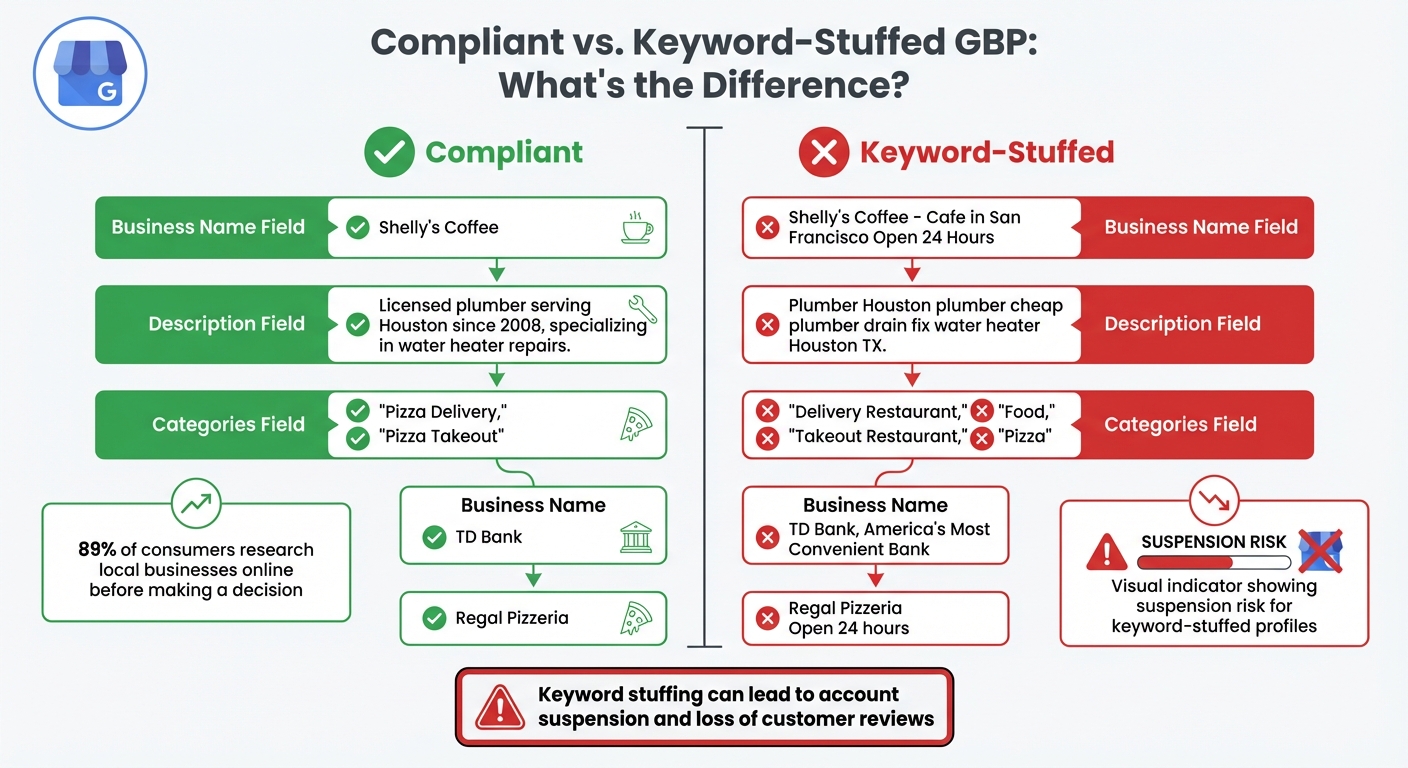
Compliant vs Keyword-Stuffed Google Business Profile Comparison
Keyword Stuffing in GBP Explained
Keyword stuffing happens when businesses cram keywords unnaturally into their Google Business Profile (GBP) fields - like business names, descriptions, services, or posts - to try and boost local search rankings. For instance, instead of listing your legitimate business name, such as "TD Bank", a keyword-stuffed version might read, "TD Bank, America's Most Convenient Bank". Similarly, a description might be overloaded with phrases like: "Pet grooming. Dog bathing. Styling. Nail trimming. Conditioning. Dog styling Philadelphia".
Google's algorithm is quite skilled at identifying these manipulative patterns. The 2021 Vicinity update specifically cracked down on businesses adding unnecessary keywords to their names. A quick way to spot keyword stuffing is by comparing the GBP name to the physical storefront sign, business license, or website header. If they don't match, it's a red flag.
These tactics not only risk penalties from Google's algorithm but also damage your business's reputation, as discussed below.
Why Keyword Stuffing Hurts Small Businesses
The drawbacks of keyword stuffing far outweigh any short-term ranking benefits. Such practices often lead to account suspensions and a loss of credibility. Following Google's guidelines is essential for maintaining your local presence.
Beyond the risk of suspension, keyword stuffing can harm how potential customers perceive your business. Overloaded, unnatural text can make your business seem unprofessional. This matters even more when you consider that 89% of consumers research local businesses online before making a decision.
"Keyword stuffing is bad for SEO because it leads to poor-quality content... unnatural keyword usage looks spammy." – Rachel Handley, Senior Content Writer, Semrush
Normal Keyword Use vs. Over-Optimization
Knowing the difference between natural and forced keyword usage is critical for managing your GBP effectively. Natural keyword use improves clarity and builds trust with customers, while over-optimization does the opposite.
The distinction lies in intent: natural usage communicates value, while keyword stuffing prioritizes manipulation. For example, a well-written description might say: "We are a Chicago-based family law firm specializing in custody, divorce, and mediation". On the other hand, an over-optimized version would look like: "Chicago attorney Chicago divorce lawyer custody lawyer Chicago IL law firm".
| GBP Field | Normal Keyword Usage (Compliant) | Over-Optimization (Non-Compliant) |
|---|---|---|
| Business Name | Shelly's Coffee | Shelly's Coffee - Cafe in San Francisco Open 24 Hours |
| Description | "Licensed plumber serving Houston since 2008, specializing in water heater repairs." | "Plumber Houston plumber cheap plumber drain fix water heater Houston TX." |
| Categories | "Pizza Delivery", "Pizza Takeout" | "Delivery Restaurant", "Takeout Restaurant", "Food", "Pizza" |
The guiding principle is readability. If your profile sounds awkward or repetitive when read aloud, it's likely over-optimized and needs adjustment. Google's algorithm now favors content written for people, focusing on user intent rather than keyword frequency.
Google's Guidelines for GBP Optimization
Following Google's rules is crucial to keep your business profile visible and avoid penalties like keyword stuffing.
Business Name Requirements
Your Google Business Profile (GBP) name must exactly match your actual business name as it appears on your storefront and official documents. This means you can't include marketing slogans, phone numbers, URLs, business hours, or service details in the name field.
"Your name should reflect your business's real-world name, as used consistently on your storefront, website, stationery, and as known to customers." – Google Business Profile Help
For example, if your storefront sign says "TD Bank", your GBP name must also be "TD Bank". Similarly, location details should avoid extra descriptors. While "Holiday Inn Salem" is acceptable, "Holiday Inn (I-93 at Exit 2)" violates Google's rules. For chain businesses, use the same name for all locations unless the storefront names are different.
| Violation Type | Non-Compliant Example | Compliant Example |
|---|---|---|
| Marketing Taglines | TD Bank, America's Most Convenient Bank | TD Bank |
| Service Information | Midas Auto Service Experts | Midas |
| Business Hours | Regal Pizzeria Open 24 hours | Regal Pizzeria |
| Location Details | Equinox near SOHO | Equinox SOHO |
| Promotional Text | The Corner Flower Shop | Cheap Roses Fast Delivery | The Corner Flower Shop |
Content Requirements for Descriptions, Services, and Posts
Once your business name complies with the guidelines, ensure the rest of your profile content is also aligned with Google's policies.
Your business description can be up to 750 characters but must avoid promotional language. Google prohibits including specific prices, sales announcements, or links in this section. Instead of writing, "Best bagels for $5" or "Everything on sale", focus on what makes your business stand out and what customers can expect during their visit.
For categories, choose the fewest and most accurate options that describe what your business is, not what it offers. For instance, a pizza restaurant should use "Pizza Restaurant" as its primary category, not broader terms like "Food" or "Delivery Restaurant." Google allows up to nine secondary categories, but adding too many can dilute your profile's focus.
When listing services or menu items, provide a complete and accurate representation of what you offer. Avoid cherry-picking popular items or stuffing keywords. The goal is to give potential customers a clear idea of what they can expect.
By adhering to these guidelines, you can optimize your GBP effectively while steering clear of penalties.
Common Violations to Avoid
Certain practices beyond naming and descriptions can also lead to penalties.
Avoid adding "near me" phrases in your profile - Google automatically handles location-based searches. Similarly, refrain from including multiple city names in your description, as this is considered keyword stuffing.
Other violations include misusing the address field. This section is strictly for your physical location - URLs or keywords are not allowed. If you're a service-area business working from a residential address (like a plumber or electrician), you must hide your address and only display your service area, which should be within a two-hour driving radius.
"Including unnecessary information in your business name isn't permitted, and could result in the suspension of your Business Profile." – Google Business Profile Help
Violations can result in different levels of penalties, such as soft suspension (losing management access), hard suspension (complete removal from Search and Maps), or reduced visibility, which can drop your profile's rankings. Considering that customers are 2.7 times more likely to view a business as reputable when they find a complete profile, staying compliant is directly tied to attracting and retaining customers.
How to Optimize GBP Without Keyword Stuffing
To make your Google Business Profile (GBP) work for you, focus on relevance and clarity rather than overloading it with keywords. Google cares more about matching user intent than how often certain words appear on your profile. The trick is to include the right details in the right places while keeping the content natural and easy to read.
How to Optimize Your Business Name
Your business name field should include only your actual business name - exactly as it appears on your storefront, signage, and legal documents. For example, if your sign says "Shelly's Coffee", that's what you should enter. Adding extra keywords like "Shelly's Coffee San Francisco Best Bagels" is against Google's guidelines and could lead to your profile being suspended. Avoid stuffing location or service keywords into the name field. Instead, use other sections like categories and descriptions to explain what your business offers.
Using Categories, Descriptions, and Services Effectively
Categories should define what your business is, not what it offers. Stick to a primary category and a few secondary ones that are most relevant. For instance, a pizza restaurant should choose "Pizza Restaurant" as the primary category, rather than broader terms like "Food" or "Restaurant".
In your business description, make the first 250 characters count, as that's all users see before clicking the "more" link. Use related terms and phrases instead of repeating the same keywords. For example, instead of repeating "family law", include terms like "child custody" or "mediation" to provide additional context. This approach helps Google's AI understand your business while keeping the description natural.
When listing services or products, be accurate and thorough without overloading it with popular keywords. Use natural language to describe what you offer. For example, write "We provide expert drain cleaning and water heater repairs" instead of cramming in terms like "Plumber, plumbing, drain cleaning, leaks". A good test? Read it aloud - if it sounds robotic or forced, it’s probably over-optimized.
Leverage attributes like "wheelchair accessible" or "free Wi-Fi" to appear in filtered searches. These are selectable options provided by Google and eliminate the need to awkwardly insert these details into your description.
To keep your profile engaging, supplement these static details with regular updates through posts.
Creating Posts and Updates That Help Customers
Once your profile's static sections are optimized, use posts to share timely updates. Google Business Profile posts allow you to communicate dynamic information - like weekly specials, events, or new arrivals - without altering your main description. Posts come in three types: Updates (general news), Offers (special promotions), and Events (with specific start and end times).
Make the first 250–300 characters of your posts count, as this is what users see initially. Naturally include relevant keywords in the opening sentences, but prioritize writing for people over algorithms. For instance, instead of "Coffee shop coffee beans espresso drinks", write something like, "Stop by this week to try our new Ethiopian coffee beans, roasted fresh daily." Keep your content authentic and customer-focused.
Aim to post at least once a week to show that your business is active and engaged. Use posts for time-sensitive content, like "this week only" promotions or seasonal events, which might not belong in your permanent description. Avoid including phone numbers, URLs, or excessive emojis, as these can lead to post rejection.
| Post Type | Best Use Case | Recommended Length |
|---|---|---|
| Update | General news, new arrivals, or "behind the scenes" content | 80–100 characters for the lead |
| Offer | Sales, discounts, or coupons (must include terms) | Clear "Offer" title with dates |
| Event | Workshops, grand openings, or live music | Highlight the unique selling point |
With 89% of consumers researching businesses locally and 80% of those searches leading to a conversion, optimizing your profile with helpful, natural content can make a huge difference. If managing your profile feels overwhelming, consider tools like Local SEO Bot (https://localseobot.com) to keep things running smoothly.
sbb-itb-0e6533f
How to Find and Fix Keyword Stuffing Issues
Once you've optimized your profile, it's important to conduct regular audits to keep keyword stuffing at bay.
Auditing Your GBP for Keyword Stuffing
Start by comparing your Google Business Profile (GBP) name with your official storefront signage, business cards, and legal documents. For example, if your profile says "Shelly's Coffee – Best Bagels & 24-Hour Cafe" but your storefront simply displays "Shelly's Coffee", that’s a red flag for keyword stuffing. Next, review your description for unnatural repetition of keywords - like listing services or locations over and over. Read it aloud; if it sounds robotic, that’s a sign it needs reworking. Also, check your categories to ensure they describe your business accurately (e.g., "Florist") rather than focusing on services (e.g., "Flower delivery").
Keep in mind that Local Guides and other users can suggest edits if they spot keyword stuffing. Audits show that keyword stuffing often triggers warnings and, in some cases, penalties. These penalties range from soft suspensions (loss of management access) to hard suspensions (complete removal from Google Search and Maps). Conducting quarterly audits can help you catch and resolve these issues before they escalate.
Once you've identified keyword stuffing, the next step is to clean it up.
How to Fix Keyword Stuffing in GBP
If you find keyword stuffing, start with your business name. Update it so it matches your storefront signage and website exactly. Remove taglines, service descriptions, or location details that aren’t part of your official name. If you want to include keywords legitimately, consider rebranding to incorporate them into your official business name.
For your description, focus on telling your story - highlight your mission, history, or unique qualities instead of cramming in keywords. Place the most important details in the first 250–300 characters since that’s what most users see before clicking "more." Shift keywords like "delivery" or "wifi" into the Attributes section, where Google displays them appropriately. Staying compliant is critical for maintaining visibility. Instead of stuffing keywords, encourage customers to include specific products or services in their reviews to naturally improve your rankings.
| Audit Area | What to Look For | Corrective Action |
|---|---|---|
| Business Name | Marketing taglines, store codes, or service info | Remove taglines or codes |
| Description | Promotional language, phone numbers, or URLs | Exclude promotional language, phone numbers, or URLs |
| Services | Repetitive custom services that mimic keywords | Use Google's suggested services; keep custom entries brief |
| Attributes | Outdated or irrelevant markers (e.g., "Outdoor seating" in winter) | Update to reflect current operational details |
After making manual corrections, consider using tools to automate monitoring for ongoing compliance.
Tools for Monitoring and Optimization
While manual audits are effective, they can be time-consuming. Tools like Local SEO Bot simplify this process by automating profile monitoring. This tool helps you stay compliant by flagging potential issues early. It also offers features like one-click local SEO optimization, Google Business Profile management, and local SEO audits. Additionally, it ensures your NAP (Name, Address, Phone) information remains consistent across 70+ directories, which is crucial for maintaining Google’s trust.
Set up a revision history to track changes made to your profile. This can help you identify unauthorized edits or keyword stuffing introduced by third parties. Keep an eye on community-suggested edits as well, since any Google user can report inaccuracies. Regular monitoring and using automated audits are your best defenses against keyword stuffing - especially after major Google updates. For example, after the June 2025 update, 16% of URLs ranking in the top 10 were previously outside the top 20. Staying proactive ensures your profile remains optimized and penalty-free.
Compliant vs. Keyword-Stuffed GBP: A Comparison
Understanding the distinction between a compliant Google Business Profile (GBP) and a keyword-stuffed one is crucial for avoiding penalties. A compliant profile fosters long-term visibility and trust, while a keyword-stuffed profile can lead to suspension and harm your online reputation. The comparison below underscores why sticking to the rules is non-negotiable.
In one notable case from 2024, a law firm added location and service keywords to its business name. Within just 48 hours of a competitor's report, the profile was suspended. The fallout? Five years' worth of five-star reviews vanished, and the firm lost over $50,000 during the three-month suspension period. In contrast, compliant profiles enjoy consistent performance, averaging 200 customer interactions monthly.
"Adding keywords to your business name might give you a temporary ranking boost, but it's also the fastest way to get your entire Google Business Profile suspended." – Olly Olly
Compliant profiles not only look professional but also inspire trust, which directly impacts customer engagement. With 89% of consumers conducting local business searches and 80% of those searches leading to conversions, maintaining credibility is vital to capturing high-intent customers.
Here’s a side-by-side look at how compliant and keyword-stuffed GBPs stack up:
Comparison Table: Compliant vs. Keyword-Stuffed GBP
| Feature | Compliant GBP | Keyword-Stuffed GBP |
|---|---|---|
| Business Name | Shelly's Coffee | Shelly's Coffee – Best Bagels & 24‑Hour Cafe |
| Categories | Florist (single primary category) | Florist, Flower Delivery, Gift Shop, Wedding Service (excessive) |
| Description | "Licensed and insured plumber serving Houston homes since 2008. We specialize in water heater repairs and drain cleaning." | "Best plumber Houston plumber cheap plumber drain fix water heater Houston TX call now!" |
| Posts | "Our new seasonal lattes are here! Try the Pumpkin Spice blend this week." | "Best coffee near me coffee shop Scranton lattes espresso cheap coffee Scranton PA." |
| Visibility | Stable, long‑term presence in Local Pack | Initial boost then suspension/demotion |
| User Trust | High; appears professional and authentic | Low; appears spammy and deceptive |
| Risk Level | Protected from penalties; sustainable growth | High risk of losing reviews and total invisibility |
| Compliance | Adheres to 2025 Google Spam Policies | Violates "Keyword Stuffing" and "Name" guidelines |
Google's June 2025 core update reinforced this point. Over 16% of URLs that previously ranked in the top 10 were displaced due to low-quality, keyword-stuffed content. The takeaway? Prioritize compliant optimization for steady, sustainable growth. Chasing short-term gains with keyword stuffing is a gamble that can cost you everything, acting as a "ticking time bomb".
Conclusion
Stuffing keywords into your Google Business Profile is a risky move. As the Semrush team explains, "Keyword stuffing is an outdated tactic... search engines now penalize this practice. To improve rankings, focus on quality content, user experience, and strategic keyword placement". Considering that 89% of consumers search for local businesses and 80% of those searches lead to conversions, keeping your profile compliant and reliable isn’t just about avoiding penalties - it’s about attracting real customers.
Stick to your actual business name, write natural and engaging descriptions, and make full use of the provided fields - like Categories, Services, and Attributes - to clearly communicate what you offer. Google’s algorithms are sophisticated enough to understand context and intent, so creating content that resonates with people is far more effective than overloading it with keywords. By adopting these practices consistently, you set yourself up for long-term success.
Make it a habit to audit your profile regularly, post updates weekly, and respond to reviews. These actions help boost your relevance, distance, and prominence - three key factors in local rankings.
If managing these tasks feels overwhelming, automation can step in to lighten the load. Tools like Local SEO Bot can simplify your efforts by automating NAP consistency across 70+ directories, sending real-time keyword alerts, and centralizing review management - all for $49/month. Its one-click features allow you to stay compliant while focusing on your customers.
Following Google’s guidelines not only strengthens your local presence but also builds trust with customers and ensures steady visibility.
FAQs
What happens if you use too many keywords in your Google Business Profile?
Overloading your Google Business Profile with keywords - commonly called keyword stuffing - can backfire in a big way. Google might respond by pushing your profile down in search rankings, making it tougher for potential customers to discover your business. In extreme situations, your listing could even face suspension.
But the damage doesn’t stop there. Keyword stuffing can also hurt your business’s reputation. A profile crammed with unnecessary keywords can come across as spammy or unprofessional, which might turn users away. Instead, aim to use relevant keywords in a natural, strategic way to keep your profile professional and engaging.
How can I optimize my Google Business Profile naturally without overusing keywords?
To make the most of your Google Business Profile (GBP) while steering clear of keyword stuffing, focus on keeping things straightforward and accurate:
- Pick the right categories: Choose the primary category that best matches your business. Add secondary categories only if they are truly relevant to what you offer.
- Write clear and natural descriptions: Craft a business description that highlights your services and what makes you stand out. Keep the language simple and avoid overloading it with repeated keywords.
- Place keywords thoughtfully: Use keywords only in approved areas, like attributes or service listings. Make sure your business name matches your legal or brand name to maintain consistency.
- Engage with authenticity: Share posts, respond to reviews, and answer questions in a conversational tone. Use keywords only if they fit naturally within your responses.
By focusing on accuracy and user-friendly content, you’ll boost your profile’s visibility while staying aligned with Google’s guidelines.
How can I audit my Google Business Profile to avoid keyword stuffing?
To keep your Google Business Profile in line with guidelines and steer clear of keyword stuffing, start by ensuring your core business information - name, address, and phone number - matches your storefront and other online listings exactly. Avoid adding extra keywords or promotional text to these details.
Take a close look at your business description. It should be clear, authentic, and free from repeated keywords or marketing-heavy language. Double-check your chosen categories to make sure they accurately represent your business, and confirm that any attributes like "Women-owned" or "Wheelchair accessible" are accurate.
Go through your posts, Q&A section, and reviews to ensure they use natural language and don’t include unnecessary or irrelevant keywords. Also, make sure your photos and videos are original, relevant to your business, and free from watermarks or promotional overlays. By sticking to these practices, you’ll stay compliant with Google’s rules and boost your visibility in local search results.