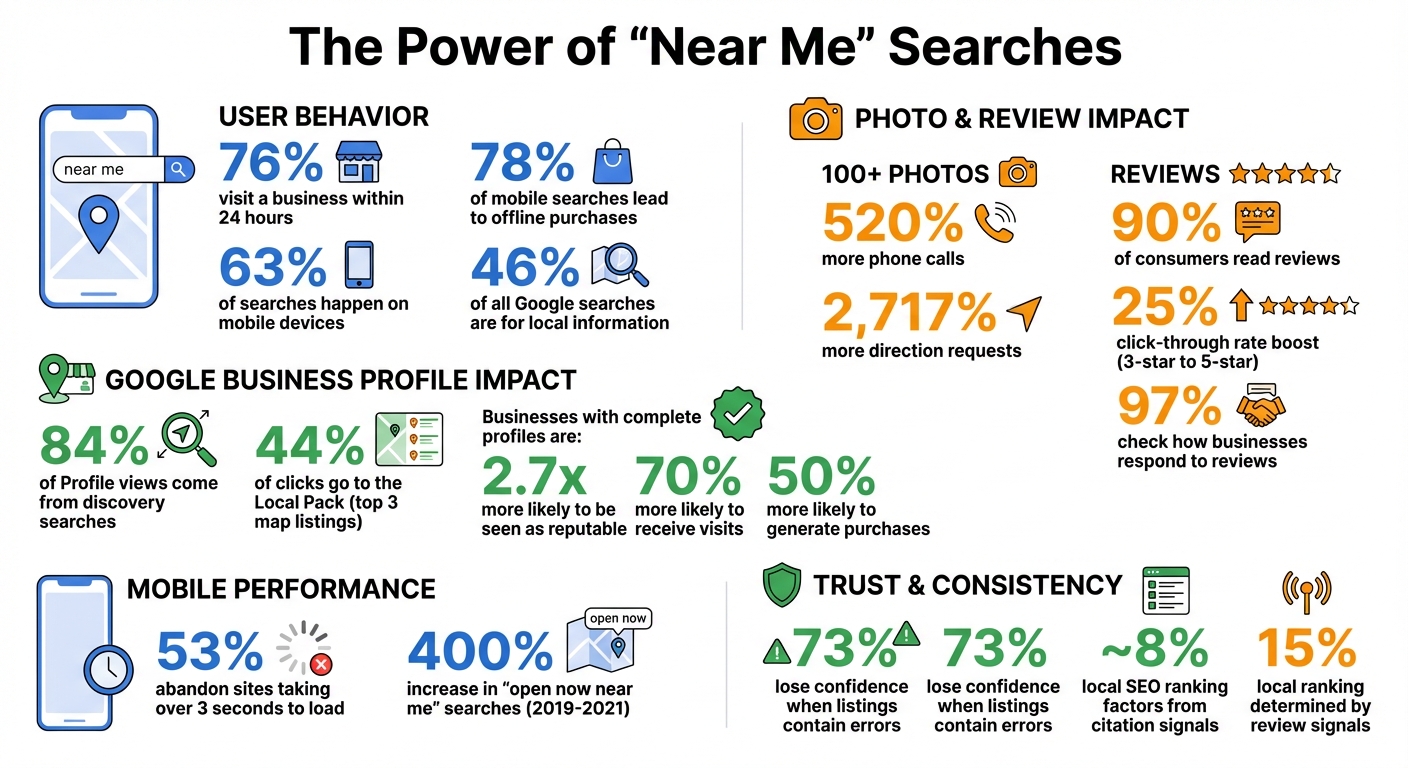
When people search for “near me” queries like “pizza near me” or “plumber near me,” they’re looking for immediate solutions. These searches are highly action-driven, with 76% of users visiting a business within 24 hours and 78% of mobile searches leading to offline purchases. To rank higher in these searches, focus on:
- Google Business Profile: Claim and optimize your profile with accurate details, photos, and local keywords.
- Local Keywords: Use location-specific terms on your website, including meta titles, headers, and body text.
- Consistency: Ensure your business name, address, and phone number (NAP) match across all directories.
- Customer Reviews: Encourage reviews and respond to all feedback to build trust and improve rankings.
- Mobile Optimization: Make your site fast and user-friendly for mobile users, as 63% of searches happen on mobile.
- Local Citations: List your business in directories like Yelp, Bing, and Apple Maps to strengthen your presence.
Ranking for “near me” searches requires optimizing your online presence, maintaining consistency, and actively engaging with customers. These steps help you connect with local users ready to visit or buy.
Near Me Search Statistics and Local SEO Impact
The Fastest Way to Rank for ‘Near Me’ on Google Maps in 2025
Set Up and Optimize Your Google Business Profile
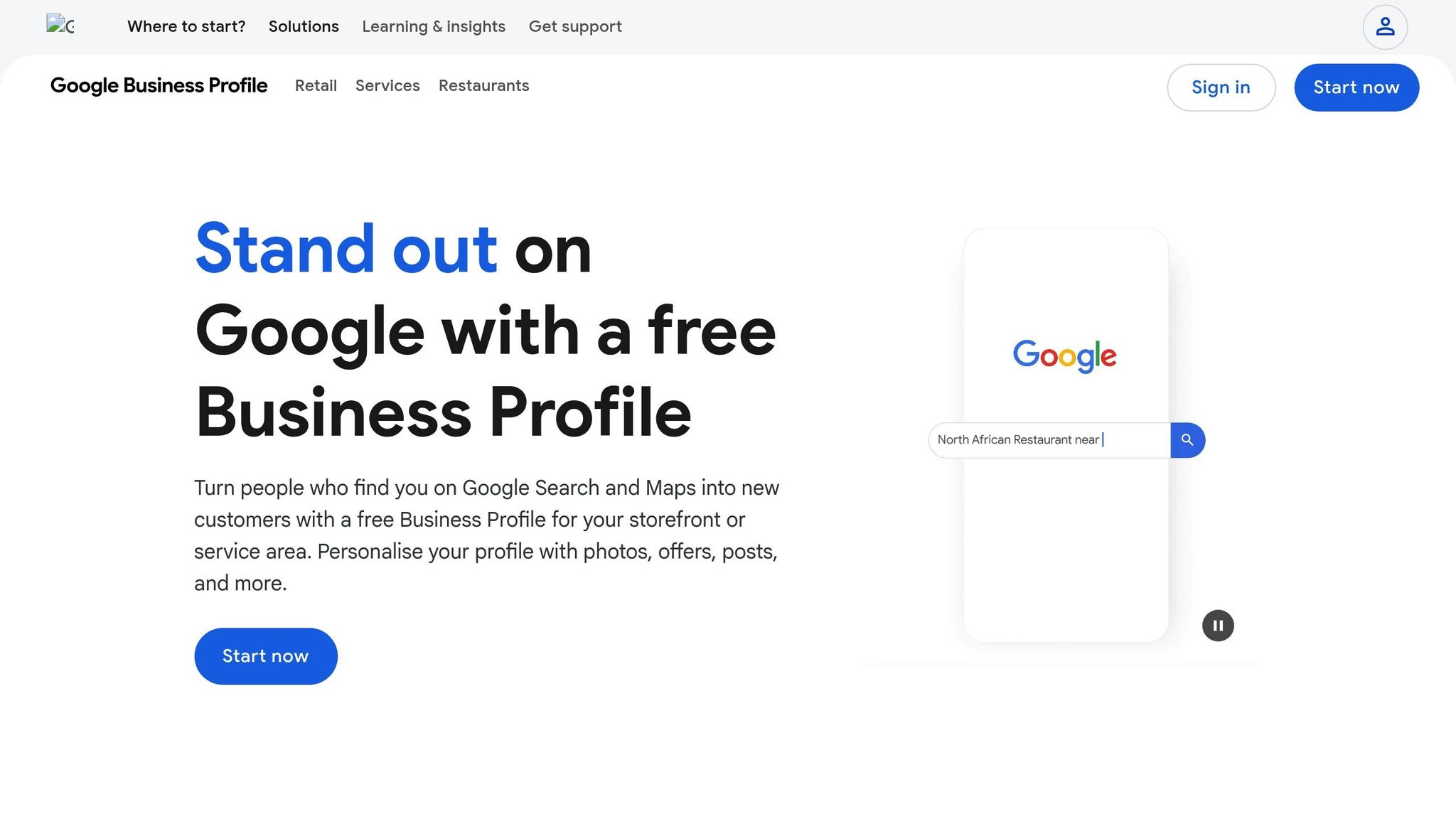
Your Google Business Profile is key to boosting your visibility in "near me" searches, especially in the Local Pack - those top three map listings that attract the majority of user clicks. Did you know that 84% of Business Profile views come from discovery searches? This means people are finding businesses like yours by searching for services you offer, not by typing in your business name.
To claim your profile, go to Google Maps and click "Own this business" or "Claim this business", then select "Manage now". If your business doesn’t have a profile yet, head to business.google.com/add and follow the steps to input your business name, category, and location. Google will verify your ownership through methods like a postcard (which takes about five business days), phone, email, text, or even a video call. Be patient - updates can take several weeks to fully appear across Google.
Google determines "near me" rankings based on three main factors: Relevance (how closely your profile matches the search), Distance (proximity to the searcher), and Prominence (how well-known your business is). To optimize for all three, make sure you fill out every single field in your profile. Your business name, address, and phone number (NAP) need to match your actual signage exactly - adding extra keywords or location names can result in penalties. Choose a specific primary category, like "Italian Restaurant" instead of just "Restaurant", and add up to nine secondary categories to broaden your reach. When writing your business description, use all 750 characters, focusing on critical details and local keywords in the first 250 characters.
Verify Your Profile and Keep Information Complete
Once your profile is verified, accuracy becomes crucial. Keep your operating hours updated, including any special hours for holidays or temporary closures. If your business serves customers at their location rather than yours, define your service area by city or zip code. Take advantage of business attributes like "wheelchair accessible", "free Wi-Fi", or "outdoor seating" to help Google match your profile with specific user needs. A complete profile makes a difference - customers are 2.7 times more likely to see your business as reputable and 70% more likely to visit, with 50% more likely to buy.
Consistency matters, too. Ensure your NAP details match across your website, Google Business Profile, and all directory listings. This consistency builds trust with Google’s algorithm and avoids confusion that could hurt your rankings.
Add Photos, Posts, and Q&A Content
Photos do more than make your profile look nice - they’re a ranking factor and a trust signal. Businesses with over 100 photos see 520% more phone calls and 2,717% more direction requests compared to others. Upload at least one new photo every week to show your profile is active. Include your logo, a cover photo (which is most likely to appear in the Local Pack), and multiple shots of your interior, exterior (at different times of day), team members, and popular products. Skip the stock images - use high-quality, original photos that represent your business accurately.
Leverage Google Posts and Attributes
Google Posts aren't like social media - they’re a direct channel to potential customers who are ready to buy. Darren Shaw, Founder of Whitespark, puts it perfectly:
"Most businesses are doing Google Posts all wrong. They treat their Google Business Profile like a social media profile, but it is NOT. GBP is the one platform that people visit with the intent to BUY, so lean into that".
Post weekly updates about promotions, announcements, or events, and include specific Call to Action buttons like "Book", "Order Online", or "Buy" to drive conversions. Use relevant local keywords naturally in the first 80 characters to improve visibility.
Don’t forget about business attributes - they help you show up in filtered searches. For instance, if someone searches for "restaurants with outdoor seating near me", having that attribute selected makes your business eligible to appear. Review and update these attributes regularly as your offerings evolve.
Once your Google Business Profile is fully set up and optimized, the next step is weaving local keywords throughout your website to strengthen your online presence even further.
Target Location-Based Keywords
Optimizing your business profile is just the start. To truly stand out in local searches, you need to weave location-based keywords into your website content. While your Google Business Profile puts your business on the map, the right keywords can help you dominate both the Local Pack and organic search results. The key? Use the terms your customers are already searching for. Let’s dive into how to identify and incorporate those keywords effectively.
Find Relevant "Near Me" Keywords
Local keywords often combine three essential elements: a core term (your product or service), a modifier (like "best", "affordable", or "emergency"), and a location (your city, neighborhood, or even "near me"). A simple way to uncover these is by using Google Autocomplete. Start typing your service into Google and see which location-specific phrases pop up. Don’t stop there - check out the "People Also Ask" section for long-tail questions that could inspire blog posts or FAQ content.
Listen closely to how your customers describe your services. For example, some regions might say "hoagie" while others prefer "sub." Reviewing customer calls or inquiries can reveal these regional differences. Another tip: examine Local Pack snippets for phrases like "Sold here" or "Shoppers love this" to discover keywords that resonate with your audience.
Local keywords come in several forms:
- Explicit keywords: These directly reference both your service and location (e.g., "plumber in Austin").
- Implicit keywords: These rely on proximity terms, such as "coffee shop near me."
- Long-tail keywords: These target specific, high-intent searches, like "24-hour emergency plumber Austin".
If keyword tools don’t provide enough data for smaller towns, you can still research the core term (e.g., "Thai restaurant") and manually add location modifiers to create relevant phrases.
Add Keywords to Your Website Content
Once you’ve nailed down your keywords, it’s time to strategically incorporate them into your website. Start with your meta title, which should directly address high-intent searchers. For instance: "Reliable HVAC Services | AC Repair Near Me". Your H1 header, visible without scrolling, is another prime spot for your main location keyword - something like "Top-Rated AC Repair in Austin" works perfectly.
Use H2 and H3 headers to target specific neighborhoods or services. For example, "Emergency Plumbing Near Me in Downtown Denver" could help you attract hyper-local traffic. Don’t forget your URL slugs (e.g., yoursite.com/austin/ac-repair-near-me), image alt text (e.g., "Technician performing AC repair in Austin"), and body copy - particularly in the first few paragraphs. Mentioning local landmarks or neighborhoods adds another layer of geographic relevance for search engines.
An FAQ section is another great opportunity to integrate conversational "near me" queries. Instead of generic questions like "What are your hours?", try phrasing them like "Where can I find a plumber near me in Rock Hill?". Embedding a Google Map on your "Contact" or "About" page also reinforces your business’s physical location. For businesses serving multiple areas, consider creating dedicated landing pages for each city or neighborhood. Just make sure each page has unique content to avoid duplication.
Build Local Citations and Keep NAP Information Consistent
Once your business profile is fully optimized and your targeted keywords are in place, the next step is to focus on building reliable local citations. These citations - mentions of your business's Name, Address, and Phone number (NAP) across directories, websites, and apps - play a key role in local SEO. When search engines notice consistent NAP details across multiple platforms, it strengthens their trust in your business. In fact, 73% of consumers lose confidence in a brand when its business listing contains errors, and citation signals contribute to roughly 8% of local SEO ranking factors.
With nearly all consumers relying on online searches to find local businesses and 76% of "near me" searches resulting in visits within 24 hours, accurate citations are critical for boosting customer trust and visibility. Erica Santiago from HubSpot explains:
"If the same name, address, and contact information for your brand are easily accessible throughout the web, search engines can trust that your business exists and is truthful about the service it provides."
Establishing this trust through consistent citations sets the stage for leveraging local directories effectively.
List Your Business on Local Directories
Start by claiming your business on high-authority directories where potential customers are actively searching. Focus on platforms like Google Business Profile, Yelp, Facebook, Apple Maps, Bing Places, and Yellow Pages. These platforms often appear in the Local Pack, which captures about 44% of all clicks from local searches.
Additionally, listing your business on industry-specific directories can deliver even better results for "near me" searches. For example, home service businesses should prioritize Angi, restaurants should focus on TripAdvisor and OpenTable, healthcare providers can benefit from Healthgrades, and legal professionals should consider Avvo.
To streamline your efforts, submit your NAP information to data aggregators like Foursquare and Localeze. For hyper-local visibility, consider joining your local Chamber of Commerce or getting listed on neighborhood-specific blogs, as these can provide highly relevant signals to search engines.
The key to success here is maintaining consistent NAP details across all platforms, which reinforces your business's credibility.
Maintain Accurate NAP Information Everywhere
Inconsistent NAP details can hurt your local SEO efforts. For example, if your Google Business Profile lists "123 Main St." but Yelp shows "123 Main Street", search engines might mistake these as two separate addresses, which can prevent your profile from showing up in relevant searches.
Carlos Silva from Semrush emphasizes this point:
"The more Google finds consistent NAP citations for your business, the more confident it becomes that your business is legitimate and reliable."
To avoid confusion, ensure your NAP information is identical across all platforms. Create a master record with your exact business name, address, and phone number, and format it the same way everywhere. Use a local area code instead of a toll-free number to strengthen your local relevance. Regularly audit your NAP details - especially if you've moved or updated contact information - to identify and fix any discrepancies.
Managing directory listings manually can be time-consuming and prone to errors. Tools like Local SEO Bot can automate the process, ensuring your NAP data is distributed accurately, monitoring for inconsistencies, and instantly updating details like holiday hours or service areas. This helps maintain consistency and improves your chances of ranking higher in "near me" searches.
sbb-itb-0e6533f
Get and Manage Customer Reviews
Customer reviews play a significant role in boosting your "near me" search rankings. Google considers reviews a key factor in prominence, one of the three pillars that determine local search rankings along with relevance and distance. Review signals - such as the number of reviews, their frequency, and the average rating - account for over 15% of a business's ranking in the Google Map Pack. Plus, a whopping 90% of consumers read reviews when searching for nearby goods and services.
But reviews aren't just about rankings - they also build trust and credibility. A higher star rating can make a big impact; for example, moving from a 3-star to a 5-star rating can boost click-through rates by up to 25%. On the flip side, only 9% of consumers would even consider a business with a 1- or 2-star average. Miriam Ellis, Local Search Scientist at Moz, highlights this:
"99% of your audience reads reviews, and 92% now consider business owner responses to reviews to be part of providing high-quality, modern customer service."
With the importance of reviews clear, the next step is actively gathering customer feedback.
Ask Customers for Reviews
Most customers are happy to leave a review if you simply ask - 77% will write one when requested. Timing is everything, though. For businesses like restaurants or salons, ask for reviews 1–2 hours after the visit. For retail purchases or online orders, wait about three days after the product is delivered or the service is completed.
Make it easy for customers by providing direct links or QR codes to your Google Business Profile review page. Use the "Ask for reviews" feature in your Google Business Profile dashboard to create a short URL, which you can share via email or text. You can also print QR codes using the free Google Marketing Kit and display them on receipts, business cards, or posters in your store.
Personalize your requests to make them feel sincere. Use the customer's name and mention specific staff members they interacted with. This adds a personal touch and avoids coming across as automated. Varvara Langer, owner of Black Cat Web Studios, emphasizes the importance of authenticity:
"Asking in the moment, with a genuine and pressure-free tone, works really well. And if they aren't happy, of course, the focus is on fixing the issue instead."
Incorporate review requests into existing communication channels like email signatures, digital receipts, invoices, or "Thank You" notes. You can also automate the process with email or SMS campaigns that send review requests after a transaction is completed. However, never offer incentives like discounts or gifts in exchange for reviews - this violates Google's policies and could lead to account suspension.
Once reviews start coming in, the next step is to engage with them.
Respond to All Reviews
Responding to reviews is crucial for showing both customers and search engines that you're actively engaged. 97% of consumers who read reviews also check how businesses respond, and 90% are influenced by the quality of those replies. Handling negative reviews professionally can even turn things around - 62% of customers are willing to give a business a second chance after a thoughtful response.
When replying to positive reviews, thank the customer by name and highlight the specific product or service they mentioned. This not only shows appreciation but also reinforces relevance for local searches. For negative reviews, aim to respond within 24–48 hours. Apologize, take responsibility, and offer to resolve the issue privately by providing direct contact information. Stay composed and professional - 45% of customers are more likely to visit a business that responds to negative reviews.
Make it a goal to respond to 100% of reviews, ideally within 48 hours. If managing responses becomes too time-consuming, tools like Local SEO Bot can help automate the process, ensuring you stay on top of reviews while monitoring customer sentiment across platforms.
Improve On-Page SEO for Local Searches
Once you've optimized your reviews and citations, it's time to focus on your website's technical SEO. On-page SEO plays a critical role in helping search engines understand your business and connect you with local customers. With nearly 46% of all Google searches aimed at finding local information, ensuring your site is technically sound can make the difference between appearing in "near me" results or being overlooked. Two essential elements to prioritize are schema markup and mobile optimization, both of which directly impact your local rankings.
Add Schema Markup to Your Website
Schema markup is a piece of code that provides search engines with detailed information about your business. It includes elements like your official name, address, phone number, operating hours, and more. When implemented correctly, schema makes your site eligible for rich results, such as knowledge panels and enhanced snippets.
To maximize the impact, use the most specific schema type for your industry. For instance, a dental practice should use the Dentist schema, while a hardware store should apply the HardwareStore schema. This specificity helps Google better match your business with relevant local searches. At a minimum, include key details like your business name, phone number, physical address, website URL, hours of operation, logo, and geographic coordinates (latitude and longitude).
Google often pulls details like operating hours and services directly from structured data for its AI-generated summaries that appear at the top of search results. As Birdeye explains:
"Schema helps Google understand and display your business info accurately in search results. Local schema per location boosts Maps visibility and rich result eligibility."
After adding schema to your site, test it using tools like Google's Rich Results Test or the Structured Data Testing Tool. This ensures your code is valid and readable by search engines, avoiding technical issues that could prevent your site from appearing in enhanced search features.
Make Your Website Mobile-Friendly
Most "near me" searches happen on mobile devices when users are looking for quick solutions. If your website is slow to load or isn't optimized for mobile, visitors may leave before they even see what you offer. 53% of mobile users abandon a site if it takes more than three seconds to load. Additionally, as page load times increase from one to three seconds, the likelihood of a visitor bouncing rises by 23%.
To address this, use Google PageSpeed Insights to identify and resolve performance issues. Common fixes include compressing images, reducing unnecessary plugins, and ensuring your design is fully responsive. Simplify your navigation for touchscreen users with clear menus and buttons that are easy to tap - designed for thumbs, not just mouse clicks.
Incorporate action-oriented buttons like "Call Now" or "Get Directions" to capture high-intent mobile users. These actions, such as clicking for directions or making a call, send strong behavioral signals to search engines, boosting your local rankings. Embedding a Google Map on your contact page also strengthens your geographic context and links directly to your Google Maps listing.
The stakes are high. Between 2019 and 2021, "open now near me" searches saw a 400% year-over-year increase. This highlights how many people rely on mobile devices to find businesses they can visit immediately. If your site isn’t mobile-ready, you risk losing a significant share of these ready-to-buy customers.
Track Your Rankings and Run Local SEO Audits
Once you've optimized your website and established a strong local presence, the next step is keeping an eye on how you're performing. Regular tracking and audits are key to ensuring your local SEO efforts stay on track. Local rankings, especially for "near me" searches, can vary significantly - even within the same city. For example, your business might rank #1 in one area but drop to #10 just a few blocks away. This fluctuation happens because Google tailors results to the searcher's exact location. Without tracking, you could miss these shifts entirely.
Track Your 'Near Me' Keyword Rankings
Manually checking your rankings might seem like an easy option, but it’s not reliable. Google customizes results based on search history, even in Incognito mode. To get an accurate picture, use local rank tracking tools that simulate searches from specific geographic locations. These tools show you what potential customers in different areas actually see.
Focus on three main ranking areas:
- Local Map Pack: These are the top three map results, which grab 44% of all clicks.
- Local Finder: The extended list of map results.
- Localized Organic Results: The traditional blue links tailored to your area.
Tools like Local SEO Bot can track your rankings across these areas automatically, providing a clear view of your visibility. For even deeper insights, geo-grid tools create heatmaps to show how your rankings vary across your service area.
Don’t overlook the data available in your Google Business Profile Insights dashboard. This can tell you how many users are requesting directions, calling your business, or visiting your website. Setting up automated reports - weekly or monthly - helps you spot sudden drops in rankings early, which could warn of algorithm updates or new competitors entering the scene.
Once you have a handle on your rankings, it's time to dive into regular audits to ensure every part of your local SEO strategy is working as it should.
Perform Regular Local SEO Audits
Quarterly audits are a smart way to catch issues before they become major problems. Start by verifying that your NAP (Name, Address, Phone Number) is consistent across your website, Google Business Profile, and key directories. Inconsistent information frustrates 93% of consumers, so this is a critical step.
A complete audit should include:
- Google Business Profile Optimization: Ensure your profile is up-to-date and fully filled out.
- Review Sentiment Analysis: Look at the tone and content of customer reviews.
- Local Keyword Performance: Check how your keywords are ranking.
- Technical Website Health: Use tools like Google Search Console to identify issues.
Pay special attention to the "Manual Actions" report in Google Search Console and use the Rich Results Test to confirm that your LocalBusiness schema markup is accurate. This helps Google correctly interpret your address, phone number, and business hours. Also, check if you're appearing in AI-generated search summaries (AI Overviews), which often pull data from Google Business Profiles and customer reviews for "best [service] near me" searches.
To refine your strategy further, compare your audit results against three or four competitors. Look at their profile categories, review trends, and location pages. This competitive analysis can highlight areas where you can improve or uncover new opportunities. Tools like Local SEO Bot can streamline this process, making it easier to spot optimization gaps.
Conclusion
Securing top spots in "near me" searches requires more than a one-time effort - it’s about maintaining visibility, building trust, and staying engaged. The businesses that dominate the Local Pack treat local SEO as an ongoing strategy rather than a one-and-done task. Local searches drive valuable traffic, offering tremendous opportunities for businesses willing to commit to steady optimization.
Start by ensuring your Google Business Profile is verified, complete, and regularly updated. Pair this with consistent NAP (Name, Address, Phone) details across all platforms. Inconsistent information doesn’t just confuse potential customers - it also signals to Google that your business might not be reliable.
Customer reviews are another powerful tool for building credibility. Encourage feedback and engage with reviews, both positive and negative. As Miriam Ellis, Local Search Scientist at Moz, explains:
"99% of your audience reads reviews, and 92% now consider business owner responses to reviews to be part of providing high-quality, modern customer service".
Responding to reviews - especially critical ones - shows that you’re actively managing your reputation and care about customer experiences.
Beyond that, focus on optimizing your website for mobile speed, using local keywords, implementing LocalBusiness schema, and keeping a close eye on your rankings. Together, these steps help ensure your business remains visible and competitive in local search. Pay attention to the key factors Google considers: relevance, distance, and prominence.
The businesses that succeed in local SEO are those that consistently follow best practices and adapt to changes in the digital landscape. Keep refining your strategy to stay ahead in "near me" rankings.
FAQs
How do I optimize my Google Business Profile to rank for 'near me' searches?
If you want your business to show up in those all-important "near me" Google searches, start with the basics: claim and verify your Google Business Profile (GBP). This gives you full control over the information displayed and ensures everything is accurate.
Next, fill out every detail completely and correctly. That includes your business name, address, phone number (NAP), hours of operation, and service areas. It's also crucial to keep this information consistent across your website and any other online listings - Google values consistency.
Don’t forget to incorporate location-specific keywords into your profile description. Mention your city, neighborhood, or any other relevant local identifiers. Adding high-quality photos of your storefront, team, and work can also make your profile more engaging and visually appealing.
Encourage your satisfied customers to leave reviews, and make sure to respond to them - whether they’re glowing or constructive. Reviews play a big role in how Google ranks your business locally, so staying active here is a must.
Finally, keep your profile fresh and active by posting updates, answering common questions in the Q&A section, and enabling features like '24-hour service' if applicable. Regular updates signal to Google that your business is active, relevant, and ready to serve nearby customers.
How do customer reviews impact local search rankings?
Customer reviews are a big deal when it comes to improving your local search rankings. Google uses reviews as a direct factor to determine where your business shows up in local results. Businesses with more positive and recent reviews tend to dominate those "near me" searches. Plus, reviews don’t just help with rankings - they build trust. In fact, studies reveal that over 90% of people check reviews before choosing a local service.
A steady stream of positive reviews tells Google your business is trustworthy and relevant, while regular updates keep your listing active. On the flip side, having very few or mostly negative reviews can hurt your visibility. Want to boost your rankings? Encourage satisfied customers to share their experiences and make it a habit to respond to reviews. This shows you’re engaged and helps build even more trust.
Why is it important to keep your business's name, address, and phone number consistent online?
Consistency in your business's Name, Address, and Phone number (NAP) across all online platforms is key to boosting your local SEO performance. When your NAP is uniform on your Google Business Profile, website, and various directories, it signals to Google that your business is legitimate. This consistency increases your chances of showing up in local map results and "near me" searches.
On the flip side, inconsistent NAP details can confuse both search engines and potential customers. This can hurt your rankings and cost you valuable opportunities. By keeping your NAP exactly the same everywhere - right down to the formatting - you not only make it easier for nearby shoppers to find and contact you but also strengthen trust with Google and your audience.