If your business serves customers at their location rather than a storefront, ranking in local search can be tricky. Google Maps doesn't show pins for service area businesses (SABs), and proximity bias often favors physical storefronts. But you can still improve your visibility with the right strategies:
- Define service areas: Focus on specific cities or zip codes where you operate. Avoid overloading your profile with too many locations.
- Optimize your Google Business Profile: Hide your address, select accurate categories, and ensure all fields are complete with photos and service details.
- Build citations: Keep your business name, address, and phone number consistent across directories like Yelp and Bing Places.
- Create location-specific landing pages: Use unique content for each area, including local keywords, testimonials, and community references.
- Manage reviews: Request reviews after service, respond to all feedback (positive and negative), and use tools to streamline the process.
- Track performance: Monitor rankings, engagement metrics, and conversion rates to refine your strategy.
These steps help boost your relevance and prominence in local search results, even without a physical storefront.
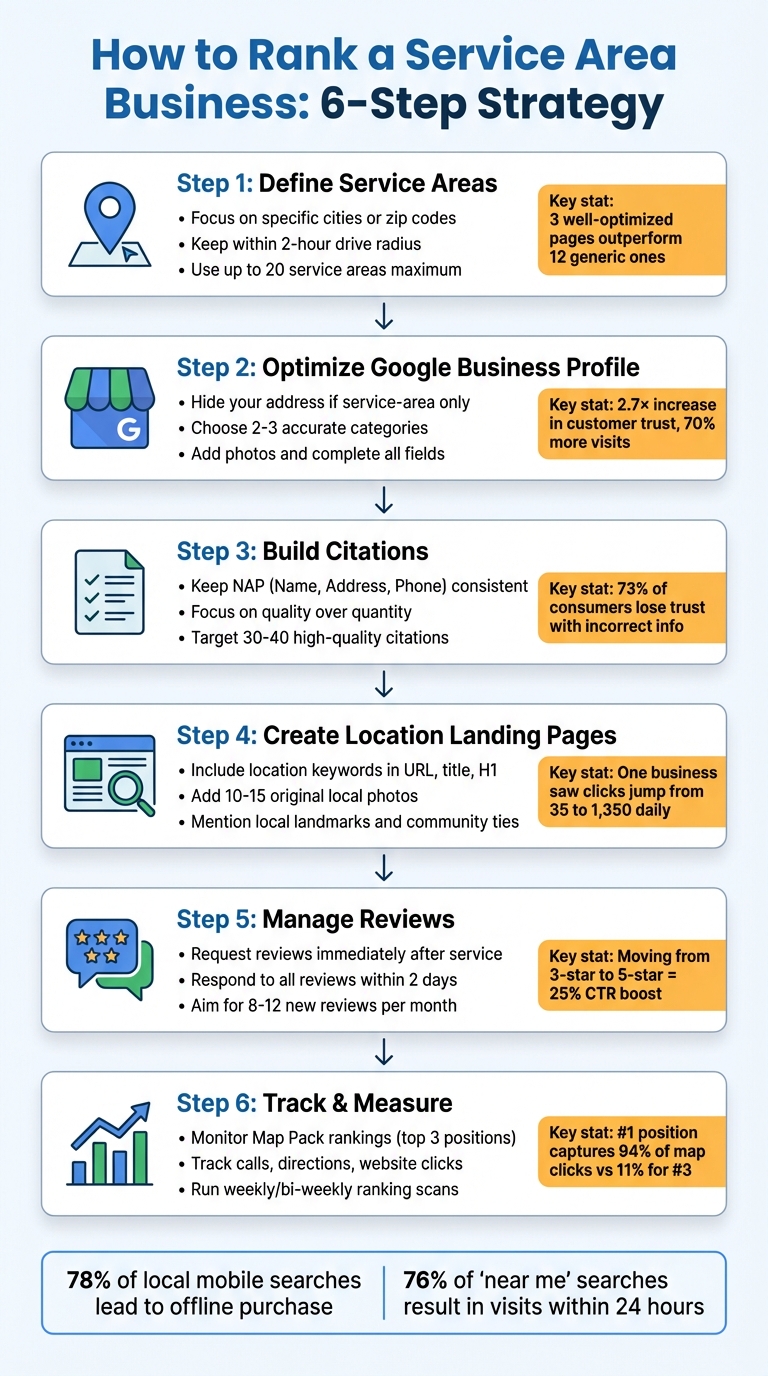
6-Step Process to Rank Service Area Businesses in Local Search
How To Rank a Service Area Business on Google Maps

Define Your Service Areas
Clearly defining your service areas is crucial. Focus on locations where you can realistically compete and deliver. Being specific not only boosts visibility but also helps attract the right customers.
List Specific Cities and Zip Codes
Google Business Profile lets you include up to 20 service areas, such as cities, neighborhoods, or zip codes. Instead of claiming an entire metro area, pinpoint the exact locations where you operate. Use tools like Semrush or Moz Keyword Explorer to identify high-volume searches like "plumber in Chicago". Additionally, review your customer database to identify zip codes that bring in the most business.
Keep your service areas within a two-hour drive from your base. Stretching beyond this range can lead to lower-quality leads and even risk suspension.
"The service areas you add won't affect how you rank, but they might encourage your potential customers to click on your listings as they'll see that you have said that you serve their area." – Abigail Leow, Marketing Executive, BrightLocal
Avoid Listing Too Many Areas
When it comes to service areas, less is often more. Three well-optimized location pages can outperform a dozen generic ones. Listing too many cities can dilute your authority and make it harder to establish yourself as a trusted local provider. If you create landing pages for each service area, make sure they include unique content - like local testimonials, project photos, or advice specific to that neighborhood. Copy-pasting the same template with just a city name swapped out can lead to Google flagging your pages as doorway pages.
Concentrate on areas where you can provide top-notch service and build a strong reputation. Once you've established yourself in these core markets, you can always expand your reach later.
Optimize Your Google Business Profile
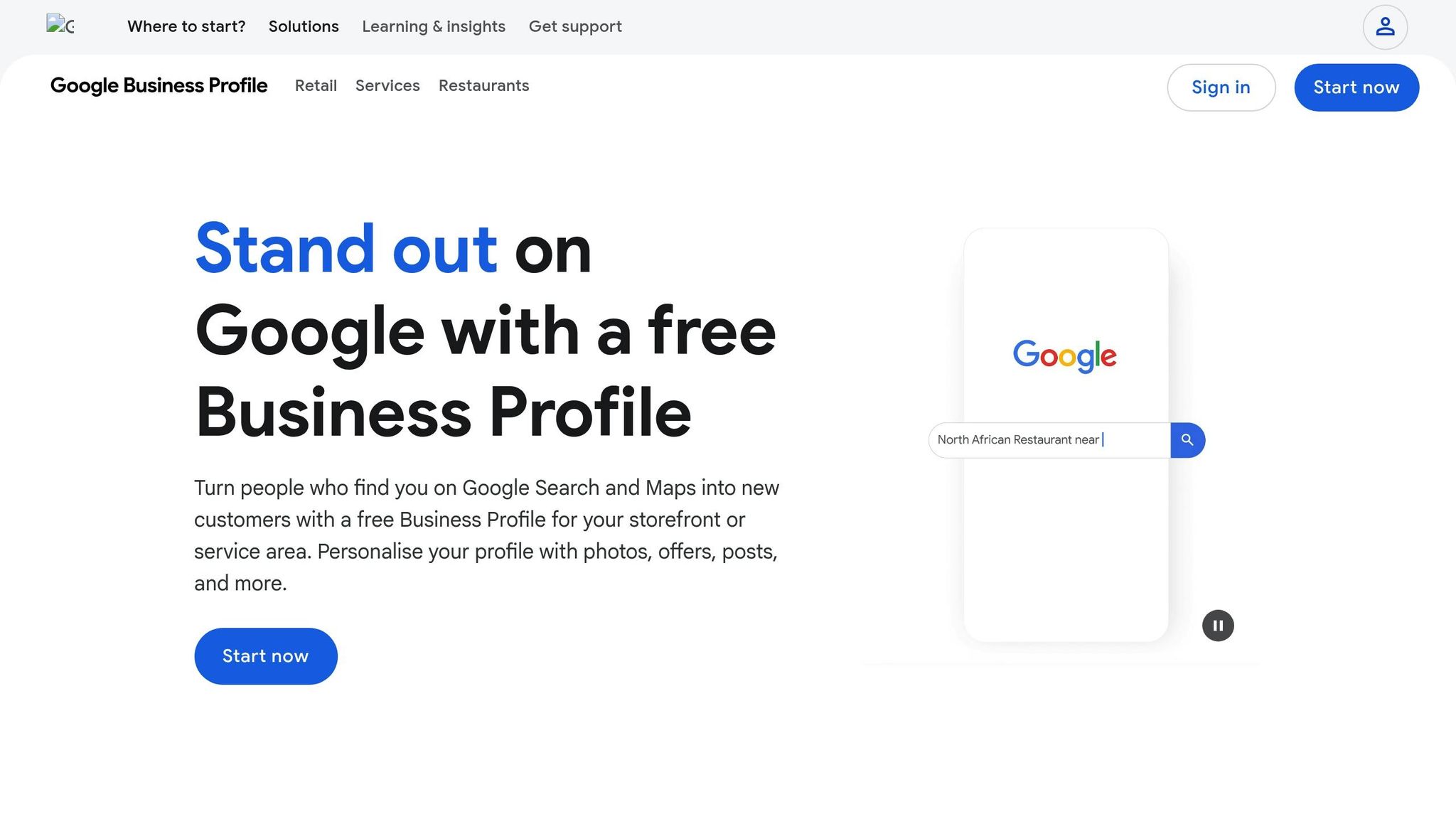
Your Google Business Profile acts as your online storefront, especially for service-area businesses. A well-optimized profile can increase customer trust by 2.7× and drive 70% more visits. Considering that nearly 46% of all Google searches have local intent, fine-tuning your profile is a must.
Configure Service Area Settings
If your business doesn’t serve customers at a physical location, make sure to hide your address. To do this, go to "Edit profile", then "Location", and toggle off the "Show business address to customers" option. Displaying an address when you operate solely as a service-area business violates Google’s terms and could result in suspension.
Be precise when adding service areas. Instead of selecting broad regions, focus on specific cities or zip codes, including those at the outer edges of your reach. Keep your service area within about a 2-hour drive from your base. Extending beyond this range can lead to verification issues or even suspension.
Choosing the right categories is equally important. Carrie Hill, a Local SEO expert, emphasizes:
"Getting the right primary and secondary categories in place for your [...] Google Business Profiles can really help local rankings".
Pick a primary category that accurately reflects your main service - like "Commercial Plumber" - and add one or two closely related secondary categories. Google advises keeping it to 2–3 categories total.
Add Complete Business Information
Make sure every field in your profile is filled out. Add photos of your team, branded vehicles, tools, and completed projects. Businesses that include images see 42% more requests for directions on Google Maps. Before uploading, name your image files with descriptive keywords, such as "hvac-repair-chicago.jpg," to improve visibility.
Craft a detailed business description that naturally incorporates your key services and service areas. Use the "Services" feature to list everything you offer - this can help Google match you to niche searches like "emergency water heater repair." Use the "Products" feature to highlight your most popular service packages.
Once your profile is complete, focus on engaging with potential customers to strengthen your local presence.
Use Profile Features to Engage Customers
With your profile fully set up, take advantage of its interactive features to connect with potential clients.
Google Posts act like mini-ads that show up directly in search results. Posting at least once a week signals to users that your business is active. Darren Shaw, a Google Business Profile specialist, explains:
"Most businesses are doing Google Posts all wrong. They treat their Google Business Profile like a social media profile, but it is NOT. GBP is the one platform that people visit with the intent to BUY, so lean into that".
Manage the Q&A section by posting and answering 10–15 FAQs to address common customer questions. Enable messaging through SMS or WhatsApp, allowing customers to contact you instantly. This is crucial, as nearly 78% of local mobile searches result in a sale. Making it easy for customers to reach you directly through your profile can significantly boost conversions.
Build Location-Specific Citations
Citations play a key role in confirming your business's credibility and relevance in a local context. When your business's name, address, and phone number (NAP) appear consistently across trusted websites, search engines are more likely to recognize your business as legitimate. This, in turn, improves your local visibility. On the flip side, inconsistencies can erode trust - not just with search engines but also with customers. In fact, 73% of consumers lose trust in a brand when they find incorrect business information online. Even small discrepancies, like using "St." instead of "Street", can confuse search algorithms and negatively impact your rankings, especially for service area businesses.
Eldar Cohen, Founder of Local Dominator, emphasizes the importance of this consistency:
"NAP consistency is the most important rule in citation management: your Name, Address, Phone number, and Website must be identical everywhere online."
Keep NAP Information Consistent
Start by creating a master document that includes your exact business name, address, phone number, and website. Use this as your reference point for all submissions to ensure uniformity. Before adding new listings, conduct an audit of your current ones on key platforms like Yelp, Bing Places, and Apple Maps. Correct any errors or duplicate entries you find, as building on inaccurate data can lead to further issues with search algorithms.
When building citations, focus on quality over quantity. Begin with foundational platforms such as Google Business Profile, Bing Places, Apple Maps, and Yelp. Once these are solid, you can expand to directories specific to your industry. Research shows that creating 30–40 high-quality citations is more effective than amassing hundreds of low-value ones.
If managing this process manually feels overwhelming, consider automating it.
Use Tools to Automate Citation Building
Manually handling citations across various platforms can be both tedious and prone to mistakes. For instance, correcting 3,500–10,000 duplicate listings manually could take up to 44 weeks. Tools like Local SEO Bot can simplify this process by automating citation creation and management. These tools allow you to update consistent NAP information across multiple directories simultaneously while also monitoring for any inaccuracies caused by third-party edits. Automation not only saves time but also ensures your listings remain accurate and up-to-date.
sbb-itb-0e6533f
Create Landing Pages for Each Service Area
When working on your service area SEO strategy, creating dedicated landing pages for each city or neighborhood you serve can make a big difference. These pages help consolidate your local SEO signals and improve visibility in local searches. For instance, Minars Dermatology saw daily clicks jump from 35 to 1,350 and monthly leads increase from 670 to 1,920 after implementing localized landing pages.
Each page should feature original content. Avoid using cookie-cutter templates that only swap out city names - search engines penalize duplicate or thin content. Treat every landing page like a personalized homepage designed specifically for that community. Liz Eisworth, Founder of SangFroid Web, explains:
"City Pages used to be 'just' helpful for ranking in traditional local search. Today, they're also a key part of how AI search engines understand and recommend your business".
Focus on creating pages for 15–20 high-priority cities, and organize them under a "Service Areas" menu to avoid being flagged for doorway pages. Structure the content with targeted keywords and hyper-local details to enhance search relevance.
Include Location Keywords
Make sure to include the target location in key areas like the URL, title tag, H1, and the first 100 words of the page. Keep title tags concise - under 60 characters - and formatted as "Service + City." Meta descriptions should stay under 160 characters and include a clear call to action.
Enhance the page with 10–15 original photos that showcase your team at work, completed projects, or recognizable landmarks from the area. Use location-specific alt text for these images to further emphasize geographic relevance.
Add Local Content and References
Beyond keyword placement, enrich your pages with authentic local details. Mention nearby landmarks, parks, streets, or unique community traits. For example, a landscaper might talk about the area's soil conditions, while a plumber could reference common issues in historic homes. Highlight your involvement in the community by mentioning memberships in local organizations, sponsorships of events, or contributions to nonprofits. Include testimonials from local clients and short bios of employees who live or work in the area.
Embedding a Google Map that outlines your service area or highlights key landmarks can also help establish your local presence.
Implement Schema Markup
Schema markup is another powerful tool for strengthening your local SEO. It connects your local content to structured data that search engines use to verify your business's presence. Local Falcon describes the process:
"Local SEO is an entity reconciliation problem. Its most important ranking factors... are external, unstructured, and sourced from dozens of different platforms... The algorithm's challenge is to find all these disparate signals... and correctly attribute them to a single, verified, real-world business entity".
Use JSON-LD schema to define your business details. Select the appropriate category for your business (e.g., Plumber, Electrician, HVACBusiness) and include key fields like your name, URL, description, logo, phone number, hours, physical address, and areaServed (e.g., "Phoenix, AZ"). Add hasMap to link directly to your Google Maps location. Where relevant, include FAQ and Review schemas, and use the sameAs attribute to link to your official social media profiles. Once implemented, validate your schema using Google's Rich Results Test.
Manage Reviews and Local Signals
Once you've optimized your profile and built citations, the next step in strengthening your local SEO is managing customer reviews and local signals. Reviews play a major role in Google's prominence signals and rankings. In fact, 90% of consumers read reviews before making a decision, and 60% trust customer reviews more than a brand’s own marketing content. Here's another compelling stat: moving from a 3-star to a 5-star average rating can boost click-through rates by up to 25%.
Keeping a steady flow of fresh reviews is key. Google sees this as a sign that your business is active and reliable. For service-based businesses, recent reviews are especially important - 67% of consumers prioritize recent feedback over average star ratings. Just like structured citations and localized landing pages, consistent review management signals trustworthiness to search engines.
Request Customer Reviews
Timing is everything when it comes to asking for reviews. The best moment? Right after completing a service. A simple personal or SMS request can go a long way. Train your team to make these requests before leaving a customer’s property.
For a more streamlined process, automate review requests through your CRM or Point-of-Sale system. Send a text or email immediately after the service with a direct link to your Google Business Profile review section. SMS requests often outperform email in terms of response rates. To make it even easier, include the review link in digital invoices, email signatures, and on your website.
Encourage customers to mention specific details about the service they received. For example, you might say, "Could you share how your water heater installation went?" This helps Google associate your business with relevant search terms. However, steer clear of offering gifts or money for reviews - this goes against Google’s guidelines. Instead, consider creating internal programs that reward employees for generating reviews.
Respond to All Reviews
Engaging with every review is crucial. 60% of reviewers expect a response within two days, and 90% of consumers are influenced by how businesses respond to reviews. Your responses are public and show potential customers how much you value feedback.
For positive reviews, avoid generic replies like "Thank you." Instead, personalize your response by referencing the service provided. For instance, "We’re glad our Boston team could help with your HVAC repair!". When it comes to negative reviews, act quickly. Show empathy, acknowledge the issue, and propose a solution. Apologize sincerely and provide a direct phone number or email to continue the conversation offline. This approach works - 70% of customers who edited a negative review did so because the business addressed their concerns thoughtfully.
"Your volunteer reviewers can be a more persuasive sales force than your paid marketing department." – Miriam Ellis, Local Search Columnist
Thoughtful and timely responses build trust not just with the reviewer but with everyone who reads them.
Use Tools for Review Management
If you're dealing with a high volume of reviews, tools like Google Business Profile Manager and Local SEO Bot can simplify the process. Google Business Profile Manager is a free tool that helps you respond to reviews and track performance metrics like calls and direction requests. Local SEO Bot takes it a step further by automating review monitoring and responses, making it easier to manage feedback across multiple service areas from one dashboard. These tools can save time and ensure no review goes unnoticed.
Track Rankings and Measure Results
Once you've optimized your profiles and built citations, the next step is keeping tabs on how these efforts are paying off. Tracking your local rankings gives you a clear picture of where you're visible, who you're competing with, and what areas need improvement.
Here’s why this matters: the #1 ranked business in a competitive local niche captures 94% of map clicks, while the #3 position gets only 11%. That’s a massive difference in visibility. Plus, since the Local Pack shows up above organic results for 93% of local searches, it’s critical to know exactly where you stand in those top three spots.
Monitor Your Local Rankings
For service-area businesses, rankings can shift depending on the searcher’s physical location. Your position might be strong in one neighborhood but weaker in another. That’s why you need tools that track your visibility across your entire service area - not just from a single point.
Using location-based scanning tools can help you see how your business ranks in different parts of your service area. A 9x9 grid (81 data points) is a good starting point, balancing data detail with cost. This approach highlights areas where your business performs well and neighborhoods that need more attention. Be sure to track both Map Pack positions (the top 3 results) and localized organic rankings.
Run these scans weekly or bi-weekly to stay ahead of algorithm updates and competitor activity. It’s also worth scanning your competitors to identify their weak spots - these are opportunities for you to gain ground. Tools like Local SEO Bot can automate this process, making it easier to monitor multiple service areas from one dashboard.
Once you’ve got a handle on rankings, the next step is to analyze engagement data to measure the impact of your improvements.
Track Performance Metrics
Rankings show visibility, but performance metrics reveal customer engagement. Pay attention to high-intent actions like phone calls, direction requests, and website clicks from your profile. These actions are strong indicators of real interest.
Check your Google Business Profile (GBP) Insights for these numbers. For example, if your profile is getting plenty of views but not many calls, it might be time to update your photos or business description. Listings with photos generate 42% more requests for driving directions than those without. Adding UTM codes to your profile link can also help you track traffic from the Map Pack separately from organic search in Google Analytics.
Don’t forget to monitor review velocity - not just the total number of reviews, but how many new ones you’re getting each month. A steady flow of 8–12 new reviews per month is a strong ranking signal. Keep an eye on your click-through rate (CTR) too; a good local search CTR is above 6%. If yours is falling short, consider improving your photos, gathering more reviews, or rewriting your business description to make it more compelling.
| Metric Type | What to Track | Why It Matters |
|---|---|---|
| Ranking Metrics | Map Pack position, Organic position, Geo-grid visibility | Shows where you appear in search results |
| Engagement Metrics | Profile views, Direction requests, Website clicks | Indicates searcher interest and intent |
| Conversion Metrics | Phone calls from GBP, Form submissions, Leads | Measures actual business results |
| Reputation Metrics | Review count, Review velocity, Average rating (target: 4.2-4.5) | Signals trust and prominence |
Adjust Your Strategy Based on Data
Once you’ve identified gaps through your tracking efforts, refine your strategy. If certain neighborhoods aren’t performing well, create hyper-local content targeting those areas or consider using Local Services Ads to boost visibility. If competitors have more reviews, ramp up your review collection efforts.
Businesses in the top 3 Map Pack positions average 250 reviews, compared to just 39 for typical businesses. If your rankings suddenly drop, conduct a NAP (Name, Address, Phone number) audit across major directories - discrepancies account for about 10% of ranking factors.
"Clients don't renew contracts based on ranking improvements. They renew based on business growth. Your metrics need to tell the revenue story, not the SEO story." – Anya Leibovitch, Contributor, AgencyAnalytics
Use Google Search Console to identify your best-performing location landing pages, then replicate their structure and depth on weaker pages. If certain service keywords aren’t triggering your listing, add those terms to your GBP "Services" section and use keyword-rich questions and answers in your Q&A section.
The goal? Keep measuring, learning, and tweaking until your business consistently shows up where your customers are searching.
Conclusion
Getting a service area business to rank well locally means staying active and visible across Google’s local ecosystem. It’s not just about setting up a Google Business Profile - it’s about maintaining and optimizing it continuously. From defining your service areas and building citations to creating location-specific landing pages and managing reviews, every action plays a role in boosting your Relevance, Proximity, and Prominence, the three key factors that drive local rankings.
Here’s why it matters: 78% of local mobile searches lead to an offline purchase, and 76% of "near me" searches result in visits within 24 hours. These aren’t just numbers - they’re opportunities for real-world revenue.
"To succeed with Google Maps SEO in 2026, businesses must treat their listings as living assets - not set-it-and-forget-it entries." – Avtar Madan, Global Director of SEO, Birdeye
The reality? Keeping up with weekly posts, responding to reviews, running NAP audits, and tracking rankings across neighborhoods can feel overwhelming - especially when you’re also running a business. That’s where tools like Local SEO Bot can help. For $49/month, this platform automates tasks like review management, citation building, and ranking tracking, giving you more time to focus on your customers.
Start with the basics: verify your profile, define your service areas, and actively gather reviews. Then, add location pages, citations, and consistent engagement. Staying visible and responsive isn’t just a strategy - it’s the foundation for local search success. Keep tracking your performance, adapt based on your data, and show up consistently. In the end, it’s not the biggest businesses that dominate local search - it’s the ones that stay consistent, engaged, and responsive week after week.
FAQs
How do I define my service areas to improve local SEO?
If you're running a service-area business (SAB) and want to improve your local SEO, the first step is to clearly outline the areas you serve. Start by listing all the towns, ZIP codes, and counties where you can realistically provide services. Focus on locations where you already have a solid customer base or can reliably operate, rather than trying to include every nearby spot.
It’s smart to prioritize regions that generate the most business or attract high-value clients. Keep your service radius practical - Google generally recommends staying within a 2-hour driving distance from your verified address. When setting up your Google Business Profile, use the “service area” option to add these locations, but make sure your address stays hidden. Including far-off or out-of-state areas can lead to profile suspension, so stick to realistic boundaries.
Lastly, be consistent. Use the same service-area details across your website, local directories, and other listings. This consistency not only builds trust with search engines but also helps boost your visibility in local search results.
How can I optimize my Google Business Profile for better local rankings?
To make the most of your Google Business Profile, start by ensuring all your business details are accurate and up-to-date. This includes your business name, phone number, website, and the ZIP codes of your service area. Select the most relevant categories for your business, craft a concise and engaging description, and upload clear, high-quality photos and videos that highlight what you offer.
Keep your profile active by posting regular updates with Google Posts, responding to customer reviews and questions, and using attributes to emphasize what makes your business stand out. Take advantage of features like messaging, bookings, or product listings to boost customer interaction and improve your visibility in local search results.
How can location-specific landing pages help improve local search rankings?
Location-specific landing pages, often called service-area or location pages, can play a key role in improving your local search rankings. These pages are designed to focus on specific towns, ZIP codes, or neighborhoods your business serves, helping search engines connect your services to those areas. By incorporating the location into the page title, meta description, headings, and body text, you increase your chances of showing up in local search results, including the Google Maps pack and "near me" queries.
These pages also serve as a hub for essential business details, such as your name, service area, contact information, and hours of operation. This not only builds credibility with Google but also reassures potential customers. On top of that, they improve user experience by featuring location-specific information like tailored services, pricing, and customer testimonials. All of these elements work together to strengthen your local visibility and make it easier for people in your target areas to find and choose your business.