GBP Reinstatement: How to Get Your Profile Restored Fast
Published August 20, 2026
GBP Reinstatement: How to Get Your Profile Restored Fast
Yes, most suspended Business Profiles can be appealed and reinstated. Success depends on two things: fixing whatever triggered the suspension and submitting exact-match evidence in a single well-prepared appeal. Google’s appeals tool gives you a strict 60-minute window to upload documents once you start, and evidence added after that window closes won’t attach to your case. That rule changes everything about how you should prepare.
Before you open the appeals form, do this:
- Audit your Name, Address, and Phone (NAP) for inconsistencies across your website and directories.
- Gather official documents: business registration, tax certificate, and a recent utility bill.
- Scan and rename every file now, so you’re not fumbling during the countdown.
Key Takeaways
A GBP reinstatement succeeds when the root cause is fixed, evidence matches exactly, and the appeal is filed correctly within Google’s 60-minute upload window.
| Point | Details |
|---|---|
| Diagnose before appealing | Audit NAP, duplicates, and categories to find the real cause first. |
| Match documents exactly | Business registration, tax certificates, and utility bills must mirror your profile’s name and address. |
| Prep files in advance | Convert to PDF, rename clearly, and ZIP everything before starting the timer. |
| Never duplicate a listing | Creating a new profile during an active appeal can worsen enforcement outcomes. |
| Audit quarterly | Prevent repeat suspensions with a recurring citation and NAP check. |
Table of Contents
- What Is GBP Reinstatement and Why Does the 60-Minute Rule Matter?
- How Do You Diagnose Why Your Profile Was Suspended?
- What Documents Strengthen a GBP Reinstatement Appeal?
- How Do You Prep Evidence for the 60-Minute Upload Window?
- How Do You Submit a GBP Reinstatement Appeal Step by Step?
- What If Your Google Account Is Restricted Instead of Your Profile?
- What Should You Check Immediately After Reinstatement?
- How Do Professionals Approach GBP Reinstatement Differently?
- Where to Find Google’s Official Reinstatement Resources
- Why the “Just Resubmit and Hope” Approach Keeps Failing
- Frequently Asked Questions
- Sources
What Is GBP Reinstatement and Why Does the 60-Minute Rule Matter?
GBP reinstatement is the formal process of appealing a suspended or disabled Google Business Profile so it reappears on Search and Maps. It’s not a request for sympathy. It’s a documentation review, and Google’s system is built to reject weak or mismatched evidence fast. Understanding the Google Business Profile restoration process starts with accepting that the appeal is only as strong as your prep work, not your explanation.
How Do You Diagnose Why Your Profile Was Suspended?
Most owners jump straight to appealing without figuring out what actually happened. That’s the single biggest reason first attempts fail, according to practitioners who handle these cases regularly. Diagnose the cause before you touch the appeals tool:
- Open your dashboard notification and read the specific policy it cites.
- Compare your listed name, address, phone number, website, and category against your official records and every directory listing you can find.
- Search Google Maps for duplicate listings under slightly different names or addresses.
- Check whether the restriction is on your Business Profile or on the underlying Google Account itself.
Pro Tip: Google over 100 local searches for your business name plus your city. If a duplicate or keyword-stuffed competitor listing shows up, screenshot it. You’ll want that evidence later.
What Documents Strengthen a GBP Reinstatement Appeal?
Google’s appeal page spells out exactly which evidence types are acceptable, and it’s less flexible than most owners expect. Every document needs to show the same business name and address that appear on your profile. A mismatch, even a suite number typo, can sink an otherwise solid appeal.
Build your file from these categories:
- Business registration from your state, showing legal name and formation date.
- State tax certificate or sales tax permit tied to your business address.
- EIN confirmation letter or other IRS documentation, when your business structure requires one.
- Utility bill, lease, deed, or bank statement dated within the last few months, confirming your physical address.
- Business insurance documents, useful as secondary proof when address records are thin.
Save everything as a clear PDF or high-resolution image, never a blurry phone photo. Rename files so a reviewer can identify them at a glance (“BusinessLicense_SmithPlumbing.pdf” beats “IMG_4021.jpg”). If your listed address doesn’t match your registration exactly, correct the profile first or the appeal is dead on arrival.
How Do You Prep Evidence for the 60-Minute Upload Window?
Google’s own guidance treats the upload window as an unforgiving, fixed technical limit. Treat it the same way a pilot treats a preflight checklist. Nothing gets improvised once the timer starts.
- Scan or convert every document to PDF and rename each file clearly.
- Compress the set into a single ZIP file as a backup, in case individual uploads stall.
- Confirm file sizes are reasonable and text is legible; open each one on a second device to double check.
- Fix any NAP inconsistencies you found in your diagnostic pass before you touch the appeals form.
- Draft a short, factual explanation of what happened and what you corrected. Save it in a text file so you can paste it instantly.
Pro Tip: Do a dry run the night before. Open every file on your phone and laptop. A document that won’t open during your actual appeal wastes minutes you don’t have.
How Do You Submit a GBP Reinstatement Appeal Step by Step?
Once your evidence is ready, the submission itself is mechanical, but the sequence matters:
- Sign in at Accounts using the exact account that manages the profile. A second Gmail address won’t have access.
- Navigate to your Business Profile dashboard and locate the suspended listing.
- Follow the prompts in the appeals tool and attach your prepared files the moment it opens the upload window.
- Submit your short written explanation alongside the documents, not as a separate follow-up.
- Do not create a new listing for the same business while your appeal is pending. Google explicitly warns against this, and a duplicate can make enforcement worse, not better.
Google typically reviews appeals within a few business days, though complex cases can take longer. Decisions arrive through the dashboard notification center and the email tied to your account, so check both.
What If Your Google Account Is Restricted Instead of Your Profile?
An account restriction is a different, higher-priority problem. If your entire Google Account is locked, you must resolve that first through the “My Account” recovery and appeal flow before Google will even look at your Business Profile suspension.
- Check whether you’re locked out of Gmail, Drive, or other Google services entirely, not just your profile dashboard.
- If a prior appeal was denied, don’t resubmit identical evidence. Google’s additional review process only applies when you can show new information or a corrected error.
- Paid escalation channels or agency partner contacts exist for genuinely stuck cases, but eligibility is narrow, and they rarely speed up a case with weak underlying evidence.
What Should You Check Immediately After Reinstatement?
Reinstatement isn’t the finish line. Confirm your listing actually appears in both Search and Maps results, and that your manager access is fully restored, not just partially visible.
- Search your business name and category to confirm live visibility.
- Fix any remaining NAP inconsistencies and remove duplicate listings you found during diagnosis.
- Correct mismatched categories that may have contributed to the original suspension.
- Schedule a quarterly citation audit going forward. A listings checklist makes this a repeatable habit instead of a scramble.
Pro Tip: Set a recurring calendar reminder for citation checks. Most repeat suspensions trace back to inconsistencies nobody noticed for months.
How Do Professionals Approach GBP Reinstatement Differently?
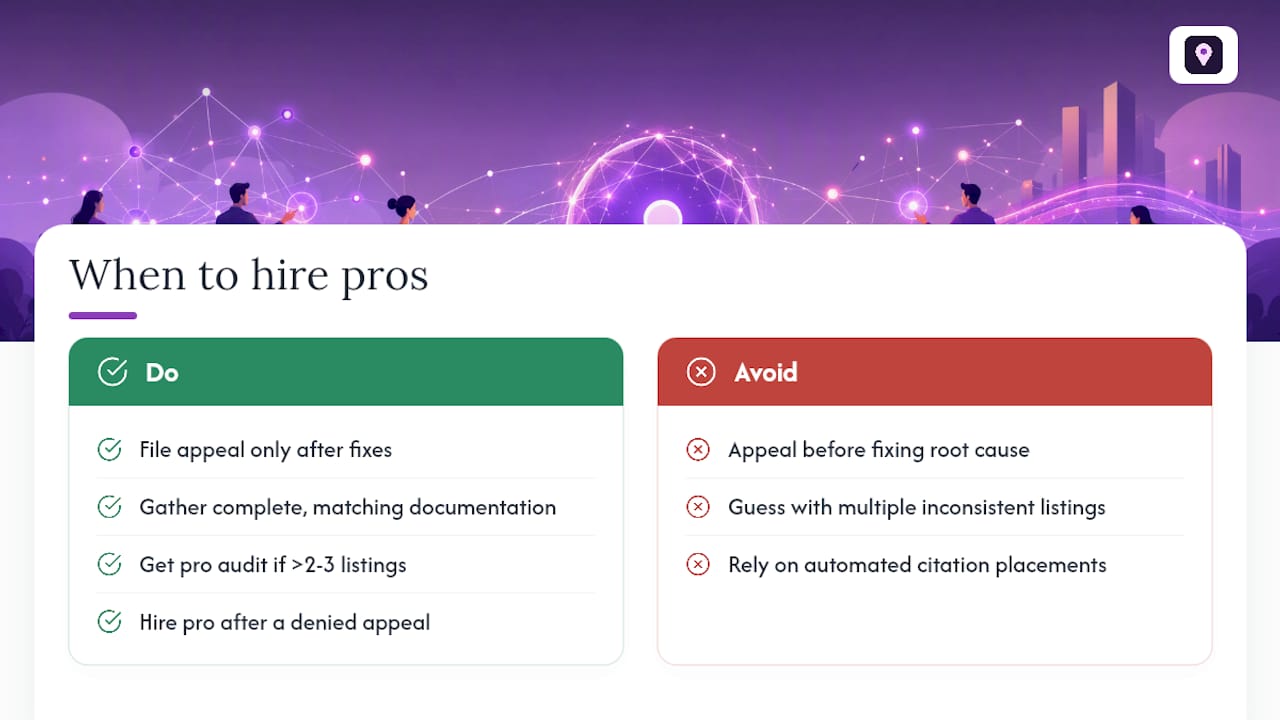
A correction-first, documentation-complete appeal materially raises the odds of success on the first try. Practitioners who handle these cases daily don’t file an appeal until the root cause is fixed and every document matches exactly. That discipline is the whole game.
Localseobot builds citations manually across high-authority directories rather than automating placements, precisely because NAP mismatches are one of the most common suspension triggers. Clients using this correction-first approach have reported improved Maps rankings and more customer calls after cleanup, backed by a 30-day money-back guarantee if rankings don’t improve.
If your diagnostic turns up more than two or three inconsistent listings, or you’ve already had one appeal denied, that’s the signal to stop guessing and get a professional audit.
DIY works well for a single obvious fix, like one wrong phone number. Multiple duplicates, a denied appeal, or a restricted account are better handed to someone who does this daily. Localseobot’s local SEO service exists for exactly that gap, and the Google Business Profile Optimizer helps you catch the issues before they become suspensions in the first place.
Where to Find Google’s Official Reinstatement Resources
Use these official entry points when you’re ready to act:
- Fix suspended or disabled profiles covers the appeals workflow and the 60-minute evidence rule.
- Appeal Business Profile content & profile restrictions lists acceptable documents and account-restriction guidance.
- Business is the dashboard where appeals begin.
Why the “Just Resubmit and Hope” Approach Keeps Failing
Most advice on this topic treats reinstatement as a form-filling exercise: attach some paperwork, write an apologetic note, wait. That’s backwards. The research is clear that root-cause diagnosis, not appeal writing, determines outcomes. Owners who resubmit the same evidence after a denial are almost always solving the wrong problem.
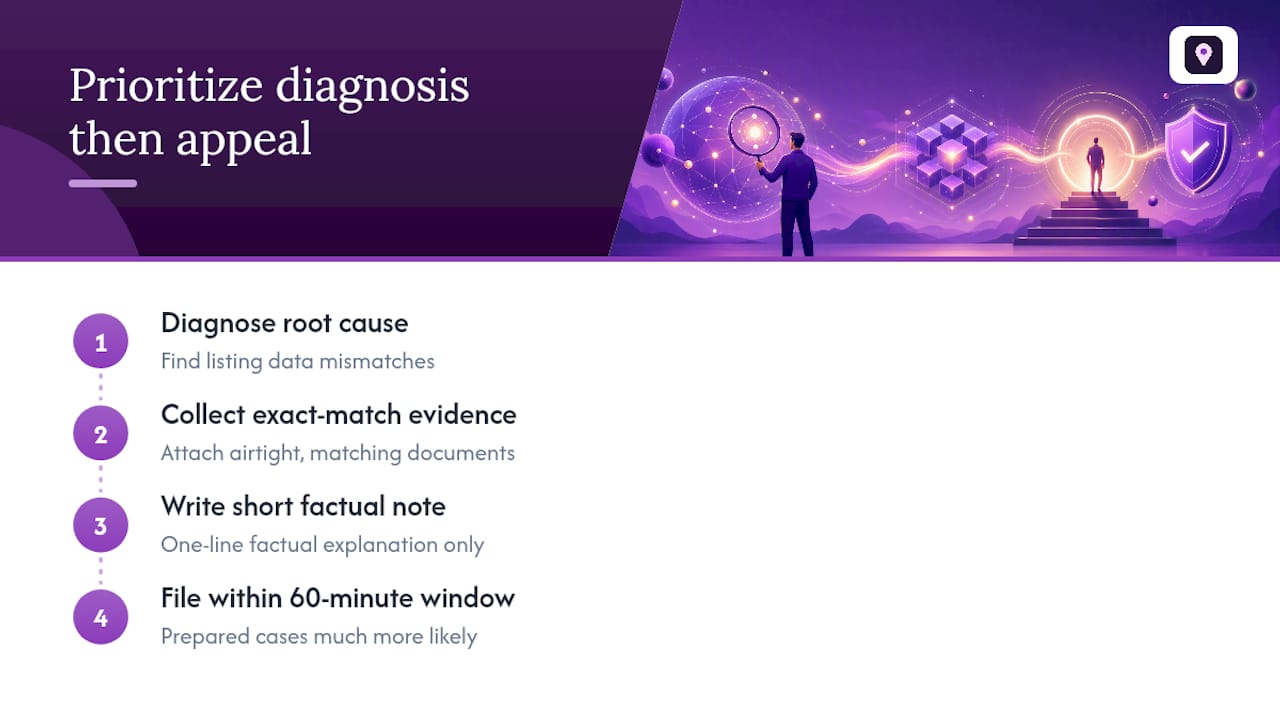
The conventional wisdom undersells the 60-minute window’s real function. It’s not a technical inconvenience. It’s a forcing mechanism that punishes anyone who shows up unprepared, which is most first-time filers.
Prioritize your diagnostic pass over your explanation letter. A short, factual note attached to airtight, exact-match documents beats a heartfelt paragraph attached to a blurry utility bill every time. If you’ve already been through one denial, that’s your signal to stop iterating on wording and start auditing your listing data instead.
Frequently Asked Questions
How long does GBP reinstatement usually take? Most decisions arrive within a few business days after a complete appeal, though cases involving account restrictions or repeated denials can take longer.
Can I appeal more than once if my GBP reinstatement request is denied? Yes, but a second appeal only works if you address new information or fix an error from the first submission. Resubmitting identical evidence rarely changes the outcome.
Does creating a new listing help while my appeal is pending? No. Google advises against creating a duplicate profile during an active appeal, since it can complicate or worsen enforcement.
What’s the difference between a profile suspension and an account restriction? A profile suspension affects one listing. An account restriction locks your entire Google Account and must be appealed separately before any profile-level reinstatement request can move forward.
Do I need a lawyer or agency to handle GBP reinstatement guidelines? Not usually, for a single, clear-cut issue. Multiple duplicate listings, repeated denials, or account restrictions are where professional help pays off.
Sources
- Fix suspended or disabled profiles - Google Business Profile Help
- Appeal Business Profile content & profile restrictions - Google Business Profile Help
- Business