5 Steps to Report and Fix Keyword Stuffing on Google Maps
Published August 28, 2026
5 Steps to Report and Fix Keyword Stuffing on Google Maps

Keyword stuffing in a Google Maps or Google Business Profile name is against Google’s guidelines and puts your listing at risk of demotion or removal. If your business name reads like “Joe’s Plumbing Emergency 24/7 Cheap Plumber Near Me,” you’re already exposed. The fixes are straightforward: correct your fields, tighten your citations, and report listings that break the rules. The rest of this guide walks through detection, reporting, correction, and recovery.
TL;DR:
- Keyword stuffing in the business name field often includes non-legitimate terms like city names, services, or superlatives that do not reflect the legal name.
- Google’s automated and human review systems quickly detect keyword stuffing through name mismatches with official registration or website content.
- Reporting stuffed listings involves suggesting edits, providing evidence, and escalating issues via Google support if necessary.
- The safest strategy is to keep your business name matching your official registration and avoid adding keywords, using categories and descriptions instead.
- Correcting citations and consistent branding across all directories strengthens your profile’s trustworthiness and supports recovery from penalties.
Table of Contents
- What Keyword Stuffing Looks Like on Google Maps
- Why Keyword Stuffing Harms Maps SEO and Business Trust
- How Google Detects and Enforces Keyword Stuffing on Maps
- How to Report a Keyword-Stuffed Maps Listing
- How to Correct Your Own Listing and Prevent Accidental Stuffing
- Monitoring and Recovering After a Penalty or Listing Removal
- What We See in the Field
- The Playbook Nobody Follows Until It’s Too Late
- Fix It Once, Correctly, With Local SEO Bot
- Where to Verify This Yourself
- Sources
What Keyword Stuffing Looks Like on Google Maps
Keyword stuffing on a Google Business Profile means cramming search terms into fields meant to hold factual information, most often the business name. Google’s own policies restrict the name field to your real-world, legal business name, nothing else. When a plumbing company lists itself as “ABC Plumbing Repair Emergency Drain Cleaning Chicago,” every word after “ABC Plumbing” is padding meant to game rankings, not describe a real entity.
Stuffing shows up in a few predictable places:
- Business name field: adding city names, services, or superlatives (“Best,” “#1,” “Cheap”) that aren’t part of the legal name.
- Alternate names: some owners register several near-duplicate profiles or alternate name variations, each stuffed with a different keyword combination.
- Business description: repeating the same service phrase five or six times instead of writing naturally.
- Category selection: choosing four or five loosely related categories just to appear for more searches.
A legitimate name looks like “Riverside Dental Group.” A stuffed one looks like “Riverside Dental Group Best Dentist Emergency Same Day Appointments.” The difference is obvious once you know what to look for, and Google’s reviewers and algorithm are looking for exactly that contrast.
Why Keyword Stuffing Harms Maps SEO and Business Trust
Stuffing rarely delivers lasting gains, and it often costs you more than it earns. Google’s local algorithm cross-checks your listing against your website, directories, and other citations. When your Google Business Profile name doesn’t match what appears on your storefront sign or your official registration, that mismatch itself becomes a negative signal, not just an aesthetic problem.
Guides on this topic are blunt about it: stuffing a business name is a losing long-term strategy because Google actively compares your profile against real-world proof of who you are. A name that keeps changing to chase keywords looks less like a business and more like a spam pattern.
The trust math is simple: consistent naming across your website, citations, and physical signage reads as a legitimacy signal to search systems. Inconsistency alone, even without overt stuffing, can trigger closer scrutiny of your entire profile.
The practical consequences stack up. Filtered visibility drops you out of the map pack for the very terms you were trying to stuff. Failed verification can freeze your listing before it ever ranks. And customers who search your business name and find it doesn’t match your sign start to wonder if the listing is even legitimate.
How Google Detects and Enforces Keyword Stuffing on Maps
Google combines automated filtering with human review to catch stuffed listings, and neither layer is easy to outmaneuver for long. Automated systems flag names that don’t match patterns found in official business registrations, trademark filings, or your own website’s title tag. If your website says “Riverside Dental Group” and your Maps name says “Riverside Dental Group Root Canal Specialist Downtown,” that gap gets noticed.
Human review adds a second layer that many business owners underestimate:
- Local Guides and public “suggest an edit” submissions let any user propose a corrected name, and Google frequently applies these edits automatically after enough agreement.
- Manual actions from Google’s spam team can suppress or remove listings that violate naming guidelines, sometimes without warning.
- Verification triggers, including video verification for higher-risk categories, require you to show your listing matches physical signage and documentation.
Industry reporting has tracked cases where a stuffed name produced a short-lived ranking bump before getting reported, edited, or filtered out entirely. The pattern repeats often enough that treating it as a viable long-term tactic is a mistake. If your listing gets flagged for video verification and your signage doesn’t match the name on file, the review can end in permanent removal rather than approval.
How to Report a Keyword-Stuffed Maps Listing
If you spot a competitor’s listing stuffed with keywords, or a directory copy of your own business with the wrong name, you have a real path to get it corrected. Google’s Business Profile support community has fielded this exact question repeatedly, and the process is consistent.
- Suggest an edit directly on the listing. Open the profile in Google Maps, click “Suggest an edit,” and propose the corrected, legitimate business name.
- Report a problem if the edit option feels insufficient, using the “Report a problem” link on the listing page for clearer policy violations.
- Collect evidence before you report anything. Screenshot the stuffed listing, save the business’s official website, and note any directory listings showing the real name.
- Contact Google Business Profile support if your suggested edit gets reverted or ignored after a reasonable window, typically one to two weeks.
- Escalate through the support community for stubborn cases, since public threads sometimes get attention from Google staff faster than the standard support queue.
Pro Tip: Keep a simple log with dates, screenshots, and edit submissions. If you need to escalate, having a paper trail speeds up the conversation considerably.
How to Correct Your Own Listing and Prevent Accidental Stuffing
The safest name field is the boring one: your actual, legally registered business name and nothing else as explained in Google Business Profile Optimization for Canadian SMBs. Services, specialties, and location terms belong in your categories, attributes, and description, not bolted onto your name.
A quick self-audit checklist:
- Confirm your Google Business Profile name matches your business license, website header, and physical signage exactly.
- Select one accurate primary category and only as many secondary categories as genuinely apply.
- Move service and location keywords into your business description and category structure instead of your name.
- Run a citation check across major directories to confirm your name, address, and phone number match everywhere, sometimes called NAP consistency.
- Avoid registering duplicate or alternate-name profiles just to capture extra keyword combinations.
Good keyword mapping assigns terms to the pages and fields built for them, your website’s service pages, your GBP description, your category choices, rather than forcing everything into a single name field. Tools like Google Keyword Planner can help you find the right terms to place on your website, where they actually belong.
Pro Tip: Before you save any change to your GBP name, ask whether it would survive a video verification call. If the name doesn’t match what’s printed on your storefront, don’t submit it.
Monitoring and Recovering After a Penalty or Listing Removal
Recovery starts with knowing what to watch. Check your Google Business Profile dashboard regularly for unexpected edits, since Local Guides and other users can modify fields without your direct involvement. Rank trackers and citation crawlers can flag when your listing drops out of the map pack or when a directory entry no longer matches your current name.
If your listing has already been demoted or removed, work through this sequence:
- Correct every affected field back to your legitimate business name and accurate categories.
- Update your website and every major directory so they match the corrected profile exactly.
- Collect current evidence, storefront photos, official registration documents, and a matching website, before requesting re-verification.
- Submit an appeal or re-verification request through Google Business Profile support once your fields and citations are consistent.
- Bring in a professional service if internal fixes don’t restore visibility within a few weeks.
What We See in the Field
Most stuffing violations we come across weren’t malicious. They came from an owner or an early-stage SEO tactic that treated the name field like a headline. The recurring failure point is verification: a name that doesn’t match the sign out front is the fastest way to lose a listing entirely. Consistent, boring naming wins over time.

The Playbook Nobody Follows Until It’s Too Late
Most advice on this topic treats keyword stuffing as a ranking problem. It’s really a trust problem, and that distinction changes what you should fix first. Chasing algorithm filters is reactive. Building a profile that survives video verification and matches your citations everywhere is proactive, and it’s the part conventional guides skip.
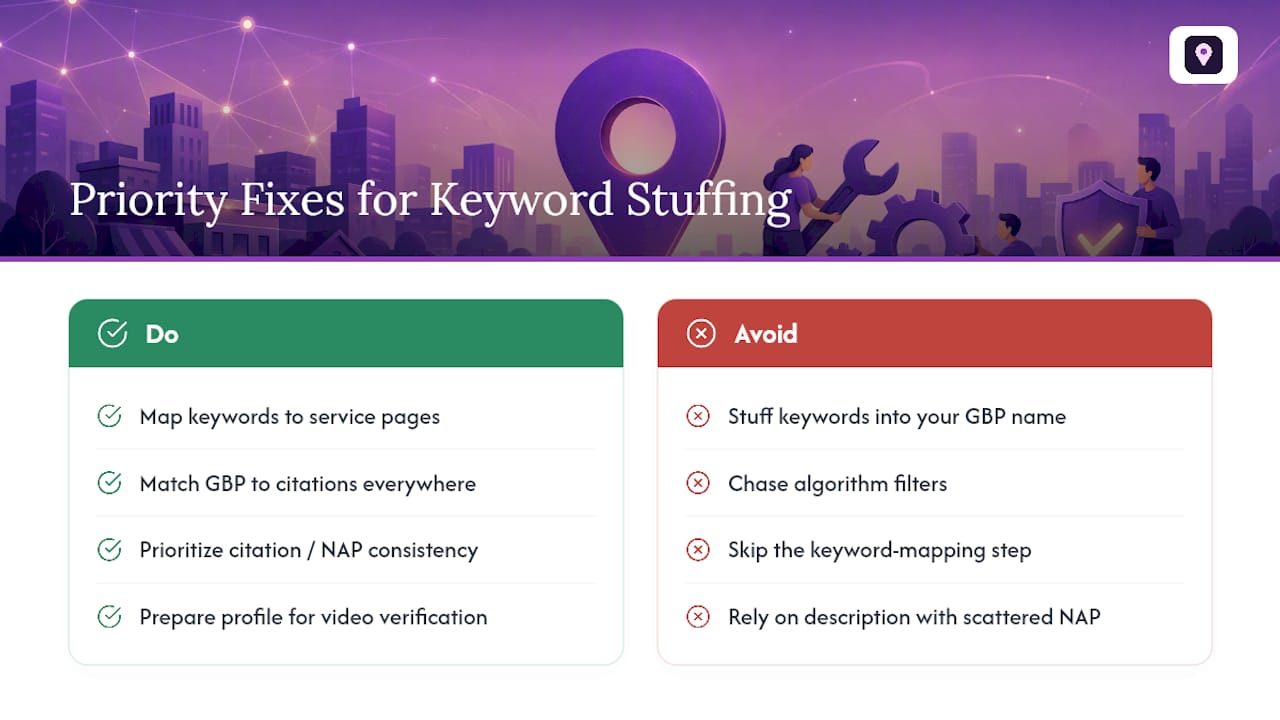
Here’s what gets underweighted: search intent already tells you where your keywords belong, on service pages, in descriptions, in category selection, not in your business name. If you’re mapping keywords correctly on your website, you shouldn’t feel any pull toward stuffing your GBP name in the first place. The businesses that get flagged usually skipped that mapping step entirely and used the name field as a shortcut.
Prioritize citation consistency before you touch anything else. A perfectly worded description means nothing if your NAP data is scattered across a dozen directories with three different phone numbers. Fix the boring stuff first. It’s what actually protects your listing.
— Local
Fix It Once, Correctly, With Local SEO Bot
Chasing down every stuffed field and mismatched citation by hand eats hours you don’t have, and one missed directory can undo the whole cleanup. Localseobot builds premium citations manually across high-authority directories instead of relying on automated placements that can introduce the very inconsistencies that trigger scrutiny in the first place.

If you’re not sure where your NAP data has drifted, the Citation Consistency Analyzer flags mismatches across your listings before they cost you a ranking. Pair that with the Google Business Profile Optimizer to correct your name, categories, and description fields in a way that holds up under verification, not just a temporary ranking bump. Localseobot backs this work with a 30-day money-back guarantee if you don’t see a ranking increase. Start with a citation audit and see exactly what needs fixing.
Where to Verify This Yourself
Read the original Google Business Profile support thread on reporting stuffed titles, and review documented stuffing cases tracked by industry reporting.
Sources
- Google keyword planner - Rank Math SEO Glossary
- Search intent - Yoast
- Google Maps Keyword Stuffing Name In Map Maker Spam - Search Engine Roundtable
- Don’t Keyword Stuff Your Business Name on Google Maps - Lockedown SEO
- How do I report Keyword Stuffing in the titles of Google Maps? - Google Business Profile Help Community