Why a Google Maps Ranking Suddenly Dropped and How to Fix It
Published August 24, 2026
Why a Google Maps Ranking Suddenly Dropped and How to Fix It
BLUF: A Maps ranking drop means something shifted in one of three areas Google uses to rank local results: relevance, distance, or prominence, according to Google’s own ranking guidance. Before touching anything, confirm the drop is real.
- Check GBP Insights for a genuine visibility decline, not a seasonal dip.
- Run a quick geo-grid scan to see if you dropped everywhere or just from certain points.
- Look for a suspension banner on your profile.
Pro Tip: If you see a suspension notice, stop reading here and start reinstatement immediately. Everything else in this article assumes your profile is active. If it’s active, work through the diagnostic order below, one change at a time, before touching a second variable.
TL;DR:
- A genuine Maps ranking decline is confirmed when multiple geo-grid scans across different days show persistent drops in visibility at several points.
- Profile suspensions or policy warnings must be resolved first, as they can cause severe drops that are fixable through documentation and reinstatement.
- Website issues like mismatched NAP information, missing schema markup, broken links, or slow loading can silently hurt prominence and should be audited thoroughly.
- Review velocity and citation consistency critically influence recovery speed, with improvements often taking four to twelve weeks depending on efforts made.
- Complex or repeated drops may require professional help, particularly for multi-location profiles, suspension issues, or when proximity effects prevent organic recovery.
Table of Contents
- How to Confirm a Real Maps Ranking Position Decline
- What to Check on Your Google Business Profile First
- Could Your Website Be Hurting Your Map Ranking?
- Do Reviews and Citations Affect How Fast You Recover?
- Is a Competitor or Your Distance From Searchers the Real Cause?
- How Long Does It Take to Recover From a Maps Ranking Drop?
- When It Makes Sense to Bring in a Recovery Specialist
- What Actually Moves the Needle When Rankings Fall
- Get Your Maps Ranking Back Without the Guesswork of DIY Fixes
- Key Takeaways
- Sources
How to Confirm a Real Maps Ranking Position Decline
A single bad scan doesn’t mean your maps ranking dropped. Rankings wobble daily based on searcher location, time of day, and even device. What confirms a real problem is a pattern, not a snapshot.
Run three scans of the same geo-grid on different days before you conclude anything changed. Compare those results against your GBP Insights data for the same window. If Insights shows a real fall in views or actions while your geo-grid confirms lower visibility across multiple points, you have a genuine issue. A drop that shows up on one scan but disappears the next is likely noise.
Next, correlate the timing. Pull your profile edit history and line it up against the date the drop started. Check whether a known Google algorithm update landed around that time, and check Google Maps or your competitors’ profiles for new listings that opened nearby. These three data points, your edits, Google’s updates, and new competition, explain the majority of sudden shifts.
Use this three-sign test to separate real problems from random fluctuation:
- Magnitude — did you fall more than 3 positions, not 1 or 2?
- Persistence — does the drop hold across at least 2 separate scans?
- Spread — does it show up consistently across multiple points on your geo-grid, not just one?
| Diagnostic Signal | What It Suggests |
|---|---|
| Drop on one grid point only | Localized noise or a data glitch, not a real issue |
| Drop across most/all grid points | Genuine ranking decline, needs investigation |
| Drop coincides with a profile edit | Likely self-inflicted, check the change |
| Drop coincides with a Google update | Algorithm-driven, may need weeks to settle |
| Drop coincides with new competitor listing | Distance/prominence squeeze from new entrant |
Once confirmed, work the diagnosis in order: suspension status first, then recent profile edits, then your website, then reviews and citations, then competitor or distance effects. Skipping ahead almost always means you fix the wrong thing first.
What to Check on Your Google Business Profile First
Profile-level problems cause a disproportionate share of sudden drops, and they’re the fastest to check. Start by looking for the obvious: a suspension banner, a “this profile is not verified” flag, or a policy warning in your GBP dashboard. If you’re suspended, Google requires documentation, typically proof of business address and identity, before it will reinstate you, and that process can take weeks.
If there’s no suspension, audit what actually changed:
- Primary category, is it still the most accurate option for your core service?
- Business name, address, and hours, did anyone (including Google’s own auto-suggestions) alter these recently?
- Service-area settings, did the radius or list of areas shift?
- Map pin placement, is it sitting on your actual building or drifting to a nearby intersection?
- Address formatting, are suite or unit numbers correctly placed in the Address line 2 field rather than jammed into line 1?
Your profile edit history inside GBP will show changes you didn’t make yourself, sometimes applied automatically by Google based on third-party data. Revert anything suspicious.
Pro Tip: Change one field, wait 14 days, then re-scan before touching the next one. Editing five fields in a single afternoon feels productive but destroys your ability to know which change caused the recovery, or the next drop.
Could Your Website Be Hurting Your Map Ranking?
Prominence isn’t just about your profile. Google also weighs signals from the website your profile links to, and a broken connection there can quietly drag down your position even when your GBP looks perfect.
Start with the basics: does the landing page linked in your profile actually load with a 200 status, and does it match your business name, address, and phone number exactly? A mismatch between your GBP and your site’s footer contact info is a common, overlooked cause of prominence loss.
Check these four items directly:
- Schema markup — confirm your
LocalBusinessschema and JSON-LD are still present; a site redesign or CMS migration often strips this out silently. - Redirects and 404s — a broken link between your profile and your site cuts off a signal Google relies on.
- Canonical tags — make sure the page Google is crawling is the one you intend to rank, not a duplicate or staging URL.
- NAP consistency — your name, address, and phone number should read identically in your header, footer, and contact page.
Site speed and mobile usability matter too. A slow-loading or poorly formatted mobile page won’t tank your maps ranking on its own, but combined with other weak signals, it adds up.
Do Reviews and Citations Affect How Fast You Recover?
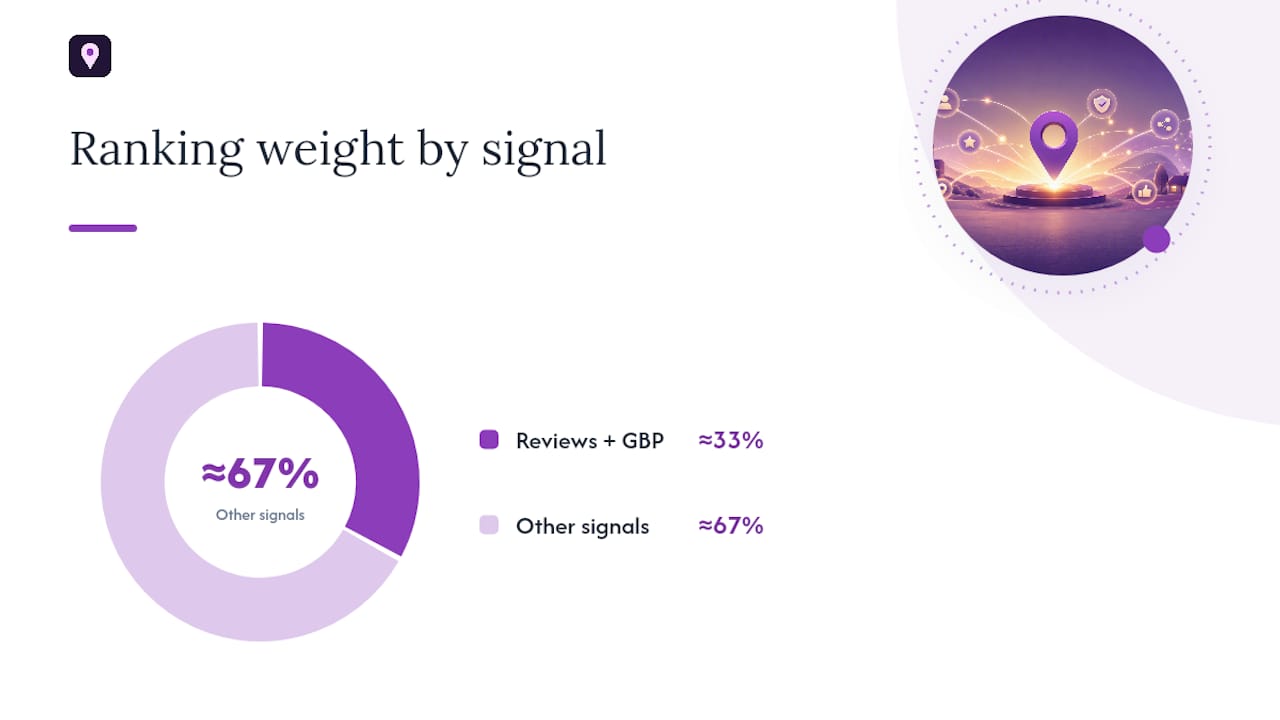
Review velocity is one of the more measurable prominence signals, and it’s one you can influence within weeks rather than months. Testing on ranking factors points to GBP and review signals carrying roughly a third of the total ranking weight, with review recency becoming increasingly important.
Calculate your own velocity by comparing new reviews from the last 90 days against the 90 days before that. A steep falloff often lines up with a ranking dip, even if nothing else changed.
To rebuild it:
- Ask recent customers directly, timing the request close to service completion.
- Put your review link somewhere visible, on receipts, follow-up texts, or email signatures.
- Reply to every new review within a few days; responsiveness itself is a signal Google tracks.
- Set a monthly target of 4 to 8 fresh reviews and track it like any other KPI.
Run a citation audit in parallel. Check your top directories for mismatched name, address, or phone data, and fix inconsistencies as you find them. A citation consistency tool can flag mismatches faster than checking each directory by hand. Expect review and citation fixes to influence rankings over 4 to 12 weeks, not overnight.
Is a Competitor or Your Distance From Searchers the Real Cause?
Sometimes nothing you did caused the drop, so using an SEO Competitor Analysis Guide for Digital Marketers can help you understand competitor data and distance effects more clearly. A new competitor opened three blocks closer to the searcher’s location, and distance simply outweighs everything else. Geo-grid data consistently shows proximity setting a hard ceiling in dense categories, one that profile optimization alone can’t always overcome.
Test this directly with a geo-grid scan. A 5x5 grid works for a first pass; a 21x21 grid gives a finer read on exactly where you win and lose. Keep the origin point and grid spacing identical between scans so you’re comparing the same map, not a shifted one.
| Grid Size | Best Use Case |
|---|---|
| 5x5 | Quick check, single-location business |
| 5x5 | Standard diagnostic for most local businesses |
| 21x21 | Fine-grained analysis for dense urban markets or multi-location comparison |
If the heatmap shows you losing ground specifically near a new competitor’s address, tactical responses include building a neighborhood-specific landing page, running targeted ads in that zone, or concentrating review requests from customers in that area.
Before assuming it’s competition, rule out a technical cause: a misplaced map pin. Geocoding errors can anchor your listing to a city centroid or the wrong building entirely, especially when a suite number gets misparsed. For service-area businesses with hidden addresses, this is harder to catch. Try a driving-directions search to your listed address to confirm where Google actually thinks you are.
How Long Does It Take to Recover From a Maps Ranking Drop?
Recovery time depends entirely on the cause, and setting the wrong expectation leads to panic edits that make things worse.
- Noise (single-point fluctuation): resolves within days, no action needed.
- Profile edit revert: typically 14 to 30 days after reverting the change.
- Algorithm update: 30 to 90 days as rankings settle into their new pattern.
- Competitor or proximity shift: 8 to 16 weeks of sustained review and citation work to close the gap.
- Suspension: 3 to 12 weeks depending on documentation and Google’s review queue.
Monitor with identical weekly scans and keep a simple log of every edit, review push, and external event (new competitor, algorithm news). Change only one variable per 14-day window, or you’ll never know what actually worked. Escalate to deeper investigation if the drop persists well past the expected window, if pin placement keeps reverting, or if a suspension remains unresolved after 12 weeks.
When It Makes Sense to Bring in a Recovery Specialist
Some drops are simple enough to fix yourself over a few weeks. Others, especially multi-location profiles, repeated suspensions, or a proximity ceiling you can’t budge, benefit from hands-on help.
Localseobot builds manual, premium citations across high-authority directories rather than automating placements, which matters when citation inconsistency is part of your problem. Its geo-grid tracking and Google Maps Visibility Score Calculator give you the same heatmap-style diagnostics described above, without building the spreadsheet yourself. Automated GBP optimization and review-response tools handle the ongoing maintenance that keeps a recovered ranking from sliding again.
- Complex or repeated suspensions
- Multi-location profiles with inconsistent data across sites
- A proximity ceiling that months of DIY work hasn’t moved
Pro Tip: If you’ve run the diagnostic order above and you’re still stuck after 60 days, that’s the signal to bring in outside help rather than keep guessing. Localseobot backs its work with a 30-day money-back guarantee if rankings don’t improve.
What Actually Moves the Needle When Rankings Fall
Most advice on ranking drops treats every symptom the same way: post more, get more reviews, build more citations. That’s backwards. The businesses that recover fastest are the ones that diagnose before they act, because the fix for a suspended profile looks nothing like the fix for a proximity ceiling, and the fix for a stripped schema tag looks nothing like either.
The overlooked piece is patience with your own data. Business owners panic after one bad scan and start changing categories, hours, and descriptions in the same afternoon. That destroys the one thing you need most: a clean signal showing which change actually worked. A geo-grid scan taken before and after a single edit tells you more than five simultaneous changes ever will.
Review velocity gets underrated too. It’s slower to move than a profile edit, but it’s one of the few signals fully within your control, and it compounds over months in a way a one-time category fix doesn’t.
If you’re going to prioritize one thing first, make it confirmation. Don’t fix what isn’t actually broken, and don’t guess when a geo-grid scan can tell you.
— Local
Get Your Maps Ranking Back Without the Guesswork of DIY Fixes
Diagnosing a ranking drop takes hours of manual geo-grid scanning, citation checking, and review tracking, work most business owners squeeze in between everything else they’re already doing. Localseobot replaces that manual grind with premium, hand-built citations, automated GBP optimization, and geo-grid tracking built specifically for local visibility recovery.

Where a typical DIY recovery means juggling spreadsheets across five different tools, Localseobot centralizes the diagnostic and repair process in one dashboard, and backs the work with a 30-day money-back guarantee if your ranking doesn’t improve. If you’ve confirmed your drop is real and want a faster path back, run your Google Maps Visibility Score Calculator check now to see exactly where you stand before deciding your next move.
Key Takeaways
A dropped maps ranking almost always traces back to a change in relevance, distance, or prominence, and fixing it requires diagnosing the cause before making any edits.
| Point | Details |
|---|---|
| Confirm before acting | Run three geo-grid scans and check GBP Insights before assuming a real drop occurred. |
| Follow the diagnostic order | Check suspension status first, then profile edits, then site issues, then reviews and competition. |
| One change per window | Edit a single profile field or variable, then wait 14 days before the next change. |
| Match your timeline to the cause | Expect 14 to 30 days for profile fixes, 30 to 90 for algorithm settling, and up to 16 weeks for proximity gaps. |
| Consider hands-on help | Localseobot’s manual citations, geo-grid tracking, and 30-day guarantee suit complex or persistent drops. |
Primary Sources and Tools
- Google Business Profile Help — ranking factors
- How to track Google Maps rankings — RankTracker
- Google Business Profile Optimizer
Sources
- Google Business Profile Help — How Google determines local search ranking
- Vrid
- If your local rankings are off, your map pin may be the reason — Search Engine Land
- How to track Google Maps rankings — RankTracker