Want your business to show up in Google’s Map Pack - the section that grabs nearly 44% of user clicks? Here’s the deal: optimizing your Google Business Profile (GBP) is the key. With 80% of US consumers searching for local businesses weekly and 78% of mobile searches leading to in-person purchases, a well-optimized profile can drive real results.
Quick Takeaways:
- Claim & Verify Your Profile: Ensure your business is listed and verified to avoid duplicates.
- Accurate Details: Keep your name, address, and phone (NAP) consistent everywhere.
- Add Photos & Videos: Listings with visuals get 42% more direction requests and 35% more clicks.
- Use Google Posts: Regular updates improve visibility and engagement.
- Respond to Reviews: Replying boosts trust and improves rankings.
- Track Performance: Use tools to monitor your Map Pack position and adjust strategies.
Optimizing your GBP isn’t a one-time task - it’s about keeping it active, accurate, and engaging. Let’s dive into the steps to secure your spot in the Map Pack and attract more customers.
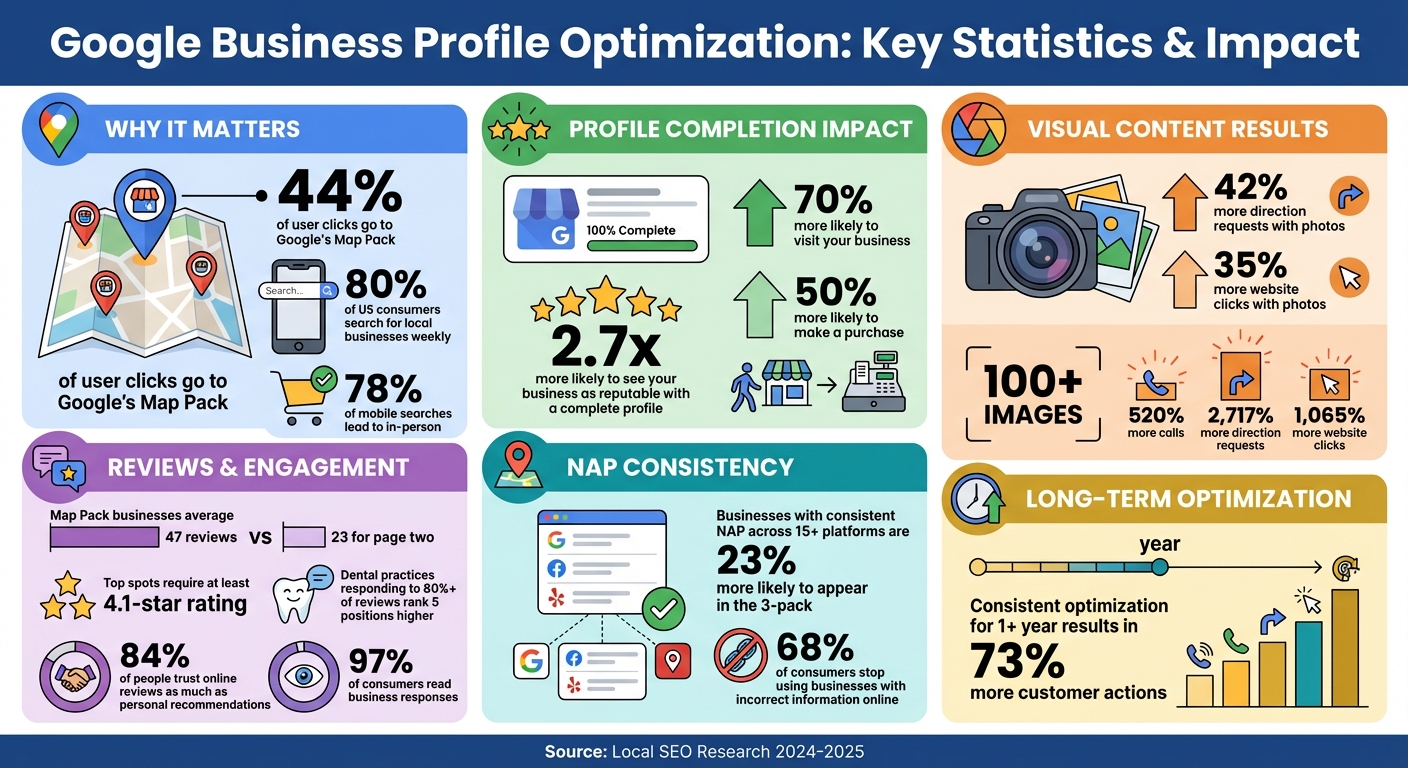
Google Business Profile Optimization Statistics and Impact
How To Optimize A Google Business Profile (Free Checklist For 2025)
Claim and Verify Your Google Business Profile
Before jumping into creating a new Google Business Profile, take a moment to search for your business online. Duplicate listings can hurt your search rankings, so it’s better to check first.
Check If Your Business Is Already Listed
Start by searching your business name along with the city in Google Search or Google Maps. If your business appears, look for prompts like "Own this business" or "Claim this business" to begin the verification process.
In cases where the profile is already verified, you can request management rights by clicking "Request Access". The current owner will then have three days to respond. If the listing exists but hasn’t been verified yet, click "Manage now" and follow the verification options provided.
Once you’ve identified or claimed the listing, move on to the verification step.
Verification Methods and Tips
The verification method you’ll need to use depends on your business category and location, as Google automatically determines the available options. Starting in 2025, video verification is the primary method. You’ll need to record a single, continuous video showing key details like your building’s exterior (including street signs), the interior, and proof of management, such as unlocking a door.
Other verification options may include phone or SMS, email, or the classic postcard, which typically arrives within 5–14 days. If your website is already verified in Google Search Console, you could qualify for instant verification.
During the verification process, avoid making changes to your business name, address, or category, as this could invalidate your claim. If you don’t receive your postcard within two weeks, double-check that your address is accurate and doesn’t include unnecessary details like landmarks.
Complete Your Profile Information
Once your profile is verified, it’s time to ensure every detail is accurate and complete. This step is crucial for improving your visibility in local searches.
A fully completed Google Business Profile significantly boosts your chances of appearing in the Map Pack. Why? Google’s local algorithm prioritizes relevance, distance, and prominence. The stats back this up: customers are 2.7 times more likely to see your business as reputable with a complete profile. They’re also 70% more likely to visit and 50% more likely to make a purchase when your information is thorough and accurate. On the flip side, incomplete or incorrect profiles may not even show up in relevant searches.
Every piece of information you provide - like your business name, address, phone number, hours, services, and attributes - helps Google understand your business better and match you with the right customers.
Enter Accurate NAP (Name, Address, Phone) Details
Your NAP details are the cornerstone of your profile. Use your exact business name without adding extra keywords or taglines. For example, avoid phrases like "Best Plumber in Houston", as they violate Google’s guidelines and could get your profile suspended.
"The non-negotiable rule for NAP is 100% consistency across your website, GBP, and all other online directories." – Eldar Cohen, Founder, Local Dominator
For your address, list the exact physical location where customers can find you. P.O. boxes and virtual offices are not allowed. If you operate a service-based business and don’t have a physical location for customer visits, hide your address and define your service areas instead, using cities, counties, or a specific radius.
A local business phone number is another key detail. Avoid toll-free numbers and opt for a local one to reinforce your connection to the area. Also, include a direct link to your website. If you manage multiple locations, link each profile to a specific local landing page for that location.
Even small inconsistencies - like using "St." instead of "Street" or "Co." instead of "Company" - can confuse search engines and hurt your rankings. Precision and uniformity in your NAP details are essential for maintaining strong local relevance.
Choose the Right Business Categories
Your primary business category is one of the most influential factors in local search rankings. It defines what your business is about and determines which features and attributes are available for your profile.
Be as specific as possible. For example, choose "Commercial cleaning service" instead of the broader "Cleaning service", or "Pizza restaurant" instead of just "Restaurant". Specific categories improve your chances of ranking for high-intent searches from customers looking for exactly what you offer.
In November 2024, SEO expert Claudia Tomina fixed a typo on a restaurant’s Google Business Profile menu. "Caesar salad" had been mistakenly listed as "Caesar kitchen." After correcting it, the business’s local rank for "Caesar salad" skyrocketed from position 71 to position 1 overnight.
You can also add up to nine secondary categories to describe other services you provide. For instance, Hicks Family Subaru uses "Subaru dealer" as its primary category instead of the generic "Car dealer." While they also sell used cars and offer maintenance services, the specific primary category ensures they rank higher for their main business offering.
As of November 14, 2024, there are 4,098 Google Business Profile categories available. Take the time to review the full list and pick categories that accurately represent your business. Avoid diluting your ranking signals by being overly broad.
"Your primary category should represent your core service or offering. Secondary categories can highlight additional services that create a fuller picture of what your business does." – Haley Collins, GPO
Choosing the right categories strengthens your profile’s authority in local searches.
Add Business Hours, Services, and Attributes
Including detailed operational information makes your profile even more effective.
Google has confirmed that whether your business is open at the time of a search - referred to as "openness" - is a key ranking factor. Keep your hours up to date, especially during holidays, emergencies, or seasonal changes, to ensure customers can find you when they need you.
Use the "More hours" feature to specify additional times for services like delivery, pickup, or other special offerings. This adds more context for Google and potential customers about how and when they can interact with your business.
The Services section is another opportunity to stand out. List all the services you offer, complete with descriptions. For example, The Radon Guys use the Products section of their profile to showcase radon mitigation services and recommended products. They include detailed descriptions, call-to-action buttons, and direct links, turning a basic listing into an interactive storefront that informs and converts.
Attributes are clickable tags that help your business appear in filtered searches. Examples include accessibility options like wheelchair access, amenities like free Wi-Fi, or identity-based attributes such as "Women-owned", "Veteran-owned", or "LGBTQ+ friendly". Check the "More" tab regularly, as Google frequently adds new attributes based on your primary category.
Add Photos and Videos to Your Profile
Adding visual content to your Google Business Profile can turn it into a dynamic, engaging storefront. Businesses with photos see 42% more requests for driving directions and 35% more clicks to their websites compared to those without them. Even more impressive, profiles with over 100 images experience 520% more calls, 2,717% more direction requests, and 1,065% more website clicks.
Photos and videos don't just appeal to customers - they also signal to Google that your business is active and committed to providing valuable information. This can improve your visibility in the Map Pack. The secret? Consistency. Adding one or two new photos weekly helps maintain that "freshness" signal.
"Visuals are a powerful tool to attract attention and drive engagement. The more frequently you add fresh, high-quality images and videos, the better your chances of standing out and converting views into actions." – Haley Collins, GPO
Authenticity is key. Real photos of your business build trust by showing customers exactly what they can expect. Avoid stock images entirely - not only does Google prohibit them, but customers also prefer genuine visuals.
To make your profile stand out, diversify the types of photos and videos you upload.
What Photos and Videos to Upload
Start with exterior shots of your storefront, signage, entry doors, and suite numbers. Capture these from various angles and at different times of the day to provide a complete picture. Then, move inside. Interior photos of waiting areas, seating arrangements, or common spaces help customers imagine their experience.
Product and service photos are a must. Highlight best-selling products, menu favorites, or action shots of your team at work - like a stylist cutting hair or a technician fixing an HVAC unit. Team photos also help humanize your brand, giving customers a sense of who they’ll interact with.
For added social proof, include before-and-after photos, project highlights, or graphics featuring customer reviews. User-generated content is especially effective, driving nearly 30% more engagement than brand-created visuals. Keep an eye on customer-uploaded photos, and flag anything that doesn’t align with your business image.
Videos are another powerful tool. Keep them short - under 30 seconds - and use them to showcase tours, services, or customer testimonials. Stick to technical guidelines: videos should be no larger than 75 MB, with a resolution of at least 720p.
When it comes to photos, upload JPG or PNG files sized between 10 KB and 5 MB, with a resolution of 720 x 720 pixels. Rename your image files with descriptive keywords (e.g., "los-angeles-coffee-shop.jpg") to boost SEO. You can also use geotagging tools to embed GPS coordinates into your photo's metadata, reinforcing local relevance.
Once your visuals are uploaded, focus on refining your profile and cover photos.
Set Your Profile and Cover Photo
Your profile and cover photos play a critical role in how your business is perceived online.
For your profile photo, choose a square logo or a clear image that represents your brand. Use a resolution of at least 250 x 250 pixels, though 500 x 500 pixels is even better for clarity. If your logo contains text, consider using just the icon (logomark) to ensure it remains recognizable when cropped to a square.
The cover photo is arguably the most important visual on your profile. It’s often the default image shown in search results and the Map Pack, so make it count. Choose a high-quality, eye-catching image that captures the essence of your business.
"Your cover photo is the most important, since it's the image most likely to appear next to your listing in the Map Pack and Google Maps." – Backlinko
Make sure your profile and cover photos are well-lit, sharp, and unedited. However, remember that Google may override your selections and display a user-submitted photo if it determines that image better represents your business.
Publish Google Posts Regularly
Keeping your Google Business Profile (GBP) fresh and active is a smart way to improve your visibility in the Map Pack rankings. One effective method? Regularly publishing Google Posts. These short updates - whether text, photos, or videos - show up on your Business Profile in Google Search and Maps. They signal to both Google and potential customers that your profile is up-to-date and actively managed, which can boost your rankings.
"Your GBP is a living, breathing online storefront that should be updated." – Ashley Nhien Do, Google
Why does this matter? Data reveals that customers are 2.7 times more likely to view a business as trustworthy if its profile is complete. Plus, businesses with polished profiles are 70% more likely to attract visits in person. Although Google Posts stay visible for six months before being archived, they’re most effective when updated weekly. This consistency not only builds trust with potential customers but also sends positive signals to Google.
Types of Google Posts You Can Create
Once you’ve committed to regular updates, it’s time to explore the different types of posts you can use to keep your profile dynamic.
Google offers four main post categories, each tailored to specific needs:
- Update posts: Perfect for sharing general news, announcements, or showcasing what sets your business apart. These posts are great for keeping your profile active between major promotions or events.
- Offer posts: Use these to highlight sales, discounts, or limited-time deals. Offer posts require a start and end date and appear in a dedicated "Offers" section on mobile. You can also include extras like coupon codes or perks such as free consultations.
- Event posts: Ideal for promoting workshops, grand openings, or live performances. These posts need a title and date range, and linking them to an event page with schema markup can amplify their reach.
- Product posts: Unlike other types, product posts don’t expire. They serve as a permanent catalog of your inventory or services, complete with product names, categories, photos, and prices.
| Post Type | Best Used For | Key Requirements |
|---|---|---|
| Update | General news and announcements | Description, photo/video, and CTA button |
| Offer | Sales and limited-time promotions | Title, start/end dates, and "View Offer" button |
| Event | Workshops, grand openings, etc. | Title, specific dates/times, and optional RSVP button |
| Product | Displaying inventory or services | Product name, category, photo, and price |
Once you’ve chosen the right post type, the next step is to make them stand out with strategic keywords and clear calls-to-action.
Add Keywords and Calls-to-Action to Posts
The first 80 to 100 words of your post are crucial because that’s often all users will see before the text is truncated. Place your most important details and keywords upfront to grab attention immediately. For instance, if you're a plumber in Austin, start with something like "Emergency plumbing in South Austin" rather than burying that information deeper in the post.
"Stick with 80-100 words per Post... put keywords and the most important message towards the front of the paragraph." – Ben Fisher, Steady Demand
Incorporate local terms like city names or neighborhoods to tie your business to a specific area. For example, a post saying, "Now offering same-day HVAC repair in Brentwood and Green Hills" will resonate more than a generic statement.
While posts can be up to 1,500 characters, aim for 150 to 300 characters for better engagement. Every post should include a clear call-to-action (CTA) button, such as "Book", "Order Online", "Learn More", or "Call Now." These CTAs not only encourage customer interaction but also send engagement signals to Google. To track the effectiveness of your posts, use UTM parameters in your links and monitor performance through Google Analytics.
Keep your posts authentic by avoiding phone numbers, excessive punctuation, or generic stock photos. Instead, use real visuals that align with your business. Regularly updating your photo gallery alongside your posts further reinforces your profile’s credibility and appeal.
sbb-itb-0e6533f
Manage and Respond to Customer Reviews
Customer reviews are a major factor in improving your Map Pack ranking and boosting local visibility. They play a key role in how Google evaluates businesses, focusing on four key areas: quantity, quality (average star rating), recency, and content (keywords and topics). On average, businesses in the Map Pack have 47 reviews, compared to just 23 for those on page two. Typically, the top spot goes to businesses with at least a 4.1-star rating, and searches containing terms like "best" or "top" often exclude businesses rated below 4.0 stars.
Actively managing reviews sends a strong signal to Google about your business's reliability and engagement. This not only helps your search ranking but also builds trust with potential customers. For example, dental practices that respond to over 80% of their reviews rank about five positions higher than those responding to fewer than 30%. Moreover, 84% of people trust online reviews as much as personal recommendations, and 97% of consumers read business responses. These stats highlight why proactive review management is crucial, starting with encouraging customers to leave reviews.
Ask Customers to Leave Reviews
Getting more reviews doesn’t have to be complicated. The key is to make it as easy as possible. Use the short link feature in your Google Business Profile (GBP) dashboard under "Ask for reviews" and share it with your customers. If you’re wondering which method works best, here’s a quick breakdown: email requests have a 15% response rate, SMS requests hit 20%, and using both together can bump that number up to 26%.
Timing is everything. Ask for reviews immediately after providing a service or within 24 hours while the experience is still fresh in the customer’s mind. To make the process even smoother, add QR codes to receipts, business cards, menus, or checkout counters. Customers can scan these codes and leave a review on the spot. Train your team to use natural scripts like, "If you could take a moment, a quick Google review would really help others know what to expect". Also, encourage customers to upload photos - whether it’s a completed home project, a new haircut, or a beautifully crafted latte. Over half of consumers prefer reviews that include pictures.
It’s important to note: never offer discounts, gifts, or money in exchange for reviews. This violates Google’s policies and could get your profile suspended.
Respond to All Reviews
Once reviews come in, responding to them is just as important as collecting them. Engaging with reviews builds trust - businesses that reply are seen as 1.7 times more trustworthy, and customers are likely to spend 50% more with businesses that take the time to respond. Additionally, 40% of consumers expect a response within 24 hours or less.
For positive reviews, show appreciation by thanking the customer by name and referencing the specific service or product they mentioned. For example: "Thanks, Sarah! We’re thrilled you loved our same-day AC repair service." This not only reinforces your strengths but also incorporates relevant keywords.
For negative reviews, keep it professional. Apologize publicly, address the concern, and offer a way to resolve the issue offline. For instance: "We’re sorry to hear about your experience, John. Please contact our manager, Lisa, at (512) 555-1234 so we can make this right." Responding to negative feedback within 24 hours can increase the chances of improving your rating by 33%. Adding a personal touch, like signing off with your name or initials, helps humanize your brand.
| Review Factor | Impact on Ranking | Strategic Action |
|---|---|---|
| Quantity | High (Prominence) | Regularly request reviews through multiple channels. |
| Quality | High (Trust/Filters) | Aim for a 4.0+ star rating to appear in "best" searches. |
| Recency | Medium (Activity) | Maintain a steady flow of new reviews. |
| Response Rate | High (Engagement) | Reply to at least 80% of reviews. |
Use Local SEO Bot to Automate Optimization
Manually managing your Google Business Profile can eat up a lot of time - especially if you’re juggling multiple locations and tasks. That’s where Local SEO Bot steps in. It takes care of repetitive tasks for you, so you can set things up once and let the platform handle the heavy lifting. Plus, it integrates smoothly with your broader Map Pack strategy.
How Local SEO Bot Manages Your Profile
Local SEO Bot simplifies profile management by offering a centralized dashboard. From here, you can schedule an entire month’s worth of Google Posts - whether they’re updates, special offers, or event announcements - across all your locations. This keeps your profile consistently active and engaging.
The platform also monitors and manages customer reviews and Q&A responses, ensuring you stay connected with your audience. On top of that, its AI audit scans your profile for common issues like missing business hours, incorrect categories, or incomplete service descriptions. It then provides actionable recommendations to help you stand out from local competitors. This hands-off, yet thorough, approach makes sure your profile is always in top shape, boosting your local search authority while freeing you to focus on running your business.
Next up, let’s look at how automated tracking helps you stay ahead in the Map Pack rankings.
Track Your Map Pack Rankings
Knowing where you stand in the Map Pack is essential for measuring your local SEO success. Local SEO Bot automates this process using grid scans - like 9x9 or 11x11 - to track your visibility at specific GPS points. This gives you a detailed view of how your business appears in different areas.
The platform’s reports also break down "Branded Searches" (when customers search for your business name) versus generic keyword searches (like "plumber near me"). These insights help you identify gaps in your local coverage and adjust your strategy accordingly. With weekly updates on your Map Pack position, you’ll always know where you stand and what to improve.
Build Local Citations and On-Page SEO Signals
Once your business profile is fully detailed, the next step is to focus on local citations and on-page signals. These elements work together to strengthen your authority in the Google Map Pack. Google relies on cross-referencing your Business Profile with online mentions of your name, address, and phone number (NAP). Consistency across these details builds trust, while any discrepancies can hurt your rankings.
Here’s a key stat to keep in mind: businesses with consistent NAP information across at least 15 online platforms are 23% more likely to show up in the Google Maps 3-pack. On the flip side, 68% of consumers say they would stop using a local business if they encountered incorrect information online. So, getting your citations right isn’t just about improving SEO - it directly impacts customer trust and, ultimately, your revenue.
Your website also plays a big role here. Embedding a Google Map on your contact page and using LocalBusiness schema markup can create a strong connection between your site and your Google Business Profile. These steps send clear location signals to Google, helping to establish exactly where you operate and what you offer. Let’s dive into two key actions you can take to strengthen these signals: ensuring consistent NAP details and optimizing your website with maps and schema.
Keep NAP Consistent Across All Directories
Your business name, address, and phone number need to be identical on every platform where your business is listed. Even small variations can confuse search engines, potentially lowering your rankings or creating duplicate listings that dilute your visibility.
Start by conducting a NAP audit. Make a list of all platforms where your business is mentioned - like Yelp, Bing Places, Apple Maps, Facebook, and Yellow Pages. Include the platform name, URL, and the exact NAP details for each. Focus on correcting errors on high-authority sites first.
"NAP consistency isn't just about SEO - it directly impacts customer trust." - Jasmine Directory
If your business relocates, don’t create a new profile. Instead, update your existing one to maintain your ranking signals. For service-area businesses like electricians or plumbers, use the “service area” feature in your profile and hide your physical address to avoid confusion for both Google and your customers.
Once your NAP details are aligned, it’s time to focus on boosting your website’s local signals.
Add Google Maps and Schema Markup to Your Website
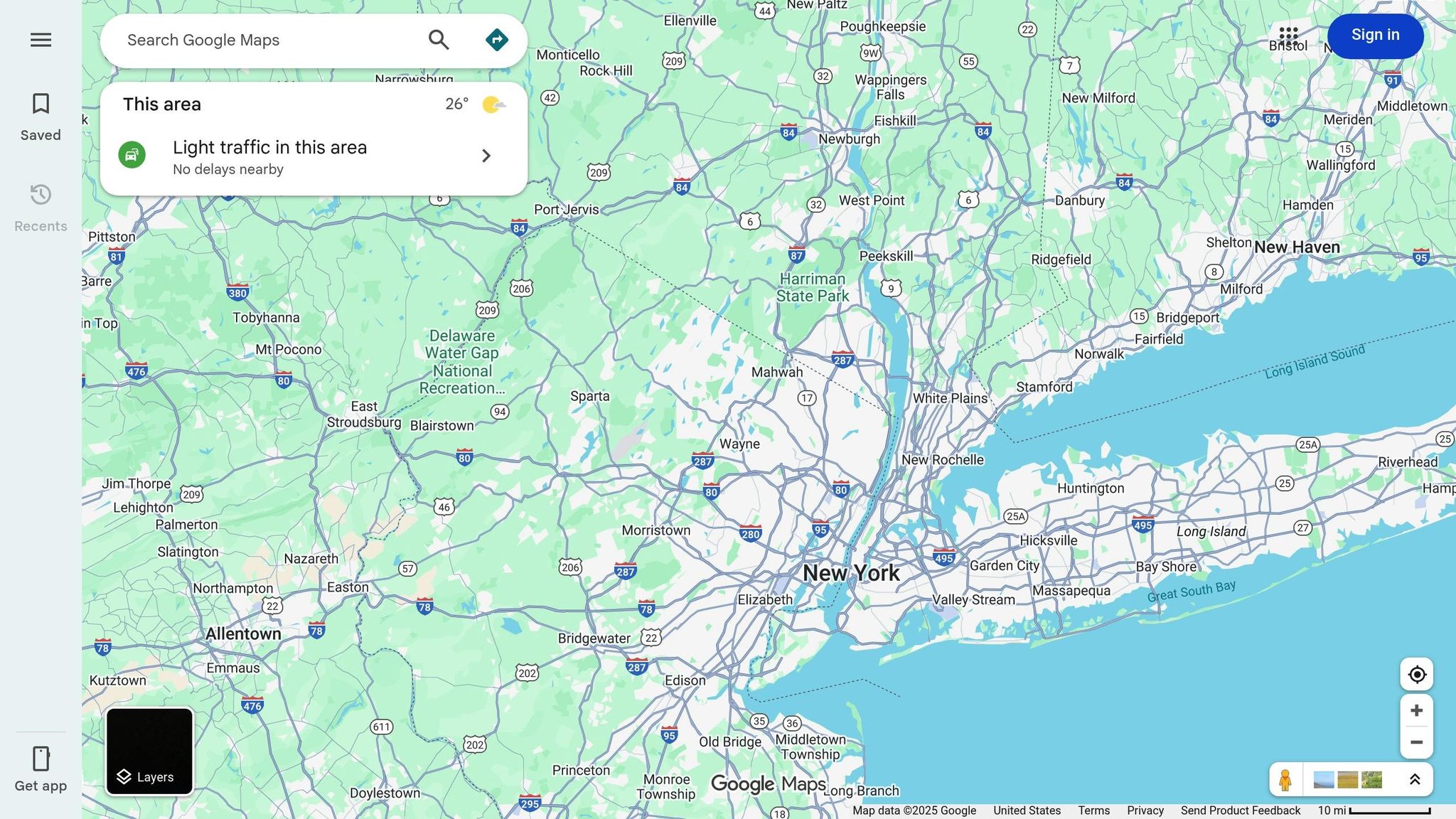
Embedding a Google Map on your website’s contact or location page creates a direct link between your site and your Google Map Pack listing. To do this, search for your business in Google Maps, click “Share,” then “Embed a map,” and paste the HTML code onto your contact page.
Next, implement LocalBusiness schema markup in your website’s code. This structured data helps search engines understand key details about your business, such as its name, location, and hours of operation. Make sure this information matches your Google Business Profile exactly.
| Schema Element | Purpose | Data to Include |
|---|---|---|
| Physical Address | Confirms location | Street, City, State, Zip Code |
| GeoCoordinates | Precise mapping | Latitude and Longitude |
| Business Hours | User experience | Regular and Holiday hours |
| Telephone | Direct contact | Local area code number |
To take it a step further, align your Google Business Profile categories with dedicated service pages on your website. For example, if one of your categories is "HVAC Repair", create a detailed service page for HVAC repair. Use location-based keywords like "HVAC Repair in [Your City]" in your headers and content. This creates a strong connection between your website and your Google Business Profile, signaling to Google that you’re a well-established business in your area.
Conclusion
Keeping your Google Business Profile in top shape isn’t a one-time task - it’s an ongoing effort that sets thriving businesses apart from those lagging behind. And the numbers prove it: businesses that consistently optimize their profiles for over a year experience an average of 73% more customer actions compared to those with irregular updates.
The basics are simple but powerful: claim and verify your profile, fill out every field with accurate NAP (Name, Address, Phone) details, upload fresh, high-quality photos regularly, post weekly updates through Google Posts, and stay on top of your reviews. Your competitors are constantly improving, so staying idle isn’t an option.
If the manual steps feel overwhelming, especially for busy business owners, automation can be a game-changer. Tools like Local SEO Bot can handle repetitive tasks such as scheduling posts, managing citations, tracking Map Pack rankings, and crafting review responses. This allows you to focus on growing your business while ensuring your profile remains active - something Google values highly.
"Your Google Business Profile is not a set-and-forget listing. It's a major marketing asset that requires ongoing optimization." - Search Engine Land
The most successful local businesses don’t just set up their profiles and walk away. They update them weekly, respond to every review, and ensure all details remain accurate. A neglected "perfect" profile won’t compete with an actively managed one. Start with the essentials, automate where you can, and keep updating regularly to strengthen your position in the Map Pack and drive more customers to your door.
FAQs
How often should I update my Google Business Profile to rank better in the Map Pack?
To keep a strong presence in the Map Pack, make it a habit to update your Google Business Profile regularly - aim for at least once a week. Share updates whenever there’s something new, like adjusted business hours, fresh photos, or special promotions.
Regular updates show Google that your profile is active and engaging, which can boost your visibility and rankings. Staying consistent not only enhances your online presence but also helps you draw in more local customers and outpace competitors.
What types of Google Posts can help improve my local search ranking?
To improve your local search ranking, make the most of Google Posts by regularly sharing engaging and relevant content. Posting at least once a week helps keep your Google Business Profile active, which signals to Google that your business is relevant and up-to-date. Prioritize posts that focus on timely and location-specific information to attract users and enhance your visibility.
Here are some effective types of posts you can create:
- Promotions: Highlight discounts, special offers, or limited-time deals to drive clicks and encourage conversions.
- Events: Share details about sales, community gatherings, or workshops to build urgency and connect with your local audience.
- Updates: Announce new products, services, or important business news to keep your profile fresh and engaging.
By actively maintaining a lively and informative profile, you not only draw in more potential customers but also increase your chances of ranking higher in Google's local Map Pack.
How can I keep my business's name, address, and phone number consistent online?
Ensuring your Name, Address, and Phone number (NAP) stay consistent across all online platforms is key to boosting your visibility in Google's local search results. Start by creating a master NAP template that includes the exact spelling, punctuation, and formatting you want to use. For example: "123 Main St., Suite 200, Anytown, CA 90210 | (555) 123-4567." Use this as your go-to reference when updating your Google Business Profile, local directories, social media profiles, and website.
Regularly audit your existing listings to catch discrepancies or duplicate entries. Tools like Local SEO Bot can make this process easier by pulling your NAP data from major platforms like Yelp, Apple Maps, and Facebook. This allows you to quickly spot and fix any errors, ensuring consistency. Additionally, embedding the same NAP details in your website’s schema markup helps search engines confirm the accuracy of your information.
To keep things running smoothly, schedule periodic reviews and train your team to always rely on the master NAP sheet when making updates. Consistent NAP details not only build trust with Google but also improve your chances of ranking higher in the Map Pack.