How to Remove Fake Reviews: Small Business Checklist
Published August 6, 2026
How to Remove Fake Reviews: Small Business Checklist

Flag the review immediately and document everything before you do anything else. That two-step sequence, flag and archive, is the foundation of every successful removal. Here is your 24–72 hour action checklist:
- Flag the review on the platform where it appears (Google, Yelp, Facebook, etc.) using the built-in report tool.
- Screenshot and archive the review with its URL, timestamp, and the reviewer’s profile link before it disappears or gets edited.
- Open the Reviews Management Tool in your Google Business Profile dashboard to check report status and submit a one-time appeal if the initial flag is denied.
- Prepare your appeal with a clear, factual statement of why the review violates policy and attach your evidence files.
- Do not engage the reviewer publicly until you have filed the report. Responding first can increase the review’s visibility.
- If the review involves a payment demand or threat, do not pay. Document the demand and use Google’s extortion reporting path rather than negotiating.
Key Takeaways
Removing fake reviews requires documentation first, then a precise platform report, and escalation to the FTC or an attorney when patterns or extortion appear.
| Point | Details |
|---|---|
| Flag and document immediately | Screenshot the review, capture the URL and reviewer profile, then file the platform report within 24 hours. |
| Use the Reviews Management Tool | Check report status in Google Business Profile; you get one appeal per review, so attach full evidence before submitting. |
| Escalate to the FTC for patterns | File at ReportFraud.ftc.gov with screenshots and a factual summary when a coordinated attack or extortion is involved. |
| Reply publicly with caution | Keep replies to two sentences, note no transaction record, and offer an offline contact; never admit liability or attack the reviewer. |
| Localseobot for ongoing monitoring | Localseobot’s review dashboard and automated alerts help you spot and document suspicious reviews before they compound. |
Table of Contents
- How can you tell if a review is fake?
- How do you remove fake reviews on Google Business Profile?
- How do you report fake reviews on other major platforms?
- What evidence should you collect before filing a report?
- When should you escalate to the FTC, police, or an attorney?
- How should you respond publicly to a fake or negative review?
- How can you prevent fake reviews and monitor for new ones?
- The reality of fighting fake reviews
- Localseobot helps you monitor and act faster on suspicious reviews
- Sources
How can you tell if a review is fake?
Spotting an inauthentic review before you report it matters because choosing the wrong policy reason is one of the most common reasons flags get denied. Train yourself to look for these patterns:
- Burst timing. Many 1-star reviews arriving in a short period from accounts created recently is a textbook spam attack.
- Identical or near-identical wording. Copy the review text into a search engine. If it appears on other businesses’ profiles verbatim, it is almost certainly coordinated.
- Reviewer profile age and history. A profile with zero prior reviews, no photo, and a generic name that reviewed your business once is a strong signal.
- Location mismatch. Google shows a reviewer’s general location on some profiles. A reviewer based 2,000 miles away who claims a specific in-store experience warrants scrutiny.
- Generic or AI-generated text. Phrases like “terrible service, would not recommend” with no specific detail are common in bulk fake-review campaigns.
- Non-customer photos. Images attached to a review that clearly show a different business, a stock photo, or an unrelated location.
- Cross-platform duplicates. The same review text appearing on your Google listing, Yelp page, and TripAdvisor profile simultaneously.
Quick triage procedure:
- Check the reviewer’s profile history. Zero reviews or a sudden burst of reviews for unrelated businesses in different cities is a red flag.
- Search the review text in quotes on Google. Duplicate text across multiple businesses confirms a coordinated campaign.
- Cross-reference the reviewer’s claimed experience against your transaction records. No matching order date, no matching service, no matching location means no customer relationship.
Illustrative red-flag pattern: Seven 1-star reviews posted between 11 PM and 2 AM from accounts all created within the previous 30 days, each containing fewer than 10 words and no specific detail. That pattern almost always qualifies as spam under Google’s content policies.
Pro Tip: Save the reviewer’s profile URL the moment you spot a suspicious review. Google occasionally removes accounts, which deletes the profile page and weakens your evidence if you wait.
How do you remove fake reviews on Google Business Profile?
Google removes reviews only when they violate its content policies, which cover spam, fake engagement, profanity, hate speech, conflicts of interest, and non-genuine feedback. Disagreeing with a review’s opinion is not grounds for removal. Here is the exact workflow.
Flagging via Google Business Profile
- Sign into the Google account tied to your Business Profile at Business.
- Navigate to Reviews in the left menu.
- Find the review you want to report, click the three-dot menu next to it, and select Report review.
- Choose the most accurate policy reason from the list (Spam, Off-topic, Conflict of interest, Profanity, Bullying or harassment, Discrimination or hate speech, Personal information, Not helpful).
- Submit. Google’s automated systems begin evaluation immediately.
Using the Reviews Management Tool
The Reviews Management Tool gives you a centralized view of all flagged reviews and their current status. Access it at support.google.com under Business Profile Help, or search “Reviews Management Tool” in the Google Business Profile Help Center. Once inside:
- You will see statuses including Under review, Report reviewed — no policy violation found, and Escalated.
- If a review shows no policy violation found, you have one opportunity to submit a formal appeal. Use it carefully: appeals are one-time only per review.
- Attach your evidence (screenshots, transaction records, profile links) when submitting the appeal.
Timeline and status expectations
Evaluation typically takes several days. Do not re-flag the same review repeatedly while waiting; Google’s systems treat repeated flags from the same account as noise and it can slow the process. If the status stalls beyond two weeks, escalate through the official Business Profile Help Community with your documented evidence. Community escalations with clear, factual write-ups regularly attract moderator attention.
Google’s contribution policies also allow the original reviewer to edit or delete their own review. If you know the reviewer personally and the review was a mistake, asking them directly to remove it is a legitimate path.
Pro Tip: Pick the single most accurate policy reason rather than the most severe-sounding one. Selecting “Hate speech” for a review that is actually spam causes a mismatch that reviewers flag as incorrect, which can result in a faster denial. Match the reason to the actual violation.
For a deeper walkthrough of the removal process, see Localseobot’s guide to Google review removal.
How do you report fake reviews on other major platforms?
The FTC provides platform-specific reporting steps and recommends filing a report at ReportFraud.ftc.gov with “fake review” in the comments field for any platform that fails to act.
| Platform | Reporting path | Typical outcome |
|---|---|---|
| Yelp | Click the three dots next to the review, select “Report review,” choose the violation type | Yelp’s Content Integrity team reviews; business owners can also flag via the Yelp for Business dashboard |
| Click the three dots on the review/recommendation, select “Find support or report,” choose the category | Meta’s review team evaluates; business owners can also use the Business Support Center | |
| Amazon | Click “Report abuse” below the review; sellers can escalate via Seller Central’s “Report a violation” tool | Amazon’s moderation team reviews; verified purchase status affects outcomes |
| TripAdvisor | Use the “Report a problem” flag on the review; owners can escalate via the Management Center | TripAdvisor’s content team reviews; patterns of abuse can trigger deeper investigation |
| Trustpilot | Click “Report review” on the review page; businesses with a paid plan can flag via the Business portal | Trustpilot’s compliance team reviews; verified-order flagging available for integrated accounts |
When on-platform reporting stalls, escalate in this order:
- Submit a formal request through the platform’s business-owner support form with your evidence package.
- Post in the platform’s official business community forum with a calm, factual description of the issue.
- Tag the platform’s official support handle on social media if the forum post goes unanswered for more than 10 business days.
What evidence should you collect before filing a report?
Capture everything before you file. Screenshots disappear, accounts get deleted, and appeals without documentation rarely succeed. Your evidence package should include:
- Full-page screenshots of the review with the timestamp and reviewer name visible.
- The review’s URL copied directly from the browser address bar.
- The reviewer’s profile URL and a screenshot of their review history.
- Transaction records showing no matching customer relationship (order logs, appointment records, CRM entries).
- Communication logs if the reviewer contacted you before or after posting.
- Cross-platform duplicates if the same text appears on other listing sites.
Organize everything in a dated folder using this naming convention: YYYY-MM-DD_Platform_ReviewerName_Screenshot01.png. That structure makes it easy to sort by date and platform when building an appeal or FTC complaint.
For your tracking spreadsheet, use these columns:
| Column | What to record |
|---|---|
| Date spotted | The date you first saw the review |
| Platform | Google, Yelp, Facebook, etc. |
| Review URL | Direct link to the review |
| Screenshot filename | Matches your folder naming convention |
| Why it’s inauthentic | Specific policy violation (spam, no transaction, etc.) |
| Report status | Pending, denied, appealed, removed |
Pro Tip: Store your evidence folder in a cloud drive (Google Drive, Dropbox) with a shared link ready to paste into support tickets. Uploading files individually during an appeal is slower and more error-prone than sharing a pre-organized folder.
When should you escalate to the FTC, police, or an attorney?
Platform appeals handle most cases. Three situations call for outside escalation.
File with the FTC when a business or individual is running a coordinated fake-review campaign against you, when you receive an offer to remove reviews in exchange for payment, or when the reviews contain false factual claims designed to deceive consumers. The FTC warns businesses that deceptive review practices can trigger enforcement, and the agency’s final rule banning fake reviews gives it stronger tools to act. File at ReportFraud.ftc.gov and include:
- Your business name, URL, and the platform where the reviews appear.
- Screenshots and URLs of the offending reviews.
- Any communication showing a payment demand or coordinated attack.
- A brief factual summary of why the reviews are false.
Contact local law enforcement when the review involves a criminal threat, extortion, or a false allegation of illegal conduct. A police report creates an official record that supports both a platform appeal and a civil lawsuit.
Consult an attorney when:
- A pattern of false reviews is causing measurable financial harm.
- Reviews contain specific false statements of fact (not just opinions) that damage your reputation.
- You have received a direct extortion demand tied to your Business Profile.
On extortion specifically: Google Maps documents extortion behaviors tied to reviews and provides a dedicated reporting path. Never pay. Paying marks your business as a target for repeat demands. Document the demand in full, use Google’s extortion reporting path, and file a police report if the threat is criminal.
How should you respond publicly to a fake or negative review?
Prioritize reporting and evidence collection first. A public reply does not remove the review and can increase its visibility in search results. When you do reply, keep it short, factual, and calm.
Three ready-to-use templates:
(a) Clearly fake (no transaction record): (b) Mistaken identity (wrong business): © Service complaint you want to resolve: Dos and don’ts:
- Do keep the reply to two sentences or fewer.
- Do offer an offline contact method.
- Do stay factual. Noting “no record of this transaction” is a factual statement, not an accusation.
- Don’t admit liability or offer a refund publicly.
- Don’t attack the reviewer’s credibility in the reply.
- Don’t repeat the negative claim in your response, as that amplifies it in search snippets.
Engaging publicly before reporting can signal to other potential fake reviewers that your business responds, which sometimes invites more attacks. File the report first, then reply if the review remains visible after 48 hours.
For guidance on how reviewers can edit or remove their own content, see how to change reviews on Google.
Pro Tip: A single, calm public reply that notes no transaction record and offers an offline contact is often more effective at defusing the review’s impact on prospective customers than a detailed rebuttal.
How can you prevent fake reviews and monitor for new ones?
Prevention is faster and cheaper than removal. Set up a monitoring workflow now, before the next attack arrives.
Monitoring checklist:
- Enable Google Business Profile email alerts for new reviews under Settings > Notifications.
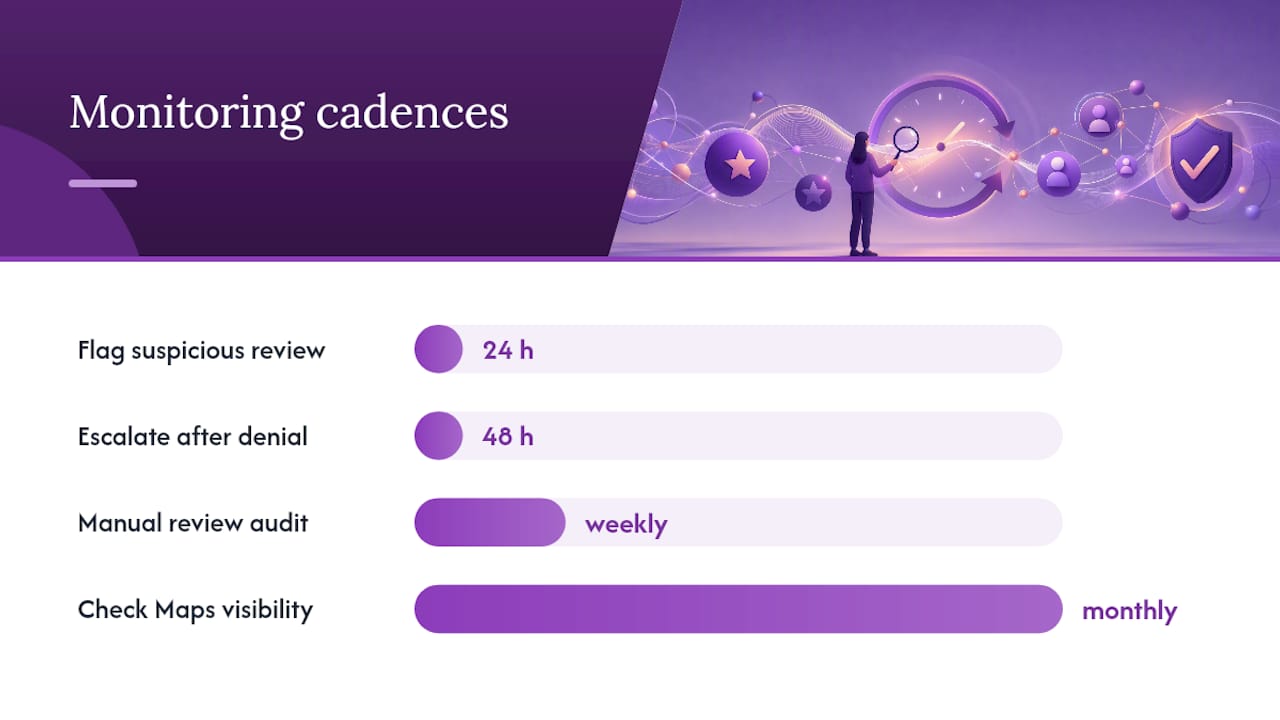
- Do a manual review audit weekly: export your reviews from the Business Profile dashboard and scan for burst patterns.
- Set a Google Alert for your business name plus terms like “scam” or “fraud” to catch off-platform attacks early.
- Check your Google Maps visibility score monthly to detect ranking drops that may correlate with a fake-review spike.
Legitimate review solicitation (stay compliant):
- Ask verified customers directly after a completed transaction, in person or via email.
- Never pay for reviews, offer discounts in exchange for reviews, or use review-gating software that filters out negative feedback before asking.
- Follow each platform’s solicitation policies. Google, Yelp, and TripAdvisor each prohibit incentivized reviews; violating those policies can get your listing penalized.
Internal incident response workflow:
Assign clear roles before an attack happens. A simple structure works:
- Who flags: the person managing the Business Profile (owner or designated staff).
- Who documents: the same person, using the evidence spreadsheet template from the earlier section.
- Who escalates: the owner or a manager, within 48 hours of a denied flag.
- SLA: flag within 24 hours of spotting a suspicious review, escalate to appeal or FTC within 48 hours of a denial.
Building a strong base of genuine reviews also dilutes the impact of any fake ones. A business with 200 authentic 4.8-star reviews absorbs a coordinated 1-star attack far better than one with 12 reviews. For a broader look at managing your online reputation, the step-by-step framework there pairs well with the monitoring workflow above.
The reality of fighting fake reviews
Most business owners expect platforms to act fast. They rarely do. Google’s automated spam detection catches a large share of fraudulent reviews, but the system makes mistakes, and manual review queues move slowly. The owners who get results are the ones who treat every fake-review incident like a small legal case: document everything, follow the process exactly, and escalate methodically when the first step fails.
Persistence matters more than volume. Filing the same flag ten times does not speed up Google’s process; it can actually slow it down by triggering duplicate-report filters. One well-documented flag, followed by one well-documented appeal, followed by a clear escalation to official support channels, is the sequence that works.
For extortion and coordinated attacks, the FTC’s final rule and Google’s extortion reporting path give you real leverage. Platforms respond faster when they see a documented pattern rather than a single complaint. Keep your evidence organized, stay calm in every public-facing communication, and treat the process as a marathon, not a sprint.
Localseobot helps you monitor and act faster on suspicious reviews
Catching a fake-review attack early cuts the damage it can do to your Google Maps ranking. Localseobot’s review monitoring tools give you a live dashboard of incoming reviews across your listings, automated alerts when new reviews appear, and AI-driven reply suggestions so you can respond quickly without drafting from scratch. The platform also generates monthly reporting exports, which means your evidence spreadsheet stays current without manual effort.

For small businesses managing their own local SEO, Localseobot pairs review monitoring with local SEO tools that track your Google Maps ranking before and after a fake-review incident, so you can see exactly how much visibility you recover after removal. The Local SEO Checker surfaces listing weak points that make your profile more vulnerable to spam attacks. Start a free trial at Localseobot and see your review monitoring dashboard within minutes.
Sources
- Identify scams on reviews & ratings - Google Maps Help
- How To Report Suspicious Online Reviews | Consumer Advice
- Federal Trade Commission announces final rule banning fake reviews & testimonials