3–5x More Reviews With Compliant SMS Review Requests for SMBs
Published August 31, 2026
3–5x More Reviews With Compliant SMS Review Requests for SMBs
Yes, use SMS for review requests when you have a customer’s consent to text them. It converts at roughly 3 to 5 times the rate of email for this exact purpose. The rule that governs everything else: send one short message, under 160 characters, with a direct review link and a clear opt-out, and follow up no more than once.
TL;DR:
- Sending SMS review requests within 160 characters with a direct review link significantly increases response rates compared to email, with open rates near 98%.
- Obtain documented customer consent before texting, restrict messages to the consumer’s local time window, and include an opt-out option in every message.
- Timing the request within hours of service or delivery maximizes review velocity, avoiding delays that cause recall issues or lost opportunities.
- Automate review requests based on clear triggers, and test messages on actual phones to prevent technical issues and ensure compliance.
- Maintaining a high response and review completion rate supports local SEO efforts by pairing fresh reviews with citation work for better search rankings.
Table of Contents
- Why SMS Often Beats Email for Review Requests
- Best Practices for Copy, Links, and Compliance
- Copy-Ready SMS Templates You Can Send Today
- When Should You Send Each Review Request?
- Setting Up Automation Without Breaking Compliance
- What Metrics Actually Show Your Program Is Working
- Mistakes That Quietly Kill Your Review Program
- How Local SEO Bot Ties Review Requests to Local Visibility
- An Author’s Checklist for a Compliant SMS Review Program
- Turn Review Requests Into Local Ranking Gains
- Sources
Why SMS Often Beats Email for Review Requests
People read texts almost immediately. Email review requests sit in inboxes for days, competing with newsletters, receipts, and spam folders that swallow them whole. SMS doesn’t have that problem, and the gap in performance shows up in every metric that matters for review collection.
SMS review requests see open rates near 98%, with click-through rates on the review link landing in the 25 to 40% range. That’s according to industry data compiled by TrueReview, and it lines up with what most local businesses report once they switch channels.
Speed matters as much as reach. A customer who gets a text four hours after a service call still remembers the technician’s name. A customer who gets an email three days later barely remembers booking the appointment. That gap in recall translates directly into review velocity, meaning how fast your business accumulates fresh reviews rather than one every few weeks.
SMS isn’t always the right tool, though. If you don’t have documented consent to text a customer, don’t text them, full stop. Email or a printed card at checkout works better there. For long-arc B2B relationships where the “review” moment might not arrive for months, or for enterprise clients who expect formal communication, email or a personal follow-up call usually reads as more appropriate than a text.
Best Practices for Copy, Links, and Compliance
Getting SMS review requests right comes down to a handful of rules you can apply to your very next message. Skip any of them and you either tank your response rate or expose your business to legal risk.
Keep it under 160 characters. That’s the limit for a single SMS segment, and messages that spill into a second segment often get truncated or delayed depending on the carrier. Personalize with the customer’s first name and your business name, but don’t pad the message with extra pleasantries.
Use a direct link, not a homepage URL. Send customers straight to your Google Business Profile review form using your Place ID or a g.page short link. Every extra tap between the text and the review box costs you completions, and Bazaarvoice’s own guidance on text review collection backs this up: one-tap links convert meaningfully better than multi-step landing pages.
Get consent and document it. TCPA rules require explicit consent before you text any customer, and you should only send between 8 a.m. and 9 p.m. in the recipient’s local time zone. Keep a record of when and how each customer opted in.
Never gate reviews or pay for positive ones. The FTC’s 2024 rule specifically targets review-gating schemes, where businesses route unhappy customers to a private form while pushing happy ones to Google. It’s risky and it produces a skewed, less trustworthy review profile anyway.
A few more rules worth building into your template library for managing online reputation:
- Include “Reply STOP to opt out” in every message, not just the first one.
- Ask for exactly one thing. Don’t combine a review request with a promotion or a survey.
- Give unhappy customers a private channel (a phone number or reply option) before they vent publicly.
- Test every link on an actual phone, not just a desktop preview.
Pro Tip: Send yourself the exact message you’re about to blast to your customer list first. Typos and broken links are invisible on a compose screen and glaring on a 6 inch mobile display.
Copy-Ready SMS Templates You Can Send Today
Templates save you from staring at a blank compose box, and short, personal messages with a direct link consistently outperform longer, multi-purpose texts. Here are templates organized by use case, all under the 160-character limit.
- General request: “Hi [First Name], thanks for choosing [Business Name]! Mind leaving a quick review? [link] Reply STOP to opt out.”
- Post-appointment (service business): “Hi [First Name], it was great working with you today. Could you share your experience? [link] Reply STOP to opt out.”
- Post-delivery (retail or e-commerce): “Hi [First Name], hope your order from [Business Name] arrived great! Leave us a quick review here: [link] Reply STOP to opt out.”
- Support ticket resolved: “Hi [First Name], glad we could resolve your issue. If you have a minute, a review helps us a lot: [link] Reply STOP to opt out.”
- Reminder (send once, days later): “Hi [First Name], just following up. If you have 30 seconds, we’d love your feedback: [link] Reply STOP to opt out.”
- Private feedback catch (for likely dissatisfied customers): “Hi [First Name], how did we do? If anything wasn’t right, reply here and we’ll fix it. [link] Reply STOP to opt out.”
Adapting these takes minutes, not hours. Swap “Business Name” and tone to match your brand voice, whether that’s a plumbing company that keeps things blunt or a boutique salon that leans warmer. Keep the link and the opt-out language intact no matter what you change. If you run multiple service lines, build one template per trigger (job completed, invoice paid, appointment finished) so the message always matches the customer’s most recent interaction rather than a generic catch-all.
When Should You Send Each Review Request?
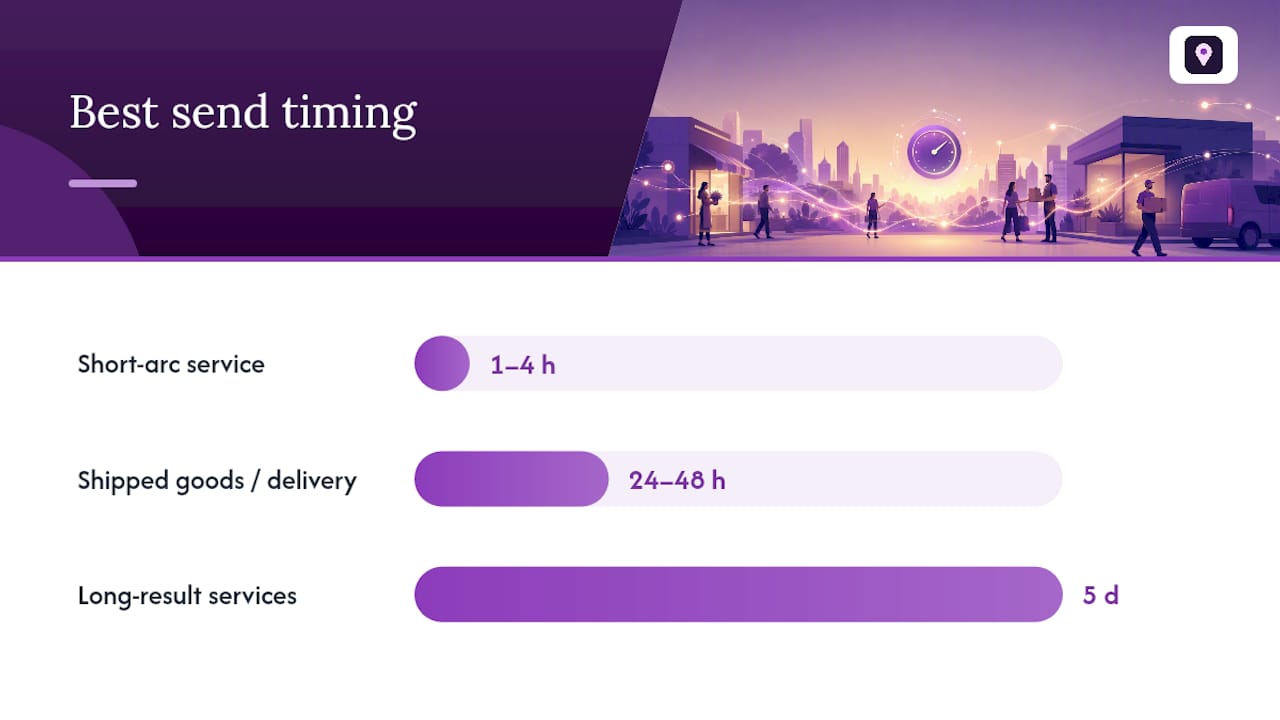
Timing changes based on what kind of business you run and how the customer experienced your service. Send too early and the experience hasn’t settled. Send too late and the details have faded.
| Interaction type | Best send window | Follow-up window |
|---|---|---|
| Short-arc service (haircut, repair, consult) | 1 to 4 hours after completion | 3 to 4 days later, once |
| Shipped goods or delivery | 1 to 2 days after delivery confirmation | 3 to 4 days after first text |
| Long-result services (renovation, legal, medical) | 5 days after resolution | 5 to 6 days after first text |
Stick to one initial request and one reminder, never more. Message IQ’s data on SMS review requests shows that a single, well-timed reminder can add a meaningful proportion of additional captured reviews on top of the initial message., but a third or fourth message tends to trigger opt-outs instead of reviews. The moment a customer replies STOP, that channel closes immediately and permanently for them, no exceptions.
Time zone awareness isn’t optional either. A business with customers spread across several states needs to schedule sends based on each recipient’s local time, not the time at company headquarters. Sending a review request at 6 a.m. or 10 p.m. local time violates the 8 a.m. to 9 p.m. window required under TCPA, even if it felt like a reasonable hour where you’re sitting.
Setting Up Automation Without Breaking Compliance
Manual review requests don’t scale past a handful of customers a week. Automation does, but only if it’s built on the same rules that apply to a one-off text.
Set your triggers around the moment the service arc actually ends: job marked complete in your field service software, invoice paid in your billing system, or support ticket closed in your helpdesk. Match the delay to the service type from the timing table above rather than firing every trigger on the same fixed schedule.
Before any automated message goes out, the workflow needs to check two things: does this contact have documented consent, and are they on a suppression list from a prior opt-out. Skipping either check is how businesses end up texting people who never agreed to it, which is the fastest way to draw a TCPA complaint.
A few operational habits worth locking in early:
- Test your review link on iPhone and Android before launching any new template.
- A/B test two message variants on a small batch before rolling out to your full list.
- Watch for carrier filtering issues tied to 10DLC registration, which can silently suppress delivery if your sending number isn’t properly registered.
Pro Tip: Run a test batch of 20 to 30 messages before any full-scale send. Carrier filtering problems and broken merge fields show up fast in a small batch and cost you nothing to catch there instead of across your whole customer list.
What Metrics Actually Show Your Program Is Working
Four numbers tell you whether an SMS review program is healthy: delivery rate, click-through rate, review completion rate, and monthly review velocity.
Delivery rate tells you if your infrastructure is sound. Click-through rate tells you if the message itself is compelling. Completion rate, meaning the share of clicks that turn into a posted review, tells you if the link and review form are frictionless. Velocity, your net new reviews per month, tells you if the whole program is moving the needle on your Google Business Profile.
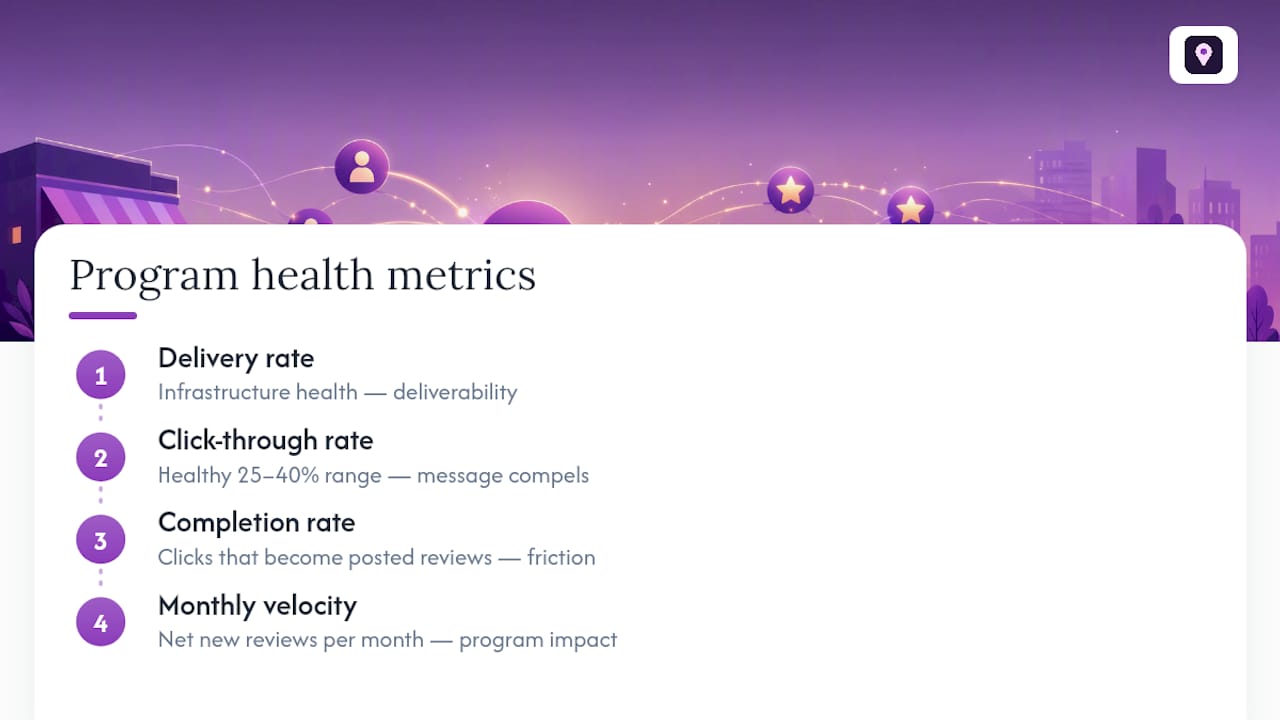
Healthy programs typically see click-through rates in the 25 to 40% range. If your click-through is solid but completion lags, the review form itself has friction, maybe too many required fields or a slow-loading page. If clicks themselves are weak, the message copy or timing needs work before anything else.
Segment these numbers by trigger type and customer cohort. A plumbing company might find that emergency-call customers click at twice the rate of routine-maintenance customers, which tells you exactly where to focus your reminder cadence.
Mistakes That Quietly Kill Your Review Program
Most SMS review programs don’t fail because the templates are bad. They fail because of a handful of repeatable, avoidable mistakes.
- Review gating, routing only happy customers toward a public review link while diverting unhappy ones elsewhere, invites FTC scrutiny and produces a review profile that doesn’t reflect reality.
- Offering incentives for positive reviews carries the same risk. Organic, unsolicited reviews hold up better long-term and cost you nothing in enforcement exposure.
- Sending outside the 8 a.m. to 9 p.m. window or without a documented opt-in violates TCPA regardless of intent.
- Combining a review ask with a promotion in the same text confuses the purpose and depresses response rates on both fronts.
- Ignoring STOP replies or texting the same customer repeatedly after they’ve asked for a review once turns a satisfied customer into an annoyed one.
How Local SEO Bot Ties Review Requests to Local Visibility
Review requests don’t exist in a vacuum. They feed directly into the signals Google uses to rank your Google Business Profile against competitors nearby. Localseobot builds SMS and automated review request flows directly into a broader local visibility workflow that also includes citation building and profile optimization, so review velocity and Maps ranking move together instead of as separate projects.
A steady stream of fresh, organic reviews paired with consistent, high-authority citations is one of the more reliable combinations for climbing local search results, because both signal to Google that a business is active and trusted by real customers.
Localseobot backs its work with a 30-day money-back guarantee if a business doesn’t see a ranking increase, and clients get access to ready-made Google review reply templates alongside the SMS request flows.
An Author’s Checklist for a Compliant SMS Review Program
Before any SMS review request goes out, run it through this list: consent recorded and dated, a direct review link, message under 160 characters, one follow-up maximum, sending scheduled to the recipient’s local time zone, and delivery plus completion rates tracked weekly.
Test every flow on an actual phone before it goes live, and build in a private feedback path so dissatisfied customers reach you directly instead of a public review page. Get these six things right and the rest of the program takes care of itself.
— Local
Turn Review Requests Into Local Ranking Gains
Localseobot gives you the templates and automation this article just walked through, built directly into a platform that also handles your citations and Google Business Profile optimization. Instead of running SMS review requests in one tool and Maps ranking work in another, you get both under one dashboard, with AI-assisted review replies and automated posting handling the follow-through once reviews land.

Pairing review velocity with consistent citation work tends to move Maps rankings faster than either effort alone, since Google weighs both fresh review activity and directory consistency when ranking local results. If you want to see where your business currently stands, run a free scan with the Google Maps Visibility Score Calculator and start a trial to put the SMS templates from this article into an automated flow this week.
Sources
- SMS Review Requests: The Complete Guide for Local Businesses (TrueReview)
- SMS Review Request Templates: 15 Texts That Work (Review Glow)