Fix Google Business Profile Duplicates Without Losing Reviews
Published September 13, 2026
Fix Google Business Profile Duplicates Without Losing Reviews

Claim and verify your correct Business Profile first. Then handle the extras: if you own both, request a merge through Google Business Profile support; if you don’t own the duplicate, suggest an edit on Google Maps flagging it as a duplicate. Merges usually fold reviews into the surviving profile, but replies you wrote to those reviews often don’t survive the process.
TL;DR:
- Only one verified Business Profile is allowed per physical location, and creating or maintaining duplicates harms search visibility and review conformity.
- Use Google searches, address variations, and citation tools to identify duplicate profiles, and log evidence carefully for support requests.
- Request merges if you own both profiles with reviews and backlinks to preserve authority, but delete only if the duplicate is unverified, empty, and created by mistake.
- Merges preserve reviews but often lose reply histories, so screenshots of responses are recommended before initiating any profile consolidation.
- Manual review is essential because automated tools can inadvertently recreate duplicates, especially when data sources or listings get updated by aggregators.
Table of Contents
- What Google Considers a Duplicate Listing
- How Do You Find Duplicate Listings on Google?
- How to Fix Duplicate Listings Depending on Who Owns Them
- Should You Merge or Delete a Duplicate Listing?
- How Do You Keep Duplicates From Coming Back?
- The Managed Alternative to DIY Duplicate Cleanup
- Let a Manual Citation Team Handle the Duplicates You Can’t
- A Publisher’s Take on Why Manual Beats Automated Here
- Quick Links for Duplicate Listing Fixes
- Sources
- FAQ
What Google Considers a Duplicate Listing
Google allows exactly one Business Profile per physical business location, full stop. Anything beyond that gets flagged, and a flagged profile simply won’t surface on Search or Maps, according to Google’s own guidance.
Duplicates show up for a handful of predictable reasons:
- An employee or agency created a second profile without checking if one already existed and was verified.
- A business shares an address with another entity (a shared office suite, a multi practice clinic) and Google’s algorithm treats the overlap as suspicious.
- A single business splits its services into separate listings, like a restaurant that also lists its catering arm as its own profile.
- An aggregator scraped old data and auto generated a page nobody claimed.
The damage compounds quietly. Reviews split across two or three profiles instead of stacking on one, which weakens the star rating that actually shows in search results. Rankings suffer because Google can’t decide which profile deserves the authority. Customers get confused, calling a disconnected number or driving to an address the business left two years ago. One especially costly mistake: businesses that rebrand or relocate sometimes mark their old profile “permanently closed” instead of requesting a merge, which can wipe out review history that took years to build.
How Do You Find Duplicate Listings on Google?
Before fixing anything, you need a full picture of what exists. Duplicates hide in plain sight, often under slightly different name spellings or address formats.
- Search your business name plus city on Google, then search again using Google Maps directly, since the two surfaces sometimes surface different results.
- Try variations: a shortened business name, an old phone number, a previous street address, and any DBA (doing business as) name you’ve used.
- Check your Google Business Profile dashboard for a duplicate warning, which Google sometimes displays automatically when it detects a conflict.
- Search your exact address in Google Maps to catch listings tied to a shared building or suite number.
- Run a citation scan through a tool like the Citation Consistency Analyzer to catch mismatched NAP (name, address, phone) data across directories, not just Google.
- Check other major publishers too, since Facebook, Yelp, and Apple Maps each run their own separate removal processes with different timelines, per Yext’s documentation on duplicate suppression.
For every candidate duplicate you find, log it in a spreadsheet with these fields: exact NAP as shown, verification status, review count, profile URL, and a screenshot with a timestamp. That log becomes your evidence file if Google support asks for proof later.
Pro Tip: Screenshot the duplicate’s Google Maps URL bar, not just the listing card. The URL often reveals the place ID, which support teams sometimes ask for directly when processing a merge request.
How to Fix Duplicate Listings Depending on Who Owns Them
The right move depends entirely on who controls each profile. Match your scenario below before you touch anything.
You own both profiles. Open the primary listing in your Google Business Profile dashboard, then request a merge through Google’s support channel rather than deleting the duplicate outright. Deleting instead of merging throws away accumulated reviews and any link equity the duplicate built up. If one of the two is clearly redundant and has zero reviews or history, you can instead remove it directly from your account, but confirm first that it isn’t the one showing up higher in local results.
Someone else owns the verified profile, and it’s wrong. Request ownership through the Business Profile interface. Google typically reviews these requests within a few business days, though contested claims (two parties both claiming legitimacy) take longer. If the current owner ignores the request or Google doesn’t respond, escalate through the support case form and attach evidence: a utility bill, a business license, or signage photos showing your name at that address. Community threads documenting real ownership disputes show that persistence and clean documentation matter more than urgency here.
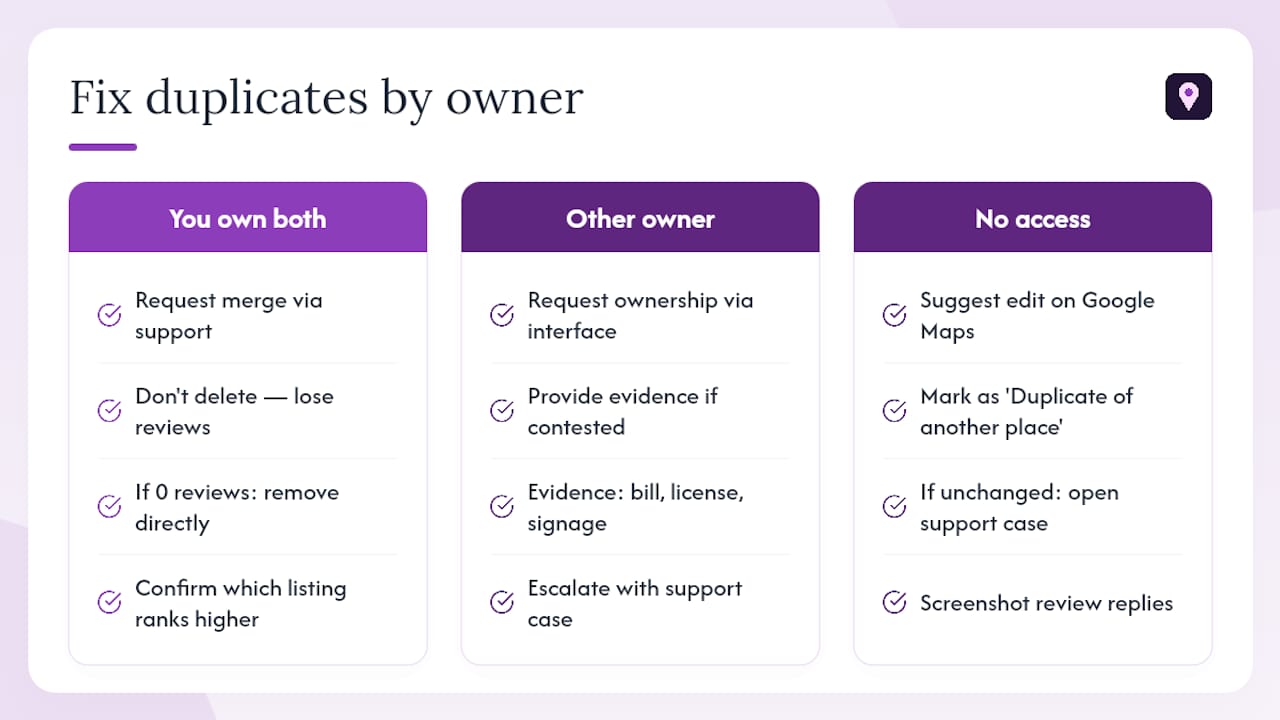
You don’t own the duplicate at all. Use the “Suggest an edit” feature on the duplicate’s Google Maps listing, select “Close or remove,” then choose “Duplicate of another place” and point it to your correct profile. This is the fastest lever available to a business owner with no account access to the duplicate. If nothing changes after a couple of weeks, follow up by opening a support case referencing your suggested edit.
Across every scenario, remember what happens to reviews once a merge completes: they combine onto the surviving profile, but replies you wrote to individual reviews frequently don’t carry over. Screenshot your best review responses before requesting any merge, just in case.
Should You Merge or Delete a Duplicate Listing?
Merging preserves value. Deleting destroys it. That’s the entire logic behind this decision, and getting it backwards is the single most common way businesses hurt their own rankings during cleanup.
Use these rules before acting on any duplicate:
- Merge whenever the duplicate has reviews, backlinks, or any search visibility of its own to preserve authority.
- Delete only when you control the duplicate directly, it has no reviews, and it was created by mistake without external citations.
- Prefer the older, more established, or better-verified listing as the survivor when choosing between legitimate candidates, as it signals authority.
- Compare review volumes; keep profiles with significantly higher review counts rather than eliminating them for those with fewer reviews.
A careful audit before deletion prevents the kind of ranking dip that happens when a business deletes the wrong profile out of impatience. If you’re appealing a Google decision, the evidence that moves the needle fastest is physical proof: photos of exterior signage, a lease agreement, or a business license showing your legal name and address exactly as they should appear.
Pro Tip: If two duplicates both have meaningful review counts, don’t guess which one to keep. Merge requests let Google’s team make that determination once you flag both profiles as the same business, and their systems often catch citation signals a manual eyeball would miss.
How Do You Keep Duplicates From Coming Back?
Fixing a duplicate once doesn’t mean it stays fixed. Aggregators and data brokers regularly re-push old business information to publishers, which recreates the exact listing you just cleaned up.
- Correct the source data first. Update your business name, address, and phone number at the aggregator and citation partner level, not just on Google directly.
- Use suppression features built into listing management platforms where your publisher supports them, since suppressing a duplicate at the feed level stops it from reappearing the next time an aggregator syncs.
- Push your corrected NAP details to every directory that syndicates listing data, closing the loop that created the duplicate in the first place. A checklist for syncing your listings keeps this from becoming a one time fire drill.
- Set a monthly check on your own calendar: search your business name and address again, confirm no new duplicate has surfaced, and check that reviews are still routing to the right profile.
- If rankings dip right after a merge or suppression, don’t panic immediately. Minor volatility for a week or two is normal while Google’s index catches up; if it hasn’t recovered after that, reopen a support case.
The Managed Alternative to DIY Duplicate Cleanup
Manually chasing duplicates across a dozen directories works, but it’s slow, and mistakes are expensive once a valuable listing gets flagged as “permanently closed” by accident. A manual approach matters specifically because bulk automated tools are often what caused the duplicate mess in the first place. That manual approach matters specifically because bulk automated tools are often what caused the duplicate mess in the first place.
For a business managing this at scale, a rank check before and after suppression tells you whether the fix actually worked, not just whether the duplicate disappeared from view. Clients typically want two data points: a citation consistency report showing NAP alignment across directories, and a Maps ranking snapshot showing position before and after cleanup. The service offers a money-back guarantee if a business doesn’t see a ranking increase, putting the risk on the provider rather than the business owner testing it out.
Let a Manual Citation Team Handle the Duplicates You Can’t
Chase duplicates across Google, aggregator feeds, and a dozen directories eats hours you don’t have, and one wrong deletion can undo years of review history. This approach uses a manual audit: a citation consistency check that flags where your NAP data conflicts across publishers, followed by hands-on suppression instead of an automated tool that might recreate the same duplicate next month.

This approach fits multi-location brands especially well, since a duplicate at one address rarely stays isolated when the same business operates under five or ten profiles across a metro area. It also matters most for businesses sitting on a review history worth protecting. Losing three years of five-star reviews to a botched merge costs far more than the time it takes to fix duplicates correctly the first time.
Run a free scan with the Citation Consistency Analyzer to see exactly where your listings conflict, or refer to our step-by-step guide for SMBs to manage online reputation to handle duplicates and improve your review flow effectively.
A Publisher’s Take on Why Manual Beats Automated Here
Most SEO software treats duplicate suppression as a checkbox: scan, flag, submit, done. That mindset misses what actually causes the problem to recur. Automated citation tools push your business data to dozens of directories on autopilot, and the moment your NAP changes even slightly, that same automation can spawn a fresh duplicate on a publisher you already cleaned up six months earlier.

The overlooked nuance is this: the tool that fixes your duplicate today can be the same category of tool that created it. Bulk syndication was built for speed, not judgment, and judgment is exactly what a duplicate decision requires. Knowing whether to merge or delete depends on reading review counts, citation age, and link signals, not just matching two addresses that look similar.
A manual review catches the edge cases that automation waves through. A business with two Google profiles because it moved locations eighteen months ago needs a merge that preserves history. A business with a stray duplicate created by a former employee needs a straightforward removal. Treating both cases identically is how ranking drops happen after “successful” suppression. The businesses that come out ahead are the ones that treat duplicate cleanup as a judgment call requiring evidence, not a form to submit and forget.
— Local
Quick Links for Duplicate Listing Fixes
Start with Google’s own duplicate resolution guide for merge requests and ownership disputes. Review Yext’s suppression documentation for how publisher-level suppression works. Read the safe removal guide from Local Data Exchange before deleting anything. For edge cases where support goes quiet, the Local Search Forum thread on ownership disputes documents real escalation paths.
Sources
- Resolve duplicate profiles & ownership issues - Google Business Profile Help
- Suppress duplicate listings - Yext Help Center
- Duplicate Google Listings - How To Remove When Not The Owner Of The Duplicate Listing - Local Search Forum
FAQ
How can I merge duplicate Google Business listings?
If you own both profiles, request a merge through Google Business Profile support; if you only own one, use “Suggest an edit” on the duplicate and mark it as a duplicate of your correct listing.
Why does Google keep showing me a duplicate warning?
Google flags a second profile when it detects a matching address, phone number, or business name already tied to a verified listing, which is its way of enforcing the one-profile-per-business rule.
How long does it take to remove duplicate listings on Google?
Suggested edits can process within days, but ownership disputes and support case merges often take several weeks, especially if Google needs to verify conflicting evidence from both parties.
Do reviews transfer when you merge duplicate listings?
Yes, reviews generally combine onto the surviving profile after a merge, but replies you previously wrote to those reviews are frequently lost in the process.
What should I do if Google support doesn’t respond to my merge request?
Escalate with a new support case referencing your original request, attach evidence like utility bills or signage photos, and consider running a citation scan through a tool like the Citation Consistency Analyzer to strengthen your case.