200 Character Openers for Local Google Business Descriptions
Published September 9, 2026
200 Character Openers for Local Google Business Descriptions
Your Google Business Profile description is a short, customer-facing summary, capped at 750 characters, that appears on your listing to help searchers decide whether to call, visit, or scroll past. It does not directly boost your ranking. The single most important move is writing one clear opening sentence that states what you do, who you serve, and what sets you apart, since links, HTML, and promotional pricing are all off limits.
TL;DR:
- The first 200 to 250 characters of your description are most visible and should contain your core service, target audience, and a unique differentiator.
- Avoid including any links, promotional offers, HTML, or filler keywords, as these violate Google’s content policies and won’t be displayed.
- Use AI-generated drafts as starting points, but thoroughly review and customize them to ensure accuracy and compliance before publishing.
- Consistency between your description, categories, and citations improves search visibility and customer trust, making profile completeness essential.
- Regularly compare previous and updated descriptions by tracking profile insights like call and request counts to measure their effectiveness.
Table of Contents
- Why the Google Business Description Matters for Customers and Search
- Official Guidelines and Hard Limits You Must Follow
- How to Write a Description That Actually Works
- Google Business Description Examples and Templates by Industry
- How to Add or Edit Your Description, Including AI Suggestions
- Best Practices That Improve Your Snippet’s Impact
- Common Mistakes That Get Descriptions Flagged or Ignored
- Why We Treat the Description as One Piece of a Bigger Puzzle
- Sources
Why the Google Business Description Matters for Customers and Search
Your description is mostly a sales tool, not a ranking lever. Google has stated that local ranking runs on relevance, distance, and prominence, and the description plays a supporting role in relevance rather than driving it outright. The heavy lifting comes from your category selection, services list, citations, and reviews.
That said, a complete profile still matters. Google has said that fully filled-out Business Profiles are more likely to appear in local results and prompt customer actions like calls or direction requests. A strong description works alongside these other elements instead of replacing them:
- It reinforces the categories and services you have already listed, so your business reads as coherent rather than scattered.
- It gives searchers the context reviews alone cannot, like your specialty or service radius.
- Industry data from Ahrefs on local SEO suggests customers are more likely to visit or buy from businesses with complete, detailed profiles.
- It sets expectations before the click, which affects whether someone calls you or a competitor.
Think of the description as your elevator pitch inside a listing that is otherwise built from structured data.
Official Guidelines and Hard Limits You Must Follow
Google caps the Business Profile description at 750 characters, but the practical limit is much smaller. Practitioner guidance consistently points to the first 200 to 250 characters as the portion most likely to display without requiring a “more” click, so that opening stretch needs to carry your strongest message.
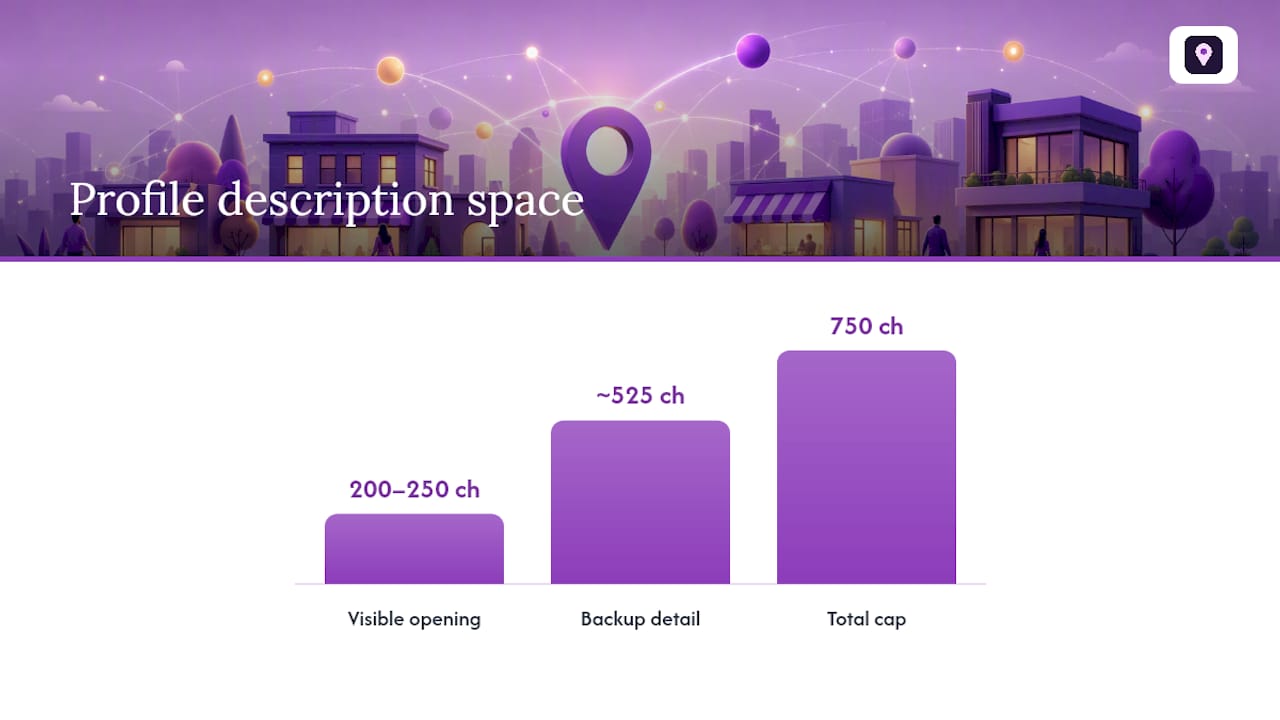
Statistic Callout: With a 750-character ceiling and only around 200 to 250 characters visible up front, roughly two-thirds of your description space is backup detail. The opening third does the actual selling.
Google’s guidelines for representing your business rule out several categories of content outright:
- No links or clickable URLs of any kind.
- No HTML tags, code, or special formatting.
- No promotional pricing, discounts, or time-limited offers.
- No irrelevant keywords, gimmicky characters, or filler unrelated to your business.
Google also offers an AI-powered “Suggest description” feature that drafts copy from your existing profile data. Treat every AI suggestion as a starting point, not a finished product. Google’s own description management guidance notes these drafts need a human check for accuracy and policy compliance before you save them.
How to Write a Description That Actually Works
Writing a good description is less about clever phrasing and more about sequencing. Put your best material first, then use the remaining space wisely.
- Open with your core service and your strongest value. Sentence one should answer “what do you do” in plain language. Skip the throat clearing.
- Name your audience or service area right after. A plumber serving “the greater Denver metro” reads more credibly than one who serves “the local area.”
- Add one differentiator. This might be a specialty, a certification, or a service angle competitors do not offer. Pick one; do not list five.
- Add a credibility line if space allows. Years in business, licensing, or a professional certification builds trust without sounding promotional.
- Cut anything that reads like an ad. No calls to action, no prices, no links. A description stuffed with keywords reads as spam to both readers and Google.
- Edit specifically for the first 200 to 250 characters. Read just that opening chunk on its own and ask whether it would make someone want to call you.
A family-owned bakery might write: “Family-owned bakery serving fresh sourdough, custom cakes, and pastries to the East Nashville community since 2014. Specializing in gluten-free and vegan options baked daily from scratch.” That first sentence covers service, audience, and history in under 130 characters.
Pro Tip: Write the first sentence five different ways before picking one. The version that reads best out loud, without you needing to explain it, is usually the one to keep.
Tools like the Local Business Description Generator can help you draft a starting version faster if you are staring at a blank field, though the editing work above still applies.
Google Business Description Examples and Templates by Industry
Below are adaptable examples across common business types. Swap in your own service, city, and specialty rather than copying these word for word, since Google’s guidelines discourage generic or irrelevant text.
- Retail: “Family-run hardware store in Asheville stocking power tools, gardening supplies, and hard-to-find fasteners since 1998. Free key cutting and expert advice on every project.” Template: “[Business type] in [city/area] offering [core products]. Specializing in [differentiator] since [year].”
- HVAC or plumbing: “Licensed HVAC contractor serving Fort Worth homeowners with same-day repair, maintenance plans, and energy-efficient system installs. Fifteen years of local service.” Template: “Licensed [trade] serving [service area] with [core services]. [Certification or years] of experience.”
- Legal or accounting: “Estate planning attorney helping Sacramento families with wills, trusts, and probate. Flat-fee consultations and twelve years focused exclusively on estate law.” Template: “[Practice area] attorney/accountant helping [audience] with [core services]. [Differentiator].”
- Salon or clinic: “Appointment-only dermatology clinic in Scottsdale specializing in acne treatment and skin cancer screenings for adults and teens. Board-certified dermatologist on staff.” Template: “[Business type] serving [audience] with [core services]. [Credential or specialty].”
- Multi-location or franchise: For businesses with several locations, keep the service and differentiator consistent across every listing, then localize only the service area line. This avoids duplicate-sounding profiles while keeping brand messaging intact.
How to Add or Edit Your Description, Including AI Suggestions
Editing the description takes a few minutes inside your Business Profile settings.
- Sign into your Business Profile and open Edit profile.
- Select the Description field and either write your own copy or select Suggest description to generate an AI draft, a feature Google notes is not available in every region or language.
- Read any AI suggestion line by line, checking it against the prohibited content rules and confirming it actually sounds like your business, not a generic template.
- Edit freely, accept as written, or reject the suggestion and write your own if it misses the mark.
- Save the changes. Updates typically show on your live profile within a few minutes to a few hours, though propagation time can vary.
Best Practices That Improve Your Snippet’s Impact
A few habits separate a description that performs from one that just sits there.
- Front-load your unique value proposition into the first 200 characters, since that is what most searchers actually read.
- Match your description language to the primary category and services you have already selected, so nothing contradicts your own listing.
- Save old versions of your copy before editing, so you can compare performance and track any shift in discovery metrics over time.
- Keep the tone and terminology consistent with any localBusiness structured data on your website, so your brand story lines up everywhere it appears.
Pro Tip: Screenshot your description every time you change it. Thirty days later, compare it against your call and direction-request counts in the profile’s insights to see whether the new copy actually moved the needle.
Common Mistakes That Get Descriptions Flagged or Ignored
Certain errors show up again and again, and most are easy to avoid once you know to look for them.
- Including promotional pricing, “% off” language, or time-limited offers, all of which violate Google’s content guidelines.
- Adding links, HTML, or keyword-stuffed sentences that read like an ad instead of a business summary.
- Letting your business name, address, or phone details drift out of sync with your citations elsewhere online.
- Publishing an AI-generated draft without reading it first, which risks generic phrasing or accidental policy violations slipping through unchecked.
If you’re managing citations across multiple directories, a tool like the Citation Consistency Analyzer can help you catch NAP mismatches before they undercut the trust your description is trying to build.
Why We Treat the Description as One Piece of a Bigger Puzzle
At Localseobot, we never treat the description as a standalone fix. It works best when it matches your categories, citations, and review activity, which is why our Google Business Profile Optimizer checks description copy against the rest of your profile automatically. Write your sentence, test it for 30 days, and track the results before rewriting again.
— Local
Sources
For the exact rules and editing steps, go straight to Google’s own documentation: managing your description, editing your Business Profile, and tips for local ranking. For a practical breakdown of what to include, see the Business Profile optimization guide from Quick Sprout. For a wider view of how AI drafting tools fit into marketing workflows generally, this guide to AI content tools is worth a read.
- Tips to improve your local ranking on Google - Google Business Profile Help
- Google Business Profile optimization guide - Quick Sprout