Nov 3, 2026 Shutdown: 8-Step Google Business Q&A Recovery
Published September 15, 2026
Nov 3, 2026 Shutdown: 8-Step Google Business Q&A Recovery

Google retired the Business Profile Q&A feature and shut down its API on November 3, 2025. It replaced customer-submitted questions with Ask Maps, an AI answer layer that pulls from your profile and website instead of your replies. If you managed Q&A by hand, that job is over. The priority now is auditing your Google Business Profile fields and building a real FAQ page on your website, because that’s what the AI reads from.
TL;DR:
- Google has eliminated the Business Profile Q&A API and public Q&A widget as of November 3, 2025, making manual management impossible.
- Ask Maps now provides AI-generated answers based on profile data, website content, reviews, and recent posts, prioritizing businesses with complete, up-to-date info.
- To optimize for Ask Maps, businesses should update profile fields, create detailed service lists, publish concise website FAQs, and ensure citation consistency.
- Old Q&A threads are largely removed from profiles, so previous content can only be preserved through screenshots or exports, and new Q&A management is no longer possible.
- Tools are available that automatically audit your profile, citations, and content to ensure accurate data, helping you adapt quickly to this shift in local search.
Table of Contents
- What Changed With Google Business Q&A and When
- Ask Maps Now Answers Customer Questions Instead of You
- Your Priority Checklist for Post-Q&A Local SEO
- What the API Deprecation Means for Developers and Tools
- What Happens to Your Old Q&A Content
- How to Roll This Out Without Losing a Week to It
- Why This Signals a Bigger Shift in Local Search
- Get the Checklist Done Without the Guesswork
- Where to Verify These Details Yourself
- Sources
- FAQ
What Changed With Google Business Q&A and When
Google confirmed the My Business Q&A API deprecation was complete as of November 3, 2025, cutting off the ability to read or post questions and answers through any connected tool. Industry outlets picked up the notice weeks earlier, after Google emailed partners in September confirming the shutdown date.
Here’s what specifically ended:
- The ability for developers to create, list, delete, or upsert Q&A entries through the API
- Public visibility of the Q&A widget on most Business Profiles in Search and Maps
- Notification webhooks tied to new questions or answers
- Any third-party tool’s ability to auto-answer or moderate questions on your behalf
Old Q&A threads that existed before the cutoff have mostly disappeared from the public-facing profile, though visibility has varied by region and by how quickly Google rolled out the change on individual listings. If your profile still shows old Q&A entries, treat that as temporary. It won’t be a channel you can actively manage going forward.
Ask Maps Now Answers Customer Questions Instead of You
Google’s replacement is Ask Maps, an AI feature built on Gemini that generates contextual answers to customer questions right inside Maps. Instead of waiting for a business owner or another customer to type a reply, Ask Maps synthesizes an answer on the spot.
It draws from several sources at once:
- Your Google Business Profile fields (categories, attributes, services, hours)
- Your website content, including any FAQ or service pages
- Customer reviews and the sentiment or details inside them
- Google Posts and recent updates
- Third-party directory listings and citations
The practical shift here matters more than the branding: Ask Maps can generate an answer about your business whether or not you’ve contributed anything specific. If your profile is thin or your site has no FAQ content, the AI still answers, just with less accurate material to draw from. Ask Maps pulls directly from profile fields, service lists, reviews, and posts, which means the businesses with the most complete, current data get the most accurate representation. Everyone else gets whatever the AI can infer, right or wrong.
Your Priority Checklist for Post-Q&A Local SEO
Work through these in order. Each one feeds data directly into what Ask Maps and other AI answer systems can reference.
- Rewrite your business description with specifics. Name the services you offer and the cities or neighborhoods you serve. Vague copy gives the AI nothing to work with.
- Make your service list granular. Instead of “plumbing services,” list “water heater repair,” “drain cleaning,” and “emergency leak response” as separate entries.
- Verify your primary category and attributes. Add every relevant service type, plus attributes like licensed, insured, emergency service, or accepted payment methods.
- Build a plain-language FAQ page on your website. Keep answers short and factual. Skip FAQ schema markup. Google deprecated FAQPage rich results for most sites, so the visible page content matters more than the markup now.
- Ask for reviews that mention specifics. A review template that prompts customers to mention the service performed, the neighborhood, or a specific product gives Ask Maps richer source material.
- Publish a Google Post weekly. Fresh, specific content, a seasonal offer, a new service, a project photo, gives the AI something recent to cite.
- Audit your directory citations for consistency. Mismatched names, addresses, or phone numbers across directories confuse both search engines and AI summarization.
- Set a 30-day monitoring window. Track profile views, call clicks, and Maps ranking before and after these updates so you can see what moved.
Pro Tip: Write your FAQ answers the way you’d explain something to a customer on the phone, one to three sentences, plain language, with the city name and service name included. That’s the exact format AI answer systems handle best.
What the API Deprecation Means for Developers and Tools
If you built or bought a tool that managed Q&A automatically, the relevant endpoints are gone. The locations.questions methods, including create, delete, list, and upsert, no longer function, and no replacement Q&A endpoint exists in the current API.
What this means in practice:
- Any dashboard feature that displayed or auto-answered customer questions needs to be removed or hidden, not just disabled
- Notification handling built around Q&A webhooks should be retired to avoid throwing silent errors
- Audit workflows that used to check “unanswered questions” should shift to monitoring GBP field completeness instead, things like category accuracy, service list changes, and attribute drift
- Teams should treat the Google Business Profile API change log as the definitive source before telling clients or stakeholders what’s live and what isn’t
Agencies that built client reporting around Q&A response time or volume need a new metric. Profile completeness score and review response rate are reasonable substitutes.
What Happens to Your Old Q&A Content
Most previously public Q&A threads are no longer visible on the profile, and there’s no bulk export tool from Google to recover them. If you have screenshots or exported text from before the cutoff, that’s likely your only record.
Not every old question deserves a second life. Prioritize migration for:
- Questions that got asked repeatedly (a sign of real customer demand)
- Answers that contained specific service or pricing details not found elsewhere on your site
- Anything tied to a page that already gets organic traffic
When you rewrite these for your website, keep each answer to one to three sentences, name the specific service and city, and skip the conversational tone that worked in a Q&A thread. A search engine’s AI system, and a human skimming your site, both want the fact fast.
How to Roll This Out Without Losing a Week to It
Treat this as a five-step workflow: audit your profile, update every GBP field that’s stale, expand your site’s FAQ content, request a batch of specific-detail reviews, then start weekly posts and clean up citation mismatches. Measure Maps visibility, call volume, and search impressions over a 30 to 90-day window to see what’s actually moving the needle.
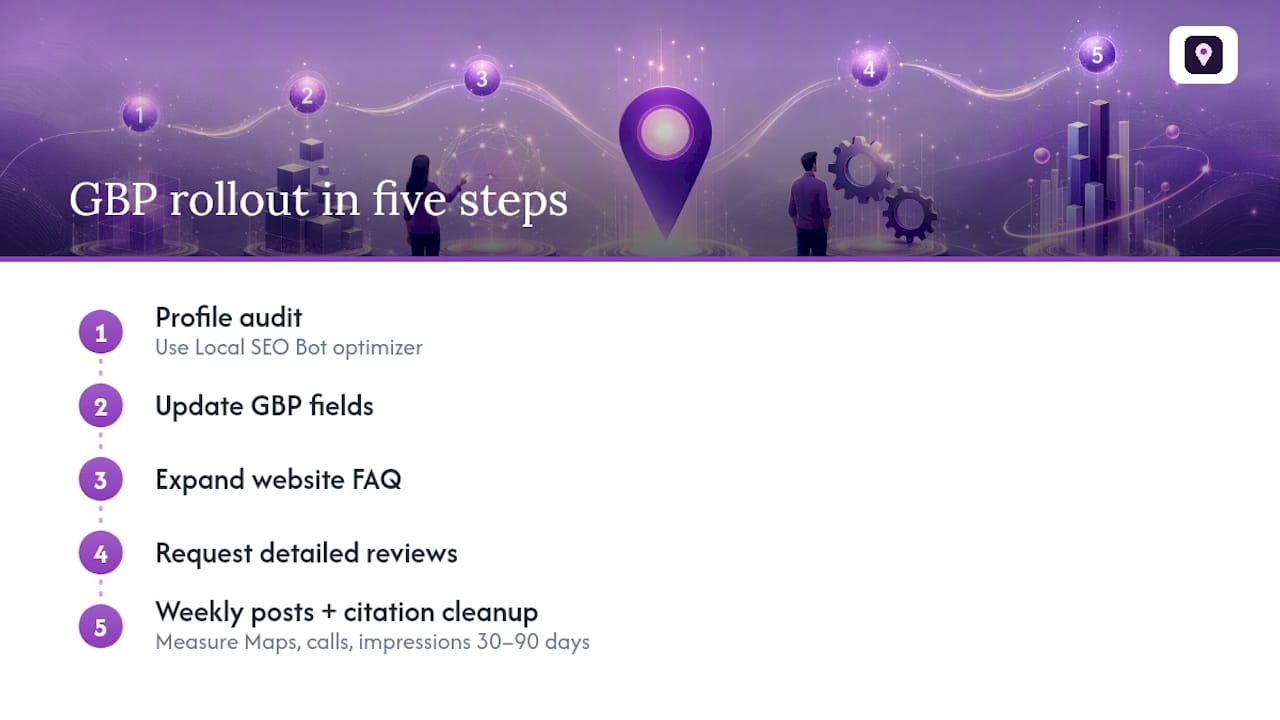
Local SEO Bot’s Google Business Profile Optimizer handles the field audit and update step, and its citation tools catch the NAP mismatches that quietly undercut everything else on this list.
Why This Signals a Bigger Shift in Local Search
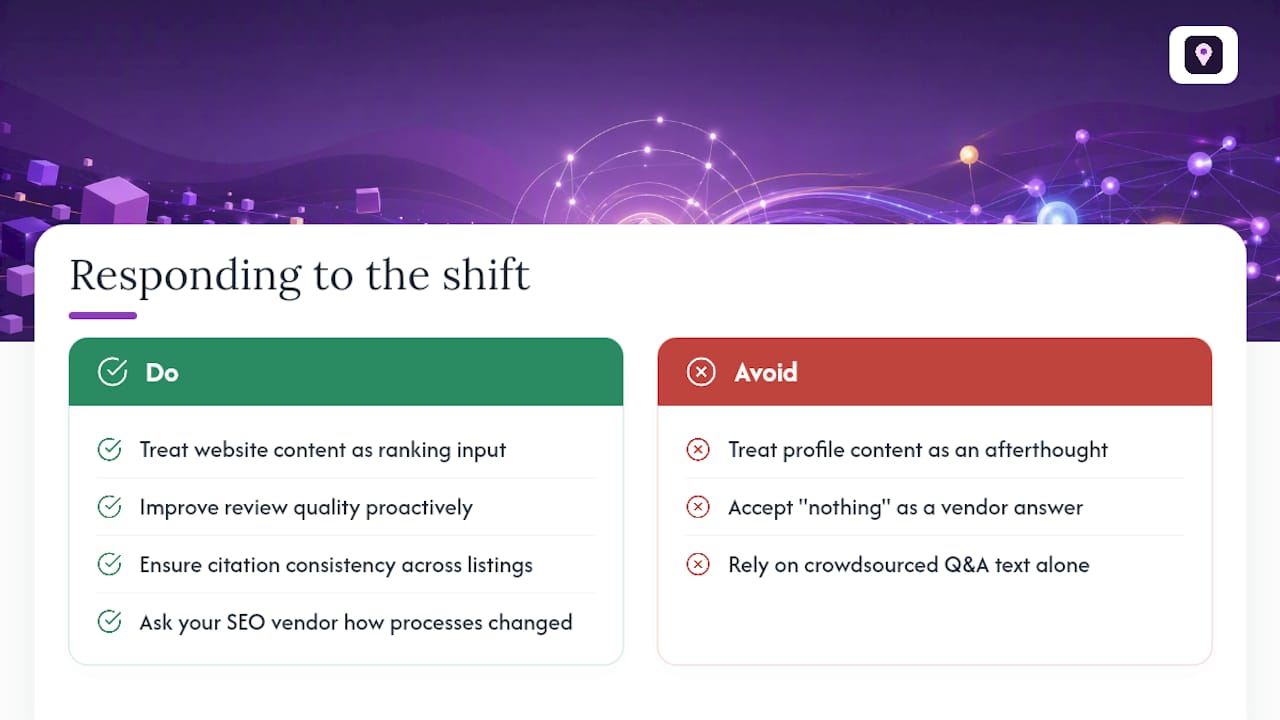
Q&A’s removal isn’t an isolated cleanup. It’s Google accelerating toward AI-generated answers built from structured signals rather than crowdsourced text. The businesses that adapt fastest will be the ones treating their website content, review quality, and citation consistency as the actual ranking inputs they now are, not as afterthoughts to a profile.
If you work with an SEO vendor or agency, ask them directly how their process changed after November 2025. If the answer is “nothing,” that’s worth questioning.
— Local
Get the Checklist Done Without the Guesswork
This is an alternative to hiring a developer or an hourly consultant to chase this change down field by field. Where a typical agency retainer charges you to manually audit each GBP attribute and citation, Tools exist that run that audit automatically and keep watching after you’ve made the fixes.

The Google Business Profile Optimizer walks through the exact fields Ask Maps reads from, category, attributes, service list, and flags what’s incomplete. The Citation Consistency Analyzer catches the NAP mismatches from step seven of the checklist above, and Localseobot backs the whole approach with a 30-day money-back guarantee if your Maps ranking doesn’t improve. Start with a Google Maps visibility check to see where your profile stands before you touch a single field.
Where to Verify These Details Yourself
- Q&A API change log: official deprecation date and technical scope
- Ask Maps announcement: Google’s own description of the AI replacement
- Google Maps Help on answering questions: regional availability and moderation history
- Search Engine Roundtable’s report on the partner notification
Sources
- Ask Maps — Google blog
- Google Business API Questions and Answers Feature Going Away November 3
- Answer questions about a place on Google Maps - Google Maps Help
- Google Removes Business Profile Q&A: What It Means and What to Do Now
FAQ
How do I do Q&A on my Google Business Profile now?
You can’t. The public Q&A feature and its API were both deprecated as of November 3, 2025. Customer questions are now answered by Ask Maps, so your job is making sure your profile and website have accurate information for it to pull from.
What is Google’s 20% rule?
This term isn’t a documented Google policy for Business Profiles or Q&A; if you’ve seen it referenced elsewhere, it likely refers to a different Google product guideline and doesn’t apply to the Q&A removal or Ask Maps.
What questions do customers ask most on Google Business listings?
Historical Q&A data across most industries skewed toward hours, parking or accessibility, pricing, and whether a specific service or product is available. Those are exactly the fields worth double-checking in your profile and covering explicitly in your site FAQ.
How do I get Google’s AI to answer questions accurately about my business?
Keep your Google Business Profile fields current, especially category, services, and attributes, and publish a plain-language FAQ page on your website since Ask Maps draws from both sources. Tools like Localseobot’s Google Business Profile Optimizer flag the fields Ask Maps relies on most.
Should I still use FAQ schema on my website?
No. Guidance published after the Q&A removal recommends visible, factual FAQ content over FAQPage structured data, since the schema no longer reliably earns featured snippets and the AI reads page content directly regardless of markup.