Batch Google Posts in One Hour: Strategy for Small Businesses
Published September 14, 2026
Batch Google Posts in One Hour: Strategy for Small Businesses

Publish one Google Business Profile post per week that leads with a clear benefit in the first line, uses an original photo instead of a stock image, and ends with a CTA button linking to a UTM-tagged URL. Match the post type to the goal: Offers for discounts, Events for time-bound activities, Updates for weekly news, Product for menu or catalog items. Then check Google Business Profile insights monthly and scale whatever gets clicks.
TL;DR:
- Consistently posting two to three times weekly with a mix of post types enhances visibility and drives more foot traffic than infrequent updates.
- Use clear, specific offers with real dollar discounts and set end dates to outperform generic marketing messages in click-through rates.
- Visuals should be near 1200 by 900 pixels, favoring authentic, real-world photos over stock images to increase engagement.
- Track post performance through Google insights and UTM parameters to refine messaging and focus on formats that produce the most actions.
- Maintaining a verified, complete profile with recent reviews, accurate info, and scheduled posts is essential before active posting to maximize results.
Table of Contents
- What Are Google Business Profile Posts and Where Do They Show?
- Which Post Type Should You Use, and When?
- The Operational Playbook: Cadence, Copy, Visuals, CTAs, and UTM Tracking
- Templates and Examples You Can Copy by Industry
- How Do You Measure If Google Posts Are Working?
- Your Quick Checklist for a Consistent Posting Cadence
- How Google Posts Fit Into Your Broader Local SEO Strategy
- Targeting Different Audience Segments With Your Posts
- Connecting Posts With Q&A and Reviews on Your Profile
- Local SEO Bot: Tools to Keep Your Posting Cadence on Autopilot
- A Practitioner’s Take on What Actually Moves the Needle
- Sources
- FAQ
What Are Google Business Profile Posts and Where Do They Show?
Google Business Profile posts are short updates you publish directly to your listing, and they surface in three places: the knowledge panel on desktop search, the “Updates” tab on mobile, and inside your Maps listing when someone taps your pin. They sit right next to your reviews and photos, which makes them one of the few free spots where you control the message a customer sees at the exact moment they’re deciding whether to call or visit.
Google’s own documentation on managing posts on your Business Profile breaks the format into four types: Update, Offer, Event, and Product. Updates stay visible on your profile indefinitely, but Offers and Events expire on the end date you set. Older posts remain accessible but lose prominence over time.
Publishing happens through Business Profile manager (either the app or business.google.com), where you can schedule a post in advance, save a draft, or set one to run on a recurring basis. Each post carries a status: live, scheduled, or expired.
Which Post Type Should You Use, and When?
Picking the wrong format is the most common reason a Google post underperforms. Each type has a job. Use the wrong one and the post either expires too fast or never gets the attention it deserves.
- Offer: Reserve this for time-limited discounts. Include a real number ($10 off, 20% off) and a hard end date. Offer posts with specific values consistently outperform vague “learn more” posts in click-through rate.
- Event: Use for anything tied to a date and time, a workshop, a sale weekend, a seasonal open house. Always list both a start and end time so Google doesn’t leave it live after the fact.
- Update: Your workhorse format. Good for weekly job highlights, a tip related to your trade, a staffing announcement, or general news that doesn’t need an expiration.
- Product: Built for flagship items with visible prices. Works especially well for retail inventory or restaurant menu items you want to push that week.
A rough rule: if the post has a deadline, it’s an Offer or Event. If it doesn’t, it’s an Update or Product. Getting that distinction right before you write a word of copy saves you from posts that either die too early or linger past their usefulness.
The Operational Playbook: Cadence, Copy, Visuals, CTAs, and UTM Tracking
Posting once and walking away doesn’t move rankings or foot traffic. Google’s own community best-practice guidance warns against over-posting low-value content, but the bigger risk for most small businesses is posting too rarely. Profiles that publish weekly show a measurable uplift in website visits and direction requests compared to profiles that go quiet for months.
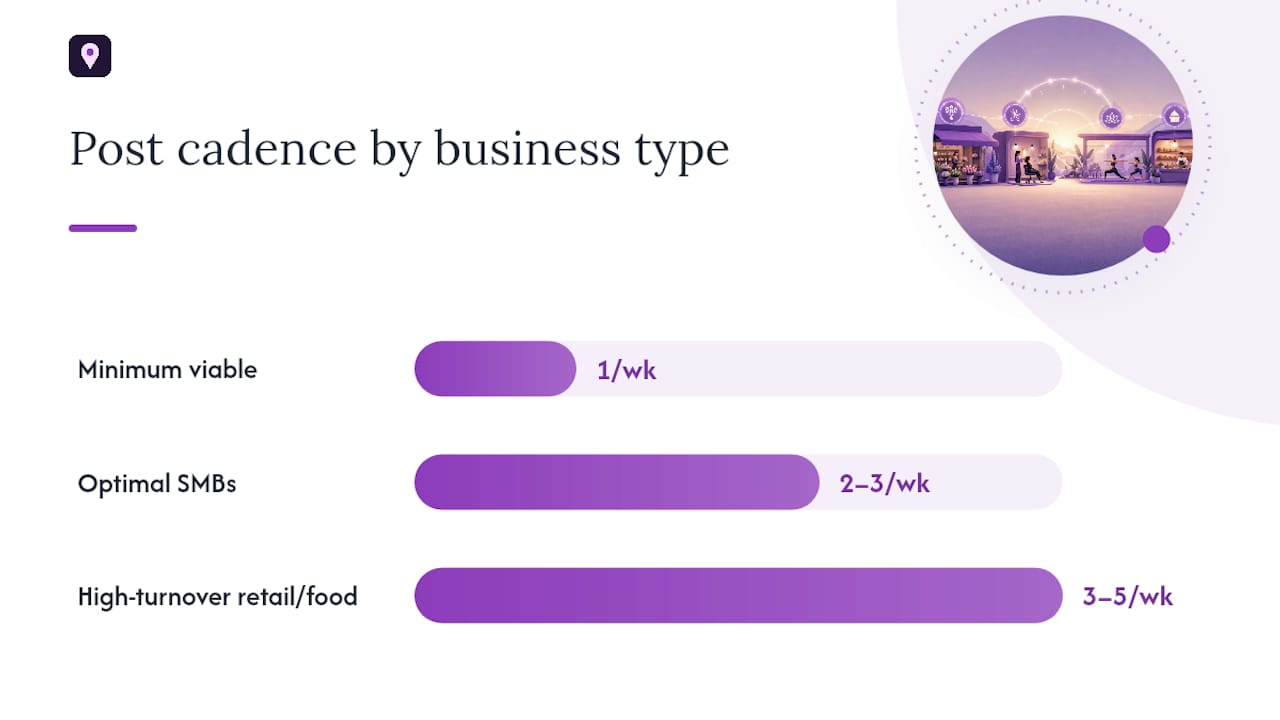
Cadence by business type:
- Minimum viable: One post per week for any local business. Below this, your profile starts looking abandoned.
- Optimal for most SMBs: Two to three posts per week, mixing Updates with occasional Offers.
- High-turnover retail and food service: Three to five posts per week, since inventory and specials change fast enough to justify it.
For copy, front-load the first 80 to 100 characters, since that’s what shows before a reader has to tap “more.” Keep total length between 80 and 150 words, and stick to one idea per post. A simple three-part formula, hook, body, CTA, is a recurring pattern across high-performing posts in nearly every vertical.
For visuals, use images sized near 1200 by 900 pixels (a 4:3 ratio) to avoid awkward cropping, and favor real photos from actual jobs over stock images, which readers spot instantly and tend to scroll past.
Pick a CTA button that matches the funnel stage: “Call Now” for urgent service needs, “Book” for appointments, “Learn More” for informational Updates. Every CTA link should carry UTM parameters, something like ?utm_source=gbp&utm_medium=post&utm_campaign=202603, so you can trace the traffic later.
Pro Tip: Batch a month of posts in one sitting using native scheduling or recurring posts, added to Google’s platform in late 2025. One hour on the first of the month keeps you consistent without daily upkeep.
Templates and Examples You Can Copy by Industry
Staring at a blank post field kills momentum faster than any algorithm change. Steal a structure below, swap in your details, and publish.
Restaurants
- Offer: “20% off lunch specials through [date]. Walk-ins welcome at [location]. [Book a table].”
- Update: “New seasonal menu just dropped, featuring [local ingredient]. Ask your server what’s fresh this week.”
Trades (plumbers, electricians, HVAC)
- Update: “Winterizing your pipes before the first freeze saves you an emergency call later. Here’s what we check on every visit.”
- Offer: “$50 off any furnace tune-up booked before [date]. [Schedule now].”
Retail
- Product: “Back in stock: [item name], $[price]. Limited quantity in-store at [location].”
- Update: “New arrivals this week from [brand/category]. Stop by before the weekend rush.”
Professionals (salons, clinics, consultants)
- Update: “Before-and-after from a client visit this week, swipe to see the transformation.”
- Offer: “New client special: $25 off your first consultation, valid through [date].”
Rotate categories so the same message type doesn’t run three weeks straight. Mixing job photos, quick tips, and the occasional discount keeps regular viewers from tuning out, which matters more than most owners assume, since your most loyal searchers see every post you publish.
How Do You Measure If Google Posts Are Working?
Google Business Profile insights show you views, post clicks, CTA clicks, direction requests, and phone calls tied to your listing. Watch those five numbers weekly, not the vanity metric of total impressions, which tells you almost nothing about whether a post actually drove action.
- Views: How many people saw the post at all.
- Post clicks: How many tapped in to read more.
- CTA clicks: How many hit the button, call, directions, or website.
- Directions and calls: The metrics closest to real revenue.
Adding UTM parameters to your CTA links makes that same traffic visible inside GA4, where you can see exactly which posts led to a session, not just a click. Without UTMs, that traffic gets lumped into “direct” or “organic” and you lose the thread entirely.
Run a simple test: write two versions of the same offer, one leading with the discount amount, one leading with the product name, and alternate them for four weeks. After that window, compare CTA clicks and keep publishing whichever angle won. AI-driven summaries and Overviews increasingly pull from active profiles, and posts older than 30 days tend to lose citation weight in those AI-generated answers, which is one more reason a stale profile costs you more than it looks like on the surface.
Your Quick Checklist for a Consistent Posting Cadence
Before you post a single word, your profile fundamentals need to be right. A perfect post on a broken profile still underperforms.
- Confirm the basics: correct business category, accurate hours, working phone number, verified address, and recent photos.
- Check your review activity: respond to recent reviews before you schedule new posts, since Google surfaces both in the same feed.
- Build your weekly post: pick the type, write the hook, size the image at 1200×900, add a CTA with UTM parameters attached.
- Schedule mid-week so it’s fresh going into the weekend traffic bump most local businesses see.
- Review your last four posts before publishing a new one, so you’re not repeating the same angle twice in a month.
Running that checklist by hand every week adds up fast when you’re juggling a business at the same time. Tools like the Google Business Profile Optimizer audit your profile fields automatically, and a dedicated Google Posts Checklist for Small Businesses keeps the weekly cadence from sliding once the first busy month hits.
How Google Posts Fit Into Your Broader Local SEO Strategy
Posts alone won’t fix a weak profile, and treating them as a standalone tactic is where most local marketers waste effort. They work as one lever in a larger system that includes your business category, your citation consistency across directories, your review volume, and your on-site content.
Think of posts as the fastest-moving layer of that system. Your category and citations shift your baseline visibility over months; a post can influence engagement within days. That speed makes posts the right tool for testing messaging, you can try three different value propositions in three weeks and see which one pulls more calls, then carry the winning language into your website copy, your review responses, and even your paid ads.
The connection runs both directions, too. A blog post about a seasonal service becomes a Google Post with a shortened hook and a link back to the full article, feeding traffic and signal in both directions. Local marketers who treat their Google Business Profile as a piece of a full local SEO strategy rather than a set-and-forget listing tend to see posts contribute more to ranking movement, since the underlying profile signals reinforce whatever the post is trying to say.
Content marketing and local SEO have always overlapped more than most owners realize. A local SEO strategy built around content gives you a steady supply of material, guides, seasonal tips, project photos, that you can slice into posts without writing something new every week. Posts stop being a chore once they’re a byproduct of content you’re already creating.
Targeting Different Audience Segments With Your Posts
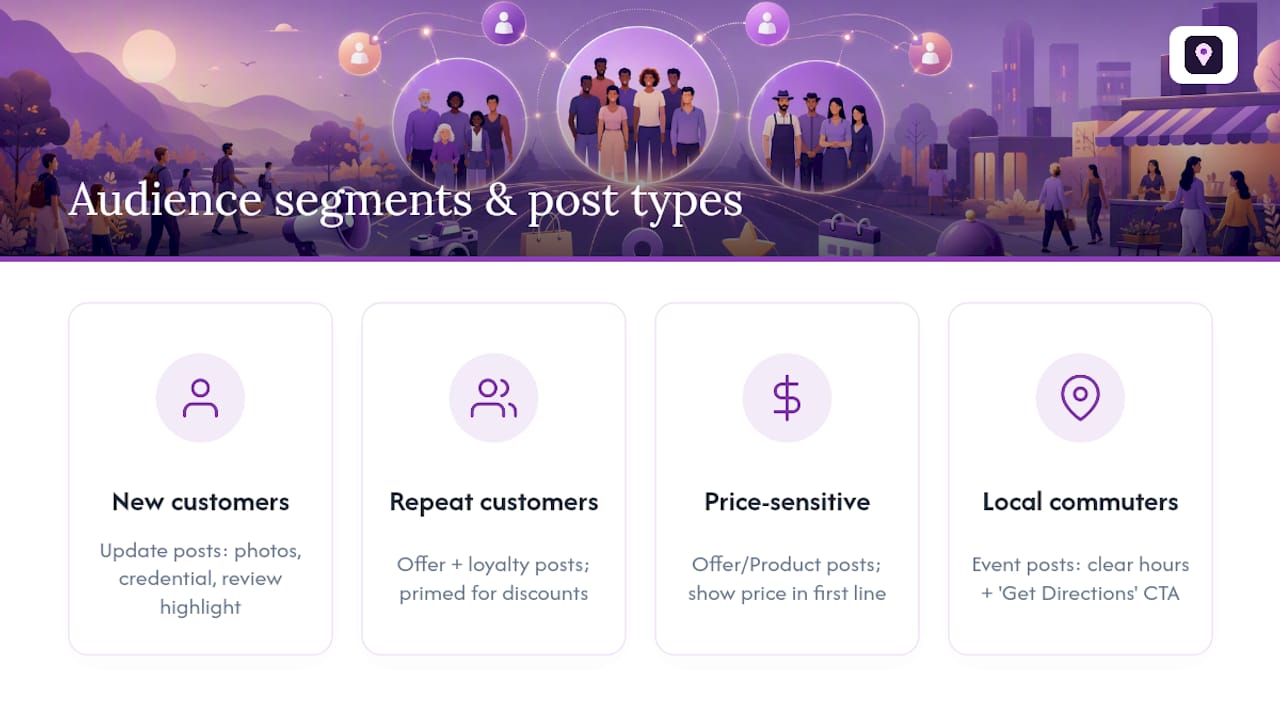
Not every customer who finds your profile wants the same thing, and a single generic post talks past most of them. Segmenting your posting calendar by who’s actually searching gets you more relevant clicks from the same weekly effort.
New customers browsing for the first time respond best to Update posts that build trust, project photos, a quick credential mention, a review highlight. They haven’t decided to buy yet, so a hard offer often reads as pushy at this stage.
Repeat customers already trust you, which makes them the right audience for Offer posts and loyalty-style pushes. They’re primed to act on a discount because the relationship already exists.
Price-sensitive shoppers searching during a specific season, tax time, back-to-school, holiday prep, need Offer or Product posts with the dollar figure visible in the first line. Bury the price and you lose them to a competitor’s listing that showed it upfront.
Local commuters and drive-by traffic respond to Event posts with clear hours and a “Get Directions” CTA, since their decision window is measured in minutes, not days.
Rotate your weekly slot through these segments rather than defaulting to whichever type is easiest to write. A trades business might run a trust-building Update in week one, a seasonal Offer in week two, and a project photo Update in week three, cycling through the audience mix instead of hammering the same message every time. Reviewing your GBP insights by post type over a full month tells you which segment is actually engaging, so you can weight future weeks toward what’s working.
Connecting Posts With Q&A and Reviews on Your Profile
Posts don’t operate in isolation on your listing. They sit on the same page as your Q&A section and your reviews, and treating all three as one connected surface gets you more mileage than optimizing each in a vacuum.
Start with Q&A. If you keep getting the same customer question, whether you take walk-ins, what your minimum job size is, turn the answer into an Update post instead of just replying once. That way the answer reaches everyone browsing your profile, not just the one person who asked.
Reviews work the same way. A glowing review that mentions a specific service is free copy for a post. Quote a line (with the customer’s permission if you’re using their name), pair it with a photo of the completed job, and you’ve got a trust-building Update that costs nothing to produce. It also signals to new visitors that your reviews are recent and your business is active, which matters since profiles with older, unanswered reviews read as neglected even when the posting cadence is strong.
Respond to reviews before you schedule new posts each week. Google surfaces your review activity and your post activity in the same general feed a searcher scans, so a profile with fresh replies and a fresh post looks like a business that’s actually open and paying attention. One without either looks abandoned, regardless of how good the underlying service is.
Local SEO Bot: Tools to Keep Your Posting Cadence on Autopilot
Using specialized local SEO software can help maintain consistent Google posts by automating scheduling across multiple locations, enforcing checklists, and tracking visibility impact over time.

For agencies managing several client profiles, that automation matters even more, batch scheduling across locations turns what used to be hours of manual work into a single monthly session. The Google Business Profile Optimizer audits your profile fields alongside your post history, flagging gaps before they cost you visibility. If you want a clearer read on where your listing stands right now, the Google Maps Visibility Score Calculator gives you a baseline number to measure future posts against.
Start by auditing your current profile with the optimizer, then build your first month of scheduled posts around whatever gaps it surfaces.
A Practitioner’s Take on What Actually Moves the Needle
Give this 60 to 90 days before judging results, rankings and calls respond to consistency, not any single viral post. Specificity beats volume every time: one sharp Offer with a real price outperforms five vague Updates. Publish one post today, and schedule the next three before you close this tab.
— Local
Sources
- Manage posts on your Business Profile - Google Business Profile Help
- Google Business Profile posts examples — Semrush
- Google Business Profile Posts: Best Practices 2026 - Wiremo
FAQ
How Often Should I Post to My Google Business Profile?
Post at least once a week, with two to three posts weekly working best for most small businesses and up to five weekly for high-turnover retail or food service.
Do Google Posts Actually Help SEO?
Google posts don’t directly boost rankings the way citations or reviews do, but weekly posting correlates with more website visits, direction requests, and engagement signals that support your broader local SEO performance.
What’s the Best Length for a Google Post?
Keep total copy between 80 and 150 words, with your strongest benefit or hook packed into the first 80 to 100 characters before the “more” cutoff.
What Image Size Works Best for Google Posts?
Use images sized near 1200 by 900 pixels in a 4:3 ratio, and favor real photos from your own jobs over stock imagery.
Can I Schedule Google Posts in Advance?
Yes. Native scheduling and recurring posts let you batch a month of content in about an hour and publish automatically on your chosen dates.
Is There a “70/20/10” or “80/20” Rule for Google Posts?
There’s no official Google rule by that name for posts specifically. A more useful guideline is Google’s own advice to prioritize high-value content and avoid over-posting low-value updates rather than chasing a fixed ratio.