Tracking the right local SEO metrics helps businesses connect with customers ready to take action. Instead of focusing on vanity metrics like website traffic, prioritize high-intent actions such as phone calls, direction requests, and bookings. These metrics directly impact revenue and show the effectiveness of your efforts. Here’s what matters most:
- Local Pack Rankings: Track your visibility in Google’s Local Pack, which drives the majority of clicks for local searches.
- Google Business Profile (GBP) Insights: Monitor impressions, customer actions (calls, clicks, direction requests), and review performance to measure engagement.
- Website Traffic from Local Searches: Use tools like Google Analytics and UTM parameters to separate local traffic from general traffic.
- Citation Consistency: Ensure your business information (NAP: Name, Address, Phone) is accurate across all platforms.
- Customer Reviews and Ratings: Regularly gather and respond to reviews, as they influence rankings and build trust.
- Conversions and ROI: Track how local SEO actions result in sales or leads to measure your return on investment.
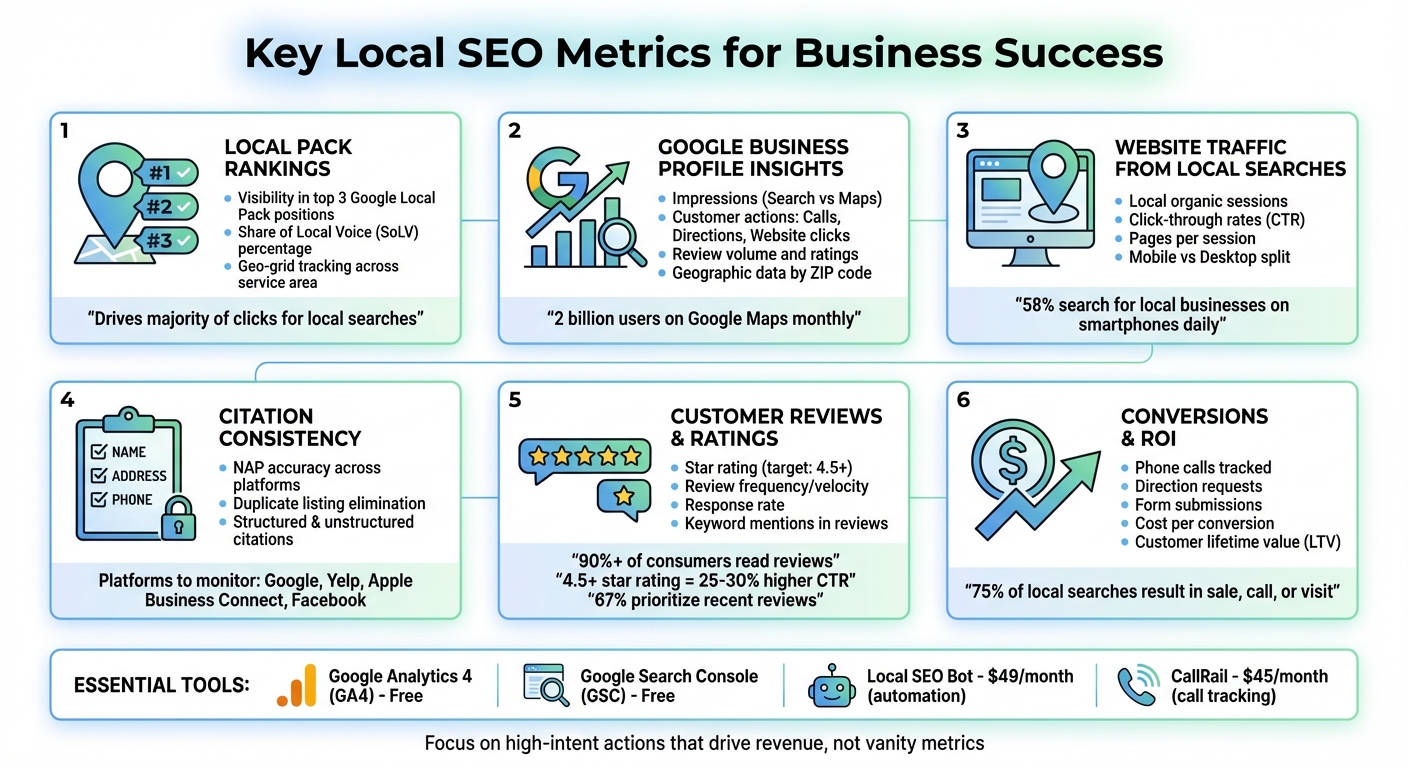
Key Local SEO Metrics Tracking Guide: What to Monitor and Tools to Use
Secrets to a Winning Local SEO Report (Clients Will Love)
Local Pack Rankings
The Local Pack refers to the prominent section at the top of Google search results that highlights the top three local business listings. For searches like "plumber near me" or "best pizza in Chicago", these businesses gain a prime spot that attracts high-intent customers.
"The Local Pack is prime real estate for local search. It drives the majority of high-intent clicks, especially on mobile." – Anya Leibovitch, AgencyAnalytics
Google decides which businesses make it into the Local Pack based on three key factors: relevance (how well your business aligns with the search query), distance (how close your business is to the searcher), and prominence (your reputation, as reflected by reviews and online presence). These top spots are seen as the most trustworthy options, instantly building credibility. If your business isn’t showing up here, you could be losing out on critical customer interactions like phone calls, direction requests, and walk-ins.
Local Pack rankings are highly dynamic, changing based on the searcher’s location. A business might rank first for someone nearby but not show up at all for someone farther away. This makes it vital to track your visibility across various locations to ensure you’re capturing local customers effectively.
How to Monitor Local Pack Visibility
To keep an eye on your Local Pack performance, use tools designed to simulate searches from different locations. Geo-grid tracking tools are especially useful; they create a virtual grid of your service area, showing how your rankings shift from one block to another. This helps you identify areas where your listing might be underperforming. Reliable local ranking data is crucial for turning searches into meaningful customer actions.
"There are no static #1 local rankings in Google's system. Google customizes the search engine results that each user sees based on their physical location at the time that they search." – Miriam Ellis, Local Search Subject Matter Expert
It’s a good idea to run scans during business hours, as your visibility often drops when your profile shows that you’re closed. Adjusting your scan radius can also provide valuable insights. For example, narrowing the radius can help focus on your immediate area if your rankings seem low, while expanding it can reveal where your visibility begins to taper off.
Automated tools can make it easier to track your Local Pack performance across your entire service area. You can also use Google Search Console to filter queries that include your city name or "near me" to better understand how your organic visibility aligns with your Local Pack rankings.
Share of Local Voice (SoLV)
Share of Local Voice (SoLV) measures how frequently your business appears in the Local Pack within a specific geographic area compared to competitors. Essentially, it reflects your local market share. For instance, if your business shows up in the Local Pack 40% of the time while a competitor appears only 25% of the time, you’re reaching more potential customers actively searching for services.
A high SoLV indicates strong local visibility, signaling that your business is consistently seen by local searchers. On the other hand, a low SoLV might point to challenges with certain keywords or a highly competitive market.
Keeping tabs on your competitors’ SoLV can provide critical insights. If you notice a competitor’s share increasing, it’s worth investigating. They might have gained more reviews, updated their business categories, or made other changes that boosted their visibility. By analyzing these shifts, you can refine your strategy and stay competitive.
Next, we’ll explore how Google Business Profile metrics can complement Local Pack data, giving you a complete view of your local search performance.
Google Business Profile Insights
Your Google Business Profile (GBP) offers a window into how customers find and interact with your business on Google Search and Maps. With over 2 billion users turning to Google Maps every month to locate businesses, these insights are invaluable for gauging your local search performance. Recently, Google transitioned this data from the old "Insights" dashboard to a new "Performance" view, which includes updated metrics while removing others, such as photo views and device breakdowns.
"Google Business Profile listings are a content goldmine for any local business owner... they provide the rare opportunity to share key messages even before customers reach your website." – Valerie Jennings, CEO, Jennings Social Media & MarTech
The new Performance tab focuses on two main areas: visibility metrics, which show how often your profile appears, and engagement metrics, which track how customers interact with your profile. By understanding both, you can measure not only how many people are discovering your business but also whether they’re taking steps to engage. Keep in mind that these metrics are specific to Google’s ecosystem and won’t appear in your website analytics unless you implement proper tracking.
Key GBP Metrics to Track
Impressions measure how often your profile appears in search results, whether on Google Search or Maps. Traffic from Maps often indicates higher intent to purchase, as users are typically ready to call or visit your business. Google also categorizes search traffic into three types: Direct (searching for your exact business name or address), Discovery (searching for a category, like "emergency plumber"), and Branded (searching for a related brand, such as "Invisalign dentist"). An increase in Discovery searches often signals that your local SEO strategies are paying off.
Customer actions provide insight into high-intent behaviors. Actions like website clicks, call clicks, direction requests, and messages show that users are moving beyond browsing to actively engage with your business. For brick-and-mortar locations, direction requests are a strong indicator of potential foot traffic.
"Most businesses care about clicks, calls, and direction requests. They don't care about how many times they've been 'viewed.'" – Joey Randazzo, Owner, Portland SEO Growth Partners
Review metrics play a crucial role in both your local search rankings and customer trust. Businesses with a 4.5+ star rating and a steady flow of fresh reviews typically achieve 25% to 30% higher click-through rates compared to competitors with lower ratings. Regularly monitor your review volume, average rating, and how often you respond to reviews.
Geographic data highlights the ZIP codes and cities where your searches originate, helping you spot gaps in your service areas or opportunities for growth. If you notice high impressions but low engagement from certain locations, it may be time to tweak your service radius or improve your profile details.
One recent change to note: Starting in July 2024, Google only reports "call clicks", removing data on call duration and timestamps. For deeper insights into call activity, consider using third-party call tracking tools.
To separate GBP traffic from general organic traffic in Google Analytics, you can add UTM parameters to your website link in the GBP dashboard (e.g., ?utm_source=gbp&utm_medium=organic).
These metrics are vital for enhancing your local SEO strategy by complementing Local Pack and website traffic data. They also set the stage for using automation to simplify performance monitoring.
Automated GBP Insights
Tracking these metrics manually might suffice for a single location, but it quickly becomes overwhelming when managing multiple locations or analyzing trends over time. Automation can streamline this process, consolidating data into unified dashboards to reveal patterns and changes.
For example, tools like Local SEO Bot automate GBP performance tracking, eliminating the need for daily manual checks. This is especially valuable for businesses with multiple locations, where manual tracking can be impractical. Automation helps you quickly identify changes - such as a drop in direction requests or an increase in Discovery searches - so you can respond promptly and stay competitive.
Website Traffic from Local Searches
Website traffic metrics provide a deeper understanding of your local SEO efforts by revealing what users do after they click on your site. While Google Business Profile (GBP) data highlights listing interactions, website traffic completes the picture by showing overall user behavior. Without proper tracking, local traffic can easily get lost in broader analytics, making it harder to assess performance in specific service areas.
Tracking Local Organic Traffic
Google Analytics is a powerful tool for pinpointing where your website visitors are coming from. By setting up a geo-specific filter, you can focus exclusively on traffic from your target city. This prevents data from being diluted by visitors from other locations, like different states or countries.
For even more precision, use UTM parameters on your GBP website link. A URL like yourwebsite.com?utm_source=google&utm_medium=organic&utm_campaign=gbp-listing helps you distinguish traffic driven by your GBP listing from general organic traffic. This approach provides deeper insights into how users engage with your site after finding you through GBP.
"Use a tracking URL on your Google My Business listing to help distinguish traffic/conversions coming in from your listing vs traffic coming in from the organic search results." – Nick Pierno, Director of Custom Projects, Whitespark
Google Search Console adds another layer of detail by allowing you to filter the Performance report for queries that include your city name or terms like "near me." This shows which local keywords are driving impressions and clicks. If you have location-specific landing pages (e.g., /chicago-plumbing), monitor their performance separately to see which areas generate the most engagement.
Since 58% of people search for local businesses on their smartphones daily, it’s also crucial to segment local traffic by device in GA4. Mobile traffic often signals higher intent, so if conversions from mobile users are low, check for issues like slow page load times on your location-specific pages.
These traffic insights, when combined with Local Pack and GBP metrics, provide a well-rounded view of your local SEO performance.
Click-Through Rates from Local Searches
Once you understand your traffic, click-through rates (CTR) help you evaluate how compelling your listings are. High impressions but low CTR suggest that while your business appears in search results, your listing may not be persuasive enough to drive clicks. Google Search Console allows you to analyze CTR for specific queries, helping you assess the effectiveness of your meta titles and descriptions.
"High impressions with a weak click-through rate suggests the listing isn't persuasive enough." – AgencyAnalytics
If impressions are high but clicks are low, consider rewriting your meta titles to include city names and strong calls to action. Phrases like "24/7", "near you", or specific neighborhood names can make your listing more relevant to local searchers.
Here’s a quick summary of key metrics to track for local website performance:
| Metric | What It Indicates | Tool to Use |
|---|---|---|
| Local Organic Sessions | Growth in visibility for regional searches | Google Analytics (Geo-Filter) |
| Local CTR | Effectiveness of titles/meta descriptions | Google Search Console |
| Pages per Session | Content relevance for local visitors | Google Analytics |
| Conversion Rate | Ability of local pages to drive business | Google Analytics (Goals/Events) |
| Mobile vs. Desktop Split | User intent insights, with mobile often indicating higher intent | Google Analytics |
Additionally, it’s important to track the difference between branded searches (e.g., people searching for your business name) and discovery searches (e.g., "plumber near me"). A low discovery CTR could mean your content isn’t resonating with local searchers, signaling an opportunity to improve alignment with what they’re looking for.
Citation Consistency Across Platforms
Making sure your NAP data (Name, Address, Phone) is consistent across all platforms is critical for building trust with both search engines and customers. Even small differences - like using "St." instead of "Street" or listing an outdated phone number - can confuse search engines and weaken your local authority.
And the stakes? They’re big. With so many queries now triggering AI-generated results, having accurate and consistent information online ensures that these systems deliver the right details about your business. Inconsistent citations don’t just hurt your search rankings - they can also harm your reputation. Imagine a customer finding incorrect hours on a review site, showing up to your business, and discovering you’re closed. That experience could easily lead to a negative review, dragging down your overall star rating.
"If a branch of your pizza franchise changes its hours of operation and does not update its citations... customers will be inconvenienced by encountering inaccurate information and arriving at closed doors. They may then take to the web to write negative reviews... eroding your average star rating." – Miriam Ellis, Local Search Columnist, Search Engine Land
Tracking NAP Accuracy
Start by auditing your primary listings - like Google Business Profile, Yelp, Apple Business Connect, Facebook, Nextdoor, and YP.com. Check for inconsistencies in your business name, address formatting, or contact details. Search engines favor businesses that actively manage their listings, as this signals legitimacy and reliability.
Don’t overlook duplicate listings. These can confuse both search engines and potential customers. Regularly search for and eliminate duplicates to maintain clarity and authority.
Beyond formal directory listings (structured citations), pay attention to unstructured citations - mentions of your business on local blogs, news sites, or podcasts. These also contribute to your local authority. Perform branded searches to find where your business is mentioned and reach out to site owners to correct any inaccuracies.
For businesses with multiple locations, manually managing citations can quickly become overwhelming. Tools like Local SEO Bot simplify the process by automating citation updates and syncing your business information across numerous directories.
Once you’ve completed your audit, the next step is to focus on building and managing your citations strategically.
Building and Managing Local Citations
Building effective citations means targeting the right directories. High-authority platforms should be your starting point. For professional services, industry-specific directories and trade associations often drive better results compared to generic directories.
Begin with the heavy hitters: Google Business Profile, Yelp, and Apple Business Connect. Then, branch out to platforms relevant to your industry. For instance, plumbers might prioritize HomeAdvisor and Angi, while lawyers could focus on directories like Avvo and Justia.
Also, keep tabs on where your competitors are earning local backlinks or mentions. This can reveal new opportunities for citations. If you’re managing multiple locations, tools like Local SEO Bot can help streamline the process. Features like one-click citation building ensure your NAP data stays consistent across 150+ directories - especially useful during seasonal changes or holidays when operating hours often shift. This kind of proactive management can prevent customer frustration and avoid negative reviews.
sbb-itb-0e6533f
Customer Reviews and Ratings
Reviews play a dual role in local SEO: they provide social proof for potential customers and serve as a direct ranking factor for search engines. Metrics like review volume, frequency, and recency help search engines measure a business's prominence in the Local Pack and Google Maps. Additionally, the tone of reviews and the inclusion of specific keywords can improve how well your business aligns with relevant searches.
Here’s the reality: over 90% of consumers read reviews before choosing local services, and only 3% trust businesses with less than a 3-star rating. Interestingly, 67% of consumers prioritize recent reviews over an overall star rating, showing just how important it is to keep feedback fresh and relevant. A steady flow of new reviews not only signals activity to search engines but also builds trust with potential customers.
AI-powered search results are now amplifying the importance of reviews. As Holiday Newton from GPO explains, "Individual reviews are being cited in AI Overviews, making reputation management more critical than ever".
Let’s dive deeper into how review volume and ratings influence customer engagement.
Impact of Review Volume and Ratings
Your star rating can make or break your click-through rates (CTR). For instance, moving from a 3-star to a 5-star rating can increase CTR by up to 25%. Furthermore, about 50% of consumers will only consider businesses with a rating of four stars or higher. But it’s not just about the numbers - how frequently you receive reviews, or review velocity, is a critical factor. Google considers this one of the top 20 ranking signals for the Local Pack.
A consistent flow of reviews feels natural and trustworthy. Too few reviews may signal neglect, while a sudden influx could appear spammy. Striking the right balance is key.
| Metric | Average Performance | Good Performance | Best-in-Class |
|---|---|---|---|
| Star Rating | ~3 Stars | 4.0 – 4.5 Stars | >4.5 Stars |
| Review Frequency | Infrequent | Regular | Daily |
| Response Rate | Low/Sporadic | Consistent | Immediate/High |
Additionally, reviews with specific keywords (e.g., "fixed my AC same day") can boost conversions. As Anya Leibovitch points out, "Positive reviews referencing specific services ('fixed my AC same day') often drive more conversions than vague praise".
These insights highlight the importance of consistently managing and optimizing your reviews.
Managing Reviews Effectively
Quick and thoughtful responses to reviews show both customers and search engines that you're engaged. For positive reviews, go beyond a simple "thank you" by mentioning specific details or sharing updates related to the feedback.
When it comes to negative reviews, a professional and solution-focused response can turn things around. In fact, 70% of customers who updated their reviews did so after experiencing a second, improved interaction, and 32% changed their reviews after being offered a replacement or having the issue fixed for free. Handling complaints with care can transform unhappy customers into loyal advocates.
To encourage reviews, integrate requests naturally into your customer journey. Use follow-up emails, text messages, or in-store signage to ask for feedback - just avoid offering incentives that violate platform rules. You can also guide customers to mention specific products or services, which helps include relevant keywords in their reviews.
Tools like Local SEO Bot can simplify review management by automating responses while keeping them personal. For businesses with multiple locations or high review volumes, this can be a game-changer, ensuring no feedback goes unnoticed and your reputation stays strong.
Mastering your review strategy is essential for driving local SEO success and building trust with your audience.
Conversions and ROI from Local SEO
Getting high rankings and impressions is great, but they only matter if they lead to actual business results. Did you know that 75% of local searches result in a sale, phone call, or store visit? That’s why tracking conversions is crucial - it shows how your visibility in local search translates into revenue.
Monitoring Conversion Actions
Start by diving into your Google Business Profile (GBP) Insights dashboard. This tool tracks key actions like click-to-call, direction requests, and website clicks. For businesses like restaurants and retailers, direction requests often signal in-person visits, making them a reliable indicator of foot traffic.
To pinpoint conversions from your GBP listing, use UTM tracking (e.g., yourwebsite.com?utm_source=google&utm_medium=gbp). This allows Google Analytics 4 (GA4) to monitor what happens after users interact with your map listing. In GA4, configure events to track actions like phone clicks, form submissions, and bookings. For phone calls, make sure your website uses tel: links so GA4 can automatically log tap-to-call actions.
Want even more precision? Consider using call tracking software like CallRail (starting at $45/month). It assigns unique tracking numbers to your campaigns, helping you attribute phone calls directly to local search efforts. This is particularly useful for service-based businesses, where phone inquiries often convert at higher rates than web forms. Make it a habit to review these metrics monthly to identify trends and opportunities.
By gathering these metrics, you’ll have the foundation you need to calculate the ROI of your local SEO efforts.
Calculating ROI from Local SEO
To measure ROI, you need to connect your conversion data to revenue. In GA4, assign a dollar value to each conversion by multiplying your average sale value by your closing rate.
Here’s a simple formula:
(Lifetime Value of a Customer) × (Closing Rate %) × (Number of Conversions) = Estimated Revenue.
For example, if you’re in an industry like HVAC or legal services, focusing on lifetime value (LTV) gives a clearer picture of ROI. A single HVAC customer might initially bring in $500 for a repair, but over five years, they could be worth $5,000.
To track your cost per conversion, divide your total local SEO investment by the number of qualified leads you generate. For instance, if you’re spending $500/month on local SEO and it brings in 25 qualified leads, your cost per lead is $20. Compare this to the lifetime value of your customers to assess whether your investment is paying off.
Sebastian Żarnowski from Localo sums it up perfectly:
"If your local SEO is working, it should move real-world numbers. Phone calls. Direction requests. Sales. That's what matters."
For a streamlined approach, tools like Local SEO Bot can automate tracking by integrating GBP performance, citation management, and review metrics into a single dashboard. This saves you from manually compiling data and ensures you’re always focused on the metrics that drive business growth.
Tools for Tracking Local SEO Metrics
Keeping tabs on local SEO metrics can be overwhelming, but the right tools simplify the process by centralizing your data and showing you what’s driving results.
Google Analytics and Search Console
Google Analytics 4 (GA4) and Google Search Console (GSC) are essential for understanding your local SEO performance. GA4 gives you insights into how users interact with your site - like which pages they visit, where they convert, and what keeps them engaged. Meanwhile, GSC focuses on how people discover your site, especially through local search queries like "near me" or city-specific terms.
Want to track traffic from your Google Business Profile (GBP)? Add UTM parameters to your GBP website link, such as ?utm_source=google&utm_medium=gbp. This helps you measure visitors and conversions coming directly from your map listing. GA4 also allows you to segment traffic by specific regions, making it easier to focus on your target local areas.
In GSC, the Performance report is your go-to tool for identifying which local keywords, like those including your city name, are driving impressions and clicks. Don’t overlook the Core Web Vitals report either. With about 58% of people searching for local businesses on their smartphones daily, a slow-loading mobile site can cost you. In fact, just a one-second delay in page load time can lead to a 7% drop in conversions.
While these free tools are powerful, they can be time-consuming to manage manually. That’s where automation comes in.
Local SEO Bot for Automation
Local SEO Bot takes the heavy lifting out of tracking and managing local SEO metrics. Starting at $49 per month, this platform combines multiple features into a single dashboard, including Google Business Profile management, automated citation building, review handling, and rank tracking.
One standout feature is its ability to automate NAP (Name, Address, Phone) data synchronization across directories. This is crucial because inconsistent listings can drive potential customers away. The platform also automates responses to customer reviews and offers geo-grid rank tracking, which shows how visible your business is across different locations within your service area.
Conclusion
Focusing on the right local SEO metrics takes the guesswork out of your strategy and helps drive real business growth. Pay attention to high-intent actions like phone calls, direction requests, and website clicks from your Google Business Profile. These interactions are what truly matter for growing your business. As Anya Leibovitch from AgencyAnalytics puts it:
"Your metrics need to tell the revenue story, not the SEO story. Clients don't renew contracts based on ranking improvements. They renew based on business growth".
These metrics go beyond rankings - they directly influence your bottom line and help you adapt to changing search behaviors. With AI Overviews reshaping how customers find businesses, staying on top of citation accuracy, gathering fresh reviews, and monitoring your local visibility is more important than ever. These factors determine whether potential customers can discover, trust, and ultimately choose your business.
Manually tracking all of this can eat up valuable time. That’s where tools like Local SEO Bot come in. For $49/month, it consolidates key tasks into one dashboard, automating NAP synchronization, responding to reviews, and tracking geo-grid rankings. It also ensures citation consistency across directories and keeps an eye on your local pack visibility, allowing you to focus on running your business.
Behavioral signals, like calls and profile engagement, now outweigh traditional ranking factors. When customers take these actions, Google recognizes that your listing is relevant and trustworthy, which boosts your local search visibility. Aligning your strategy with these revenue-driving actions is essential for success. Keep tracking these metrics, act on the insights they provide, and fine-tune your approach to bring more customers through your door. By consistently applying these strategies, you can build long-term growth in your local market.
FAQs
What are the best ways to improve my business's visibility in Google's Local Pack?
To improve your chances of showing up in Google's Local Pack, start by fully optimizing your Google Business Profile. Make sure all the details are accurate and complete - this includes your business name, address, phone number (NAP), photos, and regular updates through posts. These small but essential steps can make a big difference.
Encourage positive customer reviews and take the time to respond to them. This not only builds trust but also boosts engagement. Also, ensure your business information is consistent across online directories and listings. Search engines value accuracy and consistency, and this can help establish your credibility.
Don’t forget to incorporate location-specific keywords into your website content and your Google Business Profile. This aligns your business with what local users are searching for, increasing your chances of being found.
Lastly, keep an eye on your progress by tracking metrics like local search rankings, impressions, and click-through rates. Tools like Google Search Console or rank-tracking software can provide valuable insights. Regularly reviewing this data will help you fine-tune your local SEO strategy for better results.
What metrics should I track to measure the success of my local SEO efforts?
To understand how well your local SEO efforts are working, focus on tracking a few key metrics that give you a clear picture of your progress. Here are some important ones to keep an eye on:
- Local search rankings: Check how your business ranks for local keywords that matter to your audience.
- Google Business Profile insights: Look at actions like clicks, calls, and requests for directions to see how users are interacting with your profile.
- Website traffic from local searches: Tools like Google Analytics can help you identify how many visitors are coming from local search queries.
- Citation accuracy: Make sure your business details - like name, address, and phone number - are consistent across all directories.
- Customer reviews: Monitor the number of reviews, your average rating, and the overall tone to understand customer satisfaction.
- Conversion actions: Track specific actions like phone calls, form submissions, or bookings that stem from local searches.
By consistently reviewing these metrics, you can spot opportunities to fine-tune your strategy and get better results from your local SEO efforts.
Why is it important to keep your business information consistent across online listings?
Maintaining accurate and consistent business information - such as your name, address, and phone number (NAP) - across all online platforms is a key factor in achieving success with local SEO. When details are inconsistent, it can create confusion for both search engines and potential customers. This can result in lower search rankings, fragmented reviews, and reduced visibility in local search results.
By keeping your information uniform, you not only build trust with search engines but also ensure your business is properly represented in search results. This consistency makes it easier for customers to find you and reach out, boosting your credibility and strengthening your local presence.