Scale Location Page SEO Without Doorway Pages: 2 Templates
Published September 6, 2026
Scale Location Page SEO Without Doorway Pages: 2 Templates

Location page SEO means publishing one genuinely useful, unique page for every real location or justified service area, then linking that page directly to its Google Business Profile. The single highest-impact move is refusing to create a page unless it clears that bar. Three quick wins follow immediately: mapping local keywords to real page sections, writing content that couldn’t be copy-pasted to another city, and connecting each page to the right GBP listing.
TL;DR:
- Location pages must be created only if they serve a real business presence, unique service area, or documented local demand, not just for SEO gimmicks.
- Key elements include localized content, accurate NAP details, a relevant coverage area or neighborhood-specific details, and unique visuals like real photos and maps.
- Consistent citation building on high-authority directories and regular review of content, schema, and mobile performance are essential to maintain ranking momentum.
- Scaling location pages requires governance processes, approval workflows, merging duplicates with proper redirects, and ongoing pruning of underperforming pages.
- Manual citation management and brand consistency across listings significantly boost visibility, with tools like citation analyzers and GBP optimizers supporting ongoing improvements.
Table of Contents
- What counts as a location page, and when should you build one?
- Two location page templates you can copy today
- Location page SEO checklist: keywords, GBP, schema, and mobile
- How do you avoid doorway pages while scaling?
- What KPIs and cadence should you track for location pages?
- How manual citation work supports what your location pages do
- The location page mistake nobody talks about
- Turn your location pages into ranking signals, faster
- Sources
What counts as a location page, and when should you build one?
Not every business needs a page per zip code. Three-page types get confused constantly, and mixing them up is how doorway pages happen.
A physical location page represents a real address with staff, hours, and walk-in service. A service-area page covers a region you serve without a storefront there, common for plumbers, contractors, and mobile services. A regional hub page groups several nearby locations under one umbrella when individual pages would be too thin to justify separately.
Before publishing anything, run through this checklist:
- Does the business have a physical presence, or a documented, consistent service history in the area?
- Do operations differ enough from your other locations (different staff, inventory, or services) to justify unique content?
- Is there measurable search demand for that specific geography?
- Can your team realistically maintain and update this page long term?
Skipping any of these questions is how thin pages happen. Search Engine Land’s guidance on multi-location structure warns that templated city pages without substantive local value read as doorway pages to Google, not legitimate local content.
Two location page templates you can copy today
Templates save time, but only if you localize the right fields instead of swapping a city name into the same paragraph twelve times. Here’s what actually needs to change per page, and what should stay structurally consistent.
Physical location page modules, in order:
- Hero section naming the city and core service
- NAP block (name, address, phone) matching your GBP exactly
- Embedded Google Map centered on the actual address
- Hours of operation, including holiday exceptions
- Original photos of the storefront, team, or recent work
- Staff bios or a note on who serves that location
- Services offered at that specific site
- Trust signals: certifications, awards, review count
- A clear call to action (call, book, or get directions)
Service-area page modules:
- A coverage statement naming the specific towns or neighborhoods served
- The services available in that area, not a generic list copied from your homepage
- A pointer to the nearest physical hub or dispatch location
- Testimonials or short case notes from customers in that area
- A coverage map showing the boundary of service, not just a pin drop
The difference between a page that ranks and one that doesn’t often comes down to detail most teams skip: a two-sentence case study blurb from an actual job in that neighborhood, a local FAQ about parking or access, or directions phrased the way a local would give them (“two blocks past the water tower,” not “0.3 miles northeast”). Backlinko’s research on location pages that get cited found that the pages winning both rankings and AI citations aren’t the longest ones. They’re the most scannable, built around structured facts an algorithm or an AI model can parse cleanly.
Location page SEO checklist: keywords, GBP, schema, and mobile
This is the sequence that actually moves rankings, in the order most teams should tackle it.
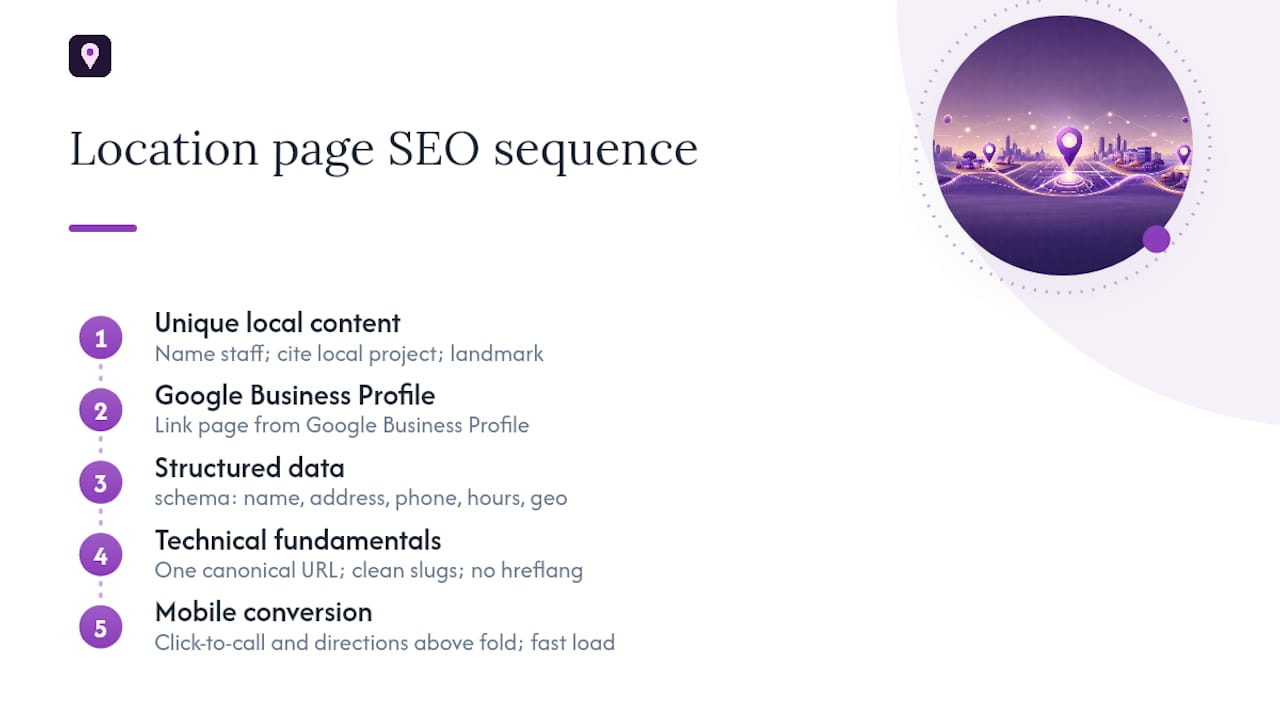
Start with local keyword research. Pull terms that combine service plus geography (“emergency plumber Denver,” not just “plumber”), then map them deliberately: primary term in the title tag and H1, a natural variant in the meta description, secondary terms in H2s and image alt text. A tool like the Local Keyword Generator speeds up finding the phrasing real searchers use instead of guessing.
Write content no other page on your site could claim. Name actual staff members, mention a specific local project, reference a neighborhood landmark. Generic paragraphs with the city name swapped out are exactly what search engines flag as thin.
Link the page from its Google Business Profile. This is not optional. Google’s own guidance confirms that complete, accurate Business Profile information improves local ranking, and the website link field is part of that completeness.
Add structured data. At minimum, implement LocalBusiness schema with name, address, phone, hours, and geo coordinates. Layer in FAQPage schema for a short question-and-answer block. Backlinko’s guide notes that FAQ sections with clear question headers meaningfully raise the odds of getting cited by AI answer engines, not just ranking in classic search.
Handle the technical basics. One canonical URL per location. No hreflang unless you’re genuinely serving different languages. Clean, readable URL slugs like /locations/denver instead of query strings.
Invest in visuals that couldn’t be stock photos. An embedded map, real photos of the space or crew, and click-to-call or click-for-directions buttons above the fold all matter more than people expect.
Pro Tip: Original location photography does double duty: it builds trust with visitors and gives you unique images Google Images can index, which stock photography never will. If you don’t have a photographer on staff, a service like Dronable can capture aerial or wide shots of a storefront or service area that make a coverage map feel real instead of theoretical.
Surface location-specific reviews. Pull reviews mentioning that city or branch specifically, and reply to every one, positive or negative, referencing the actual visit when you can. Prominence, one of Google’s three core local ranking factors, is built largely through review volume and citation consistency because distance to the searcher can’t be changed and relevance is mostly fixed by your category.
Fix mobile conversion last, but don’t skip it. Click-to-call buttons need to sit within the first screen, not buried under three sections of copy. Given how much local search happens on mobile devices, a slow-loading location page loses calls before a visitor ever reads your hours.
How do you avoid doorway pages while scaling?
The moment you’re managing ten or more location pages, the risk shifts from “will this page rank” to “will this pattern get the whole site flagged.” Governance is what separates a location page network from a doorway page farm.
Set an approval flow before anyone publishes a new URL: require sign-off confirming a real address or documented service history, a uniqueness threshold (no page allowed to share more than a set percentage of copy with another), and a required list of local elements that must be present before launch.
Keep one authoritative URL per location. If two pages could plausibly represent the same place, merge them and set a 301 redirect rather than letting both compete for the same query.
Build internal links that mirror your actual business structure:
- Location pages link up to their regional hub and across to nearby locations
- Regional hubs link down to individual locations and across to relevant service pages
- Service pages link out to every location page where that service is offered
Review performance quarterly at minimum. If a page hasn’t generated meaningful impressions or clicks after two full quarters, decide whether to noindex it, merge it into a hub, or invest in genuinely better content. A governance model without a uniqueness threshold and a refresh cadence is exactly what turns a defensible location strategy into a duplicate-content liability.
What KPIs and cadence should you track for location pages?
Measurement needs to be specific enough to catch a problem before it costs you a quarter of traffic.
- Track organic clicks and local pack impressions per page in Google Search Console, filtered by URL, not just by site total.
- Monitor calls, direction requests, and bookings through GBP Insights and analytics events tied to click-to-call and click-for-directions buttons.
- Run geo-grid rank tracking to see how visibility shifts across a service area, not just at a single center point.
- Audit content uniqueness, schema presence, citation consistency, and hours accuracy on a recurring basis, since even correct data drifts over holidays and staffing changes.
- Check mobile page speed specifically, since local searches skew heavily mobile and slow pages lose clicks before conversion tracking ever fires.
Run this audit monthly for high-traffic locations and quarterly for the rest, with an immediate review triggered by any sudden drop in local pack visibility or a citation inconsistency flagged externally. Citation consistency and review quality build the prominence portion of Google’s ranking model, the one lever businesses can actually control since relevance and distance are largely fixed by category and geography.
How manual citation work supports what your location pages do
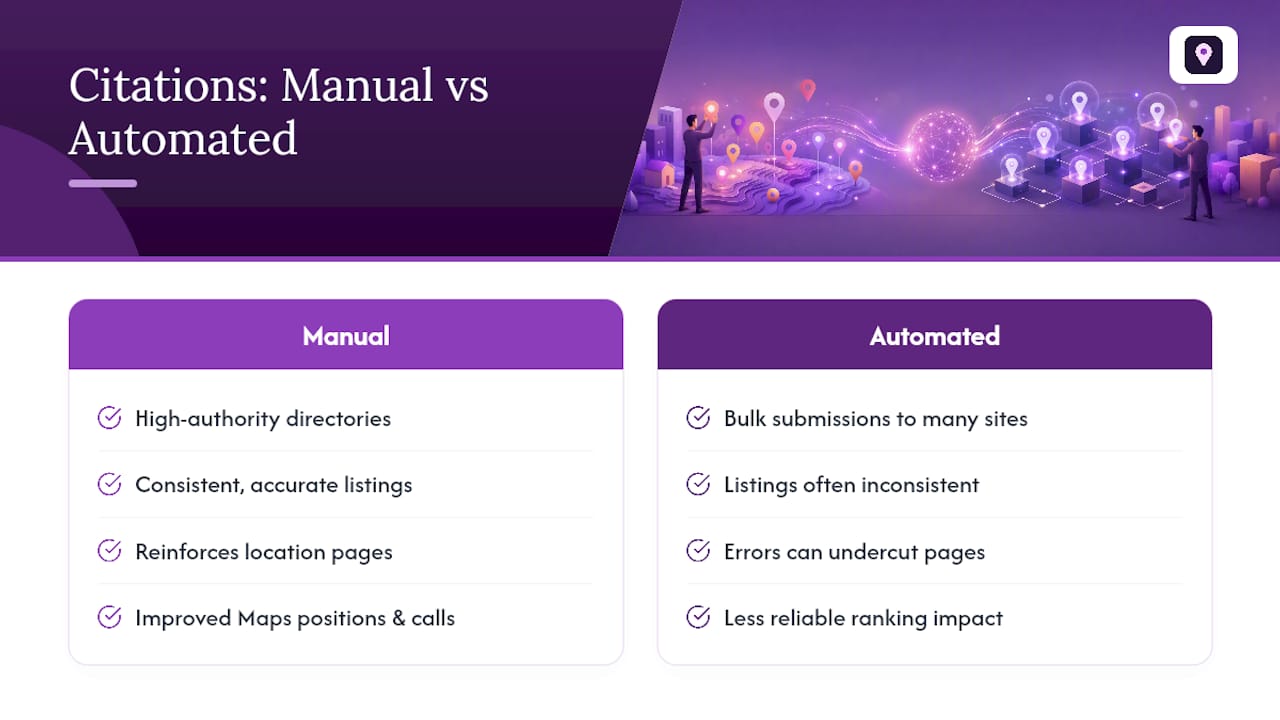
On-site optimization only carries a location page so far. The prominence signal Google weighs alongside relevance and distance comes largely from citations and reviews, and that’s the layer Localseobot focuses on, building premium citations manually across high-authority directories instead of running automated bulk submissions that often produce inconsistent listings.
The two efforts reinforce each other. A well-built location page gives searchers and Google a reason to trust the business; consistent, accurate citations across the web reinforce that the business is real and stable at that address. Clients working through this combination have reported improved Google Maps positions and more inbound calls, and A 30-day money-back guarantee is offered if a business doesn’t see a ranking increase.
Pro Tip: In most audits, the location pages that underperform aren’t missing content. They’re missing a citation that lists a different suite number or an old phone number, quietly undercutting every ranking signal the page is trying to build.
The location page mistake nobody talks about
Most guidance on this topic treats location pages as a content problem: write more, localize harder, add another FAQ. That’s incomplete. The bigger failure mode is treating location page SEO as a one-time publishing project instead of an ongoing governance responsibility.
Businesses that get this right don’t have better templates than everyone else. They have a review cadence, a uniqueness threshold, and someone whose job includes killing pages that stop performing. Conventional advice rarely mentions that pruning a location page can help more than publishing a new one, because a thin page sitting at the twentieth position drags down how Google perceives the whole location network.
If there’s one place to start, it’s not content or schema. It’s the decision checklist: confirm a real address or documented service history before writing a single word. Everything downstream, keywords, structured data, GBP linkage, only pays off on a page that had a legitimate reason to exist in the first place.
— Local
Turn your location pages into ranking signals, faster
Building the pages is half the work. Making sure Google and searchers trust what those pages say is the other half, and that’s where Localseobot fits. Every physical location page and service-area page you publish gets stronger when the citation layer behind it is accurate and consistent, and that’s the piece most teams underinvest in because it’s tedious to do by hand across dozens of directories.

Citations are built manually on high-authority directories instead of automating placements the way most tools do, which means fewer mismatched addresses and fewer inconsistencies for Google to penalize. Pair that with the platform’s Google Business Profile Optimizer to keep your GBP data aligned with what your location pages say, and a Citation Consistency Analyzer to catch NAP mismatches before they cost you rankings.
Start by requesting a visibility check through the Localseobot overview to see where your current location pages and citations stand, then review the case studies there alongside the 30-day money-back guarantee before committing to a plan.
Sources
- Tips to improve your local ranking on Google - Google Business Profile Help
- Multi-location SEO: How to structure geographic pages at scale
- How to Build Location Pages That Rank, Convert, and Get Cited - Backlinko
- Local SEO: The Complete Guide to Ranking in Local Search | Fokal Guides