GA4 for Local SEO: What It Shows and What It Misses
Published November 23, 2026
GA4 for Local SEO: What It Shows and What It Misses

GA4 tells you what visitors do on your website after they arrive. It does not tell you where your business ranks on Google Maps, and it cannot see calls or direction requests that never touch your site. To measure local SEO properly, you set up GA4 for website leads, tag your Google Business Profile links, and add map rank tracking for the part GA4 cannot see. This guide shows each step, and where the gaps are.
TL;DR
- GA4 measures website behavior: organic sessions, location-page traffic and form fills. It does not measure Google Maps rankings.
- Add UTM tags to your Google Business Profile website link so profile clicks show up as their own source in GA4.
- Link your Business Profile to GA4 to pull in calls, directions, bookings and website clicks, and treat GA4 numbers as estimates because of data thresholding.
- Pair GA4 with Search Console and geo-grid rank tracking. Local SEO Bot runs map grid scans and handles the profile work for you.
Table of Contents
- What GA4 can and cannot tell you about local SEO
- Step 1: Set up GA4 to count local leads
- Step 2: Tag your Google Business Profile links with UTMs
- Step 3: Link your Business Profile to GA4
- Step 4: Read the GA4 reports that matter for local
- Step 5: Avoid the traps that mislead local owners
- How the three data sources fit together
- A simple monthly routine
- Our perspective
- Put rank tracking and profile work next to GA4
- FAQ
- Sources
What GA4 can and cannot tell you about local SEO
Local SEO has two surfaces. One is your website. The other is your Google Business Profile (GBP), the listing that appears in the map pack and on Maps. GA4 only sees the first.
What it covers well:
- How many visitors arrive from organic search, and which pages they land on.
- Which location or service pages attract traffic.
- Which visitors call, submit a form or book, once you define those actions as key events.
What it misses:
- Map rank. Nothing in GA4 reports where you appear for “plumber near me” in a given neighborhood.
- Actions on the profile. A customer who taps Call or Directions on your Maps listing converts without triggering any GA4 event, as DreamHost’s local reporting guide points out.
- Your service area. GA4’s geographic reports rely on approximate IP-based location, and it does not know which cities you serve. You have to apply that context yourself when you read the data.
So GA4 is one third of the picture. Search Console shows how your pages appear in web search. Business Profile data shows how people act on your listing. Rank tracking shows where you stand on the map. The sections below build each layer in order.
Step 1: Set up GA4 to count local leads
A fresh GA4 property counts visitors, but it does not know which actions matter to a local business. Google’s own help page on getting more useful data out of Analytics lists setting up key events and linking Search Console among the core steps. Do both.
Mark your lead actions as key events. A key event is an interaction you tell GA4 is valuable. A conversion is the number of times a user triggers that event, for example a form fill. For most local businesses, the list is short:
- Contact or quote form submitted.
- Tap on the phone number on your site (click-to-call).
- Click on the directions or address link.
- Online booking completed, if you offer it.
Keep the list tight. If everything is a key event, nothing stands out.
Link Search Console. This brings organic search queries and landing pages into GA4 so you can see which searches lead to which pages. Do this once, in the GA4 admin settings under product links.
Write down your service area. Because GA4 does not know it, list your target cities and ZIP codes. When you open a geographic report, you will compare it against that list, not against GA4’s guess.
Step 2: Tag your Google Business Profile links with UTMs
This is the step most local owners skip, and it is the one that changes your reports most. Without a tag, a click from your Maps listing to your website tends to blend into general organic traffic. With a tag, it shows up as its own labeled source.
UTM parameters are short labels added to the end of a URL that tell GA4 where a visit came from. DreamHost suggests an example in the format ?utm_source=google&utm_medium=organic&utm_campaign=gbp on the GBP website URL. Our own walkthrough covers how to tag your profile links for GA4 in more detail.
Three details trip people up:
- Case matters. GA4 treats parameter values as case sensitive, so utm_source=google and utm_source=Google show up as two different sources. Pick lowercase and keep to it.
- Missing tags show as (not set). The same guide notes that missing UTM parameters produce (not set) values in reporting.
- The medium decides the channel. GA4’s default rules file a session under Organic Search when the source is a known search site or the medium is exactly “organic”. Use “organic” as the medium and your tagged profile visits will count in that channel, while the campaign label (gbp) lets you split them out.
If you manage several locations, give each its own campaign value, such as gbp-denver and gbp-boulder, so you can compare them.
The same practice helps in reporting. A Looker Studio report filtered on GBP campaign tags can show which profile features drive revenue.
Step 3: Link your Business Profile to GA4
Google now lets you connect a Business Profile to Analytics. Once linked, performance data such as website clicks, calls, directions, messages, bookings and menu clicks is shared with the GA4 property. That fills part of the gap described earlier.
Know the limits before you build a dashboard on it. According to this local tracking guide:
- Only the last six months of profile data are available.
- Numbers from multiple profiles are summed and cannot be split by profile.
- Profile metrics cannot be used in explorations, comparisons or filters.
For a multi-location business, that last point matters. Your UTM campaign tags and the profile’s own performance screen remain the way to compare locations.
Also note how Google counts. In Business Profile performance data, views count unique visitors, so a person is counted once a day. The search terms report refreshes at the start of each month and can take up to five days to appear. Do not expect daily search-term data.
Step 4: Read the GA4 reports that matter for local
You do not need a custom setup to start. Search Engine Land’s guide to GA4 dashboards for local SEO shows that standard reports can answer practical questions: which location pages need work, which profiles send the most organic traffic, and whether keyword growth for a location page is lifting visits.
Traffic acquisition vs. user acquisition
GA4 has two views of channels, and they answer different questions.
| Report | What it counts | Use it for |
|---|---|---|
| User acquisition | The channel of a person’s first visit | Finding new customers who discovered you through search |
| Traffic acquisition | Every session, including repeat visits | Seeing total activity by channel |
The same guide explains why this matters locally: someone typing a brand name such as “Tom’s Dental” into Google counts as organic search, and repeat branded visits can inflate organic sessions in Traffic acquisition. If you want to know whether you are winning new customers, start with User acquisition.
Location-page paths
Filter organic traffic by landing page and compare your location or service-area pages. The pages with the most organic visits are working. The ones with few visits are your next job: better content, clearer local signals, more consistent business details. That is a quick, free prioritization exercise.
Expect estimates, not exact counts
GA4 applies data thresholding to protect privacy, so local data in key organic reports is often an estimate. The same Search Engine Land guide suggests that when two compared data sets differ by fewer than about 20 users or sessions, the gap should not drive a big strategy change. For a small business with modest traffic, this is a real constraint. Look at trends over months, not single weeks.
Step 5: Avoid the traps that mislead local owners
Organic growth is not the same as ranking growth. An organic session increase can come from improved rankings, or just from more people searching your brand name. Cross-check with Search Console, which separates queries.
Search Console is not a map report. Its position data reflects web results, not map-pack position. On mobile, many local pack listings show no website link until someone taps into the listing, so those views may never register as impressions for your site. A website-only view undercounts how often you appear on Maps.
A ranking is not one number. Maps results change block by block. Where you appear for someone standing next to your shop can differ sharply from where you appear three miles away. GA4 flattens that into a single organic line.

Do not skip the offline conversion. Calls and bookings from your profile are the point. Claire Carlile estimates about a 10% drop-off between bookings made through a Business Profile and actual visits, which makes bookings a useful proxy for footfall and revenue.
How the three data sources fit together
| Question | Where to look |
|---|---|
| Are visitors from search taking action on my site? | GA4 key events |
| Which searches bring people to my pages? | Search Console, linked to GA4 |
| Are people calling, requesting directions or booking from my listing? | Business Profile performance, linked to GA4 |
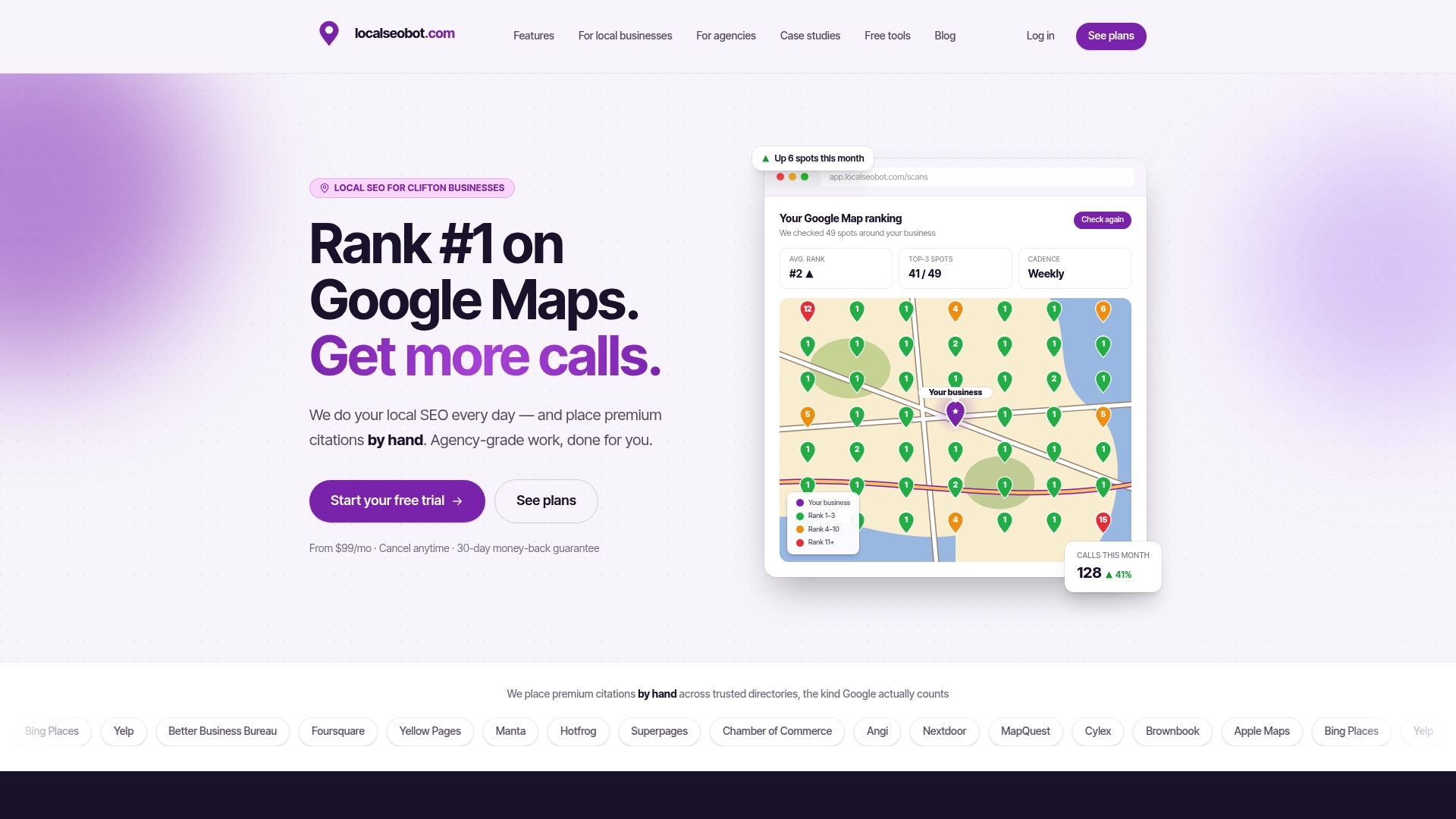
| Where do I rank on the map, and where am I invisible? | Map grid rank tracking |
The last row is the one most owners are missing. If you want to go deeper on how website analytics relates to map visibility, the local SEO academy guides cover search visibility across Google and AI search. For tracking itself, our piece on geo-grid local pack tracking explains how a grid scan works and how to read one.
A simple monthly routine
Once the setup is done, local reporting takes under an hour a month:
- In GA4, open User acquisition and note organic visitors and key events for the month.
- Check the GBP campaign tag: how many visits came from your profile link?
- In Business Profile performance, record calls, directions, bookings and website clicks.
- In Search Console, look at which queries and pages gained or lost impressions.
- Review your map grid scan: which areas gained or lost positions.
- Compare against your service-area list, and pick one fix for next month.
If calls rose while website traffic stayed flat, your profile is doing the work, and GA4 alone would have called the month a failure. That is exactly the case where combined data pays off.
Our perspective
Most SEO tools hand an owner a report and leave the work to them. GA4 is the clearest example: it is a good report on your website, and it says nothing about the half of local search that happens on Maps.
We built Local SEO Bot around that gap. It does the work itself: it optimizes the Google Business Profile, publishes regular posts, responds to reviews, and tracks rankings across your service area with map grid scans. Behind the automation, a dedicated team manually builds premium citations on high-authority directories, so your business gets signals Google trusts.
For a busy owner, the practical benefit is that the analytics question changes. Instead of spending evenings in dashboards trying to explain a flat line, you see rank movement by neighborhood and the calls it produces. GA4 stays in place as your website layer, and the profile and ranking layers are handled.
Agencies get the same engine with white-label options, so each client location can be managed and reported on without hiring more people.
Devyn H
Put rank tracking and profile work next to GA4
Local SEO Bot is an AI agent that does local SEO instead of only reporting on it. Plans are priced per location: Foundation is $99 per month and Growth is $199 per month, and the Pro plan for agencies is $399 per month per location. We offer a 30-day money-back guarantee if a business does not see a ranking increase.
If you only want to see where you stand first, the Google Maps rank tracker shows grid scans across your service area.
Agencies that resell local SEO can see how the white-label local SEO software works for client locations. For the reporting side, a sample SEO report shows what a monthly report looks like.
FAQ
Can GA4 track Google Maps rankings?
No. GA4 records visits to your website and the actions taken there. It has no data on your position in the map pack. For that you need geo-grid rank tracking, which shows your position at many points across your service area.
How do I see Google Business Profile traffic in GA4?
Add UTM parameters to the website link on your profile, using a consistent lowercase source, medium and campaign. Visits from that link then appear as a labeled source in GA4. You can also link the profile to Analytics so calls, directions and website clicks are shared with the property.
Why do my GA4 local numbers not match Search Console or my profile?
The tools count different things. GA4 applies data thresholding and uses approximate location, Search Console reports web impressions, and the profile counts unique daily viewers. Treat small differences as noise and look at monthly trends.
What should a local business track as a conversion in GA4?
Track the actions that lead to revenue: form submissions, click-to-call taps, direction clicks and completed bookings. Mark each as a key event. Profile calls and direction requests happen off your site, so read them in Business Profile performance data.
Sources
- Get more useful data out of Analytics - Analytics Help
- Connect your Business Profile to Google Analytics
- Understand your Business Profile performance and insights
- 5 useful GA4 dashboards for local SEO, Search Engine Land
- Master GA4: Google Analytics 4 Tips and Tutorials, Search Engine Land
- Local SEO Reporting: Track and Measure Performance, DreamHost
- UTM Tracking in Google Analytics 4, Terminus.app
- Metrics That Matter in Local SEO, KP Playbook
- Local SEO Tracking: What to Measure and How to Set It Up
- GA4 for Local Service Business Clients
- Local SEO Academy