Local Rank Tracking for Agencies and SEO Teams
Published August 17, 2026
Local Rank Tracking for Agencies and SEO Teams

Local rank tracking works best when you combine geo-grid scanning with scheduled Google Maps monitoring, not single-point rank checks. If you’re managing multiple locations or client accounts, Local SEO Bot gives you the practical setup: visual geo-grids, automated scans, and reports your clients actually understand.
What to look for before you commit to a tool:
- Geo-grid scanning with adjustable radius and point density
- Separate tracking for Google Maps (GBP) positions vs. organic local results
- Scheduled scans plus on-demand checks for verification
- White-label reporting and API access for agency accounts
Start with a quick scan of your top location and three to five priority keywords before scaling to a full grid across every market you manage.
Key Takeaways
Local rank tracking works because geo-grid sampling exposes neighborhood-level visibility gaps that single-point checks and average rank scores hide completely.
| Point | Details |
|---|---|
| Use geo-grids, not single checks | A 5x5 grid across a 2-mile radius reveals block-by-block variance a single ZIP search misses. |
| Track Maps and organic separately | Google Maps/GBP positions and organic local rankings move for different reasons and need different fixes. |
| Match cadence to competition | Daily scans suit competitive metros; weekly or monthly fits stable or monitoring-only accounts. |
| Diagnose before reacting | Check mobile vs. desktop and isolated vs. broad drops before changing strategy. |
| Local SEO Bot for full workflow | Combines geo-grid tracking, scheduled scans, white-label reports, and manual citation building with a 30-day money-back guarantee. |
Quick Reference Tools
- Local Falcon’s rank tracking features for geo-grid setup guidance
- Nightwatch’s local SERP tracking for ZIP and GPS-level precision
Table of Contents
- What Is Local Rank Tracking?
- Why Local Rank Tracking Matters for Your Business
- What Features Should a Local Rank Tracker Have?
- How Do You Set Up Local Rank Tracking?
- Which Metrics Actually Matter?
- How Often Should You Track Local Rankings?
- Free vs. Paid Local Rank Trackers: What’s the Difference?
- How Do You Turn Rank Data Into Action?
- Why Local SEO Bot Is Built for This Workflow
- Frequently Asked Questions
- Sources
What Is Local Rank Tracking?
Local rank tracking measures how a business or keyword performs in localized search results and map packs, checked from multiple geographic points rather than one central address. A single search from your office tells you almost nothing about how you rank two miles away, in the next zip code, or from a mobile device in a different neighborhood.
That’s where geo-grid sampling comes in. Instead of one query, the tool runs the same search from a grid of points spread across a defined radius, then plots the results as a visibility heatmap.
A small grid across a 2-mile radius returns multiple separate rank checks instead of one. A business might rank #2 at its own storefront and drop to #11 just eight blocks away, a gap a single ZIP check would never reveal. Local Falcon’s documentation on geo-grid scanning shows exactly this kind of block-by-block variance in dense urban markets.
Why Local Rank Tracking Matters for Your Business
Average rank position hides more than it reveals. A business can show “position 4” citywide while being invisible in three of its five busiest zip codes, and you won’t know it without geo-grid data broken down by point.
For multi-location brands and agencies, the payoff shows up in a few concrete places:
- Neighborhood-level gaps point you to exactly which storefront or service area needs attention first
- Visibility improvements on Google Maps translate directly into more calls, direction requests, and foot traffic
- Agencies get proof of work: a heatmap showing before-and-after coverage is far more persuasive to a client than a spreadsheet of numbers
- Prioritization gets easier when you can see which locations are losing ground and which are gaining it
G2 reviews of Local Falcon repeatedly cite geo-grid heatmaps as the single most valuable feature for agencies proving results to clients.
What Features Should a Local Rank Tracker Have?
Not every rank tracker deserves your budget. Here’s what actually earns a place in your stack, ranked by priority.
Geo-grid scanning with adjustable grid size and radius comes first. A fixed 3x3 grid works fine for a small suburban service area but misses too much in a dense downtown corridor, so you need control over both point count and spacing.
Separate tracking for Google Maps/GBP positions versus organic local results matters just as much. SE Ranking’s local rank tracker treats these as distinct data streams for a reason: a map pack drop and an organic drop have different causes and different fixes.
Beyond that, prioritize:
- Scheduled scans (daily or weekly) plus the ability to run on-demand checks
- API or integration options if you’re automating reports across many accounts
- Multi-location management with per-location quotas and white-label output for client-facing reports
- Data export, delta alerts when rankings shift, and historical trend views going back several months
Pro Tip: Don’t buy the tool with the most features. Buy the one whose grid size, scan frequency, and reporting format match how you actually deliver results to clients.
How Do You Set Up Local Rank Tracking?
Setting up your first campaign takes about 20 minutes once you know the sequence.
- Define your seed points. Use the exact storefront address for brick-and-mortar locations, or a service-area centroid for businesses that travel to customers.
- Choose grid size and radius by density. A 2-mile radius suits urban markets, 5 miles works for suburban areas, and rural service areas often need 10 miles or more to capture meaningful data.
- Add target keywords and assign them per location. Split transactional queries (“emergency plumber near me”) from discovery queries (“best plumber in [city]”) since they behave differently in the map pack.
- Set device type, schedule, and alerts. Mobile and desktop results diverge more than most people expect, so track both separately and configure alerts for any rank drop past a threshold you define.
- Run an initial on-demand scan to confirm the grid is capturing real data before you commit to a recurring schedule.
Pro Tip: Use a local keyword research tool to separate your keyword list into transactional and discovery buckets before you assign anything to a location. Mixing them makes your trend reports harder to read later.
Which Metrics Actually Matter?
Three metrics do most of the work: Average Rank Position (ARP), local pack presence (how often you show up in the map pack at all), and Share of Local Voice (SoLV), a visibility score that aggregates performance across your full grid rather than one point.
ARP tells you the average, but it can mask the neighborhood gaps a geo-grid exposes. SoLV solves that by weighting every point in the grid, which is why Local Falcon’s feature documentation treats it as the primary visibility score for agency reporting.
When rankings drop, diagnose before you react. Check whether the decline is happening on mobile, desktop, or both, and whether it’s concentrated in specific grid points or spread evenly. A drop confined to mobile searches in one zip code usually points to a different problem than a decline across the entire grid on both devices.
- Isolated drop: Likely a local competitor gaining ground or a citation inconsistency nearby.
- Broad drop across the grid: Often tied to a Google Business Profile change, a Map Pack layout update, or a site-wide technical issue.
Run the numbers through your visibility score calculator each month to keep the trend line in front of clients, not just the raw rank checks.
How Often Should You Track Local Rankings?
Cadence should match how competitive and volatile your market is, not a fixed industry default. Competitive metro campaigns justify daily scans because rankings can shift within hours during aggressive local competition. Stable, less contested markets do fine on a weekly cycle. Pure monitoring accounts, where you’re not actively running campaigns, can get by on monthly checks.

Grid density follows the same density logic as setup: tighter grids for crowded urban neighborhoods, broader radii for rural or regional coverage where competitors are spread thin.
| Market Type | Recommended Cadence | Grid Density |
|---|---|---|
| Competitive urban metro | Daily | Tight (2-mile radius, dense points) |
| Stable suburban market | Weekly | Medium (5-mile radius) |
| Rural or regional service area | Monthly | Broad (10-mile radius, fewer points) |
| Monitoring-only account | Monthly | Light grid, fewer keywords |
More frequent scans and denser grids generate more data, and more data costs more in most pricing models. Prioritize breadth (more locations covered) when you’re managing many accounts with modest budgets, and prioritize depth (denser grids, daily scans) for a handful of accounts where local competition is fierce.
Free vs. Paid Local Rank Trackers: What’s the Difference?
Free tools serve a narrow purpose well: a one-off check of where you rank right now. G2 reviews of Localo show users consistently value the convenience of instant, no-cost checks, and add-ons like the Local Business Rank Tracker on Google Workspace Marketplace let you check Maps rankings straight from a spreadsheet with zero setup.
What free tools don’t give you: scheduled scans, historical trend data, multi-location dashboards, or white-label reporting. That’s the line where paid tools take over.
Paid pricing typically scales on location count, keyword volume, and scan frequency. To estimate your monthly cost:
- Multiply the number of locations by the number of tracked keywords per location
- Multiply that by your chosen scan frequency (daily scans cost more than weekly)
- Add any premium for white-label reports or API access if you’re reselling to clients
Upgrading makes sense the moment you’re managing more than one location or reporting results to a client on a recurring basis. A one-time free check simply can’t support that workflow.
How Do You Turn Rank Data Into Action?
Data without a follow-up plan is just noise, making it essential to learn how to track SEO performance effectively to build actionable reporting workflows. Run through this prioritization checklist every time a new report comes in:
- Flag local pack losses first. Losing map pack visibility usually costs more traffic than a modest organic slide.
- Identify ZIP-level visibility gaps. A neighborhood where you’ve dropped out of the top ten needs targeted attention, whether that’s a Google Business Profile category update or fresh local content.
- Check for mobile-only declines. These often point to page speed or GBP profile issues specific to how mobile search surfaces results.
- Rank high-volume keywords with low visibility above minor fluctuations elsewhere.
From there, match the problem to the fix: update GBP categories and attributes, build out location-specific landing page content, add citations in directories relevant to that neighborhood, or launch a targeted review campaign. Re-scan two to three weeks after any change, compare the trend delta against your previous report, and log the win (or the miss) so your next prioritization round starts smarter.
Pro Tip: Keep a running log of what change caused what rank movement. After a few months, you’ll have a playbook specific to your market instead of generic advice.
Why Local SEO Bot Is Built for This Workflow
Everything covered above, geo-grids, scheduled scans, separate GBP tracking, white-label reports, works because Local SEO Bot was built around that exact checklist rather than bolted together after the fact.

The tool gives you interactive geo-grid maps you can hand directly to a client, automated scans that run on your schedule without manual triggering, and multi-location dashboards built for agencies managing dozens of accounts at once. It pairs that tracking with something most rank trackers skip entirely: manually built premium citations on high-authority directories, so when your grid reveals a citation-related gap, you have a direct path to fix it, not just a number telling you something’s wrong.
You can start with a free trial to see your own geo-grid data before committing to anything. And if your rankings don’t improve, Local SEO Bot backs the subscription with a 30-day money-back guarantee, which tells you plainly how confident the approach is. Set up your first location and run an initial scan through the Local SEO Bot platform to see exactly where your visibility gaps sit today.
A Note From the Field
We use geo-grid data the same way you should: to prioritize, not just report. A cluster of low-visibility points tells us where to focus citation building and GBP edits before we touch anything else.
Frequently Asked Questions
What is the difference between local rank tracking and regular rank tracking? Regular rank tracking checks one search result from one location. Local rank tracking uses geo-grid sampling across multiple points to show how visibility changes by neighborhood, device, and distance from the business.
How many keywords should I track per location? Most agencies track five to fifteen priority keywords per location, split between transactional queries and discovery queries, then expand once the initial data shows which terms drive real visibility.
Do I need a paid tool, or can free checkers work? Free checkers work for occasional spot checks on a single location. Once you’re managing multiple locations or reporting to clients on a schedule, paid tools with scheduled scans and white-label reports become necessary.
How often do local rankings actually change? Rankings in competitive metro areas can shift within days due to competitor activity, review velocity, or Map Pack layout changes. Stable suburban and rural markets tend to move more slowly, often over weeks.
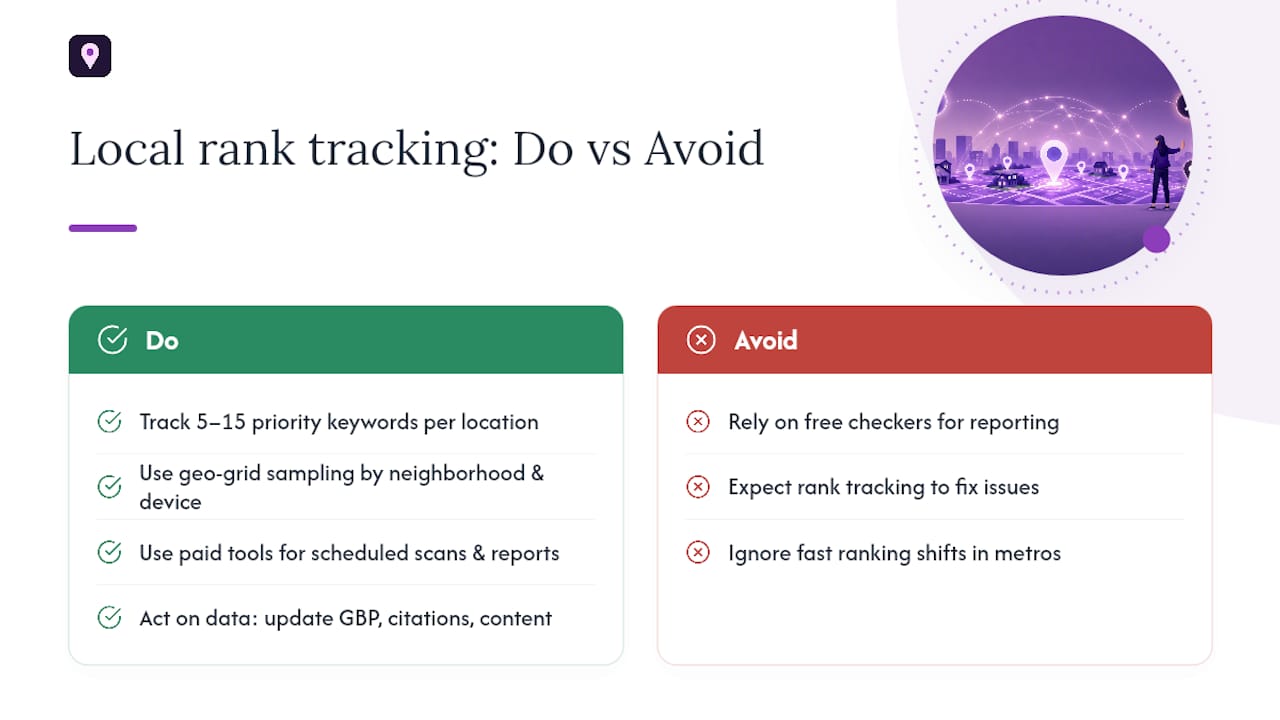
Can rank tracking data replace other local SEO work? No. Rank tracking tells you where you stand; it doesn’t fix anything on its own. It points you toward specific actions like GBP updates, citation building, or targeted content that actually move the needle.
Sources
- Local Falcon review on G2 (entry)