Google Maps Ranking: A Practical Guide for Small Businesses
Published August 9, 2026
Google Maps Ranking: A Practical Guide for Small Businesses
A verified, complete Google Business Profile combined with steady review velocity and matching on-site signals produces the fastest, highest-impact gains in Google Maps ranking. Lumina reports the Map Pack captures a large share of clicks on local searches, which means the three businesses in that top cluster absorb nearly half of all available local traffic. If your business isn’t in that pack, you’re competing for the remainder.
Here are the five highest-impact actions to execute right now:
- Claim and verify your Google Business Profile (GBP). An unverified listing can’t rank. Choose the most specific primary category that matches your core service, use a local area code phone number, and confirm your address pin is placed precisely on your building.
- Generate steady review velocity. Aim for a steady inflow of reviews rather than a one-time burst. Check the star averages of the current top-three results in your category and set a target to match or exceed them.
- Build a local landing page with LocalBusiness schema. The page title and H1 should include your city and service. The name, address, and phone number (NAP) must match your GBP exactly.
- Fix citation inconsistencies and build a handful of high-quality local links. Audit your existing directory listings, correct any NAP mismatches, then pursue sponsorships, local press, and chamber memberships for backlinks.
- Track visibility with GBP Insights and geo-grid rank tracking. A single-point rank check misses neighborhood-level variance. Monitor the queries and grid cells that drive actual calls and direction requests.
Key Takeaways
Prioritizing a verified, complete Google Business Profile combined with steady review velocity and consistent citations produces the fastest, most durable gains in Google Maps ranking for small businesses.
| Point | Details |
|---|---|
| GBP verification and completeness | A verified, fully completed profile is the prerequisite for ranking — every blank field is a missed relevance signal. |
| Review velocity over volume | Steady weekly reviews outperform one-time bursts; match or exceed the star average of your top-three local competitors. |
| Local landing page with schema | City+service in the title/H1, exact NAP matching GBP, and validated LocalBusiness schema reinforce Google’s confidence in your location. |
| Citation consistency first | Fix NAP mismatches across the top 20 directories before pursuing new backlinks; inconsistencies dilute prominence signals. |
| Localseobot for execution | Localseobot’s manual citation building, geo-grid rank tracking, and GBP automation tools help small businesses execute this plan without agency-level overhead. |
Table of Contents
- How does Google decide who shows up in Maps and the Local Pack?
- How to claim, verify, and set up your Google Business Profile correctly
- What to fill in on your GBP to improve relevance and conversions
- How reviews affect Maps ranking and how to get them the right way
- Website changes that support your Maps ranking
- Building prominence off-site: citations, directories, and local links
- Advanced GBP features that give you an edge
- How to measure Maps visibility and track your progress
- How long do Maps ranking changes take, and what do they cost?
- Common errors that hurt Maps ranking and how to fix them
- Your 30–90 day plan to improve Google Maps ranking
- What we’ve seen actually move the needle in local SEO
- Localseobot handles the heavy lifting so you can focus on your business
- Sources
How does Google decide who shows up in Maps and the Local Pack?
Google’s official guidance confirms that local results are based on three factors: relevance, distance, and prominence. Understanding what feeds each factor tells you exactly where to spend your time.
Relevance measures how well your profile matches what someone searched for. The inputs Google reads include your primary and secondary categories, your services list, your business description, and the text inside your customer reviews. A plumbing company that lists “emergency drain cleaning” as a service and has reviews mentioning “burst pipe repair” will score higher relevance for those queries than a competitor whose profile says only “plumber.”
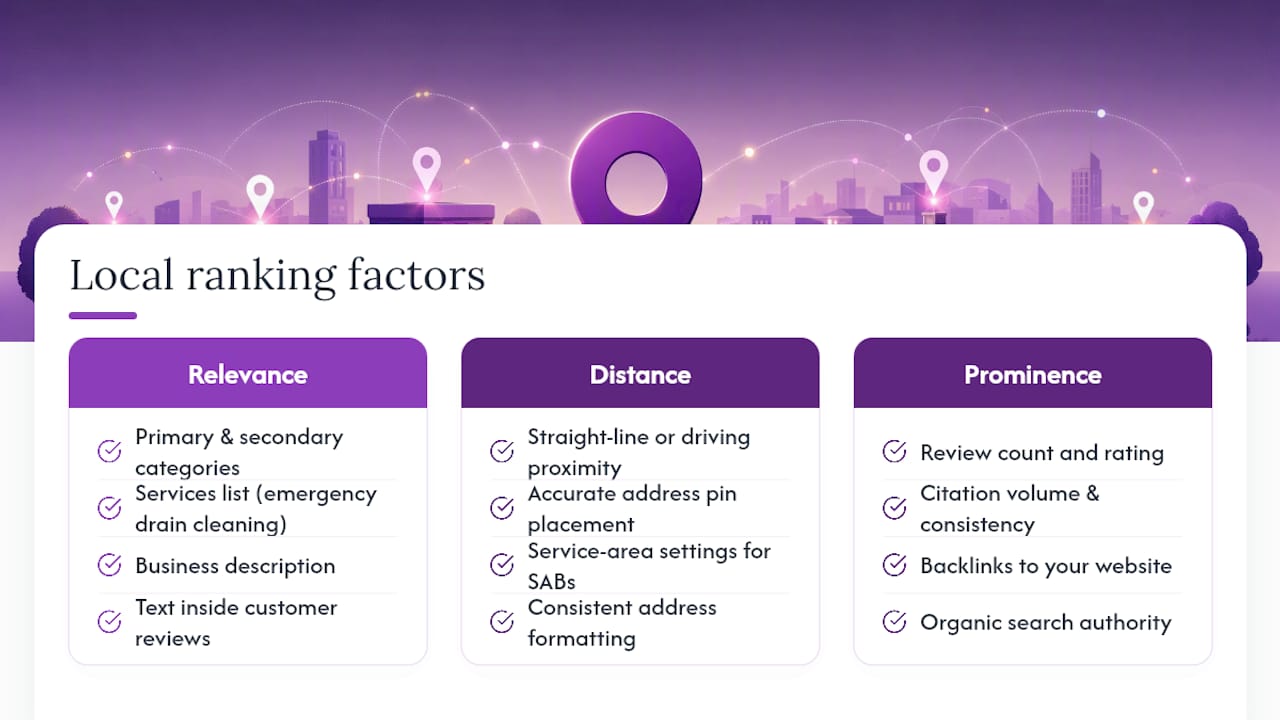
Distance is the straight-line or driving proximity between the searcher’s location and your business address. You can’t move your shop, but you can make sure your address pin is placed correctly, your service-area settings reflect where you actually work, and your address is formatted consistently everywhere Google reads it. For service-area businesses (SABs) that hide their physical address, Google uses the service area you define, so setting it accurately matters.
Prominence is the broadest factor. It reflects how well-known and trusted your business appears across the web: review count and rating, citation volume and consistency, backlinks to your website, and your organic search authority. Semrush describes the 3-pack as showing the top three local listings with name, rating, price range, address, and hours — businesses with stronger prominence signals consistently occupy those slots.
A quick example. A coffee shop targeting “latte near me” needs relevance (GBP category set to “Coffee Shop,” menu listing espresso drinks, reviews mentioning “latte”), distance (accurate pin on the building), and prominence (100+ reviews, consistent Yelp and Apple Maps citations, a few local food-blog links). Weakness in any one factor can push a competitor with a slightly worse product into the top three instead.

How to claim, verify, and set up your Google Business Profile correctly
Getting the basics right is non-negotiable before any other tactic produces results. Ahrefs confirms GBP setup is the first lever in any Maps ranking strategy.
Step-by-step setup:
- Go to business.google.com and search for your business name. If a listing already exists, claim it; if not, create a new one.
- Choose your business category carefully at this step — you can change it later, but starting correctly saves time.
- Select your verification method. Google offers postcard, phone, email, video, or instant verification depending on your business type and history. Postcard takes 5–14 days; phone and email are faster when available.
- Once verified, set up a dedicated Google account for the business (not a personal Gmail), enable two-factor authentication, and document who holds owner-level access.
- Add a manager-level user for any team member who needs access, keeping owner access to one trusted account.
Profile fields that directly affect ranking:
- Business name: Use your real-world trading name only. Adding city names or keywords to the business name field violates Google’s guidelines and can trigger suspension.
- Primary category: Pick the most specific option available. “Italian Restaurant” outperforms “Restaurant” for Italian food searches.
- Address or service area: Physical businesses enter a precise address; SABs set a service radius or list specific cities and hide the address.
- Phone number: Use a local area code. WordStream specifically flags toll-free numbers as a local trust signal weakness — a local number signals geographic relevance to both Google and potential customers.
- Website: Link to the most relevant page (homepage for single-location businesses, a location-specific page for multi-location).
- Hours: Keep regular hours accurate and add special hours for holidays. Incorrect hours generate negative reviews and hurt trust signals.
- Attributes: Check every applicable attribute (wheelchair accessible, women-owned, outdoor seating, etc.) — these feed relevance for filtered searches.
Pro tip on pin placement: Zoom into satellite view when placing your map pin and drop it on the actual entrance of your building, not the street or parking lot. Google uses pin coordinates in distance calculations, and a pin placed 200 feet off can cost you rankings for nearby searchers.
Pro Tip: If you need to replace a toll-free number with a local one, update GBP first, then update your website and directories in the same week. Staggered changes create temporary NAP mismatches that can suppress rankings.
What to fill in on your GBP to improve relevance and conversions
A complete profile consistently outranks a sparse one. Every blank field is a missed relevance signal.
- Business description (750 characters): Open with your primary service and city. Mention two or three specific services and one differentiator. Avoid keyword lists — write for the customer first, and the keywords will appear naturally.
- Services: Add every service you offer with its own name and description. A roofing company should list “roof replacement,” “roof repair,” “gutter installation,” and “storm damage assessment” as separate entries, each with a short description.
- Products: Retailers and product-based businesses should populate the product catalog with photos, prices, and descriptions. Google surfaces product listings in the knowledge panel.
- Photos and videos: Upload a cover photo (1080×608 px minimum), a logo, interior and exterior shots, team photos, and product or service images. Optimizing your GBP photos means adding new images at least monthly — profiles with recent photo activity tend to show higher engagement metrics.
- Q&A: Seed your own questions and answers before customers post inaccurate ones. Cover hours, parking, pricing, and service area. Monitor weekly and flag inappropriate content.
- GBP Posts: Use the Posts feature for offers, events, and updates. Posts expire after seven days (event posts expire on the event date), so schedule a recurring reminder to refresh them.
For primary category selection, the rule is simple: choose the category that best describes what you do most, not what you aspire to do. A dental practice that also offers cosmetic procedures should list “Dentist” as primary and “Cosmetic Dentist” as secondary. Reversing that order can suppress visibility for the higher-volume “dentist near me” searches.
How reviews affect Maps ranking and how to get them the right way
Reviews are the most measurable prominence signal available to a small business. Count, velocity, recency, average rating, and the actual text of reviews all feed into how Google scores your profile. Practitioner analyses cited by Lumina consistently rank review signals among the strongest correlates with Map Pack position.
Getting reviews without violating Google’s policy:
- Ask in person at the point of service. A simple “Would you mind leaving us a Google review?” converts well when the customer is already satisfied.
- Use a short link (your GBP review link) on receipts, invoices, and follow-up emails. Google generates this link directly in your GBP dashboard.
- Place a QR code on your counter, packaging, or service vehicle that links directly to your review form.
- Send a follow-up text or email 24–48 hours after service completion. Keep it brief and direct.
What not to do: Never offer discounts, gifts, or any incentive in exchange for reviews. Never ask employees or friends to post fake reviews. Google’s spam detection has improved significantly, and a cluster of reviews from accounts with no prior activity is a red flag that can trigger a review purge or listing suspension.
Responding to reviews:
- Respond to every review, positive or negative, within 48 hours.
- For positive reviews, thank the customer by first name and mention the specific service or location when it fits naturally (“glad the roof repair held up through the storm, Maria”).
- For negative reviews, acknowledge the issue, apologize without admitting fault, and offer to resolve it offline. Never argue publicly.
Pro Tip: When asking for a review in person, say: “If you mention the [specific service] you had done today, it helps other customers know what to expect.” This naturally prompts review text that includes service keywords, which reinforces relevance signals without coaching customers on what to write.
Website changes that support your Maps ranking
Your website and your GBP reinforce each other. A strong local landing page with correct structured data gives Google additional confirmation of your location, services, and legitimacy.
Local landing page checklist:
- Title tag and H1 include the city and primary service: “Plumber in Austin, TX | [Business Name].”
- The page contains unique content — not a copy-paste of another location page with the city name swapped.
- The contact block (name, address, phone) matches your GBP exactly, character for character.
- An embedded Google Map shows your location.
- Click-to-call buttons are visible on mobile without scrolling.
LocalBusiness schema tells Google precisely what your business is, where it operates, and how to contact it. Google’s developer documentation supports structured data implementation for local businesses. At minimum, include: @type, name, address (with streetAddress, addressLocality, addressRegion, postalCode), telephone, openingHours, and geo (latitude/longitude). Test your implementation with Google’s Rich Results Test before publishing.
Technical priorities:
- Mobile-first design. Most local searches happen on phones, and a slow or hard-to-navigate mobile page loses conversions regardless of ranking.
- Page speed: compress images, use a caching plugin, and aim for a Largest Contentful Paint under 2.5 seconds.
- For multi-location sites, give each location its own URL with a canonical tag pointing to itself. Never canonicalize location pages to the homepage.
Pro Tip: The most common schema error is a telephone number formatted differently on the page versus in the schema markup. Google reads both and flags the mismatch. Use the same format everywhere: (512) 555-0100.
Building prominence off-site: citations, directories, and local links
Off-site prominence work compounds slowly but produces durable ranking gains. Citation consistency is foundational — fix NAP mismatches before pursuing new links.
Citation action plan:
- Audit your existing citations using a tool that checks your NAP across major directories. Note every variation in business name, address format, or phone number.
- Fix the highest-authority directories first: Google, Apple Maps, Bing Places, Yelp, Facebook, and the major data aggregators (Neustar Localeze, Data Axle, Foursquare).
- Add listings to relevant niche directories (Houzz for contractors, Healthgrades for medical, Avvo for legal) and your local chamber of commerce site.
- Maintain a spreadsheet of every directory where you have a listing, including login credentials and the date last verified.
Local backlink tactics:
- Sponsor a local event, youth sports team, or charity and request a link from the organization’s website.
- Partner with complementary local businesses for cross-referral pages.
- Pitch a local news outlet or neighborhood blog with a genuinely useful story (a seasonal safety tip, a community initiative, an unusual service you offer).
- Submit your business to your city’s official business directory if one exists.
Pro Tip: Run a citation audit every quarter. Before you start any link outreach campaign, confirm your NAP is consistent across the top 20 directories. A backlink pointing to a business with inconsistent citations dilutes the prominence signal.
Advanced GBP features that give you an edge
Most businesses claim their profile and stop there. The features below are underused and can meaningfully improve both ranking signals and conversion rates.
- GBP Posts: Post weekly. Use the “Offer” post type for promotions (include a redemption code to track conversions), “Event” for time-bound activities, and “Update” for general news. Posts with photos generate more clicks than text-only posts.
- Product catalog: Retailers, restaurants, and service businesses with defined packages should populate this. Each product entry includes a name, photo, price, and description. Google surfaces these in the knowledge panel and in Maps search results.
- Bookings: If you use a supported scheduling platform (such as Acuity, Mindbody, or OpenTable), connect it to GBP so customers can book directly from your Maps listing. This reduces friction and generates a measurable conversion signal.
- Messaging: Enable GBP messaging and respond within one hour during business hours. Google displays a “Typically responds in X minutes” badge that influences click-through rates.
- Attributes: Beyond the basics, check for category-specific attributes. Restaurants have “dine-in,” “takeout,” and “delivery.” Service businesses have “online estimates” and “on-site services.” Each checked attribute can match additional filtered searches.
- Q&A: Beyond seeding your own questions, monitor for customer-submitted questions weekly. Unanswered questions from the public can contain misinformation that damages conversions.
Measuring impact from these features is straightforward in GBP Insights: track “website clicks,” “calls,” and “bookings” month over month after activating each feature. Posts and product updates primarily drive conversion rather than ranking, but an active profile with regular updates signals to Google that the business is operating and engaged.
How to measure Maps visibility and track your progress
Measurement without a baseline is guesswork. Set your baseline before making changes, then track weekly.
Metrics to monitor:
- GBP views (search and maps), calls, direction requests, and website clicks — available in GBP Insights
- Review count, average rating, and review velocity (new reviews per week)
- Local landing page organic sessions and click-to-call conversion rate (via Google Analytics)
- Map Pack rank for your primary keywords across multiple locations in your service area
| Metric | What it measures | Review frequency |
|---|---|---|
| GBP search views | Profile impressions from search | Weekly |
| GBP maps views | Profile impressions from Maps | Weekly |
| Direction requests | Intent to visit | Monthly |
| Calls from GBP | Direct conversion from listing | Weekly |
| Review velocity | New reviews per week | Weekly |
| Local landing page sessions | Organic website traffic | Monthly |
| Map Pack rank (geo-grid) | Neighborhood-level visibility | Monthly |
GBP Insights limitations: The data is sampled and typically delayed by 3–5 days. It also doesn’t show which specific keywords triggered your impressions. Supplement it with a dedicated rank tracker that uses geo-grid methodology.
Geo-grid tracking places multiple rank-check points across your city rather than checking from a single location. A business might rank #1 within half a mile of its address but drop to #8 three miles away. Single-point tracking misses that variance entirely and can give a falsely optimistic picture of your visibility. Mobile search performance tracking adds another layer, since mobile results can differ from desktop even for the same query and location.
Monitoring checklist:
- Week 1: establish baseline GBP metrics, review count, and geo-grid rank snapshot
- Weekly: check calls, new reviews, and any GBP notifications or suggested edits
- Monthly: full geo-grid rank report, landing page analytics, citation audit trigger if calls drop unexpectedly
- Trigger for deeper action: a 20%+ drop in calls or direction requests in a single week warrants an immediate GBP audit for unauthorized edits or new duplicate listings
How long do Maps ranking changes take, and what do they cost?
Setting realistic expectations prevents wasted effort and budget. The timeline depends on which lever you’re pulling.
- Immediate (hours to days): Profile edits — correcting hours, adding photos, updating categories. These changes are indexed quickly and can produce ranking movement within days.
- Short-term (2–8 weeks): Review-driven movement. A consistent weekly inflow of new reviews can shift your position in competitive markets within a month or two. Practitioner guidance confirms that profile edits move rankings within days to weeks, while prominence work takes longer to compound.
- Medium-term (3–6 months): Citation cleanup, local backlinks, and on-site schema work. These signals accumulate and compound, but they rarely produce overnight results.
Cost ranges:
- DIY: $0 in cash but 5–15 hours per month in time. Suitable for single-location businesses with low competition.
- Local SEO tools: $30–$150/month for rank tracking, citation management, and GBP optimization platforms. Appropriate when you want data without hiring an agency.
- Google Maps ads / Local Services Ads: Variable cost per click or per lead. Ads increase visibility immediately but do not change your organic Map Pack ranking. They occupy a separate paid slot above or alongside the organic pack.
- Agency retainer: $500–$2,500/month for full-service local SEO management. Justified when competition is high and internal time is limited.
The paid-vs-organic distinction matters: running Local Services Ads while your organic ranking is weak is a valid short-term strategy, but it doesn’t fix the underlying profile or prominence gaps. Treat ads as a bridge, not a substitute.
Common errors that hurt Maps ranking and how to fix them
A single mistake in this list can suppress a listing that’s otherwise well-optimized.
- Duplicate GBP listings: Search Google Maps for your business name and address. If two listings appear, report the duplicate through GBP support and request a merge. Duplicate listings split reviews and confuse Google’s distance calculations.
- Inconsistent NAP: Even minor variations (“St.” vs. “Street,” “Suite 4” vs. “#4”) across directories create conflicting signals. Fix the most authoritative directories first.
- Keyword-stuffed business name: Adding “Best Plumber Austin TX” to your business name field violates Google’s guidelines. Competitors can report it, and Google can suspend the listing. Use your real trading name only.
- Incorrect service-area radius: SABs sometimes set a 100-mile radius hoping to rank everywhere. Google ignores implausibly large service areas. Set a realistic radius that reflects where you actually serve customers.
- Toll-free phone number: As noted above, a local area code is a stronger local signal. Replace toll-free numbers in GBP and across all directories simultaneously.
- Fake or incentivized reviews: Google’s detection systems flag clusters of reviews from new accounts, reviews posted from the same IP address, and reviews that appear immediately after a business asks for them en masse. The penalty is a review purge or listing suspension.
- Frequent edits by unknown users: Enable GBP notifications so you’re alerted when someone suggests an edit to your listing. Unauthorized edits (often from competitors or automated systems) can change your hours, category, or address. Revert them immediately.
For quick fixes to low local rankings, the remediation sequence is: identify the issue, document the current state, make the correction, and monitor for 30 days to confirm the fix held. When edits are repeatedly reverted or a listing is suspended, contact Google Business Profile support directly through the GBP dashboard’s Help menu.
Your 30–90 day plan to improve Google Maps ranking
This plan is organized by time window and priority. Estimated hours assume a solo owner or a single marketer.
Days 1–7 (quick wins, high priority):
- Claim and verify GBP if not already done — 1–2 hours. (Step-by-step GBP setup guide)
- Audit and correct all profile fields: category, phone, hours, address, attributes — 1 hour.
- Add or update photos (cover, interior, exterior, team) — 1 hour.
- Seed three to five Q&A entries — 30 minutes.
- Run a citation audit and list the top 10 directories with NAP mismatches — 1 hour.
Weeks 2–4 (foundation, high priority):
- Fix all NAP inconsistencies in the top 20 directories — 3–5 hours.
- Launch a review request campaign: email past customers with a direct review link — 2 hours setup.
- Publish or update your local landing page with correct NAP, city+service in the title/H1, and LocalBusiness schema — 3–5 hours.
- Validate schema with Google’s Rich Results Test — 30 minutes.
Weeks 5–8 (momentum, medium priority):
- Establish a weekly GBP Post schedule — 30 minutes/week.
- Begin local link outreach: identify two to three sponsorship or partnership opportunities — 2 hours.
- Set up geo-grid rank tracking and record your baseline — 1 hour.
- Respond to all new reviews within 48 hours — ongoing.
Weeks 9–12 (compounding, medium/low priority):
- Submit to five to ten niche or local directories not yet covered — 2 hours.
- Pitch one local press story or community blog — 2–3 hours.
- Run a monthly GBP Insights review and adjust your review request cadence based on velocity data — 1 hour/month.
- Check geo-grid rankings against baseline and identify underperforming neighborhoods — 1 hour/month.
Weekly sprint structure for solo owners: Monday: respond to new reviews and check GBP notifications. Wednesday: publish a GBP Post. Friday: review calls and direction requests from GBP Insights. End of month: full audit against the checklist above.
What we’ve seen actually move the needle in local SEO
The businesses that gain ground fastest share one trait: they fix the fundamentals completely before chasing advanced tactics. A profile with the wrong primary category and a toll-free number won’t benefit from a sophisticated link campaign.
Review velocity is the fastest organic lever available after profile setup. In competitive markets, the difference between position one and position three often comes down to which business is generating two to three new reviews per week versus one every few weeks. Geo-grid data reinforces this: businesses that improve review velocity consistently see rank improvements spread outward from their address over 60–90 days.
Citation consistency is the most underestimated factor. Many businesses have dozens of directory listings accumulated over years, with different address formats, old phone numbers, and outdated business names. Cleaning that up before any link outreach produces a measurable lift on its own.
Pro Tip: Before investing in any paid tool or agency, run a free audit of your GBP and top 10 citations. The gaps you find in 30 minutes will tell you exactly where to focus first.
Localseobot handles the heavy lifting so you can focus on your business
Executing this entire playbook takes consistent time and expertise. Localseobot is built specifically for small businesses and agencies that want measurable Google Maps ranking gains without managing every moving part manually.

Unlike tools that automate citation submissions in bulk, Localseobot manually builds premium citations across high-authority directories, the approach that produces durable prominence signals rather than low-quality directory spam. The platform also includes geo-grid rank tracking so you can see exactly which neighborhoods you’re winning and which need attention, automated GBP optimization and posting, review generation and AI-driven review replies, and monthly local SEO reporting with clear KPIs.
The 30-day money-back guarantee means there’s no risk in testing whether it works for your market. Run your local SEO health check to see where your profile stands right now, then use the Local SEO Checklist Tool to build your prioritized action plan.
Sources
- Tips to improve your local ranking on Google
- Google Map Pack: How Local Rankings Work (2026) | Lumina
- What Is the Google 3 Pack? And How to Rank in It
- Developers
- How to Rank Higher on Google Maps in 10 Steps - WordStream