Dentist Directories That Actually Move Your Google Maps Rank
Published August 11, 2026
Dentist Directories That Actually Move Your Google Maps Rank

Claim these five dentist directories first: Google Business Profile, Bing Places for Business for Business, Apple Business Register, Facebook Business Page Page, and YellowPages (YP.com). Your single first action is to search your practice name on Google right now, claim the Google Business Profile listing, and complete phone or postcard verification. Practices that start with owner-controlled listings gain immediate control over their NAP data and speed up accuracy across every downstream directory that pulls from these primary sources.
- Google Business Profile: Claim at business.google.com; verify by phone, video, or postcard.
- Bing Places for Business: Sync from GBP or claim at bingplaces.com; instant or phone verification.
- Apple Business Register: Claim at register.apple.com; phone or email verification.
- Facebook Business Page Page: Claim or create at business.facebook.com; instant.
- YellowPages: Claim at yp.com; phone verification required.
Claiming these five first maximizes owner control and ensures the most-crawled sources carry accurate data before aggregators pick it up.
Key Takeaways
Claiming and verifying your Google Business Profile is the single highest-leverage action a dental practice can take for local search visibility, and every other directory effort compounds from there.
| Point | Details |
|---|---|
| Claim start-here tier first | GBP, Bing, Apple, Facebook, and YellowPages within 30 days; these feed aggregators. |
| NAP consistency is non-negotiable | One mismatched address or phone number across listings weakens your Maps prominence. |
| Aggregators take weeks to months | Fix owner-controlled sources first; monitor Data Axle, Neustar, and Acxiom quarterly. |
| Track the right KPIs | Monitor NAP-consistency score, verified listing count, review recency, and geo-grid visibility monthly. |
| Localseobot for scale | Manual premium citation building, geo-grid rank tracking, and a 30-day guarantee for ranking improvement. |
Table of Contents
- Why dentist directories are the foundation of local SEO
- Which directories should you claim first?
- How to claim and optimize a listing step by step
- How to find and fix duplicate or incorrect listings
- How aggregator data flows and what timelines to expect
- How to audit your listings and which KPIs to track
- Common mistakes that undo citation gains
- What an experienced dental SEO would do on day one
- Localseobot handles the citation work so your team doesn’t have to
- Authoritative resources and submission portals
- Sources
Why dentist directories are the foundation of local SEO
Directory listings act as structured citation signals that tell search engines your practice exists, where it is, and what it offers. Google’s local ranking algorithm weighs three factors: relevance, distance, and prominence. Directories directly influence prominence by multiplying the number of authoritative sources that confirm your NAP (Name, Address, Phone).
NAP consistency means every listing carries the exact same business name, address, and phone number. A single character difference — “Suite 200” on one site and “Ste. 200” on another — is enough to create a mismatch that weakens your Maps position. Search engines and AI citation systems cross-reference these signals; conflicting data reduces confidence in your listing.
Three trust signals every dental listing needs:
- Claimed and verified badge: Unclaimed profiles can be edited by anyone or overwritten by aggregator feeds.
- Schema markup and canonical URL: Your website’s structured data and canonical tag should match the NAP on every directory exactly.
- Verified phone or domain ownership: Verification locks the listing to your control and lets you respond to reviews.
Review volume, recency, and engagement are the hardest prominence signals to build but the most valuable. Directories like Healthgrades and WebMD carry enough domain authority to function as high-value citations on their own, independent of review counts.
Which directories should you claim first?
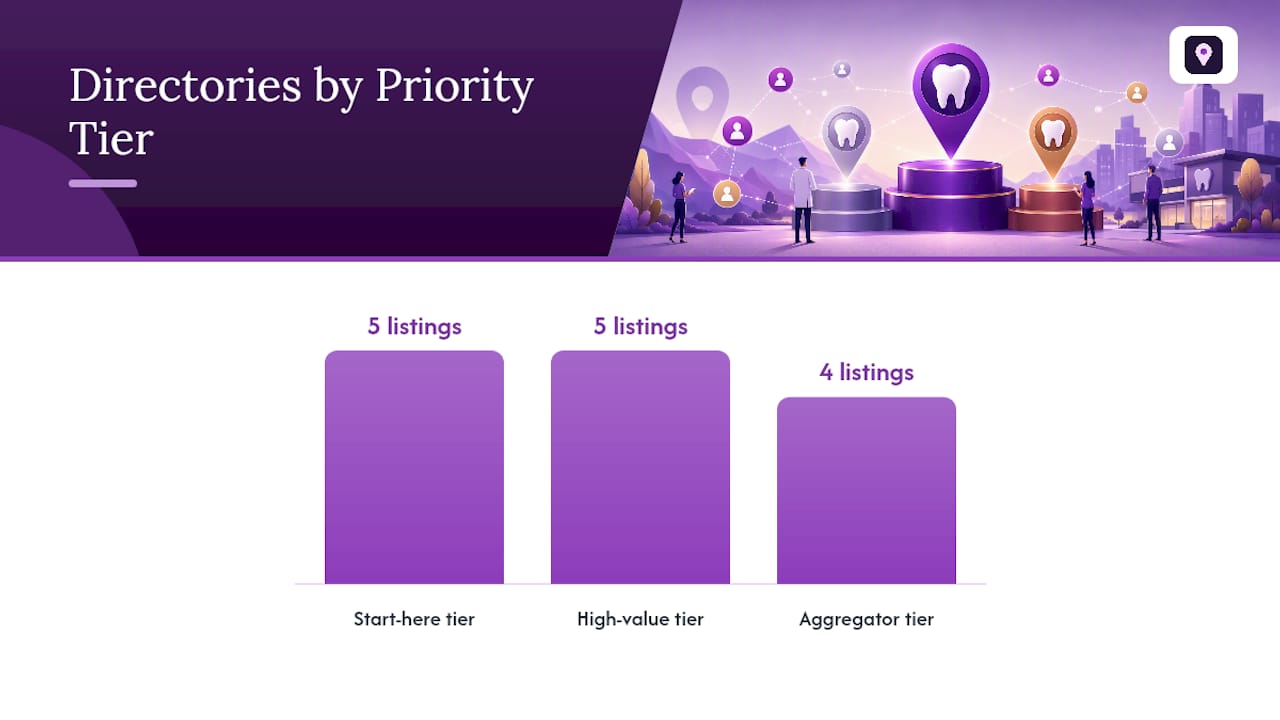
Start-here tier (claim within the first 30 days): Google Business Profile, Bing Places for Business, Apple Business Register, Facebook Business Page Page, and YellowPages. High-value tier: BBB, Healthgrades, WebMD, Vitals, and dental.me. Aggregator tier: Data Axle, Neustar Localeze, Acxiom, and Foursquare.
| Directory / Source | Priority Tier | How to Claim | Verification Method | Free vs. Paid | Propagation Time | Trust / Authority Role |
|---|---|---|---|---|---|---|
| Google Business Profile | Start here | business.google.com | Phone, video, postcard | Free; paid ads separate | Instant after verify | Primary local signal |
| Bing Places for Business for Business | Start here | bingplaces.com | Phone or import from GBP | Free | Hours–days | Secondary search engine |
| Apple Business Register | Start here | register.apple.com | Phone or email | Free | Days–weeks | Apple Maps / Siri source |
| Facebook Business Page Page | Start here | business.facebook.com | Instant | Free; paid ads separate | Instant | Social trust signal |
| YellowPages (YP.com) | Start here | yp.com | Phone | Free; featured listings paid | Days | General directory |
| BBB (BBB.org) | High value | bbb.org/accreditation | Review + fee for accreditation | Free listing; paid accreditation | Days–weeks | Trust badge, citation |
| Healthgrades | High value | healthgrades.com/pro | Phone or email | Free; paid featured | Days | Healthcare authority |
| dental.me | High value | dental.me/for-dentists | Claim form | Free; paid featured | Days | Dental-specific index |
| Data Axle | Aggregator | expressupdateusa.com | Phone or email | Free basic; paid enhanced | Weeks–months | Feeds many directories |
| Neustar Localeze | Aggregator | neustar.biz/localeze | Account + verification | Paid subscription | Weeks–months | Carrier and nav data |
| Acxiom | Aggregator | myacxiom.com | Claim form | Free | Weeks–months | Data broker network |
| Foursquare | Aggregator | foursquare.com/business | Email verification | Free | Days–weeks | App and API data source |
| NPPES / NPI Registry | Healthcare | nppes.cms.hhs.gov | CMS account | Free (required by law) | Days | Insurance and referral signal |
Many dental profiles already exist on national indexes before a practice ever logs in. Search your practice name before creating a new listing; claiming an existing profile preserves its review history and organic ranking.
Pro Tip: Claim your NPPES NPI record at nppes.cms.hhs.gov and keep it current. Insurance networks, referral platforms, and several dental-specific directories pull directly from this federal registry, so an outdated NPI record cascades into dozens of incorrect listings.
How to claim and optimize a listing step by step
- Search before you create. Google your practice name plus city. Check each target directory for an existing profile before building a new one.
- Claim and initiate verification. Select “Claim this business” or “Own this business?” and choose the fastest available verification method.
- Standardize your NAP. Decide on one canonical format for your name, address (including suite abbreviation), and phone number. Write it down. Use it everywhere.
- Complete every core field. Business name, address, local phone number, website URL, primary and secondary categories, hours (including holiday hours), and a 250-word description.
- Add providers, specialties, and services. List each dentist by name and specialty. Add service items (cleanings, implants, orthodontics) where the platform supports them.
- Upload photos. Exterior, interior, team, and equipment photos. Google Business Profile rewards listings with recent, high-quality images.
- Request reviews. Send a direct review link to patients immediately after their appointment.
For field formatting: spell out “Street” rather than “St.” and “Suite” rather than “Ste.” unless your state’s USPS record uses an abbreviation. Whatever the USPS record shows is the safest standard. On your website, add LocalBusiness schema with the same NAP and a canonical tag pointing to your primary domain. Use the Google Business Profile Optimizer to audit field completeness before moving to the next directory.
Pro Tip: The most common NAP-breaking mistake is using a tracking phone number on directories instead of your main local number. Tracking numbers are fine on your website, but every directory should carry the same permanent local number.
How to find and fix duplicate or incorrect listings
Start with Google Business Profile, then move to the major aggregators. Duplicates on GBP suppress your primary listing and split review equity.
- Search Google Maps for your practice name, address, and phone number separately. Flag every result that is not your primary listing.
- Use the Local Citation Finder to surface listings across directories you may not have checked manually.
- For GBP duplicates: select the duplicate listing, click “Suggest an edit,” and mark it as permanently closed or a duplicate. If that fails, use the Google Business Profile support chat.
- For aggregator duplicates (Data Axle, Neustar, Acxiom): log into each platform’s claim portal, locate the duplicate, and submit a merge or removal request.
- Cross-check your NPI number at nppes.cms.hhs.gov. Incorrect NPI data propagates into insurance directories and referral networks.
- Document every change with a before-and-after screenshot and the date submitted.
Expect GBP corrections to resolve within 3–7 days. Aggregator corrections typically take 4–8 weeks to propagate downstream.
How aggregator data flows and what timelines to expect
Changes you make on owner-controlled platforms (GBP, Bing, Apple) push outward within hours to days. Aggregator networks move on their own refresh cycles, which run weeks to months.

The flow works like this: your verified GBP and direct directory claims feed into major data aggregators (Data Axle, Neustar Localeze, Acxiom, Foursquare). Those aggregators then distribute your NAP to hundreds of downstream sites, apps, navigation systems, and voice assistants. If your data at the aggregator level is wrong, every downstream site inherits the error.
| Source Type | Update Timeline | Owner Control Level |
|---|---|---|
| Google Business Profile (verified) | Hours–1 day | Full |
| Bing Places for Business (verified) | 1–3 days | Full |
| Apple Business Register (verified) | 3–7 days | Full |
| Data Axle / Express Update | 4–8 weeks | Partial (claim required) |
| Neustar Localeze | 4–8 weeks | Partial (paid plan) |
| Acxiom | 6–8 weeks | Partial (claim form) |
| Downstream directories | Varies; follows aggregator cycle | Indirect |
Fix owner-controlled sources first. Then submit corrections directly to each aggregator portal and monitor for reversion. Aggregators sometimes overwrite corrected data with stale records on their next refresh cycle, so a one-time fix is rarely enough.
How to audit your listings and which KPIs to track
Run a full NAP audit at launch, fix the top 10 inconsistencies, then schedule monthly checks on your start-here tier and quarterly reviews of aggregator records.
Audit checklist:
- NAP matches across GBP, Bing, Apple, Facebook, and YellowPages
- Verification status confirmed on each platform
- No duplicate listings detected (use the Citation Consistency Analyzer)
- LocalBusiness schema present and matching on your website
- At least one inbound citation link from a high-authority directory
KPIs to track monthly:
- NAP-consistency score across your top 20 directories
- Number of claimed and verified listings
- Review count and average rating per platform
- Google Maps impressions, search queries, and call clicks (from GBP Insights)
- Geo-grid visibility score across your service area
For geo-grid tracking, the Local Search Visibility Analyzer shows how your Maps rank shifts across different points in your city, not just at your practice address. That matters because a patient two miles away sees a different local pack than one next door.
Pro Tip: Keep a single master NAP spreadsheet. Every time you update an address, phone number, or business name, update the spreadsheet first, then push the change to every directory in priority order. This prevents partial updates that create new inconsistencies.
Common mistakes that undo citation gains
The fastest way to lose local visibility is inconsistent NAP, multiple unclaimed profiles, and a mismatched primary category on Google Business Profile.
Red flags and quick fixes:
- Mismatched address formats: Standardize to your USPS record. Fix on every platform, not just GBP.
- Multiple phone numbers across listings: Pick one permanent local number. Remove tracking numbers from directories.
- Wrong primary category on GBP: “Dentist” should be the primary category, not “Health & Medical” or a specialty. Subcategories can include “Cosmetic Dentist” or “Pediatric Dentist.”
- Aggregator overrides: Aggregators can revert your corrections. Monitor quarterly and resubmit if needed.
- PO Box as address: Google and most directories reject PO Boxes for service-area businesses. Use your physical address.
- Unreviewed merged edits: When Google suggests a merge, review it before accepting. Merges can combine review histories incorrectly.
On paid featured placements: they make sense on high-traffic dental directories (Healthgrades, dental.me) once your organic listing is fully claimed and accurate. Paying for a featured spot on an unclaimed or NAP-inconsistent listing wastes budget.
What an experienced dental SEO would do on day one
Claim the Google Business Profile first. Verify by phone if available; request a postcard if phone verification is not offered. While waiting for the postcard, claim Bing Places for Business, Apple Business Register, and Facebook. Use that window to build your master NAP document and audit your website’s LocalBusiness schema.
For batch claiming across multiple locations, assign one staff member as the verification owner for each platform. Verification codes go to whoever controls the business phone or email, so misrouted codes are the most common reason claims stall. Document the login credentials and verification method for every platform in a shared, secured location.
Escalate to a managed service when you have three or more locations, when aggregator corrections keep reverting, or when your in-house team cannot commit to monthly audit cycles. The local SEO benefits for dental practices compound over time, but only if the underlying citation data stays clean.
Localseobot handles the citation work so your team doesn’t have to
Managing dental practice listings across a dozen directories, three aggregators, and an NPI registry is a real time commitment. Localseobot’s managed citation service builds premium listings manually on high-authority directories, tracks your Google Maps rank with geo-grids, monitors for aggregator reversions, and generates review requests automatically. Agencies get a white-label dashboard to manage multiple dental locations from one login.

What separates a managed service from a DIY approach is the guarantee. Localseobot backs its work with a 30-day money-back guarantee if your Maps ranking does not improve. When evaluating any vendor, ask for documented correction workflows, a reporting cadence, and proof of claim control on each directory. Localseobot’s dental SEO service covers all of that. Start your free trial at localseobot.com to see your current citation gaps before committing.
Authoritative resources and submission portals
Use these portals when claiming, correcting, or escalating listings:
- Google Business Profile: business.google.com
- Bing Places for Business for Business: bingplaces.com
- Apple Business Register: register.apple.com
- Facebook Business Page: business.facebook.com
- YellowPages: yp.com
- Better Business Bureau: Bbb
- Data Axle / Express Update: expressupdateusa.com
- Neustar Localeze: neustar.biz/localeze
- Acxiom: myacxiom.com
- Foursquare for Business: foursquare.com/business
- NPPES NPI Registry: Nppes
- dental.me for Dentists: dental.me/for-dentists
- Localseobot Local SEO Checklist: Localseobot
- Localseobot Dentist SEO Service: Localseobot
- Partner guide on digital footprint management: Babylovegrowth
Sources
- Local SEO for Dentists: Complete Guide for US Practices | Flento
- Dental SEO Strategies | Rank Higher & Get More Patients
- What Are Directory Listings?