Local Keyword Research for Small Businesses: Get Found Nearby
Published August 8, 2026
Local Keyword Research for Small Businesses: Get Found Nearby

Local keyword research is the process of identifying the exact phrases nearby customers type into Google when they need a service in a specific city, neighborhood, or ZIP code. It drives Google Maps visibility, Local Pack rankings, and foot traffic in a way that national SEO simply cannot replicate. Start today with this three-step checklist you can complete in under an hour:
- List every service you offer and every city, neighborhood, or ZIP code you serve.
- Open Google Keyword Planner and run each service+location pair to collect volume and competition data.
- Pull your Google Business Profile, check the Insights tab for queries already driving impressions, and cross-reference those terms in Google Search Console.
Those three steps give you a working keyword list before lunch. The rest of this guide shows you how to prioritize, map, and apply that list so it actually moves your rankings.
Key Takeaways
Effective local keyword research connects geographic intent to specific pages and GBP fields, which is what separates businesses that appear in the Local Pack from those that do not.
| Point | Details |
|---|---|
| Start with GBP and top five terms | Fix your Google Business Profile and map your top five service+city keywords before building out neighborhood pages. |
| Use the three-tier framework | Organize keywords into Tier 1 (service+city), Tier 2 (service+neighborhood/ZIP), and Tier 3 (service+intent modifier) to prioritize by conversion potential. |
| Match keywords to ranking levers | Local Pack terms need GBP optimization; organic-only terms need on-page content and links. Never confuse the two. |
| Map every keyword to a URL | A keyword without a target page cannot rank. Use the spreadsheet template to assign each term before any optimization begins. |
| Localseobot for faster execution | The Local Keyword Research Tool and GBP Optimizer reduce monthly research and implementation time for businesses managing one or more locations. |
Table of Contents
- What does local keyword research actually mean for your business?
- How to do local keyword research step by step
- Which tools help you find and validate local keywords?
- How to apply local keywords to your Google Business Profile and website pages
- How should you handle keyword research for multiple locations?
- How do you track local keyword rankings across Search and Maps?
- A ready-to-use keyword-to-page mapping template
- What Localseobot has seen work for U.S. small businesses
- A practitioner’s honest take on local keyword priorities
- Localseobot speeds up every step of this process
- Sources
What does local keyword research actually mean for your business?
Local keyword research differs from national keyword research in one critical way: geographic constraints change both competition and intent. A plumber ranking for “emergency plumber” nationally faces thousands of competitors. A plumber targeting “emergency plumber Bucktown Chicago” faces a fraction of that field, and the searcher is almost certainly ready to call. The same keyword can carry very different competition and conversion rates across ZIP codes and neighborhoods.
Explicit local keywords include a named geography. Common forms:
- Service + city: “roof repair Austin TX”
- Service + neighborhood: “HVAC repair Midtown Atlanta”
- Service + ZIP code: “electrician 78701”
- Service + landmark or district: “dentist near Wicker Park”
Implicit local keywords carry no city name but still trigger Local Pack results. When someone searches “plumber” or “roof repair” from their phone, Google uses device location to serve nearby results. The same applies to “near me” queries. Google resolves those using proximity signals, not because a business stuffed “near me” into its website copy. Accurate address data and a complete Google Business Profile matter far more than adding the phrase to a page title.
Intent matters for page type. A search like “how much does a roof replacement cost in Denver” is informational. The searcher wants an answer, not a quote form. “Roof replacement Denver” is transactional: the person is ready to hire. “ABC Roofing Denver” is navigational: they already know the brand. Matching the right page type to each intent tier is what separates a keyword list from a keyword strategy.
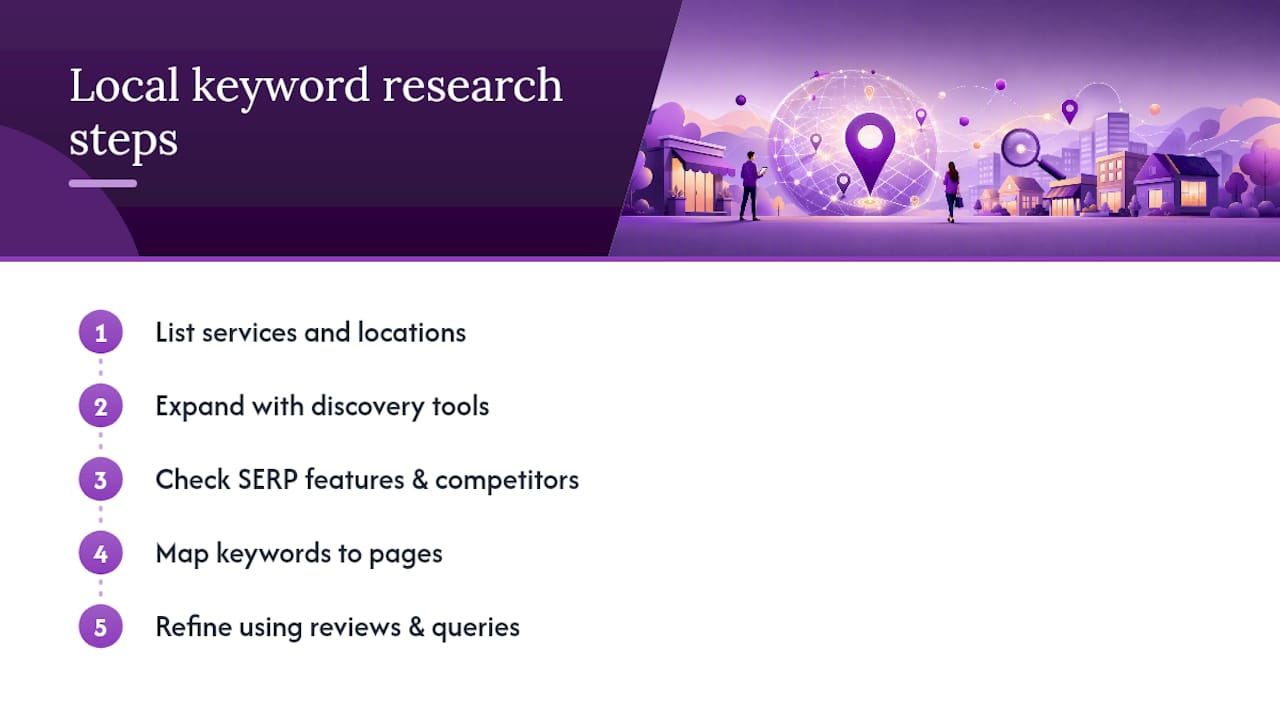
How to do local keyword research step by step
A concise four-step workflow produces immediately usable local keyword lists: list services and locations, expand with discovery tools, evaluate SERP features and competitors, then map keywords to pages. Practitioners who follow this sequence consistently build prioritized lists faster than those who start with tools. Here is the full five-step version with the detail small businesses need.
Step 1: Build your seed list
Write down every service you offer. Be specific: “plumbing” becomes “water heater installation,” “drain cleaning,” and “pipe repair.” Then list every geography you serve: cities, neighborhoods, ZIP codes, and any local nicknames residents actually use. Combine them into pairs. A 10-service business serving 5 neighborhoods generates 50 seed terms before any tool is opened.
Step 2: Expand with tools and SERP signals
Type each seed term into Google and watch the autocomplete suggestions. Those suggestions reflect real user queries and are reliable free discovery signals for natural search phrasing. Scroll to “People Also Ask” and “Related searches” at the bottom of the results page. Both surfaces surface question-format and long-tail variants you would not have guessed.
Open your Google Business Profile Insights and note every query that triggered an impression on your profile. Those keywords are ones Google already associates with your business, making them high-priority targets. Run the same seed terms through Google Keyword Planner for volume estimates.
Step 3: Analyze SERP features and competitors
Search each keyword and look at what appears. Does the result show a Local Pack (the map with three listings)? Or is it purely organic blue links? Keywords that trigger a Local Pack require Google Business Profile optimization as the primary ranking lever; organic-only queries depend on on-page content and backlinks. Knowing which surface a keyword triggers tells you exactly where to invest your effort.
Check who appears in the Local Pack for your top terms. Review their GBP profiles: categories, review count, photo volume, and service descriptions. That analysis reveals the bar you need to clear. For a deeper look at how to read competitor profiles, the GBP competitor comparison guide on the Localseobot blog walks through the process field by field.
Step 4: Organize by intent tier
Group your keywords into three tiers:
- Tier 1 (service + city): Highest volume, most competitive, broadest intent. Target with your main service pages.
- Tier 2 (service + neighborhood or ZIP): Lower volume, lower competition, stronger conversion signal. Target with dedicated location landing pages.
- Tier 3 (service + intent modifier): Phrases like “emergency,” “same-day,” “affordable,” or “licensed.” Often the highest converters because they carry urgency or qualification signals.
Step 5: Map keywords to specific URLs
Every keyword needs a home. Assign each term to one target URL. A keyword without a page is just a word in a spreadsheet. The mapping template in Section 8 gives you the exact columns to use.
Pro Tip: Mine your Google reviews and GBP Q&A for natural language. Customers describe their problems in phrases no keyword tool surfaces: “my pipes froze overnight,” “the AC smells like burning.” Those phrases become long-tail blog post targets and FAQ content that converts because they match exactly how buyers describe their needs.
Which tools help you find and validate local keywords?
No single tool covers every layer of local search. Use a combination, and know what each one is actually good for.
- Google Keyword Planner: Best for volume estimates and discovering service variants. Its hyper-local granularity is limited, so treat city-level data as directional rather than precise. Pair it with GBP Insights and Maps checks before committing to a target.
- Google Autocomplete and Related Searches: Free, real-time, and reflects actual query phrasing. Use it for discovery and to find question-format variants. No account required.
- People Also Ask: Surfaces informational intent questions tied to your seed terms. Ideal for blog post and FAQ content that supports your service pages.
- Google Business Profile Insights: Shows the actual queries that triggered impressions on your profile. This is validation data, not discovery data. If a term appears here, Google already connects it to your business.
- Google Search Console: Reveals which queries bring organic clicks to your website, along with position and impression data. Filter by location if you serve multiple cities. High impressions with low clicks often signal a ranking just outside the top three.
- Google Maps search: Type your service into Maps and note the categories and business names that appear. The categories competitors use are often the exact GBP primary categories you should claim.
- Review mining: Read your own reviews and your top competitors’ reviews on Google. The language customers use to describe the problem they had before calling is keyword gold, especially for long-tail and voice-search terms.
- Specialized local keyword tools: Platforms built specifically for local markets provide AI-assisted suggestions and local-specific metrics that general national tools often miss. Localseobot’s Local Keyword Research Tool integrates discovery, prioritization, and geo-grid tracking in one workflow.
For voice search, phrase your targets as full questions: “who fixes water heaters in [city]” or “what’s the best HVAC company near [neighborhood].” Voice queries tend to be longer and more conversational, and they often match the same intent as “near me” searches. Capturing those variants in your content and GBP Q&A gives you coverage without creating separate pages.
For a broader look at keyword discovery approaches, this overview of keyword discovery methods covers additional techniques worth adding to your process.
How to apply local keywords to your Google Business Profile and website pages
Knowing your keywords is half the work. Placing them correctly is the other half.
Google Business Profile field checklist
- Primary category: Choose the most specific category that matches your core service. This is the single most influential GBP field for Local Pack eligibility.
- Additional categories: Add every relevant secondary service. A plumber can add “Water Heater Repair Service” and “Drainage Service” alongside “Plumber.”
- Business description: Write 250–750 characters that describe what you do, who you serve, and where. Include your primary city and one or two service terms naturally. Avoid repeating the same phrase more than once. For guidance on what crosses the line, the Localseobot post on avoiding keyword stuffing in GBP is worth reading before you write your description.
- Services: List every service with its own name and a short description. This is where Tier 2 and Tier 3 keywords fit naturally.
- Service areas: Add every city and neighborhood you serve. Google uses this data to determine relevance for searches outside your physical address.
- Q&A: Seed your own Q&A with questions customers actually ask, phrased the way they ask them. Answer each one with a sentence that includes the service and location naturally.
- Posts: Publish weekly GBP posts tied to seasonal services or promotions. Each post is an opportunity to use a Tier 1 or Tier 2 keyword in context.
- Reviews: Respond to every review. When a customer mentions a specific service or neighborhood, echo that language in your reply. It reinforces the keyword association without stuffing.
For a complete walkthrough of GBP optimization for Local Pack visibility, the GBP Map Pack optimization guide covers every field in detail.
On-page element checklist
- Title tag: Include the primary keyword and city. Format: “Service in City | Business Name.”
- H1: Match the title tag intent but write it as a natural sentence.
- Meta description: Summarize the page’s value with the service and city. This does not directly affect rankings but influences click-through rate.
- Service pages: One page per core service. Use the city name in the body copy, but write for the reader, not the crawler.
- Location pages: One page per city or neighborhood you serve, with unique content for each. Thin pages that swap only the city name are a ranking liability, not an asset.
- LocalBusiness schema: Mark up your name, address, phone, hours, and service area. This helps Google parse your location data accurately.
- Reviews and user-generated content: Embed Google reviews on relevant pages. Customer language in reviews reinforces the keyword signals on the page.
How should you handle keyword research for multiple locations?
The short answer: one location page per city or neighborhood where you have meaningful search volume and distinct local intent. A single service-area page works when you serve a broad region with no concentration of demand in any one spot.
When to create separate location pages:
- The city or neighborhood generates enough search volume to justify unique content.
- You have local proof for that area: reviews from customers there, photos of completed work, or a physical address.
- Competitors already have dedicated pages for that location and are ranking with them.
URL structure: Keep it clean and consistent. /services/plumbing/austin-tx/ and /services/plumbing/round-rock-tx/ are easier to manage and crawl than dynamic parameters. Each page needs a unique title tag, H1, body copy, and at least one location-specific element (a neighborhood reference, a local landmark, a review from a customer in that area).
What to avoid:
- Near-identical pages where only the city name changes. Google treats these as thin content.
- Canonical tags that point all location pages to a single parent page. Each location page should be self-canonical if the content is genuinely unique.
- A single GBP profile for multiple physical locations. Each address needs its own verified GBP listing with its own keyword strategy.
The Local Business Keyword Planner on Localseobot helps organize keyword assignments across multiple locations so no two pages target the same term without a clear hierarchy.
How do you track local keyword rankings across Search and Maps?
Rankings in Google Search and rankings in the Local Pack (Google Maps) are separate metrics that require separate tracking.
Key metrics to monitor:
- Local Pack position: Where your GBP listing appears for each target keyword. This varies by the searcher’s location, so geo-grid tracking (checking rank from multiple points across your service area) gives a more accurate picture than a single position check.
- GBP impressions and queries: Available in your GBP dashboard. Track which queries drive the most impressions and which drive the most clicks, calls, and direction requests.
- Organic position: Your website’s ranking in the blue-link results for each keyword. Pull this from Google Search Console filtered by query.
- Clicks, calls, and direction requests: The conversion metrics that connect keyword performance to business outcomes. A keyword that drives impressions but no calls may need a stronger GBP description or a more compelling page.
Tracking cadence: Check GBP Insights weekly for sudden spikes or drops. Run a full keyword position audit monthly. Set up Search Console email alerts for significant traffic drops so you catch rank losses before they compound.
Attribution: When a customer calls, ask how they found you. Cross-reference that with the GBP query data for the same week. Over time, you will see which keywords drive actual revenue, not just impressions. The Local Search Visibility Analyzer from Localseobot tracks geo-grid rankings and Maps visibility so you can see exactly where you rank across your service area, not just at one point.
If rankings drop unexpectedly, the quick fixes guide covers the most common causes and how to address them fast.
A ready-to-use keyword-to-page mapping template
Copy these columns into a spreadsheet and fill one row per keyword. Three sample rows follow.
How to run your first 30-minute research sprint:
- Open a blank spreadsheet with the columns above.
- List your top five services and your top three locations. That gives you 15 seed combinations.
- Run each through Google Autocomplete and note the top three suggestions per seed.
- Check GBP Insights for any queries already appearing there and add them.
- Assign each keyword to a tier and a target URL.
You now have a prioritized, mapped keyword list ready for implementation. Google Autocomplete and People Also Ask are the fastest free sources for filling in the “Keyword” column with real phrasing.
What Localseobot has seen work for U.S. small businesses
Based on what consistently moves the needle for local businesses across the U.S., here is an eight-point checklist worth running through before you publish a single new page or update a GBP field.
- Tune GBP first. Primary category, services list, and business description carry the most weight for Local Pack eligibility. Fix these before anything else.
- Create neighborhood-level pages for any area where you have reviews, photos, or completed work. Generic city pages rank below pages with local proof.
- Mine reviews for keyword language. Read your last 50 reviews and highlight every service term and location reference. Those phrases belong in your content.
- Audit citation consistency. Your business name, address, and phone number must match exactly across every directory. Inconsistencies suppress local rankings.
- Add LocalBusiness schema to every service and location page. It takes 20 minutes and removes ambiguity about your address and service area.
- Publish targeted blog answers. Write one post per month that answers a specific question your customers ask. Format: “How much does [service] cost in [city]?” or “What to do when [problem] in [neighborhood].”
- Post to GBP weekly. Each post keeps your profile active and gives you a natural place to use Tier 1 and Tier 2 keywords in context.
- Track both Search and Maps. Businesses that monitor only organic rankings miss Local Pack movement entirely. Use geo-grid data to see the full picture.
A typical U.S. small business that applies this checklist consistently tends to see Local Pack movement within a few months, with call volume increases following as rankings stabilize. The timeline varies by market competitiveness and how complete the GBP profile was at the start.
A practitioner’s honest take on local keyword priorities
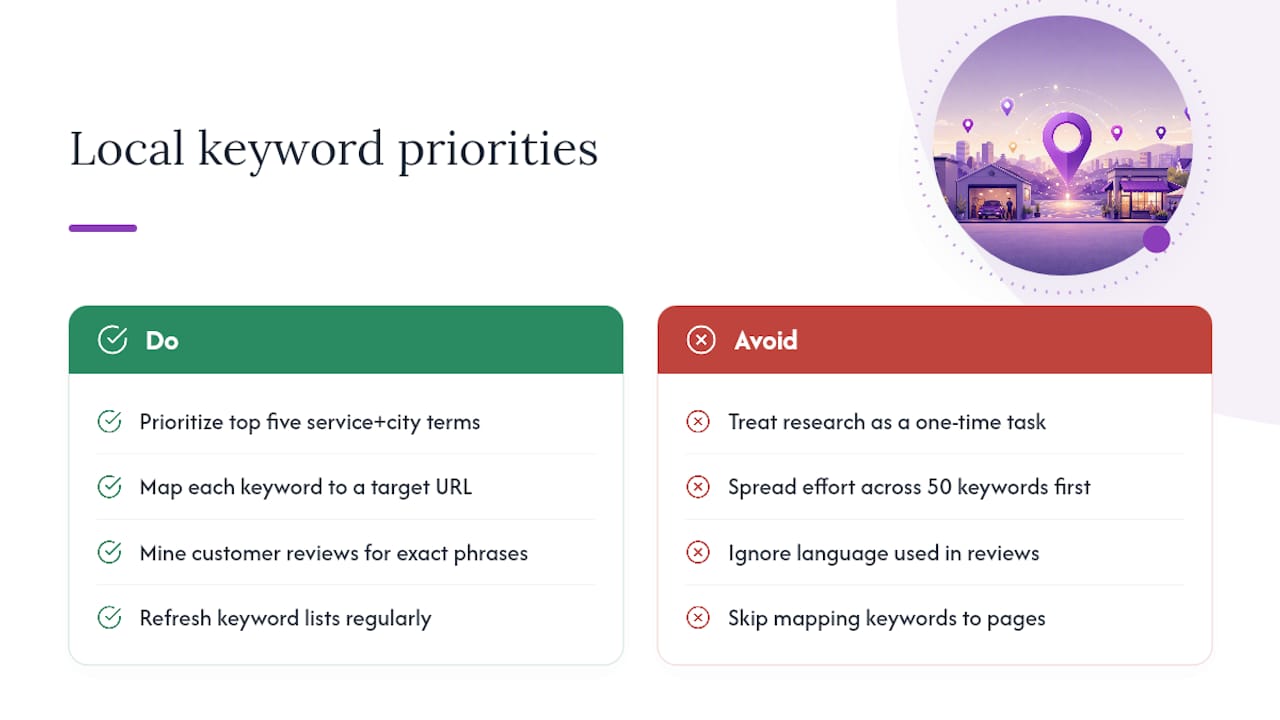
The most common mistake in local SEO is treating keyword research as a one-time task. Markets shift, competitors update their GBP profiles, and Google’s Local Pack composition changes. A keyword list built in January may need a meaningful refresh by July, especially in competitive service categories.
Start with your GBP and your top five service+city combinations. Those five terms drive the majority of Local Pack impressions for most small businesses. Get those right before building out neighborhood pages or Tier 3 content. Spreading effort across 50 keywords before the top five are properly mapped and optimized is the most common way to stall progress.
Two blind spots show up repeatedly. First, businesses ignore the language in their own reviews. A customer who writes “they fixed my burst pipe at midnight” is handing you the exact phrase to use in an emergency services page. Second, keywords get researched but never mapped to a specific URL. A keyword without a target page cannot rank. The mapping step is not optional.
DIY research works well when you serve one or two locations and have time to run monthly audits. When you scale past three locations, or when a competitor is outranking you despite weaker content, the time cost of manual research and tracking usually exceeds the cost of a tool or managed service. That is the inflection point where local SEO benefits from professional support become measurable in hours saved per week, not just rankings gained.
Localseobot speeds up every step of this process
Doing local keyword research manually across multiple locations takes hours every month. Localseobot cuts that time significantly by combining discovery, GBP optimization, and geo-grid rank tracking in one platform, without the agency retainer.

The Local Keyword Research Tool handles discovery and prioritization from seed terms to a mapped keyword list. The Local Keyword Generator builds service+location combinations in seconds. The GBP Optimizer applies keyword placements to your profile fields and schedules posts automatically. Geo-grid Maps tracking shows where you rank across your entire service area, not just at your front door. For businesses ready to check their current standing, the Local SEO Checklist Tool runs a full audit and flags the highest-priority fixes.
Self-service tools work best for businesses managing one to three locations with an owner or marketer who can dedicate a few hours per month. For agencies or businesses scaling past five locations, Localseobot’s managed citation building and white-label dashboard reduce execution time further. Start with a free trial at Localseobot to see where your rankings stand today.
Sources
- 4 Steps to Do Local Keyword Research & Attract More Customers
- Local Keyword Research for SEO: What It Is & How to Do It
- Google support - How autocomplete predictions work
- Google Keyword Planner