Find Your 50% Rank Loss Point: Rank by Distance for Small Businesses
Published September 17, 2026
Find Your 50% Rank Loss Point: Rank by Distance for Small Businesses

When Google “ranks by distance,” it orders local matches by proximity to a computed search centroid, not just your street address. The single most effective move is confirming your Google Business Profile pin, primary category, and citations are exact and consistent, then running a grid scan to see where you actually rank as distance increases. Fix the profile first. Measure second. Everything else is a rounding error by comparison.
TL;DR:
- Business proximity ranking varies greatly depending on the search query, with sharp drops often occurring between 1.5 and 4 kilometers from the centroid.
- Accurately measuring your proximity performance requires grid scans across multiple coordinates, revealing whether your rank drops at the expected cliffs.
- Fixing profile accuracy, citations, and review velocity can help push the proximity cliff outward, especially for fast-moving local service industries.
- Service-area businesses should set their registered address close to their actual service center to avoid unintentionally worsening proximity rankings.
- Competitors opening new locations or forming tight clusters can swiftly reshape local rankings, making ongoing measurement and adaptation essential.
Table of Contents
- What Rank By Distance Really Means on Google Maps
- What Google’s Developer Docs Say About Distance Sorting
- How to Fix Your Ranking When Distance Is the Problem
- How to Measure Whether Distance Is Actually Your Problem
- Service-Area Businesses Play by a Different Set of Rules
- What Happens When Two Businesses Are Equally Close
- Why the Same Search Shows Different Results to Different People
- Why Your Phone’s GPS Accuracy Changes Your Own Rankings
- How Competitor Locations Reshape Your Own Ranking Map
- The Local SEO Bot Take on Distance Ranking
- Get Measured Ranking Data Instead of Guessing at Your Position
- Sources
- FAQ
What Rank By Distance Really Means on Google Maps
Distance is one of three signals Google names outright for local results, alongside relevance and prominence, according to Google’s own local ranking guidance. None of the three works alone. A business two miles closer than a competitor can still lose if its profile is thin, miscategorized, or buried under inconsistent citations.
The tricky part is that “distance” isn’t measured from a fixed point. It’s measured from a centroid that shifts depending on what someone searches and how they search it. A query like “plumber near me” typically anchors to the user’s actual coordinates. A query like “plumbers in Denver” anchors closer to a city or neighborhood centroid instead, according to Google Maps’ own explanation of how local results appear. Two searchers standing in the same spot can see different rankings just because they typed different words.
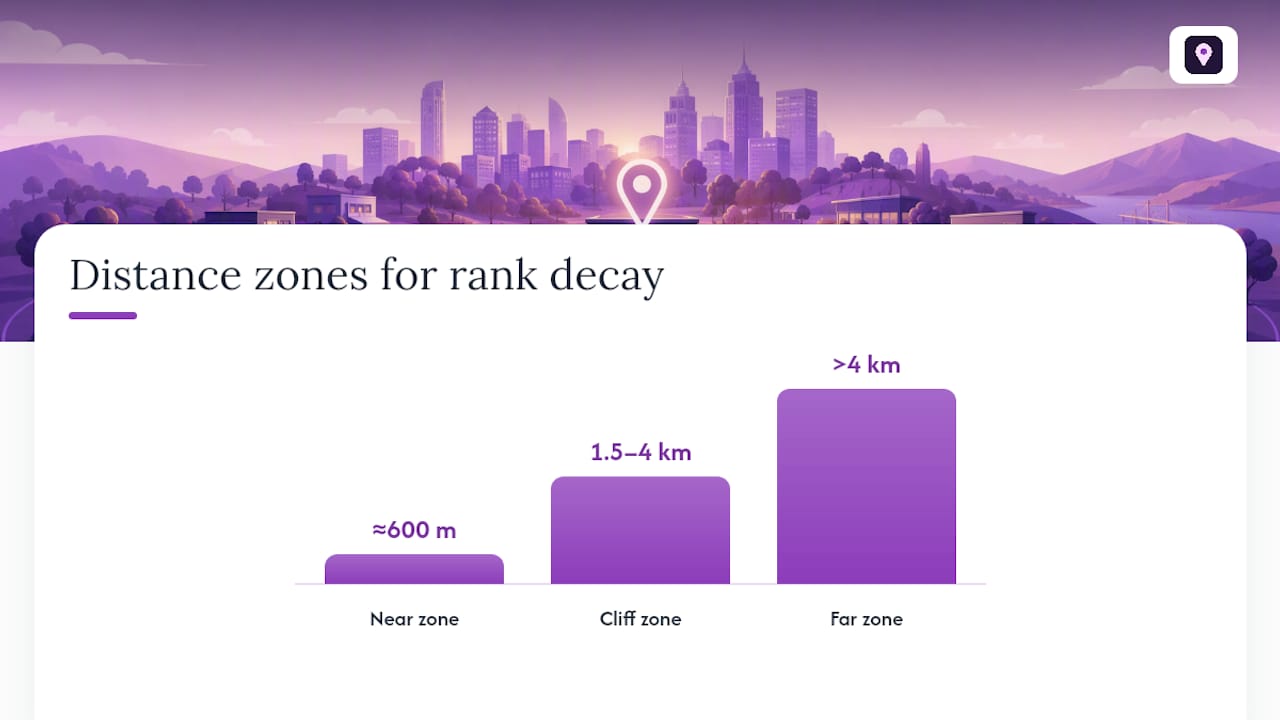
Distance decay isn’t linear, either. Grid-scan research from Geogrid’s proximity analysis found three distinct zones:
- Inside roughly 600 meters: rank barely changes with distance. Being closer helps a little, but other signals dominate.
- Between roughly 1.5 and 4 kilometers: rank often falls off a cliff. This is where a business can drop from page one to invisible within a few blocks.
- Beyond roughly 4 kilometers: rank flattens near the bottom, and prominence signals rarely pull a business back up.
Pro Tip: The exact cliff distance depends heavily on your vertical. Emergency services (locksmiths, towing, urgent plumbing) tend to have tighter cliffs because searchers won’t travel far. Destination businesses (specialty retailers, high-end restaurants) tend to have wider, softer curves because people already expect to drive.
What Google’s Developer Docs Say About Distance Sorting
Google’s Places API documentation draws a hard line between two ranking modes, and mixing them up causes real confusion for agencies building or buying rank-tracking tools.
rankby=prominence(the default) blends distance with a business’s overall standing and lets you set a search radius.rankby=distancesorts strictly by ascending distance from the query point, according to the Places API’s Nearby Search documentation.
Here’s the part that trips people up: radius is disallowed when you use rankby=distance. You can’t ask the API for “the closest coffee shops within 5 kilometers.” You get closest first, full stop, with no distance ceiling built into the call.
That constraint mirrors something important about the actual Maps interface. Google doesn’t apply one fixed search radius across every query. The candidate pool of businesses it considers expands or contracts based on query type and how dense the local competition is, a behavior confirmed by Moz’s local ranking factors research. A rural search pulls from a wider footprint than an urban one, because there simply aren’t enough nearby options otherwise. Any rank-by-distance tool worth trusting accounts for that variability rather than assuming a static radius.
How to Fix Your Ranking When Distance Is the Problem
If a grid scan shows you falling off the cliff inside your own market, work through these fixes in order. They’re ranked by how much control you have over each one and how fast it typically moves the needle.
- Lock down your Google Business Profile fundamentals. Confirm the map pin sits on your actual entrance, not a geocoded approximation two blocks off. Pick the most specific primary category available, not the broadest one that technically applies. Keep hours and service options current, since stale data quietly erodes prominence over time. The Google Business Profile Optimizer is built to catch exactly these gaps.
- Audit and rebuild your citations. Inconsistent name, address, and phone details across directories confuse the systems that verify your location. Manually placed citations on high-authority directories tend to outperform bulk-submitted ones, because quality directories carry more trust weight per listing.
- Increase review velocity and depth. A steady stream of recent reviews mentioning your service and neighborhood reinforces both prominence and location relevance. One five-star review a month does less work than five reviews that each mention specific services and specific parts of town.
- Decide between a storefront listing and a service-area profile. If you serve a wide radius without a walk-in location, a service-area business setup avoids showing a misleading address, but it changes how Google evaluates your proximity. More on that trade-off below.
- Sharpen your local content around implicit intent. A landing page for “emergency water heater repair in [neighborhood]” captures long-tail proximity intent that a generic services page never will.
- Consider a second location only after you’ve confirmed you’re outside the cliff. If your grid scan shows you consistently vanishing 2 kilometers from your own door in a dense market, no amount of citation work fixes that. A satellite location or local partnership might be the only real lever left.
Steps one through three are usually where the fastest wins live, especially for businesses that have never had a full profile audit.
How to Measure Whether Distance Is Actually Your Problem
Checking your own ranking from your office chair tells you almost nothing. You’re one data point on a curve that might have a dozen inflection zones across your service area. A single search confirms you rank fine near yourself and says nothing about the neighborhood four miles away where you’re losing every job to a competitor.
Grid scans solve this by checking rank at dozens of coordinates simultaneously. The standard approach: run a 13 by 13 grid across a several-kilometer radius, per the methodology outlined in Geogrid’s proximity study. That resolution is fine enough to catch the cliff without missing it between check points.
Once the scan runs, three numbers matter more than the rest:
| Metric | What it tells you |
|---|---|
| Median rank by distance band | Where your ranking realistically sits within three progressive distance bands from your location |
| 50% rank-loss distance | The specific point where your visibility drops by half |
| Review velocity correlation | Whether recent review activity is shifting your cliff outward or inward |
Run the scan before any major change to your profile or citations, then again four to six weeks after. A well-executed citation cleanup or category fix that isn’t moving your 50% rank-loss distance outward isn’t working, no matter how good it looks on paper. Maprank’s geo-grid tracker automates this exact scan so you’re not manually querying dozens of coordinates by hand.
Service-Area Businesses Play by a Different Set of Rules
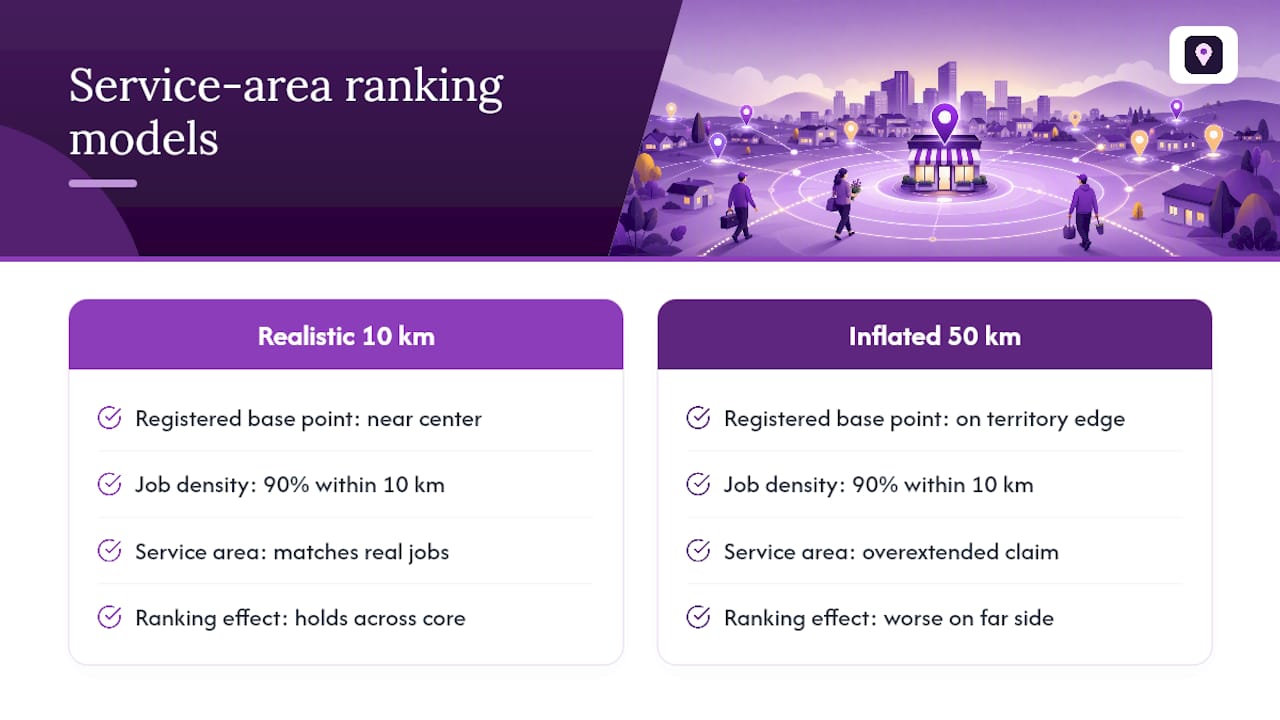
A service-area business, one that serves customers at their location instead of a storefront, doesn’t get to hide its address entirely. Google still needs a base point to calculate distance from, and that point is usually the address you registered your profile with, even when it’s hidden from public view.
This creates a real tension. Hiding your address protects your privacy if you work from home, but it doesn’t remove you from the proximity calculation. You’re still being measured from that hidden point, which means a service-area business registered on the edge of its territory will rank worse for searches on the far side of that territory than a competitor registered more centrally, even with identical reviews and citations.
Google also limits how many service areas you can define, and setting an area far larger than you can realistically serve tends to dilute relevance rather than expand reach. A locksmith claiming a 50 kilometer radius when 90% of jobs come from within 10 kilometers is fighting an uphill battle in the outer bands while doing nothing to strengthen the core.
The fix isn’t complicated, just underused: set your registered address as close to your actual service center of gravity as legitimately possible, define service areas that match your real job density, and don’t inflate them for reach you don’t actually convert. A grid scan will show you exactly where your service-area listing holds up and where it quietly disappears past a few kilometers, which is usually a better guide than guessing at your coverage radius.
What Happens When Two Businesses Are Equally Close
Distance rarely produces a perfect tie, but when two businesses sit close enough that proximity alone can’t separate them, Google leans on the other two signals to break the deadlock. Relevance and prominence stop being tiebreakers and start being the whole decision.
Relevance ties often come down to category precision. A general contractor and a specialized kitchen remodeler sitting at the same distance from a “kitchen remodeling” search won’t rank equally, because the specialist’s category and service listings match the query more tightly. Prominence ties usually come down to review signals: total count, recency, and how often reviews mention the specific service searched for.
This is where a lot of small businesses lose ground without realizing distance was never the actual obstacle. They assume they’re losing on proximity when they’re really losing on category specificity or review depth against a near-identical competitor. Running a grid scan alongside a review and citation audit at the same time is the only reliable way to tell which signal is actually costing you the position, since checking rank in isolation won’t reveal whether a rival two doors down is simply better categorized or better reviewed.
Why the Same Search Shows Different Results to Different People
Two people standing on the same street corner can search the identical phrase and see different local results. Personalization and query intent both reshape the centroid Google measures distance from, and that reshaping happens before proximity even gets calculated.
A branded or highly specific query, like a searcher typing your exact business name, barely uses distance as a filter at all, since relevance already narrows the field to almost nothing. A generic, high-intent query like “urgent care near me” leans on distance heavily, because the searcher’s location is doing most of the filtering work. Google’s own explanation of local results confirms it will use whatever location signal it has, GPS, IP address, or past search history, even when a user hasn’t explicitly shared their location, according to Google Maps’ help documentation.
Search history adds another layer. A user who has visited your competitor’s website or previously called a specific type of business may see results skewed toward businesses similar to that prior behavior, independent of pure distance. None of this is something a business can directly control, but it explains a pattern a lot of owners notice and can’t quite name: why rankings seem to shift for the same keyword depending on who’s asking, or when, or from where.
Why Your Phone’s GPS Accuracy Changes Your Own Rankings
Location accuracy isn’t just a searcher-side concern. It quietly shapes what a business owner sees when they check their own rank, and it can lead to bad decisions if misread.
A phone with a strong GPS lock gives Google a location accurate to a few meters. A desktop computer or a phone on a spotty connection often gets located via IP address or Wi-Fi triangulation instead, which can place the “searcher” hundreds of meters or even a few kilometers off from their real position. That gap matters enormously inside the proximity cliff described earlier: a business sitting right at the edge of its cliff can look like it’s ranking well or ranking poorly purely based on how accurately the checking device was located, with nothing about the business itself changing.
This is exactly why single-device, single-location checks mislead so many business owners. Checking your rank from your own phone standing in your own parking lot tells you almost nothing about how you rank for someone with shaky GPS three kilometers away. A grid scan sidesteps the accuracy problem by querying from fixed, known coordinates rather than relying on a device’s self-reported location, which is part of why the measurement approach matters as much as the optimization work itself.
For businesses in dense urban cores, where GPS signals bounce between buildings, this accuracy gap tends to be wider than in open suburban areas. Anyone comparing rank checks across different cities should factor that in before assuming a fix worked or failed.
How Competitor Locations Reshape Your Own Ranking Map
Your ranking by distance was never calculated in a vacuum; it’s calculated against everyone else competing for the same query in the same space. A competitor opening a new location, or simply having a tighter cluster of nearby reviews, redraws the map you’re competing on without you doing anything wrong.
Dense urban markets amplify this. When ten competitors sit within a one-kilometer radius of each other, the proximity cliff described earlier compresses dramatically, since every business is fighting for position inside a much smaller radius. Rural and suburban businesses often enjoy a wider effective cliff simply because there’s less competition crowding the same few kilometers.
Analyzing competitor proximity starts with the same grid scan used to measure your own performance, run against competitor names instead of yours. Overlaying both results reveals where your service areas genuinely overlap and where you’re actually competing in name only because a competitor’s true center of gravity sits several kilometers outside your real market. A business that discovers its biggest “competitor” barely overlaps within the cliff zone often finds that competitor irrelevant to actual local rankings, despite ranking for the same keywords citywide.
Watch for competitors opening satellite locations specifically to capture proximity in a neighborhood they don’t naturally serve. It’s a common tactic in service industries with tight cliffs, like locksmiths and appliance repair, and it’s usually detectable through a sudden appearance in grid-scan results at a coordinate that didn’t show that business a few months earlier.
The Local SEO Bot Take on Distance Ranking
Most advice on ranking by distance treats it as something you fix once and move on from. It isn’t. The proximity cliff shifts as competitors open locations, as review velocity changes, and as Google adjusts how it weights each query type. Treating a single profile audit as the finish line is the most common mistake we see among businesses that plateau after an initial ranking bump.
Manual citation building on high-authority directories tends to outperform automated citation blasts, since inconsistent or low-quality citation data is one of the common hidden causes of proximity underperformance. Combine that with recurring grid scans through Maprank, and you get a genuine before-and-after picture instead of a guess. If rankings don’t move within 30 days, this indicates that the process may not be effective. Distance ranking rewards businesses that measure before they optimize, not after.
— Local
Get Measured Ranking Data Instead of Guessing at Your Position
A practical alternative to hiring a full-service agency for proximity work includes manual citation building on high-authority directories and geo-grid rank tracking. Some providers offer a money-back guarantee if Google Maps rankings don’t improve.

If everything in this article pointed you toward one conclusion, it’s this: you can’t fix a proximity problem you haven’t measured. Maprank runs the geo-grid scans described above automatically, showing you exactly where your cliff sits and whether your citation or profile work is pushing it outward. For the citation side, Localseobot’s plans start at Foundation, priced at $99 per month per location, with Growth at $199 . Both the tracking and citation work run manually behind the scenes, not through bulk automated submissions.
Start with a free trial, run a grid scan on your own listing, and see exactly where your rank falls off before spending another dollar on generic local SEO advice.
Sources
The claims in this piece lean on a small set of primary sources worth checking directly if you’re building your own measurement process:
- Tips to improve your local ranking on Google - Google Business Profile Help
- How the Proximity Factor Actually Works on Google Maps | Geogrid Blog
- Local Search Ranking Factors - What Are They? - Moz
For readers who also want to strengthen organic visibility alongside local proximity work, Baby Love Growth’s step-by-step SEO strategy guide covers the broader groundwork that complements Maps-specific fixes.
FAQ
What Does “Rank by Distance” Mean on Google Maps?
It means Google is ordering local results primarily by how close each business is to the searcher’s location or the query’s centroid, one of three core signals Google names alongside relevance and prominence. It’s not a fixed radius search; the geographic footprint adjusts based on query type and local business density.
How Far Away Can a Business Still Rank Well?
There’s no single number, since the proximity decay curve varies by vertical, but grid-scan data typically shows near-full ranking strength inside 600 meters, a steep drop between 1.5 and 4 kilometers, and a flat, low ranking beyond that. Emergency and urgent-service businesses tend to have tighter cliffs than destination retailers.
Does Radius Search Work With Distance Ranking on the Places API?
No. The Places API explicitly disallows the radius parameter when rankby=distance is set, since sorting by ascending distance already returns the closest matches without a separate radius filter.
How Do I Check My Actual Distance-Based Ranking Instead of Guessing?
Run a grid scan, checking rank from a grid of coordinates across your market rather than a single search from your own location. A 13 by 13 grid over a 5 to 6 kilometer radius typically reveals the exact point your ranking falls off, and Maprank’s geo-grid tracker automates that process.
Should I Open a Second Location if I’m Outside the Proximity Cliff?
Only after confirming with a grid scan that you’re consistently losing visibility in a specific area despite a fully optimized profile and clean citations. If the scan shows the drop-off is tied to weak citations or a mismatched category instead, fixing those usually costs less and moves faster than opening a new location.